
How to Make Photo Cinematic with AI: Complete Guide Using Nano Banana Pro
Ever wished your phone photos had that epic movie look? This guide provides everything you need: a step-by-step tutorial, proven prompt templates, and pro tips for stunning results.
Have you ever looked at your phone photos and wished they had that epic movie quality—you know, those dramatic colors, perfect lighting, and professional depth that make every frame look like it belongs on the big screen?
You're not alone. The good news? You don't need expensive cameras, professional editing software, or years of photography experience to turn photo to cinematic quality.
With AI technology, specifically Nano Banana Pro, you can create stunning AI cinematic photo in minutes.
In this comprehensive guide, we'll walk you through everything you need to know about how to make photo cinematic using AI, from understanding what makes an image cinematic to providing you with ready-to-use prompt templates for any scenario.
What Makes a Photo Cinematic?
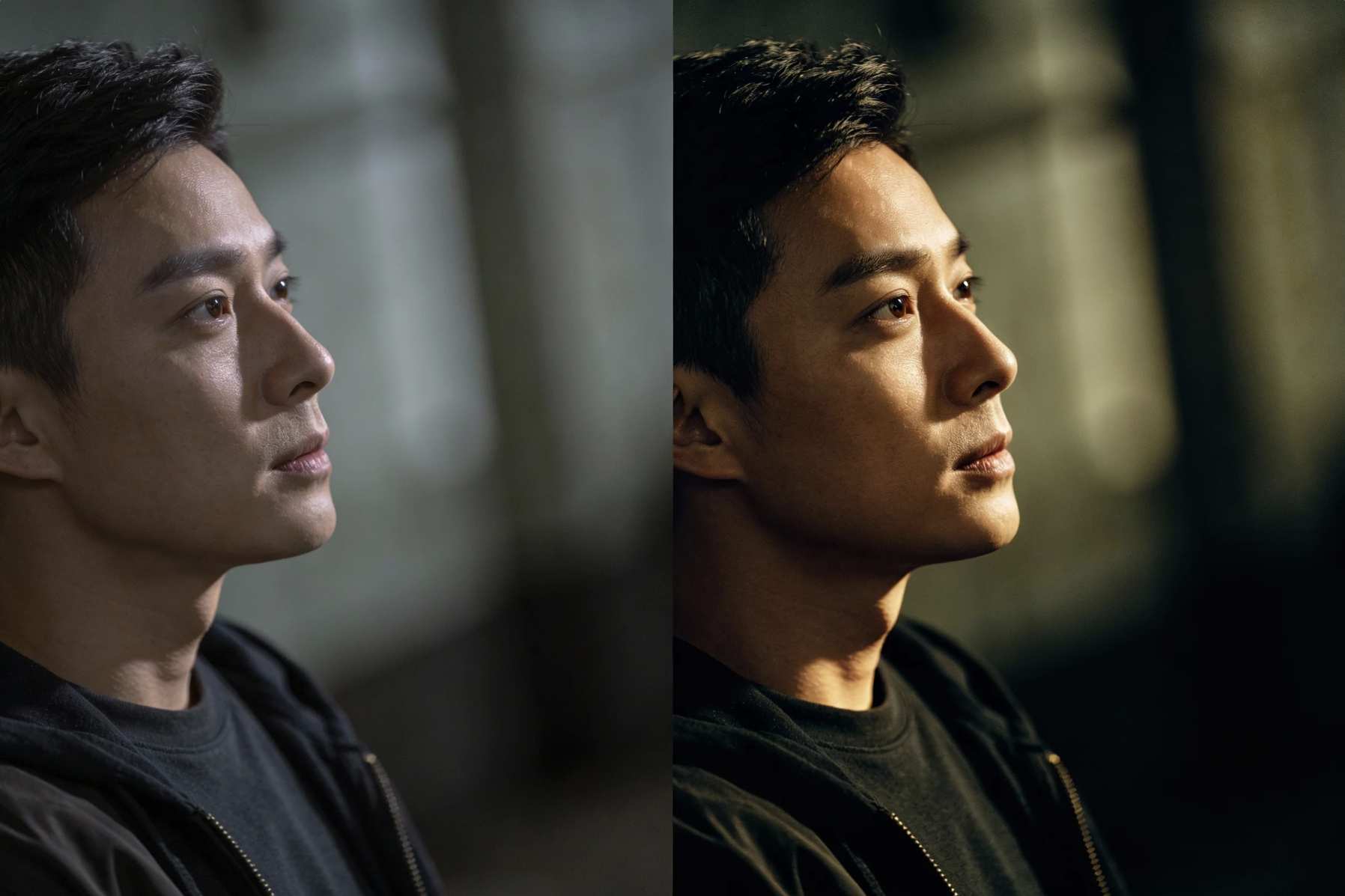
Before we dive into how to make photo cinematic, let's understand what cinematic photo actually means. A cinematic photo isn't just a pretty picture—it tells a story and evokes emotion through specific visual elements.
Color Grading and Tone
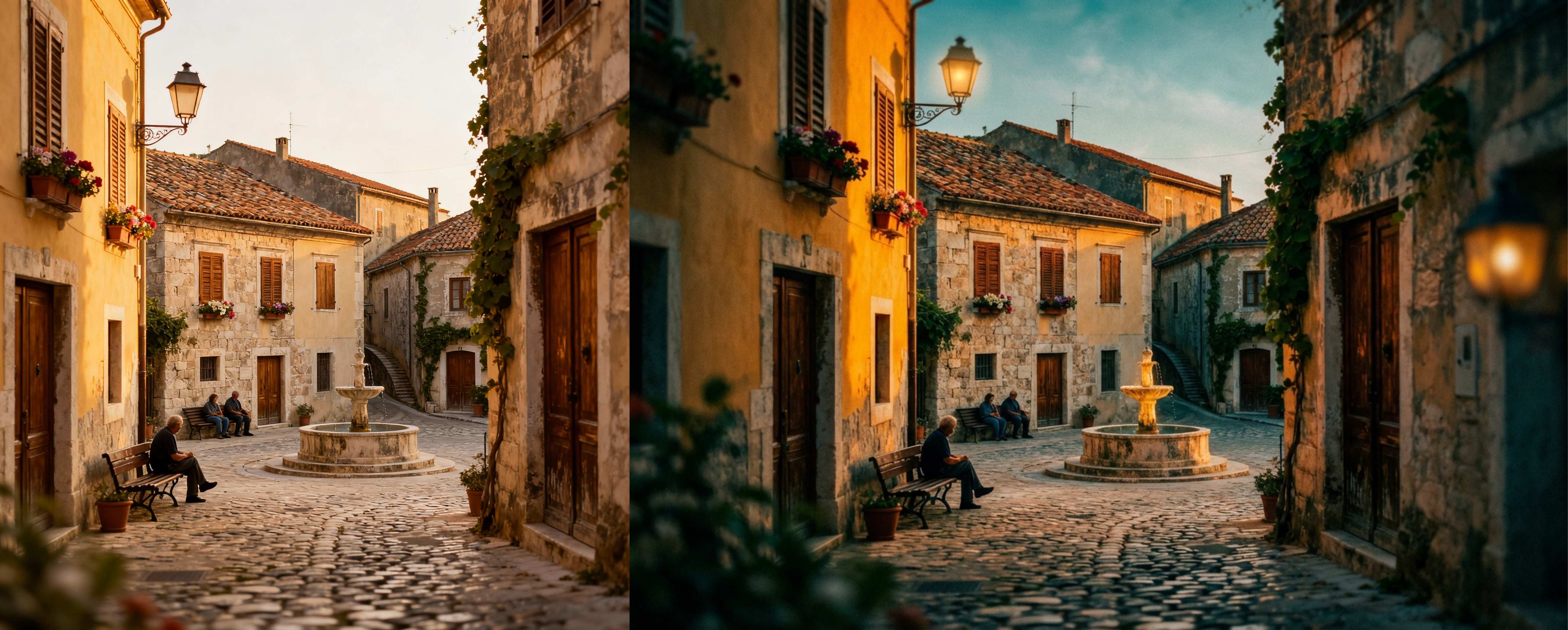
Cinematic photo typically features distinctive color palettes. The most iconic is the teal and orange color scheme—warm skin tones contrasting with cool shadows. You'll also see desaturated colors for a film-like quality, or rich, moody tones that create atmosphere.
Composition and Framing
Cinematic photo often uses widescreen aspect ratios (like 16:9) that mimic movie screens. They employ compositional techniques like the rule of thirds, leading lines, and careful subject placement to guide the viewer's eye and create visual interest.
Lighting and Contrast
Dramatic lighting is the backbone of cinematic image. Think high contrast between light and shadow, rim lighting that outlines subjects, and intentional use of harsh or soft light to set the mood. Golden hour warmth or moody blue tones can completely transform the atmosphere.
Depth and Bokeh
Cinematic photo uses shallow depth of field to isolate subjects from their backgrounds. That beautiful background blur (bokeh) creates a sense of depth and draws attention to what matters most in the frame.
Atmosphere and Mood
Finally, cinematic photo has storytelling power. They often include film grain for texture, create specific emotional tones, and feel like they're freeze-frames from a larger narrative.
What You Need to Turn Photo to Cinematic?
Traditionally, achieving that cinematic photo required expensive DSLR cameras with professional lenses, complex editing in software like Adobe Lightroom or DaVinci Resolve, and years of experience in color grading and composition. AI changes everything. With Nano Banana Pro, one of the leading AI image models available on SuperMaker, you can:
- Turn photo to cinematic in seconds instead of spending hours in post-production
- Apply professional-grade effects without technical expertise
- Experiment freely with different cinematic styles
- Achieve consistent results across your entire photo collection
The best part? You don't need to understand the technical complexities of color theory, exposure curves, or masking. Simply describe the cinematic look you want, and let AI do the heavy lifting.
Step-by-Step Tutorial: How to Make Photo Cinematic with Nano Banana Pro
Ready to turn photo to cinematic quality? Follow these simple steps to create your first AI cinematic photo.
Step 1: Access Nano Banana Pro on Supermaker
Navigate to SuperMaker and locate the Nano Banana Pro image generator. The interface is clean and intuitive—you'll see an upload area and a prompt box.
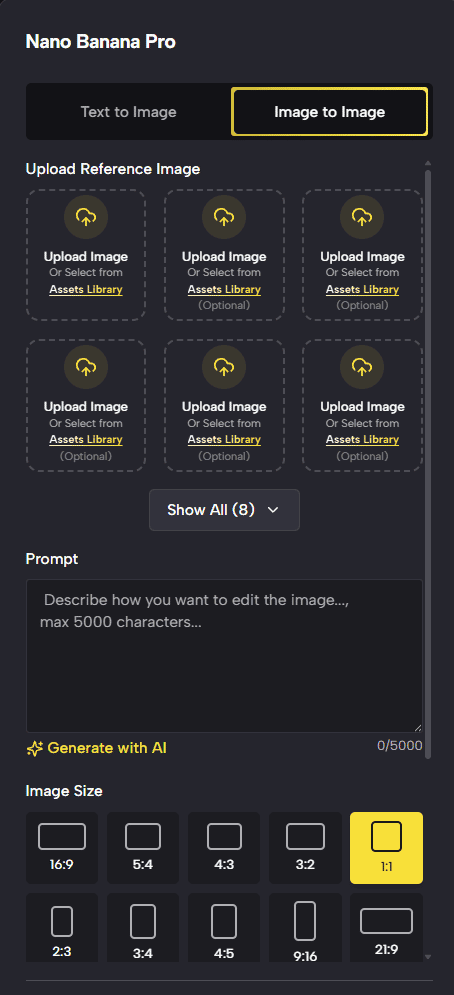 Try Nano Banana Pro free and online.
Step 2: Upload Your Photo
Click the upload button and select your image. For best results:
- Choose photos with good lighting—even phone photos work great if well-lit
- Pick images with clear subjects—the AI needs to know what to emphasize
- Higher resolution is better—but not required
- Avoid extremely dark or overexposed images—some detail helps the AI work its magic
Step 3: Craft Your Cinematic Prompt
This is where the magic happens. The prompt tells the AI cinematic photo generator exactly what kind of cinematic photo you want. Here's a powerful, versatile prompt that works for most scenarios:
Transform into a cinematic photo with dramatic lighting, teal and orange color grading, shallow depth of field, film grain, moody atmosphere, professional color correction, high contrast, cinematic bokeh
Step 4: Generate and Refine
Click Generate and watch the AI turn your photo to cinematic. The process typically takes 10-30 seconds. If the result isn't quite what you envisioned:
Adjust your prompt—add or remove specific elements Try different color schemes—swap "teal and orange" for "warm golden tones" or "cool blue aesthetic" Specify mood more clearly—add words like "melancholic," "uplifting," or "mysterious"
Step 5: Download Your Cinematic Photo
Once you're satisfied with your AI cinematic photo, simply download it in your preferred format. The AI cinematic photo generator maintains high quality, so your cinematic image will be ready for social media, printing, or professional use.
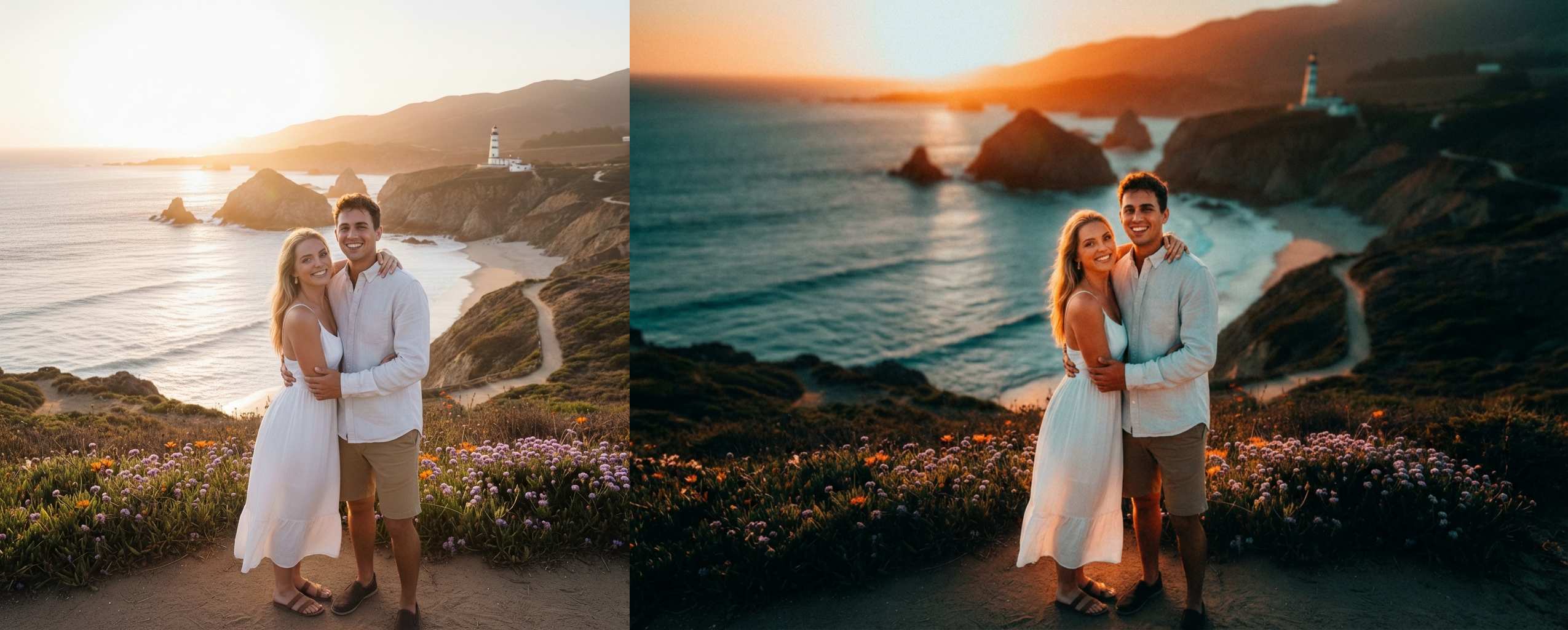
Cinematic Prompt Templates for Every Scenario
Not sure how to describe the cinematic look you want? Use these tested prompt templates for different photography scenarios. Simply copy, paste, and modify them to match your specific cinematic image.
1. Portrait Photography
Golden Hour Portrait:
Cinematic portrait with shallow depth of field, golden hour lighting, warm tones, soft bokeh background, film grain, gentle rim light, 2.35:1 aspect ratio
Best for: Outdoor portraits, natural light scenarios, warm and inviting feel
Street Candid:
Cinematic street photography with natural bokeh, person in urban environment, storytelling composition, film grain, natural lighting, authentic moment, documentary style
Best for: Street photography, candid moments, urban settings
Intimate Moments:
Cinematic lifestyle photo, warm color palette, soft diffused lighting, emotional atmosphere, shallow depth of field, focus on human connection, gentle film grain
Best for: Couples, family photos, friend gatherings, emotional connections
2. Night Photography
Urban Night Scene:
Cinematic night photography, neon lights, wet pavement reflections, bokeh from city lights, teal and orange color grading, moody atmosphere, high contrast
Best for: City nightscapes, urban streets, neon-lit environments
Starry Night/Low Light:
Cinematic astrophotography style, starry night sky, silhouette composition, deep blues and purples, ethereal atmosphere, wide angle perspective
Best for: Starry nights, low-light environments, ethereal scenes
3. Landscape/Cityscape
Epic Landscape:
Epic cinematic landscape, golden hour, wide angle, teal and orange grading, dramatic sky, professional color correction
Best for: Nature photography, sweeping vistas, mountain scenes
Urban Architecture:
Cinematic cityscape, geometric composition, modern architecture, clean lines, professional color grading, moody sky, dramatic perspective
Best for: Buildings, skylines, architectural photography
4. Street Photography
Documentary Style:
Street photography with cinematic bokeh, natural lighting, film grain, authentic moment, storytelling composition, vintage film aesthetic
Best for: Candid street scenes, documentary-style photos, raw moments
5. Food/Product Photography
Dramatic Food Shot:
Cinematic food photography, dramatic side lighting, shallow DOF, dark moody background, professional commercial style, rich colors
Best for: Food photos, product shots, commercial-style imagery
Pro Tips for Better AI Cinematic Photo
Want to take your cinematic photo from good to exceptional? These advanced tips will help you get the most out of Nano Banana Pro.
Start with Quality Source Material
While AI can work miracles, you still to give clear photo for base. Photos with good foundational lighting and clear composition will always yield better results. Even smartphone photos work great if they have decent exposure and a clear subject.
Layer Your Prompt Keywords
Don't be afraid to combine multiple cinematic elements. Try mixing "Blade Runner aesthetic" with "teal and orange grading" or "Wes Anderson symmetry" with "pastel color palette." Just keep prompts clear and not contradictory.
Specify Aspect Ratios for Different Uses
SuperMaker AI cinematic photo generator provides so many image size for your choice:
- 16:9 for YouTube thumbnails and presentations
- 1:1 for Instagram posts
- 9:16 for TikTok, Instagram Stories and Reels
Reference Specific Film Styles
Want a particular cinematic look? Reference actual films or directors in your prompts: "Blade Runner 2049 style," "Wes Anderson aesthetic," "Christopher Nolan dark gritty realism," or "Wong Kar-wai neon romanticism."
Iterate and Experiment
The beauty of AI is that experimentation costs nothing. Try variations on your prompts—change one element at a time to see what works best. Save successful prompts for future use.
Common Mistakes to Avoid
Overly Complex or Contradictory Prompts
Don't overwhelm the AI with 20 different requests or contradictory instructions like "bright and dark" or "minimalist and detailed." Keep prompts focused on 5-8 clear elements.
Using Low-Quality Source Images
Extremely blurry, heavily compressed, or severely overexposed photos won't transform well. The AI needs some visual information to work with. If you can barely see your subject in the original, AI can't magically create detail.
Start Creating Cinematic Photos Today
Learning how to make photo cinematic has never been more accessible. With cinematic photo generator on Supermaker, you have a powerful AI tool that can turn photo to cinematic quality in seconds—no technical expertise required.
Whether you're transforming vacation photos, elevating your social media content, or creating professional-grade imagery for projects, AI cinematic photo technology puts Hollywood-level results at your fingertips. The prompt templates in this guide give you a solid foundation, but don't be afraid to experiment and develop your own signature cinematic style.
Remember, the best way to learn is by doing. Start with the basic cinematic prompt we provided, then branch out into different scenarios and styles. Pay attention to what works for your specific images and refine your approach over time. Ready to transform your photos? Head over to Supermaker and start creating stunning AI cinematic photo with Nano Banana Pro today. Your Instagram feed will thank you.


