
Hunyuan-Image 3.0 Mastery: Architecture, Performance, and Practical Guide
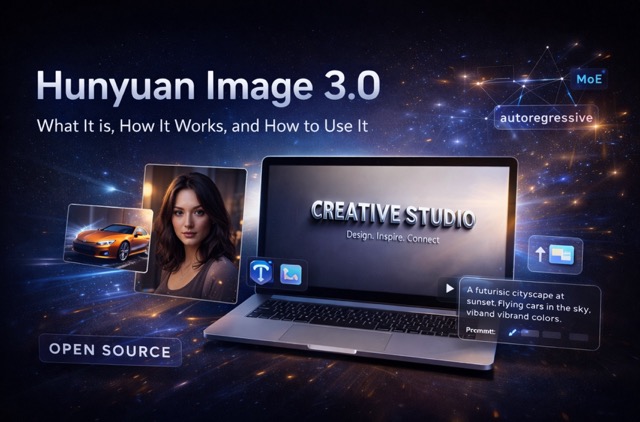
A complete guide to using Hunyuan Image 3.0, including architecture highlights, model variants, system requirements, step-by-step runs, and prompting best practices.
Introdution
In the rapidly shifting landscape of open-source AI image generation, most releases follow a predictable pattern of incremental updates. Hunyuan-Image 3.0 (Tencent Hunyuan) breaks this mold by transitioning away from traditional DiT-style diffusion routes toward a native multimodal, unified autoregressive framework. By integrating a massive Mixture-of-Experts (MoE) design, this model achieves a rare balance between cinematic aesthetic quality and pinpoint prompt adherence.
What is Hunyuan-Image 3.0?
Hunyuan-Image 3.0 is a next-generation text-to-image model that unifies multimodal understanding and generation within a single autoregressive framework. Unlike traditional models that treat text and image as separate entities to be "bridged," Hunyuan-Image 3.0 models these modalities together.
Solving Critical Industry Challenges
- Superior Prompt Adherence: Through rigorous dataset curation and reinforcement learning (RL) post-training, the model follows complex, multi-layered instructions without losing semantic accuracy.
- Visual-Semantic Harmony: It eliminates the trade-off between high-detail aesthetics and sticking to the prompt, ensuring that every artistic detail serves the user's original intent.
- Intelligent Reasoning: The model utilizes "world-knowledge reasoning" to fill in the gaps of sparse prompts, creating complete, rich scenes from minimal input.
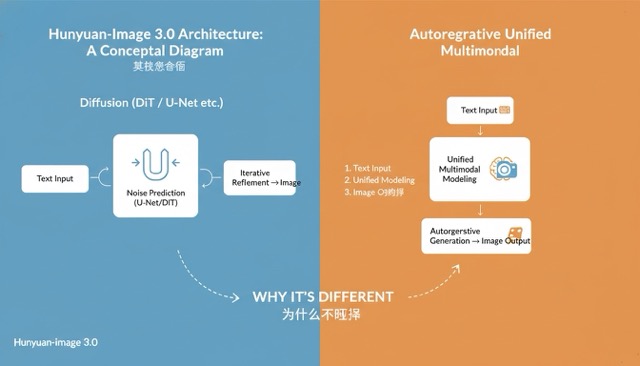
Image source: Supermaker
II. Key Features of Hunyuan-Image 3.0
1. Massive Mixture-of-Experts (MoE) Scaling
The model features 64 specialized "experts" with a total of 80 Billion parameters.
- Efficiency at Scale: Despite its massive size, only approximately 13 Billion parameters are activated per token during inference. This provides the creative headroom of a massive model with the speed and cost-efficiency of a much smaller one.
- Generalization Power: The MoE design allows the model to master a wider diversity of visual "modes"—from photorealistic product shots to intricate digital illustrations—more effectively than dense architectures.
2. Strategic Model Variants
| Variant | Ideal Use Case | Key Capabilities |
|---|---|---|
| Base Model | Professional researchers and prompt engineers | Offers maximum predictable control and responds strictly to structured, technical prompting. |
| Instruct Model | General users and creative leads | Features "thinking" abilities to automatically rewrite and enhance sparse prompts into rich, detailed instructions. |
How to Use Hunyuan-Image 3.0
While the underlying technology is complex, the user experience is designed for seamless integration into various creative workflows.
💡 Quick Tip: Use it Online via Supermaker For the easiest experience, you can use Hunyuan-Image 3.0 directly on Supermaker. It is simple, fast, and convenient, offering a free way to access the model's full capabilities without any complex local setup or hardware requirements.
1. Accessing via Integrated Platforms
For users who prefer a no-code solution, Hunyuan-Image 3.0 is being integrated into major AI creative suites and WebUI distributions. Simply search for the "Hunyuan-Image 3.0" weights within your preferred tool's model library to start generating high-fidelity assets immediately.
2. Using the Gradio Web Interface
For those running the model on local or cloud-rented hardware, the official Gradio demo provides a powerful playground:
- Launch the App: Run sh run_app.sh in your terminal.
- Access the Dashboard: Open the URL shown in your terminal.
- Optimization Hint: For the best performance, launch using the flags: --moe-impl flashinfer --attn-impl flash_attention_2 to leverage optimized kernel compilation.
3. Generate Your Image (on Supermaker)
Once your prompt and settings are ready, generating with Hunyuan Image 3.0 on Supermaker is a one-click step:
- Select the model: Choose Hunyuan Image 3.0 (or Hunyuan Image 3.0 Instruct if you want prompt enhancement).
- Click Generate: Press Generate to start the render.
- Preview the result: Wait a few seconds for the image to appear in the results panel.
- Iterate fast: If the result isn’t perfect, tweak your prompt (add style/lighting/composition details) or adjust aspect ratio/resolution, then generate again.
Prompt Engineering of Hunyuan-Image 3.0
Hunyuan-Image 3.0 excels when given logically structured descriptions. To achieve professional-grade results, we recommend following this comprehensive template:
- Subject & Action: Clearly define who or what is the focus and what is happening.
- e.g., A young woman in a flowing red silk dress dancing gracefully.
- Scene & Environment: Specify the location, time of day, and atmospheric context.
- e.g., A cobblestone street in old Paris during the golden hour of sunset.
- Artistic Style: Define the medium. Options include cinematic photography, oil painting, or cyberpunk digital art.
- Composition & Perspective: Set the "camera" parameters, such as a close-up, wide-angle shot, or dramatic low-angle perspective.
- Lighting & Quality: Add technical flourishes like Tyndall effect, rim lighting, high contrast, and hyper-detailed textures.
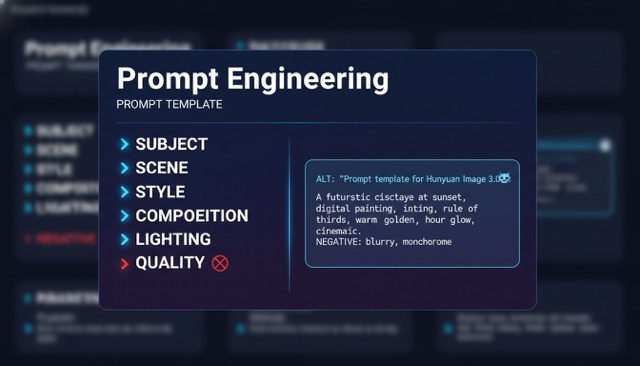
Image source: Supermaker
Licensing and Commercial Considerations About Hunyuan-Image 3.0
Before deploying Hunyuan-Image 3.0 for enterprise use, please review the Tencent Hunyuan Community License Agreement:
- MAU Threshold: If your product exceeds 100 million monthly active users, a separate commercial license must be requested from Tencent.
- Territory Restrictions: The standard license currently excludes the EU, UK, and South Korea.
- Integrity Clauses: Outputs may not be used to train competing image-generation models.
Conclusion
Hunyuan-Image 3.0 represents a significant departure from the status quo. By combining a unified autoregressive approach with an 80B MoE framework, Tencent has provided a tool that finally understands the nuances of human language while delivering breathtaking visual clarity.
Whether you are a creative agency looking for brand-consistent assets or a solo developer building the next generation of visual apps, Hunyuan-Image 3.0 offers the scale and precision necessary to set a new standard in your digital content.
Ready to try it? If you want the fastest way to generate images with Hunyuan-Image 3.0, launch it online via Supermaker — no setup, just prompt and generate.


