
Lumen5 Review: How to Turn a Blog Post into a Video in One Minute

This guide provides a complete Lumen5 review, explaining how bloggers and marketers can convert written content into engaging videos in minutes using AI. It covers features, pricing, pros and cons, and real-world use cases for blog-to-video marketing.
How Lumen5 Works?
Lumen5 simplifies video creation by converting written content into visually engaging stories. Rather than spending hours editing timelines or learning advanced software, users can rely on AI to analyze text and automatically generate video scenes based on key ideas.
This approach significantly lowers the barrier to video production. Lumen5 is built for creators who want speed and clarity, making it easy to turn blog posts and articles into videos without any technical background.
By focusing on content repurposing, Lumen5 helps bloggers and marketers transform existing content into shareable videos, allowing them to reach wider audiences while saving time and resources.
 Image source: Supermaker
How to Turn a Blog Post into a Video with Lumen5
Step 1: Import Your Blog Content
You can start by pasting your blog text directly into Lumen5 or importing it using a published URL. The platform automatically scans the content and identifies key sentences that can be turned into video scenes.
This makes Lumen5 an ideal blog-to-video tool for marketers managing large content libraries.
Step 2: AI Scene and Visual Generation
Once your text is analyzed, Lumen5 creates multiple scenes based on the structure of your article. Each scene includes:
- A short text overlay
- Relevant stock images or video clips
- Smooth transitions between scenes
The AI focuses on clarity and pacing, making videos suitable for social media and short-form consumption.
Step 3: Customize the Video
After the AI-generated draft is ready, you can easily customize it:
- Replace visuals with your own media
- Shorten or rewrite text overlays
- Apply brand colors, fonts, and logos
- Adjust layout and animation styles
This balance between automation and manual control is one of Lumen5’s biggest strengths.
Step 4: Export and Share
Once editing is complete, export your video in the desired format. Lumen5 supports multiple aspect ratios, allowing you to publish videos across platforms like YouTube, Instagram, LinkedIn, and Facebook.

Image source: Supermaker
Key Features of Lumen5
AI-Powered Text to Video Conversion
Lumen5 uses natural language processing to transform written content into structured video scenes. This feature significantly reduces production time and eliminates the need for advanced editing skills.
Built-In Stock Media Library
The platform includes a large library of royalty-free images, video clips, and background music, allowing users to create videos without sourcing external assets.
Drag-and-Drop Video Editor
Lumen5’s editor is beginner-friendly, making it accessible to bloggers and marketers with no design background.
Multi-Platform Video Optimization
Videos can be resized and optimized for different platforms, making Lumen5 suitable for social media marketing and content distribution.
Lumen5 Pricing Overview
Lumen5 offers a free plan as well as multiple paid plans.
- Free plan: Includes watermarked videos and limited resolution
- Paid plans: Unlock higher resolutions, brand kits, and advanced customization options
For content marketers and businesses, paid plans provide better branding consistency and a more professional final output.
Pros and Cons of Lumen5
Pros
- Extremely easy to use
- Fast blog-to-video workflow
- Ideal for content repurposing
- No video editing experience required
Cons
- Limited advanced editing features
- AI-selected visuals may need manual adjustment
- Not suitable for complex or cinematic video projects
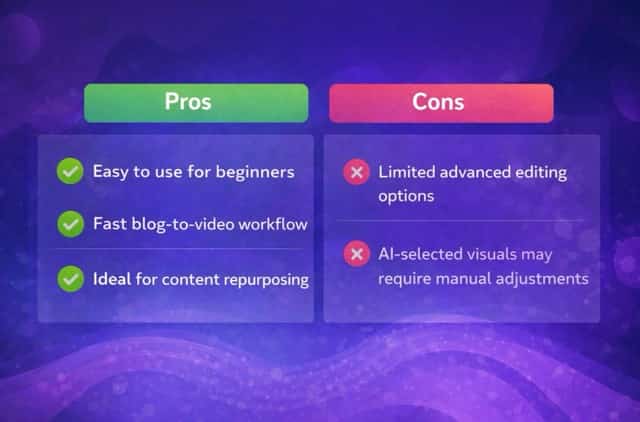 Image source: Supermaker
Best Use Cases for Lumen5
Lumen5 works best for:
- Bloggers repurposing articles into video
- Social media managers creating short-form content
- Marketing teams scaling content production
- Small businesses producing promotional videos
It is less suitable for professional video editors who require full creative control.
Is Lumen5 Worth It?
If your goal is to convert blog posts into videos quickly and efficiently, Lumen5 is a strong choice. The platform is designed for speed and simplicity, allowing creators to turn written content into engaging visual formats without spending hours on manual video editing.
Lumen5 excels at helping bloggers, marketers, and small teams extend the lifespan of their existing content. By repurposing blog posts into videos, users can reach wider audiences across social media platforms while maintaining a consistent content workflow.
For anyone looking for an accessible AI video creation tool with a minimal learning curve, Lumen5 delivers solid value. However, it is less suitable for professional video editors who require full creative control or advanced, frame-by-frame customization.
Video source: Supermaker
Final Verdict
Lumen5 removes the traditional barriers to video creation by combining AI automation with simple customization. It allows users to transform written content into shareable videos in minutes, making it a valuable tool for modern content marketing strategies.
If video is part of your growth plan, Lumen5 is well worth exploring.


