
FLUX.2 Review: An AI That Actually Does What You Want
Say goodbye to random slot-machine results. We explain how FLUX.2 uses advanced features like Hex color control and multi-image references to give everyone—from beginners to designers—total creative control.
Introduction
For the past few years, AI image generation has felt like a slot machine. You pull the lever (type a prompt), and you hope for a jackpot. Sometimes it’s amazing, sometimes it’s weird, but it was rarely consistent.
Enter FLUX.2, the latest release from Black Forest Labs.
FLUX.2 represents a massive shift in the industry. It moves beyond the "wow factor" of random generation and focuses on what creators actually need: reliability, precision, and control. It is no longer just a toy for making memes; it is a robust engine designed to fit into professional creative workflows.
What is FLUX.2?
FLUX.2 is a next-generation AI model suite designed to generate and edit images with unprecedented control. Unlike its predecessors, which often struggled with complex instructions or maintaining character identity, FLUX.2 is built for production pipelines.
It comes in several versions, including FLUX.2 [pro] (for top-tier enterprise use) and FLUX.2 [dev] (an open-weight model for advanced local users). Whether via API or running locally on a powerful GPU, FLUX.2 is engineered to understand the real world, read complex text, and strictly follow your brand guidelines.
New Features of FLUX.2
Here are the standout technical upgrades that make FLUX.2 unique, along with examples of how they work.
1. Multi-Reference Support (Up to 10 Images)
FLUX.2 allows you to upload up to 10 reference images simultaneously. The model analyzes these inputs to lock in specific styles, character faces, or product details.
Example: You are drawing a digital comic book. You upload 3 photos of your main character's face. Now, when you generate new panels—whether the character is running, eating, or sleeping—they look exactly like the same person, not a generic lookalike.

2. Precise Color Control (Hex Codes)
Forget vague descriptions like "dark blue." FLUX.2 supports specific hexadecimal color codes, ensuring exact color matching.
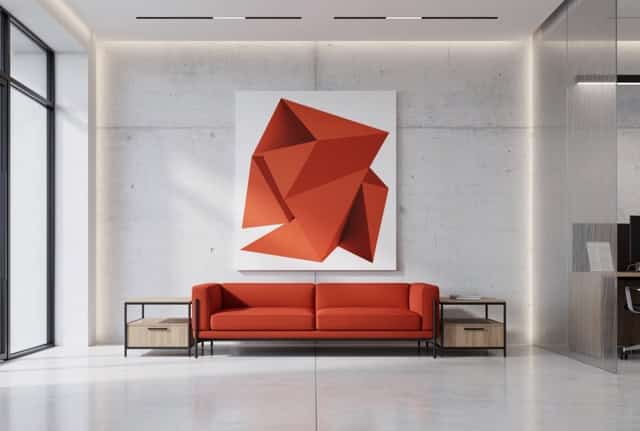
Example: A designer needs to create a background that matches a company's official branding. Instead of guessing, they prompt: "A modern office lobby with accents in color #FF5733." The AI generates the image using that exact shade of orange.
3. Advanced Text and Layout Rendering
FLUX.2 can read and write complex text, handling layouts for posters, menus, or user interfaces without the gibberish text common in older models.
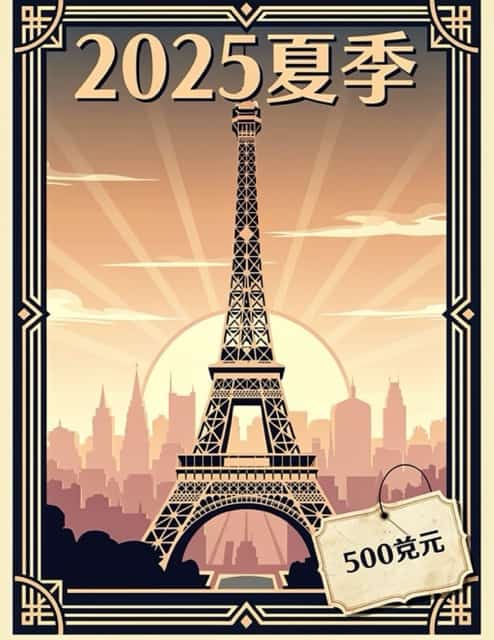
Example: You ask for "A vintage travel poster for Paris with the large text 'SUMMER 2025' at the top and a small price tag reading '$500' at the bottom." FLUX.2 renders both text elements perfectly legible and in the correct style.
4. 4MP Resolution & High-Fidelity Editing
The model supports editing and generation at up to 4 Megapixels (4MP). This allows for professional-grade sharpness and detail retention.
Example: A fashion photographer needs to fix a detail on a model's jacket. They use FLUX.2 to edit the texture of the fabric. Because of the high resolution, the zoomed-in fabric weave looks crisp and realistic, not blurry or pixelated.

5. Structured "JSON" Prompting
For power users, FLUX.2 accepts structured data (JSON) instead of just sentences. This separates instructions for lighting, subject, and camera settings so the AI doesn't get confused.
Example: Instead of a long, messy paragraph, you feed the AI a structured list:
{"Subject": "Cat", "Lighting": "Cinematic", "Camera": "85mm lens"}The AI executes each parameter distinctively.
What You Can Use FLUX.2 to Do
FLUX.2 transforms how we approach daily creative tasks. Here are specific professional applications:
1. Brand & Product Photography
You can place your product in infinite environments without organizing a physical photoshoot, while keeping the product looking 100% real.
- The Scenario: You sell a specific brand of water bottle.
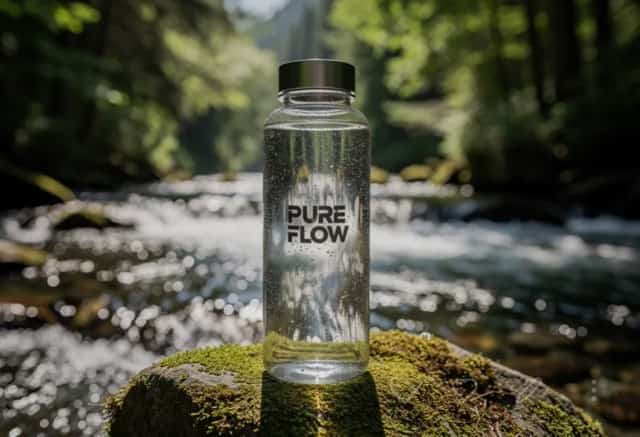
- The Solution: Upload a reference image of your bottle. Use FLUX.2 to generate the bottle sitting on a desk, in a gym, and on a hiking trail. The lighting changes to match the scene, but the logo and bottle shape remain perfect.
2. UI/UX Design Mockups
Designers can rapidly prototype app interfaces or websites with readable placeholder text and logical layouts.
- The Scenario: You are designing a food delivery app and need a mockup image for a presentation.
- The Solution: You prompt FLUX.2 to create "A mobile phone screen displaying a pizza delivery app interface with a 'Buy Now' button and a map." The result is a high-res image where the buttons look clickable and the text is readable, ready for a client pitch.

3. Creating Consistent Storyboards
Directors and writers can visualize entire scenes with consistent lighting and spatial logic, thanks to the model's improved world knowledge.
- The Scenario: A film director wants to visualize a scene where a car chases a motorcycle.
- The Solution: They generate a sequence of 5 images. Because FLUX.2 understands physics and spatial logic, the shadows fall correctly in all shots, and the relative size of the car and motorcycle stays realistic throughout the sequence.

4. Marketing Materials with Strict Guidelines
Marketing teams can generate assets that strictly adhere to corporate style guides regarding color and composition.
- The Scenario: A tech company needs a holiday greeting card that uses their specific brand purple.
- The Solution: They use the Hex code feature and reference images of their mascot. The result is a festive image that feels "on-brand" and requires zero manual color correction in Photoshop.

Not Just for Pros: FLUX.2 for Everyone
While the features above sound technical, you don't need to be a coding wizard or own a supercomputer to use FLUX.2. The model is surprisingly accessible for everyday creativity.
1. No Hardware? No Problem.
You don't need to buy an expensive graphics card. FLUX.2 is available on popular cloud platforms like Poe, SeaArt, or LiblibAI. You can access the model directly through your web browser or mobile phone—just sign up and start creating.
2. It Understands "Plain English"
While pros can use JSON code, you don't have to. FLUX.2’s advanced language understanding means you can talk to it like a human.
- Old Way: Memorizing complex "spell tags" like
((best quality)), 8k, masterpiece. - FLUX.2 Way: Simply typing "Draw a cute girl in a red sweater building a snowman, Pixar style." It understands your intent instantly.
3. Everyday Life Hacks
FLUX.2 can be your personal creative assistant:
- Unique Avatars: Create a cyberpunk version of yourself for social media profiles that no one else has.
- Custom Memes: Since FLUX.2 can spell correctly, you can generate a funny cat meme with the text "Monday Again" written perfectly on a coffee mug.
- DIY & Crafts: Need an idea for a school project? Ask it to generate "A step-by-step visual guide for making a rocket out of cardboard tubes," and use it as a reference.
Conclusion
FLUX.2 is more than just an upgrade; it is a maturation of AI technology. By solving the "randomness" problem and introducing professional features like Hex codes, multi-reference support, and 4MP editing, Black Forest Labs has created a tool that respects the user's intent.
For the casual user, it creates beautiful images easier than ever without complex "spells." For the professional, it finally provides the control needed to rely on AI for daily production work. The era of trial-and-error is ending; the era of precision has begun.


