
Seedance 2.0 Video Model Deep Dive: The “Nano Banana Pro” Moment for AI Video
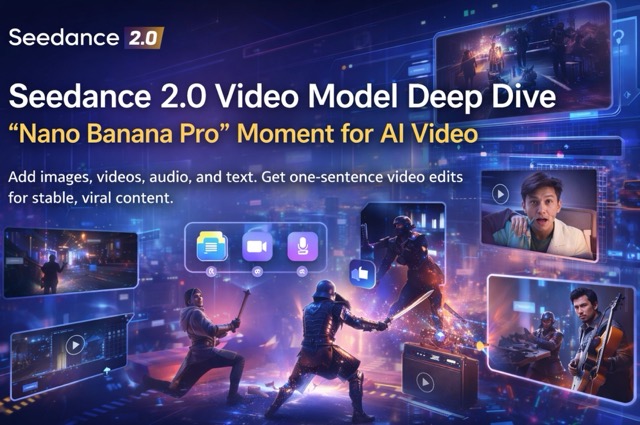
Seedance 2.0 revolutionizes video creation with multi-lens narratives, 1080p/2K HD output, and native audio—turning prompts into pro-level films effortlessly.
Introduction
Seedance 2.0 represents a major turning point for creators. The promise of “One-Sentence Video Editing” is no longer just a tagline—it is now a reality.
With Seedance 2.0, you are no longer just prompting into the void. You can combine images, video, audio, and text as specific references to teach the model exactly what you want: the camera movement, the action, the visual effects, the rhythm, and the sound. The result is a generation that is significantly more stable, controllable, and realistic.
More than just a model, it is a “Full Workflow” upgrade. By integrating with top-tier image generation (Seedream 5.0), Agents, and an Infinite Canvas, creators can now handle the entire production pipeline in one place without constant context switching.
Release Note: Seedance 2.0 is rolling out in phases. Currently, Whitelisted Users can upload reference videos. All other users can still leverage Prompts + Reference Images to achieve significantly improved quality.
Try Seedance 2.0 Now
What Seedance 2.0 Does Best
1. Multi-Modal Reference (Top Feature): Merge up to 12 Files
Seedance 2.0 introduces support for referencing four distinct modes simultaneously: Image, Video, Audio, and Text. You can integrate a massive total of 12 files in a single generation.
Current Constraints:
- Images: Up to 9 files.
- Video: Up to 3 files (Max 15s duration).
- Audio: Up to 3 files (Max 15s duration).
Why this matters: This makes "Reference Synthesis" practical. You can anchor the first frame with an image, borrow camera language from a video, steal the pacing from a second video, and set the mood with an audio track—all guided by natural language.
2. “Edit Video Like an Image” (One-Sentence Editing)
Seedance 2.0 allows for direct modification of existing footage. You can:
- Replace Elements: Swap a character or object seamlessly.
- Add/Remove Elements: Clean up or populate scenes.
- Style Transfer: Apply new visual styles while retaining the original motion.
Crucially, it strives to maintain thematic consistency without hallucinating unwanted changes to the rest of the scene. It allows for targeted adjustments rather than requiring a full rebuild.
3. Enhanced Controllability
The update focuses on the nuances that matter for professional workflows:
- Character/Object Persistence: Better preservation of identity, product details, and composition.
- Typography Consistency: Font styles are more stable, and text rendering is significantly more accurate.
- Pacing Control: Fast cuts and beat-driven editing now feel fluid and intentional.
4. Superior Output Quality
- Intelligent Continuation: The model doesn't just create; it "continues the shoot," maintaining narrative logic.
- Cinematic Multi-Shots: Better coherence across different scenes for storytelling.
- Audio-Visual Sync: Supports single or multi-speaker setups; lip-syncing and SFX now match visual cues much tighter.
- Physics Engine: Movements and interactions look natural and believable.
5. End-to-End Workflow
Seedance 2.0 works as part of a creative workstation, syncing perfectly with Seedream 5.0 (Image Model), AI Agents, and the Infinite Canvas for rapid iteration.
Use Cases of seedance2.0
Based on the demo materials, here are the specific workflows Seedance 2.0 unlocks:
- Case A — The Composite Scene: Assign specific roles to different inputs. Use Image A for the first frame, Video B for camera movement, and Images C/D/E for layout references. This allows for viral structure replication without needing technical filmmaking terms.
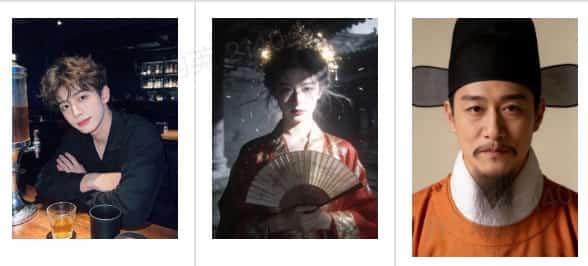
Example:"A trailer for a historical time-travel drama. 0-3s: The male protagonist (Reference Image 1) sits drunk at a wooden bar counter with half a glass of whiskey in front of him. He looks up at the camera with a confused expression and says, 'I just wanted a drink, don't tell me I'm time-traveling...' 4-8s: The camera shakes violently. The bar lights and glassware spin and blur, instantly switching to a rainy night at an ancient mansion. The female protagonist (Reference Image 2), with a cold gaze, looks through the rain towards the camera. Thunder roars, and her clothes flap in the wind. She says, 'Who dares to trespass into my Yongning Marquis Manor?' 9-13s: The scene cuts to a Ming Dynasty official (Reference Image 3) sitting in the Yamen. His eyes are sharp as knives, and he speaks angrily, 'Guards! Arrest this "monster" immediately!' Flashbacks ensue: the male protagonist in ill-fitting rough hemp clothes panic-running while surrounded by guards; crossing paths with the female protagonist in a rainy alley; the male protagonist walking in the palace wearing official robes. 14-15s: Black screen displaying the title 'Drunken Dream of Jinghua' accompanied by heavy drum beats."
- Case B — Action & Camera Cloning: Upload Reference Video 1 for character motion and Reference Video 2 for camera shake/tracking. Then, apply these movements to your own character in a new environment.
- Case C — Creative Transition & Style Transfer: Instruct the model to learn a specific transition effect or editing rhythm from a reference and apply it to a new subject (ideal for ads and viral shorts).
- Case D — Consistent UGC / Product Demos: Perfect for vertical (phone) formats where stability is key. Keep the product details consistent while controlling the presentation pace.
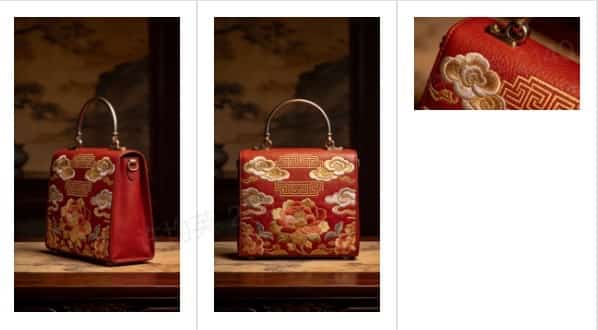
Example:Create a commercial cinematic showcase of the bag from @Image2. Reference @Image1 for the side profile structure and @Image3 for the surface material texture. Ensure all details of the bag are clearly displayed. Background music should be grand and atmospheric.
- Case E — Smart Extension: Extend an existing video with a new ending, text overlays, or a scene sequel while keeping the narrative glue intact.
- Case F — Audio-Driven Narrative: Scenes where audio dictates the visual. Match voice tones, dialogue timing, and environmental SFX perfectly to the video generation.
How to Use Seedance 2.0
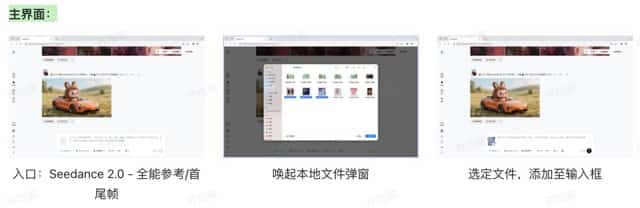
Step 1: Choose Your Mode
- First/Last Frame: Best for simple Prompt + Image anchoring.
- All-in-One Reference: Best for complex multi-modal synthesis (Image/Video/Audio combined).
Step 2: Upload Assets
Upload your reference files, keeping the limits in mind (Max 9 images, 3 videos, 3 audio files).
Step 3: Assign Roles Clearly with "@"
This is the most critical step. Use the @asset syntax in your prompt to prevent the model from getting confused.
Prompt Structure Example:
"@Image1 as the first frame anchor. Reference @Video1 for camera movement. Reference @Video2 for character action. Use @Audio1 for background atmosphere. @Image2 defines the scene layout."
Step 4: Direct the Scene
Write your prompt in plain language but be specific about roles. Define what must change (subject/scene) and what must stay the same (identity/font/pacing).
Step 5: Generate & Iterate
Don't rewrite everything if the first pass isn't perfect. Use targeted commands for the next iteration:
- "Tighten camera: Match reference rhythm exactly."
- "Fix typography: Font style must match reference; keep text legible."
Conclusion
Seedance 2.0 stands out because it combines the two things creators actually need: Multi-Modal Reference Control and Production Stability.
By supporting up to 12 reference files, role-based "@" prompting, and superior consistency in typography and physics, it makes high-level video workflows repeatable. It brings us closer than ever to the holy grail of "One-Sentence Video Editing."


