
More AI Image Generators
Explore our collection of specialized AI image generators designed for different creative needs and styles


















![FLUX.1 Krea [dev]](https://static.supermaker.ai/cdn-cgi/image/q=55/https://static.supermaker.ai/files/vtp5vmm87f65.png)
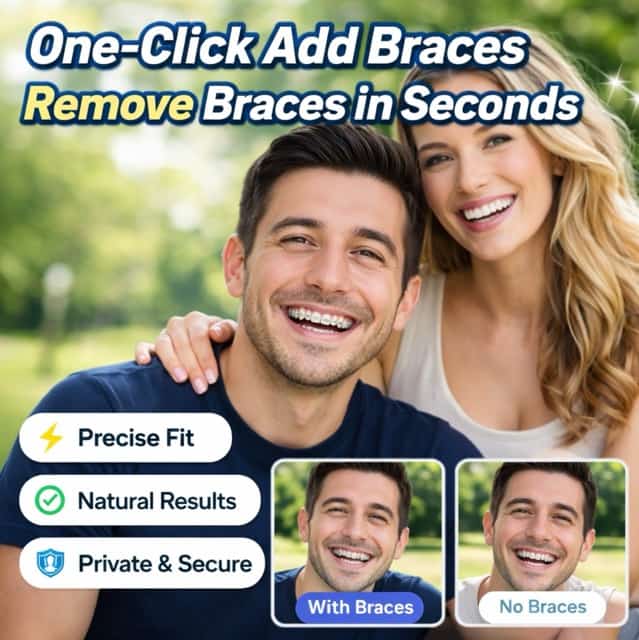
Instant AI Braces Filter: Transform Your Smile in Seconds
Visualize your perfect smile effortlessly. Add braces to photo or remove braces online with our ultra-realistic AI technology.
Experience the most advanced braces filter online. Whether you are planning orthodontic treatment or just having fun, our braces filter tool lets you add braces to photo or remove braces from photo automatically. No downloads required—just upload, let the AI detect your smile, and generate your new look instantly.
How to Use The Best Braces Filter Online
Achieving a transformed smile is fast and simple. Follow these three steps to use our realistic braces filter for adding or removing braces efficiently.

Upload Your Photo
Start by uploading a clear image where your teeth are fully visible. Our braces filter supports high-resolution formats to ensure the best quality when you decide to add braces to photo or edit your smile.

Automatic AI Detection
No manual editing is needed. Our smart braces filter AI automatically detects your teeth area. It precisely identifies where to add braces to photo or remove braces from photo without affecting your lips.

Generate & Download
Click generate to see the magic. Within seconds, you will see a realistic braces filter result. Satisfied with the look? Download your edited photo immediately and share your new style.
Best AI Image Tools for Creative Projects
Explore creative tools for image, learn tips and tricks, and see how AI can be your assistant in turning concepts into finished projects.











Why Our AI Braces Filter Stands Out
We combine cutting-edge AI with user-centric design. Explore the features that make us the leading choice for users wanting to add braces to photo online or clean up their dental photos.
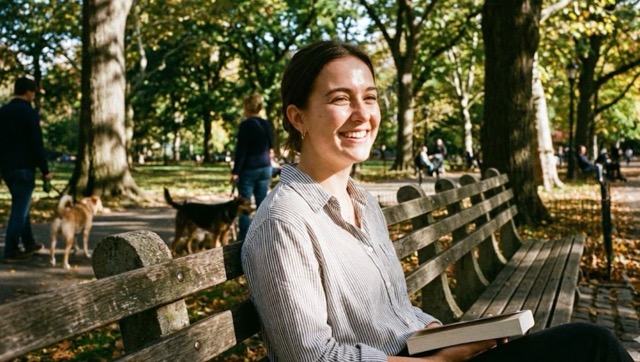
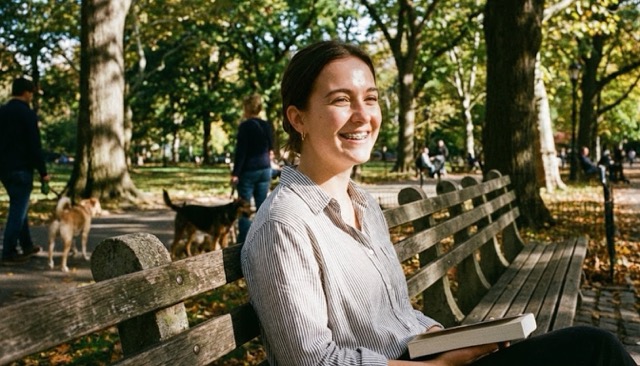
100% Free Access: Professional Braces Filter
Unlock professional photo editing at zero cost with our accessible platform.
- While other apps charge for realistic results, our braces filter is completely free to use.
- We believe visualizing your smile should be accessible; that is why you can add braces to photo or remove them without a credit card.
- Our braces filter free model ensures you get high-quality, watermark-free downloads without hidden fees.
- Experience the market's best braces filter online technology and transform your smile as many times as you want for free.
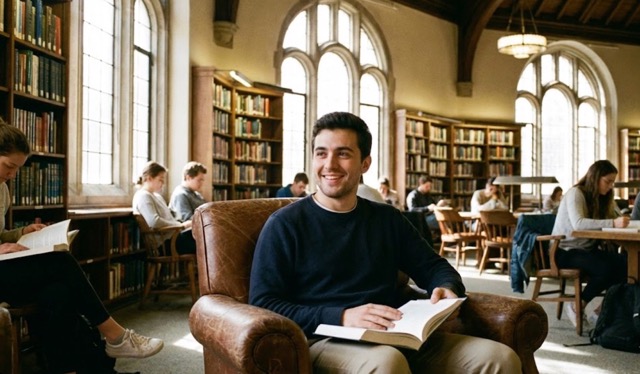
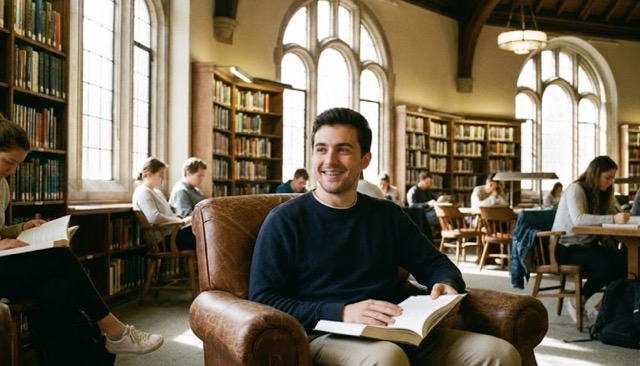
Dual Mode: Add Braces to Photo & Remove Braces
Our platform is a versatile powerhouse catering to two distinct needs with equal excellence.
- Mode 1: Add braces to photo online. Visualize how you will look with various orthodontic styles before you commit to the real thing. It is perfect for alleviating anxiety about dental work.
- Mode 2: Remove braces from photo. If you are currently undergoing treatment but want a photo without wires for a special occasion, our braces filter AI seamlessly wipes them away.
- This dual capability makes our braces filter a comprehensive tool for your entire dental journey, from planning to progress tracking.

Hyper-Realistic Braces Filter Technology
We do not just overlay flat stickers; we generate texture and lighting compatible with your photo.
- Our realistic braces filter analyzes the ambient light in your image to create convincing shadows and reflections on the brackets.
- When you use the braces filter tool to remove braces, the AI reconstructs the underlying tooth surface with natural enamel textures, not just a blur.
- This attention to detail ensures that whether you use the braces filter free version or premium features, the output is indistinguishable from reality.
- It is the closest thing to a digital orthodontist visit you can experience from home.


100% Online, Fast, and User-Friendly
Accessibility is key to our philosophy. We provide a robust braces filter online that works on any device.
- No heavy software installation is needed; simply open your browser and start editing with our braces filter to add braces to photo.
- The interface is designed for simplicity, automatically handling the dental recognition process for you.
- Our cloud-based processing ensures that the heavy lifting is done on our servers, not your device, delivering your braces filter result in seconds.
- Enjoy a hassle-free experience that prioritizes your time and convenience.
Endless Possibilities with Our Braces Filter
From fun pranks to serious dental planning, discover how our versatile braces filter helps users achieve their goals.
Orthodontic Treatment Visualization
Deciding to undergo orthodontic treatment is a significant commitment that often comes with anxiety about appearance. Our advanced realistic braces filter serves as a powerful visualization tool to bridge the gap between imagination and reality. You can effortlessly add braces to photo to preview how different styles suit your facial structure, helping you choose with confidence. Conversely, for those already in treatment, use the braces filter tool to remove braces to catch a glimpse of your future perfect smile, staying motivated throughout your dental journey.
Social Media Content Creation
In the fast-paced world of social media, standing out requires creativity and unique visuals. Whether you want to jump on a new trend or pull a harmless prank on friends, the add braces to photo online feature offers endless entertainment value. Our braces filter generates such authentic high-definition results that your followers on TikTok, Instagram, or Snapchat will genuinely believe you visited the orthodontist, driving engagement and fun interactions on your profile.
Restoring Old Memories
Photographs capture precious moments, but sometimes orthodontic appliances can distract from your natural expression or cause unwanted glare. Do not let metal wires overshadow your memories. With our smart braces filter tool, you can remove braces from photo to restore the timeless beauty of your smile. It is like traveling back in time to fix a photo with our braces filter, ensuring that your wedding, graduation, or family portraits look exactly how you want them to be remembered.

Acting and Modeling Portfolios
For actors, models, and professionals, versatility in appearance is crucial for booking jobs. If you are currently wearing appliances but need a clean headshot for a specific role, you do not need to wait months. Quickly remove braces using our automatic AI feature to present a polished, versatile look to casting directors immediately. This cost-effective solution saves you from expensive professional retouching fees while delivering high-quality, studio-ready images.
Stories from Happy Users
See why thousands trust our realistic braces filter for their photo editing needs.
I was hesitant about getting adult braces. The add braces to photo feature allowed me to see that I could still look good with them. The braces filter was incredibly accurate and helped me make a confident decision.
I had my prom photos taken while I still had metal brackets. I used this braces filter to remove braces from photo and it saved the day! The AI automatic removal made it so easy to get a clean result.
This is the best braces filter online. Other apps look fake, but this realistic braces filter actually follows the curve of my teeth. I use it to prank my friends all the time.
As a photographer, I often need to quick-fix smiles. The ability to remove braces or even add braces to photo for specific character looks is invaluable. This braces filter is a staple in my workflow.
I love that there is a braces filter free option to try. I used it to add braces to photo online just to see how I would look. The braces filter quality is top-notch compared to other software.





Frequently Asked Questions
Everything you need to know about our AI braces filter, from how to add braces to photo to removing them seamlessly.
Our realistic braces filter is built on advanced machine learning algorithms trained on thousands of dental images. The smart AI automatically detects your dental structure. This allows the braces filter to generate brackets and wires that align perfectly with your tooth orientation and lighting, or remove braces without leaving digital artifacts.
Yes, we believe in accessibility. You can access the core functions of our braces filter free. This allows you to test the add braces to photo online capability or the remove braces feature. We want you to experience the quality of our AI transformation before deciding on any premium options.
The most effective method is using our dedicated removal tool. Simply upload your image and let our intelligent AI handle the rest. It automatically identifies and removes brackets and wires. Our AI then fills in the area with natural tooth texture. This specialized braces filter online tool is far superior to generic clone stamp tools found in basic editors.
Our braces filter works best on high-resolution portraits where the teeth are clearly visible. Whether it is a selfie or a professional headshot, the key is the visibility of the smile. Our braces filter lets you add braces to photo for close-ups or group shots, provided the teeth are clear enough for the AI to detect.
Absolutely. We prioritize user privacy. Images uploaded to use the braces filter are processed securely and are not stored permanently on our servers. You can feel safe using our tool to add braces to photo or remove braces from photo, knowing your personal images are handled with strict confidentiality.
Ready to Transform Your Smile Today?
Don't wait to see the new you. Join millions of satisfied users who trust our AI. Click below to add braces to photo or remove braces instantly with the market's best braces filter.
