Seedance 2 vs Mini: Which Model Should You Use?
A practical breakdown of ByteDance's two AI video models — and how to use both on SuperMaker
AI video models are becoming more capable, but a larger model is not automatically the right choice for every project.
Some creators need maximum control for a polished campaign. Others need to test several ideas, publish daily, and keep credit use under control. That is why the Seedance 2 vs 2.0 mini comparison matters.
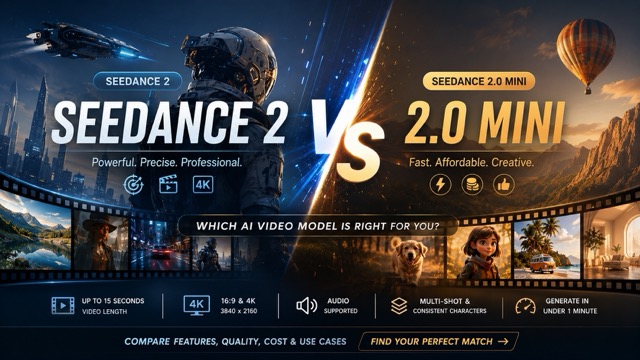
Seedance 2 and Seedance 2.0 mini can turn text, images, and references into short cinematic clips. On SuperMaker, both support videos up to 15 seconds, 480p, 720p, and 1080p output, audio generation, multi-shot storytelling, and consistent characters. Many generations can finish in under one minute, depending on the prompt and current demand.
The main difference is how each model balances quality, precision, speed, and cost. This Seedance 2 vs 2.0 mini guide compares features, visual quality, use cases, and credit requirements so you can choose the right model for each project.
Seedance 2 vs 2.0 Mini Feature Comparison
The two models offer a similar workflow. You can start with a written idea, animate an image, or provide references that guide the character, environment, movement, framing, and visual style.
| Feature | Seedance 2.0 Mini | Seedance 2.0 |
|---|---|---|
| Input Modes | Text to video, image to video, and reference to video | Text to video, image to video, and reference to video |
| Maximum Video Length | Up to 15 seconds | Up to 15 seconds |
| Supported Resolution | 480p, 720p, and 1080p | 480p, 720p, and 1080p |
| Audio Generation | Supported | Supported |
| Multi-Shot Storytelling | Supported | Supported |
| Character Consistency | Supported | Supported |
| Typical Generation Time | Usually under one minute | Usually under one minute |
| Starting Credit Cost | 15 credits per second | 25 credits per second |
| Creative Control | Suitable for clear prompts and fast iterations | Better suited to complex prompts and detailed direction |
| Best For | Social media content, prompt testing, daily creation, and concept development | Premium ads, complex scenes, branded videos, and final production |
| Main Advantage | Lower generation cost and efficient experimentation | Greater precision and stronger control for demanding projects |
The table shows why Seedance 2 VS 2.0 mini is not a comparison between a capable model and a basic one. Mini still includes camera movement, scene continuity, reference guidance, and narrative structure.
In this part of Seedance 2 VS 2.0 mini, the decision is simple: use Mini when iteration volume matters most, and use the full model when each generation needs greater precision.
Seedance 2 VS 2.0 mini: Video Quality and Creative Control
Seedance 2.0 Mini performs well for clear prompts with a defined subject, action, setting, and camera direction. It can create cinematic social clips, product animations, short stories, and stylized sequences without making the workflow feel heavy.
For many short-form projects, the quality difference may not justify the extra credits. A well-structured Mini prompt can deliver the atmosphere, pacing, and visual impact needed for TikTok, Instagram Reels, YouTube Shorts, ads, and concept tests. The Seedance 2 VS 2.0 mini comparison should therefore include the value of each successful result, not only maximum quality.
The full Seedance 2 video generator becomes more valuable as the scene becomes harder to interpret. It is designed for stronger multimodal control, detailed reference reproduction, multi-camera storytelling, audio-visual synchronization, and visual continuity. A Seedance 2 video can be the safer option for dialogue scenes, branded product shots, VFX-inspired sequences, or narratives that depend on exact timing.
- SAME PROMPT FOR DIFFERENCE MODELS.
⬆️GENERATE BY SUPERMAKER SEEDANCE 2.0 MINI
⬆️GENERATE BY SUPERMAKER SEEDANCE 2.
That does not mean every Seedance 2 video will automatically look better. Prompt quality, reference quality, subject complexity, and settings still affect the result. The advantage is that the full model gives demanding prompts more room to succeed.
A practical Seedance 2 VS 2.0 mini workflow is to develop the idea with Mini, identify the strongest prompt, and run the final version with Seedance 2.0. This reduces wasted credits while preserving access to the full model when needed.
Seedance 2 VS 2.0 mini Use Cases
Social Media and Daily Content
Mini is usually the better starting point for repeatable content. Creators can test hooks, camera angles, styles, and endings without spending full-model credits on every variation. For trend-based posts and short narrative clips, Seedance 2 VS 2.0 mini often favors Mini because speed and output volume are central.
Product Videos and Advertising
Both models can animate product images and create commercial scenes. Mini works well for concepts, organic posts, and multiple ad variations. A Seedance 2 video is more suitable for hero content that must preserve packaging, materials, logos, lighting, and a planned camera path.
For marketing teams, Seedance 2 VS 2.0 mini can become a two-stage process: produce several lower-cost concepts with Mini, then create the selected campaign asset with the full model.
Character Stories and Short Films
Both options support consistent characters and multi-shot storytelling. Mini is a strong choice for episodic social stories, animated sketches, and narrative experiments. The full model is better for multiple characters, precise interactions, dialogue, emotional pacing, or complex transitions.
A Seedance 2 video may provide more confidence when continuity must hold across a carefully directed sequence. Here, Seedance 2 VS 2.0 mini depends on scene complexity rather than genre.
Previsualization and Creative Testing
Mini is useful for storyboards, pitch concepts, camera tests, and early visual development. You can generate several approaches before committing to a final direction. The Seedance 2 VS 2.0 mini cost difference makes this practical for exploration.
Once the direction is approved, the full model can handle the more detailed final prompt.
Which One Should You Choose?
Choose Seedance 2.0 Mini when you publish often, test many prompts, create social content, or need to control credit use. It offers a strong balance of cinematic motion, reference support, character stability, and speed. For beginners, it is easier to experiment with because an unsuccessful test costs less.
Choose the full model when the output has higher commercial value or the prompt includes complex requirements. A Seedance 2 video is a better fit for premium ads, detailed product scenes, dialogue, multiple interacting characters, advanced camera direction, and stronger reference fidelity.
The most useful conclusion from Seedance 2 VS 2.0 mini is that you do not need to select one model permanently. Use Mini as the everyday production engine and the full model as the premium option for difficult or final-stage work.
When unsure, begin with Mini. Check the face, hands, product details, motion, camera path, timing, sound, and transitions. Move to the full model only when the Mini result cannot meet a requirement that matters.
How to Try Seedance 2 VS 2.0 mini on SuperMaker
- Open Seedance 2.0 Mini or the Seedance 2 video tool.
- Select text to video, image to video, or reference to video.
- Upload clear references when identity, product appearance, action, or style must remain consistent.
- Describe the subject, setting, action, camera movement, lighting, mood, audio, and ending.
- Choose a duration up to 15 seconds and select 480p, 720p, or 1080p.
- Generate and preview the clip. Refine the prompt or switch models when needed.
- Download and share the result once the motion, sound, and visual continuity match your goal.
SuperMaker users can earn credits through consecutive daily check-ins, making it possible to test Seedance 2 VS 2.0 mini before spending more credits.
Final Words
There is no universal winner in Seedance 2 VS 2.0 mini.
- Seedance 2.0 Mini offers better cost efficiency and is powerful enough for many social, advertising, storytelling, and testing workflows.
- Seedance 2 costs more, but it can be worth the difference for complex direction, premium visuals, detailed reference control, and important final outputs.