Photo Editing 1980s AI Photo Prompt: 10 Retro Styles to Try
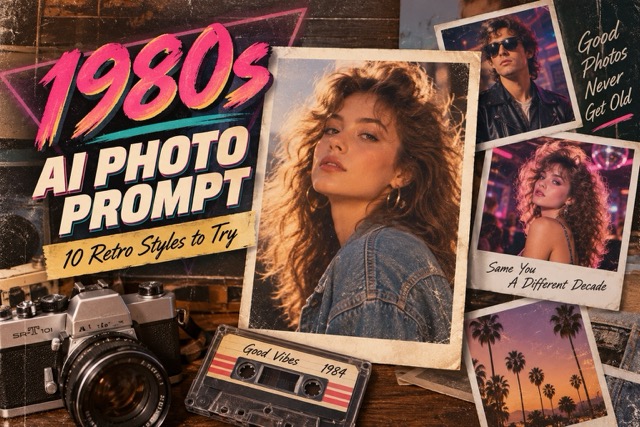
Discover 10 creative photo editing 1980s AI photo prompts to transform ordinary selfies into nostalgic retro portraits. Explore classic yearbook photos, vintage studio portraits, disco-inspired looks, and cinematic 1980s styles. Each prompt is ready to copy, making it easy to recreate authentic vintage fashion, lighting, and film effects with AI.
The 1980s are back, and this time, you don't need a vintage camera, old-fashioned clothes, or a professional photography studio to join the trend. With AI photo editing, an ordinary selfie can become a nostalgic portrait filled with retro fashion, cinematic lighting, and authentic film textures.
The photo editing 1980s AI photo prompt trend makes it easy to reimagine yourself in a completely different decade. From classic yearbook pictures and family album snapshots to colorful disco portraits and cinematic street photography, AI can recreate many recognizable photography styles from the 1980s.
The best part? You only need a clear photo and a creative prompt. If you're looking for more inspiration beyond vintage photography, explore SuperMaker AI Prompts to discover additional creative ideas and experiment with different visual styles.
What Is the 1980s AI Photo Trend?
The 1980s AI photo trend uses artificial intelligence to transform modern photographs into images inspired by photography from the 1980s. Rather than simply applying a vintage filter, an AI editor can reinterpret clothing, hairstyles, backgrounds, lighting, and photographic texture while preserving the subject's recognizable appearance.
Think oversized blazers, denim jackets, dramatic hairstyles, pastel studio backdrops, instant-camera snapshots, and warm film colors. These details help transform everyday portraits into images that resemble photographs discovered in an old family album.
A good photo editing 1980s AI photo prompt combines three elements: a recognizable subject, authentic retro styling, and natural photographic imperfections. The result should feel like a genuine photograph from another era instead of an overly polished digital illustration.
10 Best Photo Editing 1980s AI Photo Prompts
Ready to create your own retro transformation? These ten prompts explore different 1980s photography styles, from everyday snapshots to glamorous fashion editorials.
Each prompt is designed for photo editing with an uploaded reference image. Simply copy your favorite prompt, paste it into a compatible AI image editor, and generate your vintage portrait. You can also browse the AI photo prompt collection for more creative styles and inspiration.
1. Classic 1980s Studio Portrait
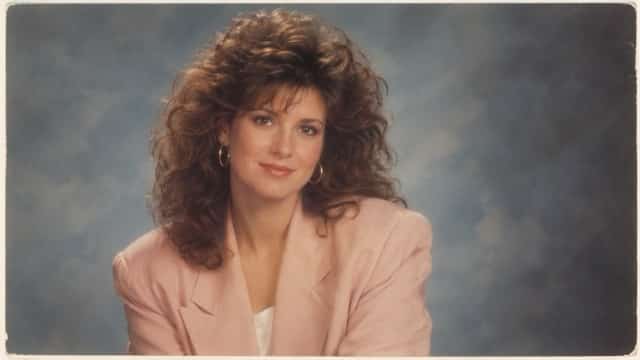
The classic studio portrait is one of the most recognizable photography styles of the 1980s. Soft lighting, carefully arranged clothing, and painted backgrounds give these pictures an unmistakable nostalgic character. This style is ideal for profile photos, retro portraits, and before-and-after comparisons.
Image: Classic 1980s studio portrait with vintage blazer, soft blue-gray background, warm lighting, and natural film grain.
Copy Prompt:
Transform my uploaded photograph into an authentic 1980s professional studio portrait. Preserve my recognizable facial features, facial proportions, natural expression, and original skin tone. Dress me in a stylish oversized 1980s blazer with a classic vintage hairstyle. Place me against a softly painted blue-gray studio backdrop with subtle gradients. Use gentle frontal portrait lighting, natural shadows, realistic skin texture, slightly faded warm colors, and fine 35mm film grain. Create a genuine printed photography studio portrait from 1985. Photorealistic, authentic analog photography, no modern accessories, no text, no watermark.
Best For: Professional-looking retro portraits, profile pictures, and vintage photo collections.
2. 1980s High School Yearbook Photo
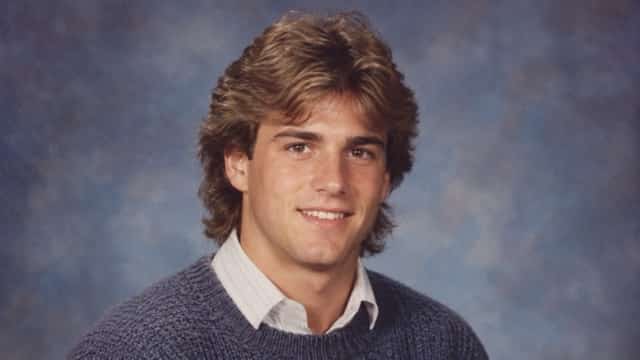
Vintage yearbook photography brings back the familiar appearance of school portraits from the 1980s. With simple backgrounds, casual clothing, and slightly softened colors, these images can make modern selfies look like graduation memories from decades ago.
Image: Authentic 1980s high school yearbook portrait with classic hairstyle, vintage sweater, and muted studio backdrop.
Copy Prompt:
Edit my uploaded selfie into an authentic 1980s American high school yearbook photograph. Preserve my original facial identity, natural skin tone, recognizable facial structure, and realistic expression. Give me a period-appropriate 1980s hairstyle and a vintage collared shirt or casual knitted sweater. Use a traditional blue-gray photography backdrop, soft frontal camera flash, subtle facial shadows, slightly muted film colors, and gentle analog photographic grain. Frame the image as a centered head-and-shoulders yearbook portrait. Make it look like a real school photograph printed in 1987. No modern clothing, no text, no watermark.
Best For: Nostalgic school portraits, social media challenges, and vintage transformation comparisons.
3. Cinematic 1980s Street Photography
Bring your portrait into a busy city street inspired by 1980s urban photography. Brick buildings, older cars, worn storefronts, and natural sunlight help create a believable cinematic atmosphere without relying on exaggerated visual effects.
Image: Cinematic vintage street portrait with denim jacket, old storefronts, and warm afternoon sunlight.
Copy Prompt:
Transform my uploaded photograph into a cinematic street portrait captured in New York during the 1980s. Keep my recognizable face, natural body proportions, skin tone, and expression consistent with the reference image. Dress me in a classic vintage denim jacket, relaxed jeans, and authentic retro sneakers. Place me on an old city street surrounded by brick buildings, period-correct storefronts, and parked 1980s cars. Use natural late-afternoon sunlight, realistic shadows, subtle 35mm film grain, slightly desaturated colors, and candid documentary photography. Make the scene look like a genuine street photograph from 1986. No modern smartphones, no futuristic objects, no text, no watermark.
Best For: Cinematic profile pictures, retro fashion photography, and storytelling portraits.

4. Glamorous 1980s Disco Portrait
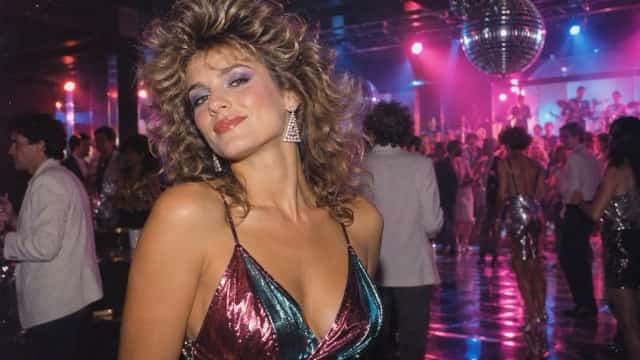
Few styles capture the energetic atmosphere of the 1980s quite like disco photography. Bold clothing, dramatic hairstyles, colorful lighting, and reflective backgrounds create a distinctive party-inspired look.
Image: Glamorous 1980s nightclub portrait with colorful party clothing, disco lights, and vintage photographic texture.
Copy Prompt:
Turn my uploaded photograph into a glamorous 1980s disco nightclub portrait. Preserve my recognizable facial identity, original skin tone, and natural facial proportions. Style me in fashionable 1980s party clothing with metallic details, vintage accessories, and a voluminous retro hairstyle. Place me inside an authentic 1980s nightclub with a reflective dance floor, colorful party lighting, and softly blurred decorations. Use vibrant magenta and electric blue highlights, realistic skin texture, natural flash photography, subtle analog film grain, and authentic vintage color grading. Keep the result photorealistic and stylish, like a genuine nightclub photograph from 1984. No text, no logos, no watermark.
Best For: Social media portraits, creative fashion images, and colorful retro-themed posts.
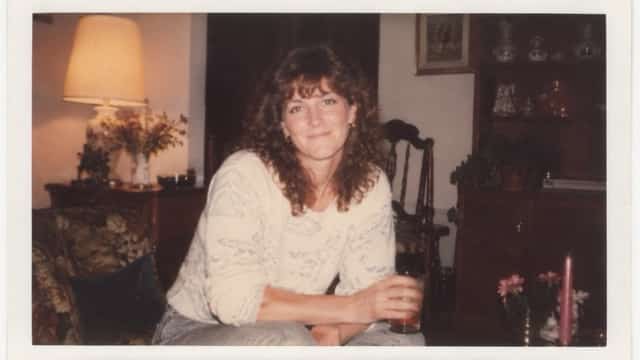
5. Nostalgic 1980s Family Album Photo
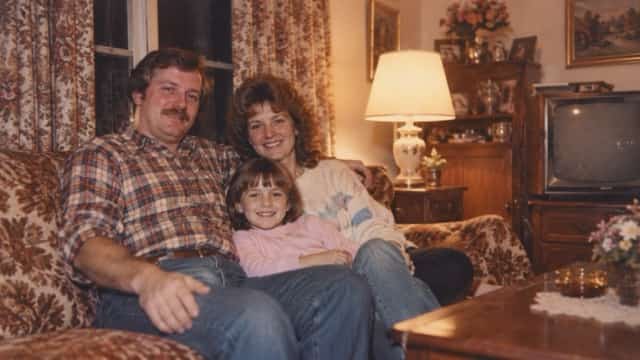
Not every vintage photograph needs dramatic fashion or cinematic lighting. Sometimes, the most convincing 1980s transformation comes from an ordinary family snapshot. Warm lamps, old furniture, patterned curtains, and imperfect framing create an intimate nostalgic atmosphere.
Image: Warm 1980s family album snapshot in a cozy living room with vintage furniture and faded film colors.
Copy Prompt:
Convert my uploaded photograph into an authentic family album snapshot taken in 1984. Preserve my recognizable facial features, natural expression, original skin tone, and realistic body proportions. Dress me in comfortable everyday 1980s clothing and place me inside a cozy vintage living room. Include patterned curtains, wooden furniture, an old television, family decorations, and warm indoor lamps. Use natural household lighting, slightly imperfect framing, gentle photographic softness, faded warm colors, subtle film grain, and realistic analog photo imperfections. Make the result feel like a treasured family memory discovered in an old photo album. No modern electronics, no text, no watermark.
Best For: Nostalgic family-inspired portraits, personal memories, and authentic retro photo edits.
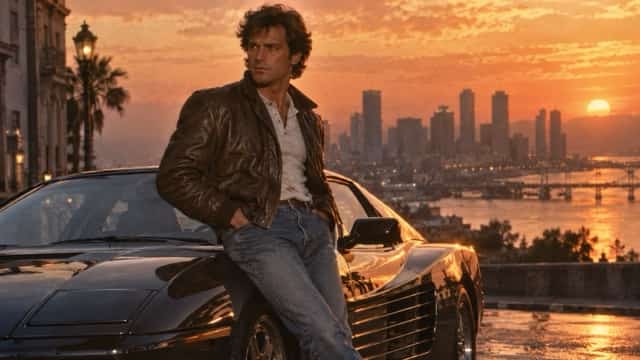
6. 1980s Retro Movie Character
Ever wondered what you would look like as the main character in a fictional 1980s movie? This cinematic prompt combines period-appropriate clothing, dramatic lighting, and vintage urban scenery to create a movie-inspired photograph.
Image: Retro movie character portrait with leather jacket, vintage sports car, and cinematic sunset lighting.
Copy Prompt:
Reimagine my uploaded photograph as a cinematic promotional portrait for an original fictional 1980s adventure movie. Preserve my recognizable facial identity, natural skin tone, and realistic expression. Dress me in a vintage leather jacket, classic denim jeans, and period-appropriate accessories. Place me beside a retro sports car on an atmospheric 1980s city street at sunset. Use warm orange highlights, rich cinematic shadows, realistic 35mm film grain, natural color grading, and authentic movie publicity photography. The final image should resemble a genuine 1986 film promotional still. No real movie titles, no celebrity likenesses, no text, no logos, no watermark.
Best For: Cinematic portraits, imaginative character photography, and retro movie-inspired visuals.
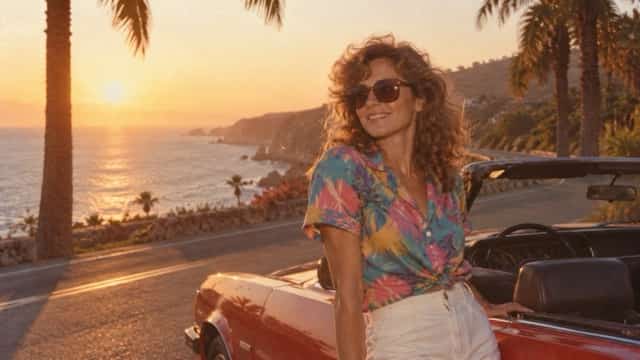
7. Vintage 1980s Summer Vacation
The warm colors and casual compositions of vintage vacation photography make this one of the most approachable 1980s AI photo styles. Palm trees, coastal roads, retro sunglasses, and slightly faded film colors create a relaxed summer atmosphere.
Image: Vintage summer vacation portrait with palm trees, classic convertible, and warm sunset colors.
Copy Prompt:
Transform my uploaded selfie into a nostalgic summer vacation photograph from the 1980s. Preserve my recognizable facial features, skin tone, natural proportions, and original expression. Dress me in a colorful vintage short-sleeve shirt with classic retro sunglasses. Place me beside a sunny coastal road with palm trees, a period-correct convertible car, and a warm golden sunset. Use soft natural lighting, realistic shadows, authentic analog film colors, slight photographic softness, subtle 35mm grain, and gently faded highlights. Capture the relaxed composition of a genuine family vacation photograph taken in 1985. Photorealistic, no modern technology, no text, no watermark.
Best For: Summer portraits, travel-themed images, and colorful nostalgic social media posts.
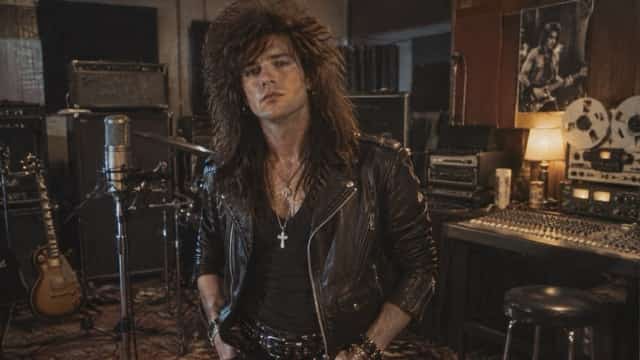
8. 1980s Rock Music Portrait
Rock music played a major role in shaping the visual identity of the 1980s. Leather jackets, dramatic hairstyles, rehearsal studios, and analog music equipment provide plenty of inspiration for distinctive AI portraits.
Image: Vintage 1980s rock musician portrait with leather jacket, old amplifiers, and warm studio lighting.
Copy Prompt:
Transform my uploaded photograph into an authentic 1980s rock musician portrait. Preserve my recognizable facial structure, original skin tone, natural expression, and realistic proportions. Style me in a vintage black leather jacket with classic rock-inspired accessories and a voluminous 1980s hairstyle. Place me inside a small rehearsal studio with old amplifiers, analog recording equipment, vintage microphones, and warm overhead lights. Use dramatic but realistic shadows, slightly muted colors, visible analog film grain, and candid music magazine photography composition. Make the final image resemble an authentic rock magazine photograph from 1987. No real celebrity likenesses, no modern equipment, no text, no watermark.
Best For: Music-inspired photography, creative profile pictures, and retro character portraits.
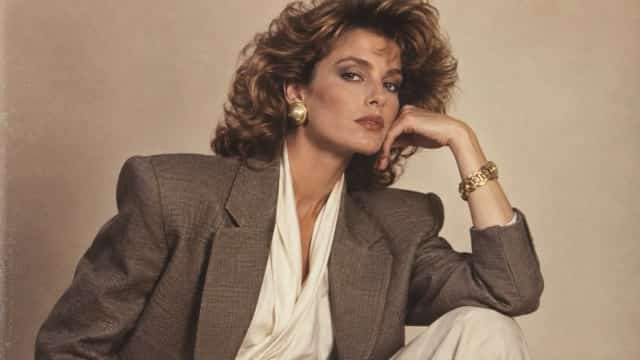
9. Elegant 1980s Fashion Magazine Photo
If you prefer a more sophisticated vintage appearance, try a 1980s fashion editorial style. Structured blazers, elegant accessories, subtle makeup, and soft studio lighting can turn an ordinary portrait into a polished magazine-inspired photograph.
Image: Elegant 1980s fashion editorial portrait with oversized blazer, soft studio lighting, and warm neutral tones.
Copy Prompt:
Edit my uploaded photograph into an elegant 1980s high-fashion magazine editorial portrait. Maintain my recognizable facial identity, original skin tone, natural facial structure, and realistic body proportions. Dress me in a sophisticated oversized blazer with structured shoulders and tasteful vintage accessories. Style my hair in a polished, period-appropriate 1980s fashion look. Use a minimalist beige studio background, soft professional portrait lighting, gentle natural shadows, realistic skin texture, warm neutral colors, and fine 35mm film grain. Create the appearance of authentic printed fashion editorial photography from 1986. Avoid excessive beauty retouching, unrealistic skin smoothing, modern accessories, text, and watermark.
Best For: Fashion portfolios, sophisticated profile pictures, and elegant retro transformations.
10. Authentic 1980s Instant Camera Snapshot
Instant-camera photography is perfect for recreating the relaxed, imperfect charm of vintage snapshots. Soft edges, direct flash, muted colors, and a familiar instant-photo border help make the result look like a physical photograph.
Image: Authentic 1980s instant-camera photograph with a warm interior, vintage outfit, and off-white photo border.
Copy Prompt:
Transform my uploaded photograph into an authentic instant-camera snapshot taken at a casual gathering in 1983. Preserve my recognizable facial features, original skin tone, natural expression, and realistic proportions. Dress me in everyday 1980s clothing and place me inside a cozy vintage room with warm lamps, classic furniture, and simple household decorations. Use realistic direct camera flash, gentle image softness, subtly imperfect exposure, warm faded colors, natural analog photographic grain, and an authentic off-white instant photograph border. Make the result look like a real old photograph discovered in a family album. No modern objects, no captions, no text, no watermark.
Best For: Vintage photo collections, nostalgic memories, and casual social media portraits.
How to Create a 1980s AI Photo with SuperMaker
You don't need advanced Photoshop skills to recreate a nostalgic 1980s portrait. With SuperMaker AI Image Maker, you can explore AI image creation and editing workflows using descriptive prompts and supported image tools.
Not sure which retro style to try first? Browse creative AI image prompts for additional inspiration before starting your transformation. Once you've selected a style, follow these three simple steps.
Step 1: Upload Your Photo
Open a suitable AI image editing tool in SuperMaker and upload a clear reference photograph. Choose an image with good lighting and visible facial features. A simple portrait usually gives the AI a stronger starting point.
Step 2: Copy and Enter Your Prompt
Choose one of the 1980s AI photo prompts above and copy the complete text. Paste it into the prompt field of your selected image editing workflow. You can adjust details such as hairstyle, outfit, colors, and background to match your preferred vintage look.
Step 3: Generate and Download
Start the generation and review your transformed photograph. Check whether the facial features, clothing, and retro setting look natural. If needed, refine the prompt and generate another variation. Download your preferred result when it is ready.
Tips for Making Your 1980s AI Photos Look Realistic
A well-written photo editing 1980s AI photo prompt can produce impressive results, but small adjustments often make the difference between an artificial-looking image and a believable vintage photograph.
Preserve Your Facial Identity
When editing an existing photograph, ask the AI to preserve your recognizable facial features, skin tone, natural expression, and proportions. Without these instructions, the model may change important details or reinterpret your appearance.
Use Realistic Analog Film Effects
Genuine 1980s photographs often contain slight grain, softer details, imperfect exposure, and characteristic color reproduction. Incorporating these elements creates a more convincing vintage aesthetic.
Avoid excessive scratches, heavy blur, or extreme discoloration unless you're specifically trying to recreate an aged or damaged photograph.
Choose Authentic 1980s Fashion
Clothing is one of the easiest ways to establish the decade. Oversized blazers, denim jackets, patterned sweaters, colorful casual outfits, and vintage accessories can make a modern portrait look more historically inspired.
Choose a consistent style rather than combining too many unrelated fashion trends.
Match the Background to the Photography Style
Different photography styles require different surroundings. A yearbook photo works best with a simple painted background, while a family snapshot benefits from vintage furniture and warm indoor lighting.
For cinematic street photography, incorporate realistic storefronts, older cars, brick buildings, and period-appropriate urban details.
Avoid Overprocessing
The most convincing AI-generated retro photographs rarely look perfectly polished. Natural skin texture, realistic shadows, subtle blur, and slightly imperfect framing often create a stronger nostalgic effect than extreme beauty filters or dramatic visual enhancements.
Why Are 1980s AI Photo Prompts Popular?
The popularity of the 1980s AI photo trend comes from its combination of nostalgia, personal creativity, and accessibility. Instead of searching for vintage clothing or arranging a professional photoshoot, users can explore retro photography through simple image editing.
These transformations also provide a playful way to imagine an alternative version of yourself. A modern selfie can become an old school yearbook portrait, a cinematic character photograph, or a warm family album memory.
For social media creators, 1980s AI photo prompts offer a broad range of visual styles without requiring complicated editing processes. Each prompt can be personalized by changing the location, clothing, color palette, or photographic atmosphere.
The flexibility makes this trend suitable for personal portraits, creative collections, themed social posts, and nostalgic image experiments.
Frequently Asked Questions
What is the best photo editing 1980s AI photo prompt?
The best prompt depends on your desired visual style. For an authentic vintage appearance, try a classic studio portrait or 1980s yearbook prompt with specific instructions for clothing, background, lighting, and analog film texture.
How can I turn my photo into a 1980s AI portrait?
Upload your photograph to an AI image editor that supports reference-image editing, copy a suitable 1980s photo prompt, and generate the transformed image. Adjust the prompt if you want to refine your appearance or background.
Can I use 1980s AI photo prompts with ChatGPT?
Yes, if your ChatGPT experience supports image uploads and image editing. You can upload a reference photograph and provide a detailed transformation prompt. The available capabilities and results may vary.
How do I keep my original face in an AI retro photo?
Include clear instructions to preserve your recognizable facial identity, facial proportions, natural expression, and original skin tone. Start with a high-quality reference photo where your face is clearly visible.
What makes a realistic 1980s AI photo?
Authentic-looking 1980s AI photos combine vintage fashion, period-appropriate environments, natural lighting, subtle analog film grain, slightly faded colors, and realistic photographic imperfections.
Can I create multiple 1980s photo styles from one image?
Yes. You can reuse the same reference photograph with different prompts to create yearbook portraits, movie-inspired images, summer vacation photographs, disco scenes, and vintage studio portraits.
Conclusion
The 1980s AI photo trend makes it easier than ever to explore the timeless appeal of retro photography. Whether you prefer classic studio portraits, nostalgic family snapshots, cinematic street scenes, or glamorous fashion editorials, the right photo editing 1980s AI photo prompt can transform an ordinary picture into a distinctive vintage-inspired image.
The ten prompts in this guide offer different ways to experiment with 1980s fashion, lighting, environments, and photographic texture. Start with a clear reference photo, choose your favorite prompt, and refine the details until you achieve the style you want.
Ready to bring your retro photography ideas to life? Start experimenting with the prompts in this guide, or explore more inspiration through SuperMaker AI Prompts. With creative instructions and a compatible AI image editing workflow, you can turn an ordinary portrait into a memorable vintage-inspired photograph.