Transparent Backgrounds in GPT-Image-2: How to Create Transparent AI Images
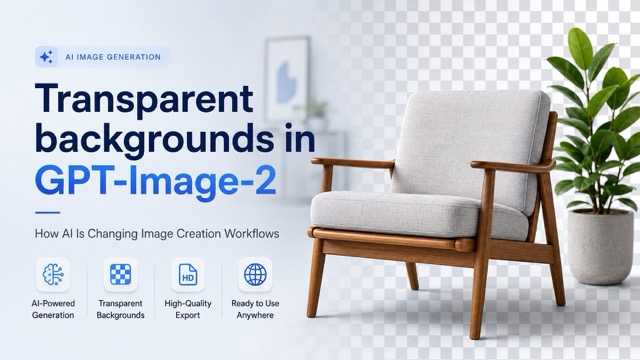
Transparent backgrounds in GPT-Image-2 make AI-generated images more practical for real creative workflows.** By generating isolated, reusable visual assets, creators can reduce manual background removal and prepare images faster for ecommerce, marketing, graphic design, and web projects. This guide explains how the feature works, how to write better transparent-background prompts, and how GPT-Image-2 can turn simple ideas into flexible visual assets.
Creating an image is often only the first part of the job. For ecommerce sellers, designers, marketers, and website creators, the real work can begin after generation: removing the background, cleaning up difficult edges, exporting the correct file type, and preparing the asset for its final destination.
That workflow is becoming much simpler. Transparent backgrounds in GPT-Image-2 make it possible to think about AI-generated images as reusable creative assets rather than finished pictures locked to a single background. Instead of generating an image and opening another tool to isolate the subject, creators can move more directly from an idea to an image that is easier to place into real projects.
For users who want a straightforward way to explore this workflow, GPT Image 2 provides a practical way to generate visual assets for products, marketing materials, creative concepts, and other design needs.
What Are Transparent Backgrounds in GPT-Image-2?
A transparent background means that the area surrounding the main subject contains transparency instead of a solid color, photographed environment, or generated scene.
The most familiar example is a transparent PNG product image. A perfume bottle, sneaker, camera, chair, or other object appears independently and can then be placed over:
- A white ecommerce page
- A colored advertisement
- A website hero section
- A social media graphic
- A presentation
- A new generated background
This matters because it reduces the gap between generating an image and producing an asset that can actually be used in a design workflow.
Previously, a typical AI image workflow might look like this:
Generate Image ↓ Open Background Remover ↓ Remove Background ↓ Refine Difficult Edges ↓ Export PNG ↓ Add to Design
When transparency becomes part of the image-generation workflow itself, several of those steps can potentially be reduced.
Instead of treating every generated image as a complete scene, creators can generate individual visual elements and reuse them across multiple projects.
Why Transparent Images Matter for AI Creation
Transparent images are useful because they separate the subject from its environment.
Imagine generating a luxury watch on a marble table. The image may look excellent, but the marble background restricts where the watch can be reused.
If the same watch is generated as a transparent asset, it can later appear on:
- A black promotional banner
- A white ecommerce listing
- A red holiday campaign
- A website landing page
- A social media post
- A printed catalog
The product remains consistent while the surrounding design changes.
This makes transparent assets especially valuable for teams producing large volumes of visual content.
Traditional Workflow vs. GPT-Image-2 Workflow
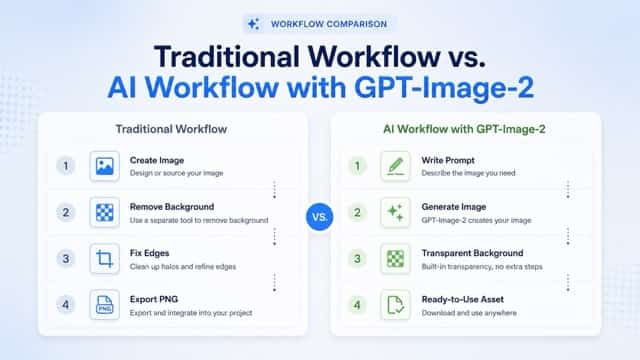
Traditional background removal is not necessarily difficult when working with a single image.
The problem appears when the same process has to be repeated dozens or hundreds of times.
Consider an ecommerce store preparing 80 new product visuals. Even if background removal and edge cleanup take only a few minutes per image, the production time quickly adds up.
Traditional Workflow
Create Image ↓ Remove Background ↓ Fix Edges ↓ Export PNG ↓ Add to Design
This workflow works, but every additional tool introduces another task.
AI-First Workflow
Write Prompt ↓ Generate Image ↓ Create Transparent Background ↓ Export Asset ↓ Use Anywhere
This is where transparent backgrounds in GPT-Image-2 become particularly useful.
The goal is no longer simply:
Generate an attractive AI image.
Instead, it becomes:
Generate an image that is already closer to the format needed for production.
Using GPT Image 2 can help bring image generation, creative iteration, and asset preparation into a more direct workflow.
How to Create Transparent Background Images with GPT-Image-2
Generating a useful transparent image starts with the prompt.
The model needs to understand both what should appear in the image and how the final asset should be presented.
1. Describe the Main Subject Clearly
Avoid overly broad prompts such as:
Create a watch.
Instead, provide enough visual information to define the subject.
For example:
A premium black smartwatch with a minimal round display, realistic materials, commercial product photography, three-quarter view.
This gives the model more information about:
- Product type
- Material
- Style
- Perspective
- Intended visual quality
The clearer the subject description, the easier it becomes to generate an asset suitable for the intended project.
2. Specify the Transparent Background
Tell the AI directly that the object should be isolated.
For example:
A premium black smartwatch isolated on a transparent background, realistic commercial product photography, soft studio lighting, sharp edges, high detail.
Useful prompt phrases include:
- transparent background
- isolated object
- clean edges
- product photography
- centered composition
- studio lighting
- no environment
- high detail
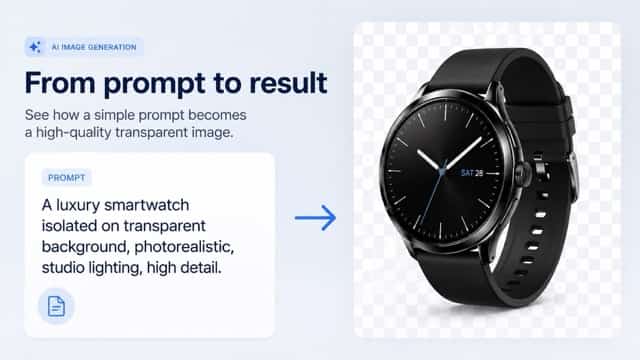
The important difference is that the prompt describes the desired final asset, not simply the object.
3. Define the Visual Style
Transparency does not mean the object itself has to look plain.
You can still specify:
- Photorealistic
- Minimalist
- Editorial
- Luxury
- Cartoon
- 3D render
- Commercial photography
- Soft studio lighting
- Dramatic lighting
For example:
A luxury pink perfume bottle, photorealistic commercial photography, subtle glass reflections, premium studio lighting, isolated on a transparent background.
This gives the model both a visual direction and a clear production requirement.
4. Match the Prompt to the Final Use Case
A transparent image intended for ecommerce requires different priorities from an image intended for advertising.
For ecommerce, prioritize:
- Accurate product proportions
- Realistic materials
- Neutral lighting
- Clean edges
- Consistent viewing angles
- Clear product details
For advertising, you may prefer:
- Dramatic lighting
- Strong highlights
- Dynamic perspectives
- More stylized presentation
- Creative reflections
For web design, consider:
- Empty space
- Direction of the subject
- Image balance
- Perspective
- How the object will sit beside text
Thinking about the destination before generating the image reduces unnecessary revisions later.
Transparent Background Product Examples
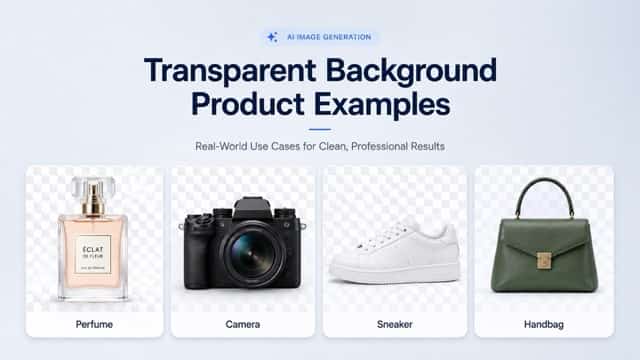
Transparent AI images are particularly useful for physical products because one clean asset can be reused across many different contexts.
Perfume and Cosmetics
A transparent perfume bottle can be used in:
- Product detail pages
- Beauty advertisements
- Seasonal campaign graphics
- Instagram posts
- Email promotions
- Product comparison pages
Instead of recreating or photographing the same bottle for every layout, the isolated asset can serve as a reusable foundation.
Fashion and Accessories
Products such as handbags, sneakers, watches, sunglasses, and jewelry work especially well with transparent backgrounds.
A brand can reuse the same isolated product across multiple campaigns while changing the surrounding design.
Electronics
Transparent images of cameras, headphones, smartphones, keyboards, and smartwatches can be useful for:
- Product comparisons
- Landing pages
- Promotional banners
- Presentations
- Technology articles
A transparent asset gives designers more freedom than an image containing a fixed environment.
Furniture and Home Products
Furniture assets are another strong use case.
A chair generated with transparency can later be placed inside:
- A living room mockup
- An ecommerce listing
- An interior design concept
- A promotional banner
- A catalog layout
This makes the image useful beyond the original generation.
Real-World Use Cases for Transparent AI Images

The value of transparent backgrounds becomes clearer when looking at practical workflows.
Ecommerce
Online stores often need the same product presented in several different ways.
A single transparent product asset can appear on:
- Product pages
- Category pages
- Comparison graphics
- Promotional banners
- Marketplace listings
- Email campaigns
- Social media ads
This is particularly useful for stores managing large catalogs.
Instead of manually preparing a completely new visual every time, teams can reuse the isolated product and change only the surrounding layout.
Marketing and Advertising
Marketing teams frequently need multiple versions of the same campaign.
For example, a transparent sneaker image could be placed into:
- A summer promotion
- A Black Friday banner
- A minimalist Instagram ad
- A product launch email
- A website hero image
The subject stays consistent while the creative direction changes.
Creators working on this kind of visual production can use GPT Image 2 to test different product concepts, styles, compositions, and visual directions for ecommerce, advertising, social media, and web projects.
Graphic Design
Transparent AI assets can function similarly to stock design elements.
Designers can generate:
- Objects
- Characters
- Product cutouts
- Decorative elements
- Illustrations
- Icons
- Props
These can then be combined into larger visual compositions.
The main advantage is specificity.
Instead of searching a stock library for something that is "close enough," a designer can describe the exact object needed.
Website and App Design
Transparent assets are also useful for websites.
Imagine:
- A SaaS landing page featuring a floating smartphone
- A headphone product overlapping a gradient background
- A furniture site displaying a chair beside a headline
- A beauty brand placing a perfume bottle over a custom color block
A fixed background limits where the image can be placed.
A transparent asset gives developers and designers much more control over composition.
Before and After: Why Transparency Changes the Result
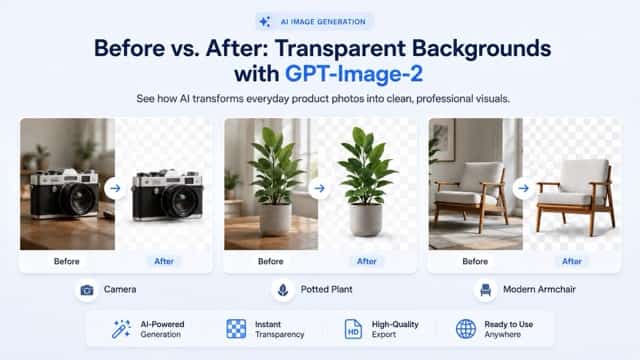
The difference between a normal image and a transparent asset is easiest to understand visually.
Imagine a camera sitting on a wooden desk.
The original image includes:
- The desk
- The wall
- Reflections
- Nearby objects
- Environmental lighting
That image is useful if you want exactly that scene.
But if you later want to place the camera inside a new ad, the background becomes a limitation.
Once isolated, the same camera can be placed on nearly any layout.
The same logic applies to:
- Plants
- Furniture
- Shoes
- Cosmetics
- Electronics
- Food packaging
- Decorative objects
This is why transparent-background generation is more than a cosmetic feature.
It changes how reusable the generated asset becomes.
GPT-Image-2 Transparent Backgrounds vs. Background Removal Tools
Transparent image generation does not make traditional background-removal tools irrelevant.
The two workflows solve different problems.
| Method | Best For | Main Advantage |
|---|---|---|
| Photoshop | Complex professional editing | Maximum manual control |
| AI Background Remover | Existing photos | Quickly isolates existing subjects |
| Transparent AI Generation | Creating new assets | Generates with final usage in mind |
| Manual Masking | Difficult edges | Precise human control |
If you already have a completed product photo, using a background remover may still be the fastest option.
If you are generating a completely new image, requesting transparency from the beginning can reduce extra editing.
The key difference is:
Generation-first vs. correction-first.
Traditional background removal modifies the image after it has already been created.
Transparent AI generation aims to produce something closer to the desired final asset from the start.
A Better Prompt Structure for Transparent Images
Instead of guessing what to write every time, use a consistent prompt framework.
A useful structure is:
[Subject] + [appearance] + [view] + [lighting] + [image style] + transparent background + [quality requirements]
For example:
A premium glass perfume bottle with pale pink liquid, front three-quarter view, soft commercial studio lighting, luxury product photography, isolated on a transparent background, clean edges, realistic reflections, high detail.
Another example:
A modern gray lounge chair with natural walnut armrests, three-quarter product view, soft studio lighting, photorealistic furniture photography, isolated on a transparent background, clean edges, high detail.
Or for electronics:
A premium black wireless headset, three-quarter front view, matte materials, soft studio reflections, commercial product photography, isolated on a transparent background, clean edges, realistic details.
This structure communicates four important things:
What it is → what it looks like → how it should be presented → how the final asset should be delivered.
From Prompt to Ready-to-Use Transparent Asset
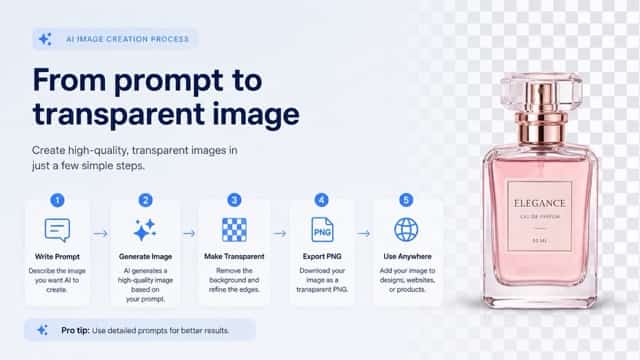
A practical transparent-image workflow can look like this:
Write the Prompt
Describe:
- The object
- Its visual style
- Composition
- Lighting
- Perspective
- Transparent-background requirement
Generate the Image
Let the model create the visual based on those instructions.
Review the Subject
Check important details such as:
- Shape
- Proportions
- Material
- Reflections
- Edge quality
- Small visual details
Export the Transparent Asset
Save the image in a format that preserves transparency.
PNG is commonly used because it supports transparent pixels and works well across most design and web workflows.
Reuse the Asset
The finished visual can then appear in:
- Ecommerce pages
- Advertising campaigns
- Websites
- Presentations
- Social posts
- Email campaigns
- Graphic designs
This is one of the biggest benefits of transparent backgrounds in GPT-Image-2: a generated image can become part of a reusable content system instead of remaining a one-off visual.
What Makes Transparent Backgrounds Important for AI Image Generation?
For years, AI image generation mainly focused on one question:
Can AI generate a convincing image?
That question is increasingly being replaced by another:
Can AI generate an asset that fits directly into a real production workflow?
The distinction matters.
Businesses rarely need images simply because they look impressive.
They need images that can be:
- Edited
- Reused
- Resized
- Repositioned
- Combined
- Published
Transparent backgrounds make generated visuals much more flexible.
A marketer can change a campaign without recreating the product.
A designer can reuse an object across several layouts.
An ecommerce seller can maintain consistent product presentation.
A content creator can place the same visual across thumbnails, ads, websites, and social media graphics.
That is a more practical definition of useful AI-generated content.
Tips for Better Transparent Background Results
A few prompt-writing habits can improve consistency.
Keep the Main Subject Specific
Instead of:
A chair
use:
A Scandinavian lounge chair with walnut armrests and light gray fabric.
More specificity helps the model understand what needs to remain visible.
Avoid Unnecessary Background Descriptions
If you want transparency, there is usually no reason to describe an elaborate environment.
For example, avoid combining:
Transparent background
with:
Inside a luxury apartment beside a large window.
Those instructions are working against each other.
Describe the Desired Perspective
Specify:
- Front view
- Side view
- Three-quarter view
- Top-down view
This matters when the image will be used in a product catalog or consistent design system.
Mention Edge Quality
For products with complex outlines, terms such as:
- clean edges
- sharp silhouette
- isolated subject
- clearly separated details
can help communicate the intended result.
Generate Variations
The first generation does not always have to be the final version.
Testing several variations allows you to compare:
- Lighting
- Orientation
- Proportions
- Product detail
- Composition
before choosing the most useful asset.
FAQ About Transparent Backgrounds in GPT-Image-2
Can GPT-Image-2 generate transparent backgrounds?
GPT-Image-2 supports transparent-background image generation workflows, allowing creators to generate isolated visual assets that are easier to reuse across different designs.
What format is best for transparent images?
PNG is one of the most common formats because it supports transparency and works with most design tools, websites, ecommerce platforms, and presentation software.
What should I include in a transparent image prompt?
Clearly describe the main subject and include instructions such as transparent background, isolated object, clean edges, and the desired photography or illustration style.
Are transparent AI images useful for ecommerce?
Yes. Transparent product assets can be reused across product pages, advertisements, marketplace listings, email campaigns, social graphics, and promotional banners.
Is generating a transparent image better than removing the background afterward?
It depends on your starting point. If you already have an existing photo, a background remover may be more suitable. If you are generating a new AI image, creating it with transparency in mind can reduce additional editing.
Can transparent AI images be used in graphic design?
Yes. Transparent assets can be combined with typography, backgrounds, illustrations, layouts, and other design elements.
What products work well with transparent backgrounds?
Common examples include:
- Cosmetics
- Shoes
- Electronics
- Furniture
- Accessories
- Packaging
- Home products
- Decorative objects
Do transparent backgrounds make AI images easier to reuse?
Yes. Because the subject is separated from its original environment, designers can place the same image into different layouts without recreating or removing the background every time.
Final Thoughts
Transparent backgrounds in GPT-Image-2 represent a practical change in how AI-generated images can be used.
Instead of treating every generation as a finished scene, creators can increasingly produce individual visual assets designed to move between different projects.
For ecommerce teams, that can mean reusable product images.
For marketers, it can mean faster campaign variations.
For designers, it provides more flexible creative elements.
For website creators, transparent assets are easier to integrate into custom layouts.
More importantly, transparent output reflects where AI image generation is heading: away from simply creating impressive pictures and toward producing assets that fit directly into real creative workflows.
If you want to test these workflows yourself, you can explore GPT Image 2 and experiment with different products, prompts, visual styles, perspectives, and transparent-background compositions.