
More AI Image Generators
Explore our collection of specialized AI image generators designed for different creative needs and styles






![FLUX.1 Krea [dev]](https://static.supermaker.ai/cdn-cgi/image/q=55/https://static.supermaker.ai/files/vtp5vmm87f65.png)
Master Visual Consistency with the Ultimate 3D Camera Transform Tool
Instantly rotate, tilt, and control the perspective of any single photo using 3D Camera Transform. The premier AI camera angle generator for professional creators.
Break free from static 2D images with our advanced 3D Camera Transform tool. Using precise 3D Camera Transform Camera Angle Control, you can dynamically shift perspectives like a virtual photographer. Whether you need to generate multiple angles from one image for e-commerce or game design, our reliable 3D Camera Transform camera angle generator ensures perfect consistency. Skip the expensive reshoots—create multi angle images from single photo inputs in seconds. Experience ultimate creative freedom with the industry's leading AI camera perspective generator.
How to Use the 3D Camera Transform Tool in 4 Simple Steps
Master our 3D Camera Transform tool in seconds. Follow these four simple steps to generate multiple angles from one image and achieve precise Camera Angle Control without any technical skills.

Step 1: Upload an Image
Upload a clear, well-lit photo to start your 3D Camera Transform. Optionally, use the AI image editor remove background feature to cleanly isolate your subject.

Step 2: Describe Your Camera Perspective
Enter a brief text prompt to guide the 3D Camera Transform AI camera perspective generator. This helps maintain consistent lighting and background details as you AI change photo camera angle.

Step 3: Adjust the 3D Camera Controls
Use the intuitive 3D Camera Transform sliders for exact Camera Angle Control. Adjust Rotation, Vertical Tilt, Move Forward (zoom), and Wide Angle to perfect your new 3D Camera Transform viewpoint.

Step 4: Generate and Download
Click generate and let our 3D Camera Transform engine create multi angle images from single photo inputs instantly. Download your high-resolution 3D Camera Transform results and upgrade your workflow.
Best AI Image Tools for Creative Projects
Explore creative tools for image, learn tips and tricks, and see how AI can be your assistant in turning concepts into finished projects.







Core Features: Redefining Camera Angle Control
Experience predictable, professional-grade 3D Camera Transform Camera Angle Control. Our 3D Camera Transform camera angle generator ensures perfect consistency when you rotate image perspective AI.
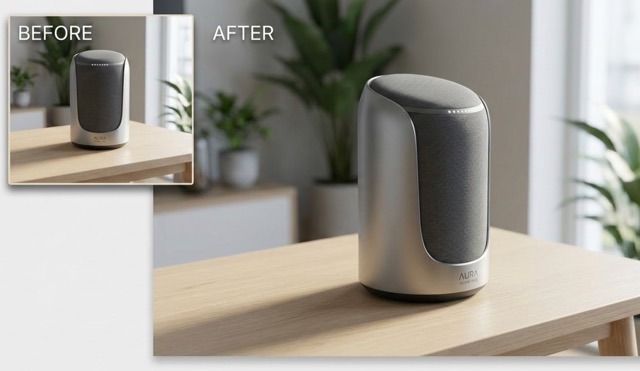
Single Image to Multi-Angle: Act Like a Virtual 3D Camera
The foundational breakthrough of our 3D Camera Transform tool is the ability to fundamentally change viewpoints.
• Instant Perspectives: Easily generate multiple 3D Camera Transform angles from one image with a single upload.
• Virtual Director: Use the 3D Camera Transform camera angle generator to orbit, tilt, or zoom in on your subject.
• True Transformation: Accurately rotate image perspective AI to create multi angle images from single photo inputs without redrawing the original details.
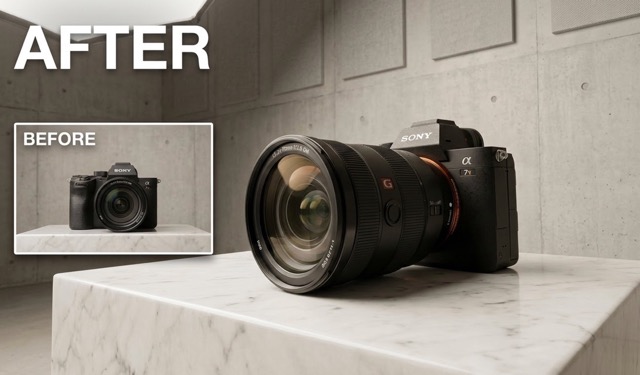
4 Precise Camera Control Parameters for Replicable Results
True professional work requires exact Camera Angle Control, provided by our four distinct numerical parameters.
• Four Core Controls: Adjust 3D Camera Transform Rotate degrees, Move forward, Vertical tilt, and Wide angle.
• Replicable Precision: Use this precise 3D Camera Transform camera angle generator instead of relying on vague text prompts.
• Standardized Production: Set exact parameters to AI change photo camera angle for perfectly consistent 3D Camera Transform workflows.
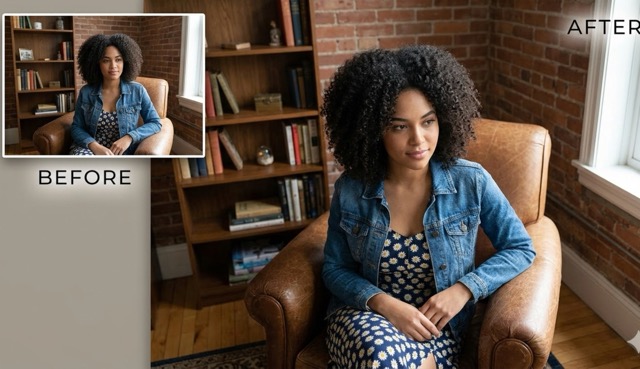
Absolute Identity and Stylistic Consistency Priority
When you generate multiple angles from one image, maintaining exact visual consistency is our top priority.
• Identity Lock: Our 3D Camera Transform engine strictly preserves your subject's unique facial features and branding.
• Texture Retention: The 3D Camera Transform camera angle generator meticulously maintains complex lighting and material textures.
• Professional Output: Reliably create multi angle images from single photo assets, solving consistency flaws via advanced Camera Angle Control.
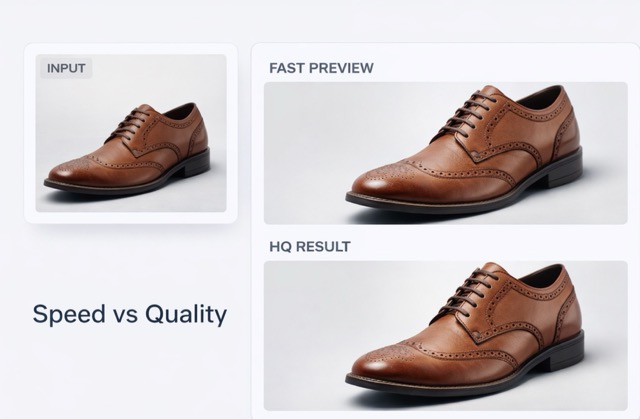
Adjustable Speed vs. Quality and Transform Strength
Our 3D Camera Transform tool supports dynamic toggling to fit your specific production timeline.
• Fast Preview Mode: Use the 3D Camera Transform AI camera perspective generator to rapidly test different Camera Angle Control settings.
• High-Fidelity Rendering: Disable fast mode to render meticulous, museum-quality final outputs.
• Adjustable Strength: Fine-tune relative strength to precisely control how you rotate image perspective AI, ensuring low iteration costs.
Why Choose Our 3D Camera Transform Tool?
Overcome the challenge of visual consistency. Our 3D Camera Transform tool empowers you to generate multiple angles from one image flawlessly, streamlining your production with precise 3D Camera Transform Camera Angle Control.
Solves Multi-Angle Consistency Pain Points Reliably
When producing turn-around sheets, multi-angle product displays, or character concept art, the ultimate struggle is ensuring the subject remains recognizable from every view. Traditional text-to-image AI fails at this, often altering crucial details. Our 3D Camera Transform tool acts as a true camera angle generator, fundamentally solving this pain point. By guaranteeing structural and textural consistency, you can confidently create multi angle images from single photo inputs, making it vastly superior and more stable than pure text-driven generation for professional workflows.
Controllable Parameters for Scalable Asset Production
For studios and agencies, scalability is survival. Our 3D Camera Transform tool replaces guesswork with mathematical certainty. Because our Camera Angle Control utilizes fixed parameters, you can create perfectly replicable templates. Need a side profile at exactly 90 degrees, a back view at 180 degrees, and a slight upward tilt (+1) for your entire product line? Simply plug those numbers into the 3D Camera Transform camera angle generator. This turns the unpredictable task of trying to AI change photo camera angle into a highly efficient, standardized assembly line for massive asset production.
Speaks the Authentic Language of Photography
Stop struggling to translate visual ideas into awkward text prompts. Our 3D Camera Transform tool is built around actual cinematography and photography principles. The Camera Angle Control interface uses concepts you already know: panning, dollying, tilting, and focal length adjustments. By bringing real-world camera actions into the AI space, this 3D Camera Transform camera angle generator allows directors and photographers to intuitively craft shots. You can literally rotate image perspective AI using a cinematic mindset, making the tool feel like a natural extension of your creative intent.
High-Efficiency Workflow: Draft Fast, Polish Slow
Time is money, and our 3D Camera Transform tool respects your deadlines. We designed this camera angle generator with a 'fast draft, slow polish' philosophy. Utilize the fast preview modes to rapidly test dozens of Camera Angle Control variations, instantly seeing how different perspectives impact the narrative when you generate multiple angles from one image. Once you have selected the ultimate hero shot, switch to high-quality mode to render the final, pristine asset. This iterative 3D Camera Transform AI camera perspective generator workflow drastically reduces rendering wait times and frustration.
Success Stories: Professionals Mastering 3D Camera Transform
See how industry experts leverage our camera angle generator. Discover why professionals trust our Camera Angle Control to generate multiple angles from one image flawlessly.
As a solo dev, making character turnarounds took weeks. This 3D Camera Transform tool changed everything. The Camera Angle Control is so precise, I can generate multiple angles from one image and the armor details never warp. Best camera angle generator out there.
Client requested 5 different angles for a shoe campaign, but we only shot one. Using the 3D Camera Transform, I was able to AI change photo camera angle effortlessly. The Camera Angle Control kept the lighting perfectly consistent across all shots.
The ability to rotate image perspective AI without losing my art style is mind-blowing. I use the 3D Camera Transform to explore different dynamic viewpoints for my sketches. It is a highly intuitive AI camera perspective generator.
I rely on the replicable parameters of this camera angle generator. Being able to set exact Camera Angle Control degrees means I can create multi angle images from single photo inputs for my 3D reference boards in minutes, not hours.
Before this, I had to manually edit perspectives which looked fake. This 3D Camera Transform tool is a lifesaver. Plus, pairing it with the AI image editor remove background feature gives me incredibly clean assets instantly.





3D Camera Transform & Camera Angle Control FAQs
Find quick answers about our AI camera perspective generator and learn how to create multi angle images from single photo inputs effortlessly.
Our 3D Camera Transform tool acts as an advanced camera angle generator. It allows you to take a flat 2D picture and apply physical Camera Angle Control (like rotation and tilt) to generate multiple angles from one image while keeping the subject identical.
Yes. For optimal 3D Camera Transform results, especially for products, we recommend using our AI image editor remove background tool first. A clean subject allows the camera angle generator to rotate image perspective AI much more cleanly.
The Camera Angle Control interface mimics a real lens. You adjust sliders to AI change photo camera angle: 'Rotate' spins around the subject, 'Tilt' moves up/down, 'Forward' acts as a zoom/dolly, and 'Wide Angle' shifts the focal length in the 3D Camera Transform space.
No, that is the core advantage of our 3D Camera Transform tool. Unlike standard AI, our camera angle generator prioritizes identity lock, ensuring the face, clothes, or product details remain strictly consistent when you create multi angle images from single photo.
Unlock Total Perspective Control with 3D Camera Transform Today
Stop settling for flat, static images. Take the director's chair and experience the most precise Camera Angle Control available. Join thousands of creators who use our camera angle generator to elevate their visual storytelling.
