
Edit the uploaded photo of the person. Preserve their recognizable face, skin tone, hairstyle, expression, body proportions, pose, camera angle, framing, and background. Replace only their clothing and requested accessories. Dress the person in an original phantom pirate captain costume: a weathered midnight-teal wool captain's coat with antique brass buttons, an ivory linen shirt, a muted plum sash at the waist, dark trousers, a broad leather belt, and a distressed tricorn hat tilted clear of the eyes. Add delicate sea-chart embroidery along the coat cuffs and a small compass-shaped brooch on the lapel. Keep the face natural and the styling ghostly through aged fabrics rather than altered skin. Do not add a weapon or change the hands. Fit the costume to the existing pose with realistic seams, fabric folds, contact shadows, and the original lighting. Keep the face and eyes unobstructed, hands anatomically natural, and materials separate from skin. Output one photorealistic edited photograph, with no text, logos, watermarks, extra people, or extra limbs.
AI Halloween Costume Prompts: Try Your Next Look
Find AI Halloween costume prompts for witch, vampire, fairy, and playful party looks. Copy a prompt or try a costume with your own photo.
Describe your idea and let AI create the perfect prompt for you
AI Halloween Costume Prompts
Find Your Look And Try It With Your Own Photo
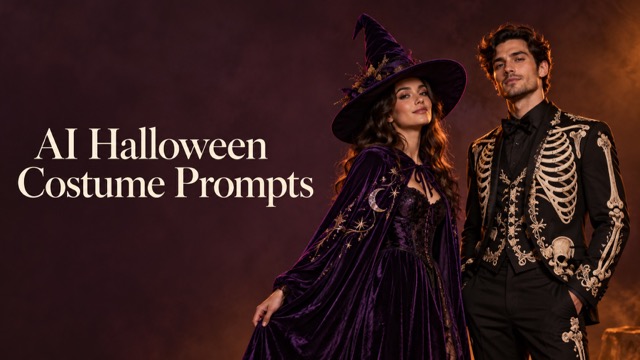
Use AI Halloween costume prompts to picture your next party outfit on your own photo. Browse 12 original directions, including velvet witches, gothic vampires, playful pumpkins, forest fairies, and embroidered skeleton suits. Each example pairs a costume image with a complete editing instruction, so you can start with a defined outfit instead of writing from scratch. Copy the wording into an image editor, or select Use Prompt and replace the example with your photograph. AI Halloween costume prompts describe the clothing, accessories, and materials while asking to keep your recognizable face, pose, and background. Choose a mood you enjoy, then personalize the details.
How To Use AI Halloween Costume Prompts
Turn a costume reference into a personal photo edit in three steps. AI Halloween costume prompts give you a starting outfit and clear instructions about what should stay recognizable. Keep your source photo consistent when comparing several looks.
Choose A Costume
Browse the example images and read the matching instructions. Start with the overall silhouette: a flowing cape, a fitted evening jacket, or a soft pumpkin tunic. AI Halloween costume prompts are easier to customize when you choose one main direction first. Notice the neckline, sleeve shape, hat, and dominant fabric before adding extra accessories. Pick an outfit that works with the amount of your body visible in the photograph. Use AI Halloween costume prompts to narrow that choice before editing.

Use Your Own Photo
Select Use Prompt to open the image generator, then upload your own photo or replace any example image. Check that the selected text and your photograph are loaded together. You can also copy AI Halloween costume prompts into your preferred image-to-image editor. A clear face and visible shoulders give the clothing instructions a useful reference. Leave space around your head if the costume includes a tall hat or crown. Keep AI Halloween costume prompts paired with your own source image.

Generate And Refine
Generate a version and inspect the face, hands, seams, and accessory placement. AI Halloween costume prompts request recognizable features, but you should still review the result. Refine one detail at a time, such as shortening a cape or changing velvet to satin. Keep the remaining wording stable so you can judge that specific change. Save a version you like before exploring a different costume direction. Revisit AI Halloween costume prompts when you want a different outfit.
Classic Looks With AI Halloween Costume Prompts
Start with three familiar Halloween silhouettes, each built around a distinct palette and fabric. AI Halloween costume prompts help describe the difference between a dramatic gothic outfit and a cheerful party costume without relying on vague style words.
Velvet Witch Costume Ideas
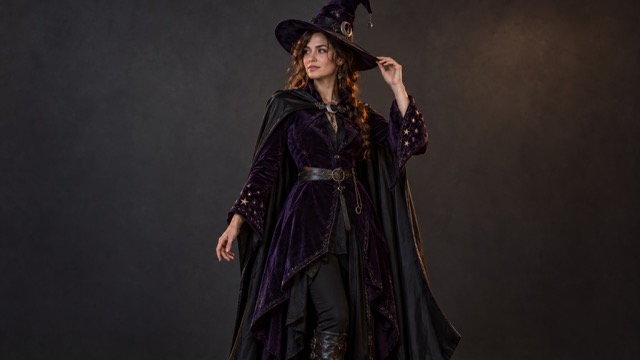
Purple velvet, a crescent clasp, and a pointed hat give the witch outfit its recognizable silhouette. Use AI Halloween costume prompts to describe a tailored coat, an asymmetric hem, and a cape that rests naturally on your shoulders. Keep the brim tilted away from your eyes so the face remains readable. For a quieter version, replace the embroidered stars with plain cuffs and choose a shorter cape. AI Halloween costume prompts also let you change midnight purple to emerald or charcoal while retaining the same outfit structure. A three-quarter photograph offers room for the hat, belt, and flowing fabric.
Gothic Vampire Costume Prompts
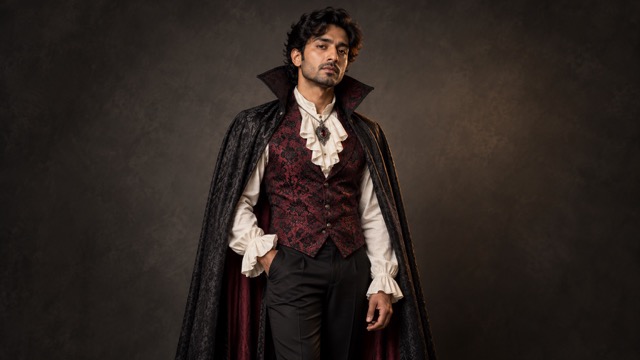
A burgundy brocade waistcoat and charcoal cape create a dramatic vampire direction through clothing rather than heavy makeup. AI Halloween costume prompts specify an ivory shirt, antique pendant, and a structured collar that stays below the jaw. Choose a photograph showing your torso so the editor has a reference for tailoring and layered fabrics. You can simplify the ruffles, lower the collar, or change burgundy to deep navy. Keep natural skin texture and a visible face in the instructions. These AI Halloween costume prompts suit a gothic portrait when you want the outfit to carry the character.
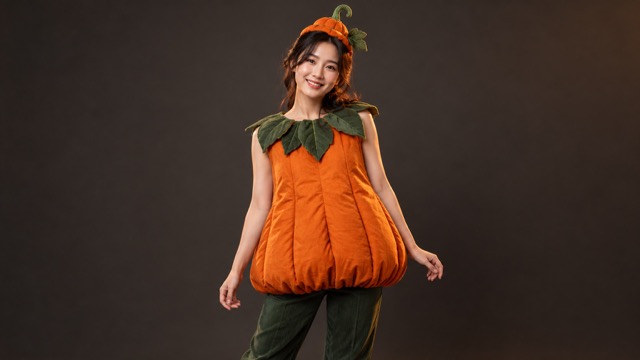
Cute Pumpkin Costume Inspiration
Soft orange fabric and a leaf-shaped collar offer a cheerful costume direction. AI Halloween costume prompts describe a quilted tunic, curved panel seams, green trousers, and a small seasonal headpiece. The focus is a wearable garment with natural proportions, rather than a rigid pumpkin shell. Try a muted terracotta palette or ask for a longer tunic if you prefer softer autumn styling. With AI Halloween costume prompts, small changes to collar size and quilting can produce a different outfit concept without changing the entire theme. Keep the headpiece modest when working from a closer portrait.
Fantasy Details In AI Halloween Costume Prompts
Explore botanical wings, antique lace, and decorative bone embroidery. AI Halloween costume prompts describe how these details belong to the garment, helping you turn an imaginative idea into a more coherent costume portrait.
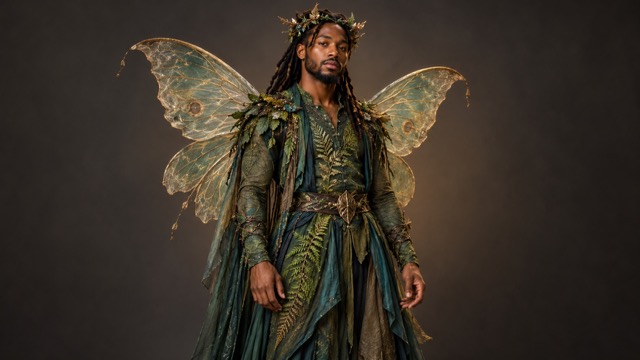
Midnight Forest Fairy
Botanical Embroidery And Delicate Wings
Moss-green layers, fern embroidery, and translucent wings create a woodland fantasy direction. AI Halloween costume prompts place the wings behind the shoulders and keep the face clear of the botanical crown. Start with visible shoulders and enough space around your body for the wings. For a tighter crop, ask for smaller wings and let the embroidered cuffs carry more of the detail. You can also change teal accents to bronze or autumn gold. AI Halloween costume prompts work best as a focused outfit description: keep the attachment points and layered fabric instructions when changing the colors.
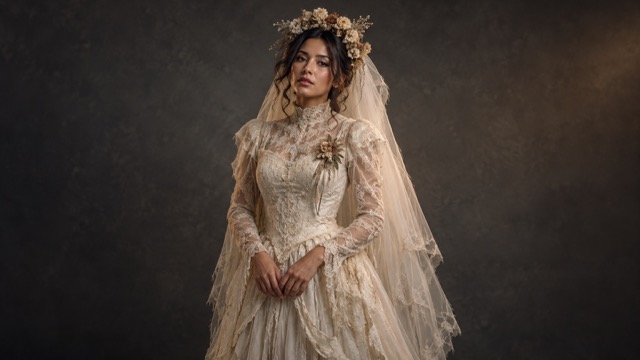
Moonlit Ghost Bride
Antique Lace And A Soft Veil
Ivory satin, weathered lace, and dried flowers suggest a romantic haunted-house costume. AI Halloween costume prompts use a high neckline, opaque lining, long sleeves, and a veil resting behind the head and shoulders. Those details establish the mood while keeping the person's face visible. If the photograph is tightly cropped, emphasize the lace collar and flower brooch instead of asking for a complete gown. Adapt AI Halloween costume prompts with a shorter veil or warmer ivory fabric for a softer interpretation. Keep the natural skin tone instruction when you want the eerie atmosphere to come from styling.
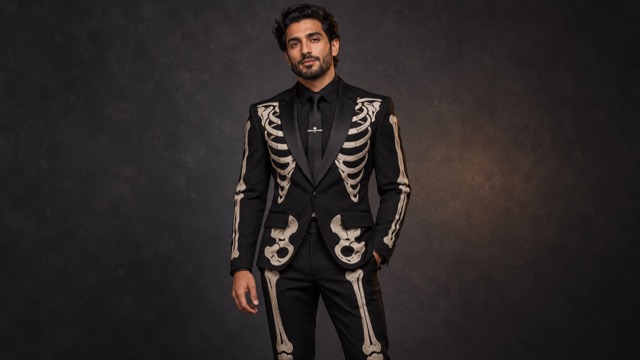
Skeleton Evening Suit
Bone Embroidery On Black Tailoring
Ivory bone embroidery turns a black evening suit into a clear Halloween statement. AI Halloween costume prompts describe stitched decorations on opaque fabric, with satin lapels and a small silver tie pin. The costume keeps a natural face rather than depending on skull makeup. Use a photograph showing the jacket and arms to give the embroidery a useful reference. For a simpler look, limit the pattern to the chest and cuffs. These AI Halloween costume prompts can also guide a tailored jacket concept when a full suit would extend beyond the original photograph.
Personalize AI Halloween Costume Prompts
Use AI Halloween costume prompts to explore a look for a party, a seasonal profile picture, or a fantasy portrait. Start with your intended crop and mood, then choose details that will remain visible in the finished image.

Party Outfit Planning
Compare colors, layers, collars, and accessories on your own photo before choosing a party direction. AI Halloween costume prompts can help you picture a cape with a fitted jacket or a brighter palette with softer layers. Treat the image as inspiration for deciding which details you would like to recreate with real garments.

Halloween Profile Pictures
Choose a clear portrait and request smaller headwear or a simpler neckline so the outfit remains readable in a tight crop. AI Halloween costume prompts give you specific costume details to retain, such as a crescent clasp or embroidered collar. Keep important accessories near the face rather than below the visible frame.

Fantasy Portrait Concepts
Try celestial embroidery, botanical wings, clockwork appliques, or icy brocade while keeping your source photograph consistent. AI Halloween costume prompts offer several visual directions to compare. Change one dominant feature, such as the material or shoulder shape, and study how it changes the portrait's mood before adding more decoration.
Last-Minute Costume Inspiration
Start with a black jacket, waistcoat, or autumn layers and focus on a few distinctive accessories. AI Halloween costume prompts can be simplified to emphasize a hat, brooch, collar, or fabric trim. Choose elements you could realistically assemble, then use the portrait to compare their colors and proportions.
What Makes A Costume Concept Appealing
Illustrative creative preferences for choosing a look with AI Halloween costume prompts, rather than verified customer reviews.
A clear face and a distinctive hat make the witch idea easy to recognize. I would keep the crescent clasp and simplify the embroidery.
The brocade and structured collar give the vampire look enough character without needing heavy face paint.
The orange and green palette feels cheerful. A soft tunic is the detail I would keep for a relaxed party look.
Botanical embroidery makes the fairy idea interesting even with smaller wings. I like the balance of texture and color.
The ivory lace and veil create a haunting mood while leaving the face visible. That is the part I find most useful for a portrait.
Bone embroidery on a tailored jacket is a strong Halloween detail. It gives an ordinary suit a clear seasonal theme.




Questions About AI Halloween Costume Prompts
Use these practical tips to choose your photo, adapt a costume, and keep the editing instructions focused.
Choose a gallery example and select Use Prompt, then upload your own photograph or replace any example image in the generator. Check the source image and loaded instructions before generating. You can also copy AI Halloween costume prompts into an image-to-image editor and add your photo there. Keep the whole instruction for the first attempt, including the parts about preserving the face and pose. After reviewing the result, adjust the clothing details you want to change.
Use a well-lit photograph with one clearly visible person and an unobstructed face. A half-body or three-quarter view provides more information about shoulders, sleeves, and clothing. AI Halloween costume prompts involving wings, capes, or tall hats need space around the person. For a face crop, choose a collar, small crown, or compact headpiece instead of a full outfit. Avoid accessories already covering the face when you want facial features to remain recognizable.
Yes. Customize the outfit description while keeping the instructions to preserve recognizable facial features, skin tone, pose, and background. AI Halloween costume prompts can be adapted by specifying a new color, fabric, sleeve length, or accessory. Make one change first and inspect the generated face, hands, garment edges, and material textures. The wording guides the edit rather than guaranteeing identical features. If a detail drifts, return to the original photograph and simplify the outfit request.
Find Your Look With AI Halloween Costume Prompts
Choose an outfit that fits your Halloween mood, then try it with your own photo. AI Halloween costume prompts give you a detailed starting point for changing fabrics, colors, and accessories. Copy a prompt or select Use Prompt, check your photograph, and create a costume portrait to refine.
