A charming vintage storybook illustration of two children discovering a tiny traveling carnival in a quiet countryside meadow during a golden autumn afternoon. A little boy in a mustard cardigan holds a striped paper pinwheel while his younger sister in a faded blue dress points toward a beautifully painted miniature carousel. Soft amber sunlight falls across the grassy field, with delicate wildflowers, colorful bunting, and scattered fallen leaves adding warmth to the scene. Hand-painted gouache on textured watercolor paper, traditional European children's book illustration, muted sage green, dusty blue, warm cream, and burnt orange palette, delicate visible brushstrokes, slightly imperfect hand-drawn shapes, gentle nostalgic atmosphere, richly layered details, 16:9 landscape, no text.
Kling 4.0 Image Prompts: Shape Your Next Image
Explore Kling 4.0 image prompts for portraits, products, cinematic scenes, and illustrations. Adapt clear examples to your own visual ideas. Start creating.
Describe your idea and let AI create the perfect prompt for you
Kling 4.0 Image Prompts
Image Prompt Examples For Portraits, Products, And Original Art
Give your next image a clearer starting point with Kling 4.0 image prompts. Explore image prompt examples for thoughtful portraits, distinctive product scenes, welcoming architecture, cinematic moments, playful illustrations, and sculptural objects. Each direction connects a subject with a setting, a visual treatment, and details you can personalize. Use Kling 4.0 image prompts to turn a general mood into a brief you can actually picture. These Kling image prompts are designed for adaptation. Replace the central subject, change the materials, or choose a different source of light while keeping the composition focused. Browse the image prompt examples, identify the choices that matter to your project, and make them your own.
How To Use Kling 4.0 Image Prompts
Start with Kling 4.0 image prompts that fit your subject. Use the image prompt examples as a practical starting point, then personalize and refine.

Choose A Direction
Choose a portrait, product, environment, or illustration example. Read the description and decide which visual direction fits your idea.

Personalize Your Prompt
Copy the example and replace the subject, setting, and style. Add a reference image when you need to guide an existing person or object.

Generate And Refine
Generate your image, then inspect the result. Keep the details you like and adjust the prompt before creating another version.
Kling 4.0 Image Prompts For Photographic Concepts
Build a recognizable subject into a deliberate scene with Kling 4.0 image prompts. These image prompt examples cover people, objects, and spaces without relying on vague quality adjectives. Treat Kling image prompts as editable briefs: describe what the viewer should notice first, then choose details that support that focus.
Portrait Photography Prompts With Character
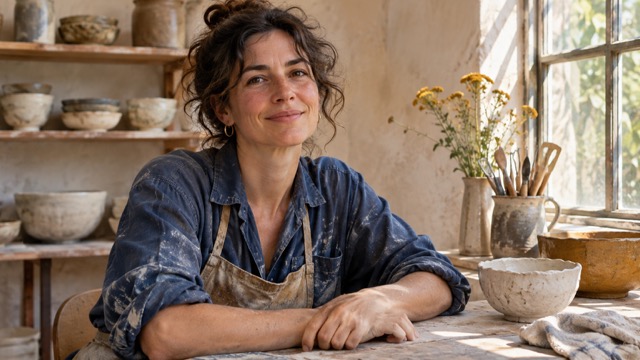
Portrait photography prompts work best when the person has a believable relationship with the setting. Start with Kling 4.0 image prompts describing an adult ceramic artist seated at a wooden workbench, wearing a faded indigo shirt, with clay bowls behind her and daylight entering from the right. Request an eye-level environmental portrait, a relaxed expression, and visible skin and fabric texture. These Kling image prompts give the subject a place and an activity, rather than leaving the image to depend on styling alone.
Adapt Kling 4.0 image prompts by changing the occupation, location, or season. Keep portrait photography prompts focused on one expression and one main light source. Compare image prompt examples for framing: a closer crop emphasizes the face, while a wider view shows the workshop. Review Kling 4.0 image prompts for conflicting directions before generating. If the background becomes distracting, simplify the objects instead of adding more adjectives to the person.

Product Photography Prompts With Clear Materials
Use Kling 4.0 image prompts to give one object a clear visual role. Begin with a cobalt glass perfume bottle on a terracotta plinth, a brushed silver cap, and folded ivory paper behind it. Describe directional light from the upper left, a grounded contact shadow, and a three-quarter view. Product photography prompts should explain the object before decorating its surroundings. These Kling image prompts separate glass, metal, and stone through specific surface descriptions.
For new Kling 4.0 image prompts, replace the bottle with a ceramic cup, a compact speaker, or your own described product. Keep the object dominant and leave space where later graphics belong. Image prompt examples become useful comparison tools when the same item appears under different lighting choices. With product photography prompts, inspect proportions, reflections, and edges before choosing a result. Revisit Kling 4.0 image prompts to remove props that compete with the product, and add final labels separately when precise typography matters.
Architectural Kling 4.0 Image Prompts
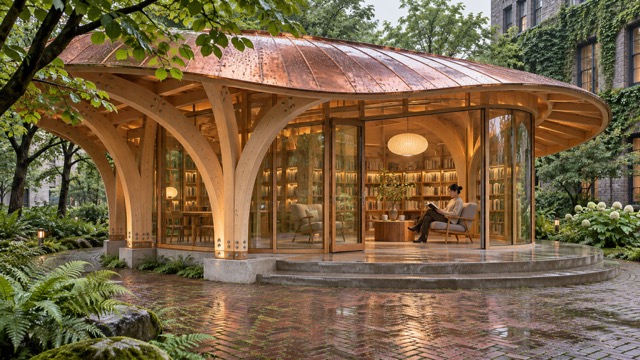
Architectural Kling 4.0 image prompts need a clear viewpoint and readable scale. Describe a small public reading pavilion in a green courtyard after rain, with curved timber ribs, a broad copper roof, and a warmly lit reading room. Add one seated reader for scale and frame the building from eye level. These Kling image prompts use paving, planting, and material changes to connect the building with its surroundings.
Adapt Kling 4.0 image prompts around the design question you want to explore. Compare a sheltered entrance with a more open terrace, or test a cooler facade against a warmer interior. Image prompt examples help organize those decisions when the camera position stays consistent. Keep structural details plausible and examine columns, glazing, roof edges, and circulation. Use Kling 4.0 image prompts as a starting brief for visual exploration, then develop the selected direction through drawings; a concept image is not a construction specification.
Kling 4.0 Image Prompts For Expressive Visual Styles
Take Kling 4.0 image prompts into story, illustration, and material design. These image prompt examples show how a specific medium changes the way a scene reads. Start with Kling image prompts that match your intended mood, then preserve the strongest visual idea as you explore variations.

Cinematic Image Prompts With A Story
Build A Moment Within One Frame
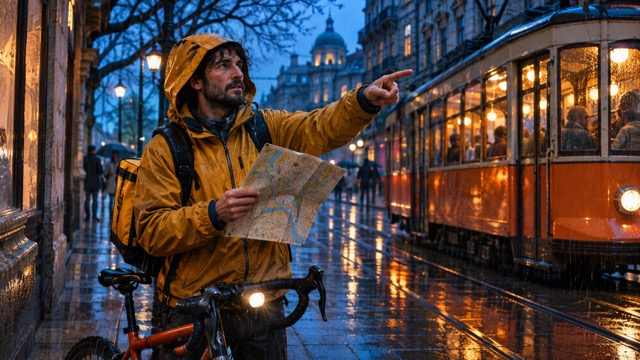
Cinematic image prompts can suggest an event inside a single frame. Try Kling 4.0 image prompts featuring an adult bicycle courier in a mustard rain jacket reading a folded map beside an orange tram at blue hour. Give the scene a medium-wide viewpoint, warm carriage lights, and rain-dark pavement. These Kling image prompts connect a practical action with a recognizable atmosphere.
Shape cinematic image prompts around what happened just before the frame or what the person will do next. Adapt Kling 4.0 image prompts by changing the destination or weather while keeping the gesture readable. Compare image prompt examples for the balance between subject and background. Review Kling image prompts for a clear focal point; one meaningful prop often communicates more than a street filled with unrelated details.
Illustration Prompt Ideas With Personality
Choose A Medium And A Purpose
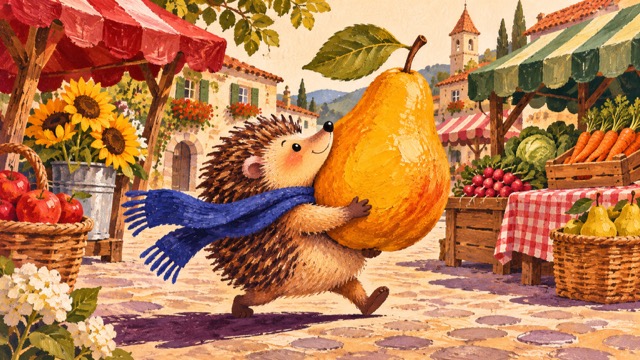
Illustration prompt ideas start with an action and a chosen medium. Use Kling 4.0 image prompts to describe a small hedgehog in a cobalt scarf carrying an oversized golden pear through a village market. Request textured gouache, warm paper, rounded shapes, and a balanced composition. These Kling image prompts give the character an immediate purpose and the scene a coherent visual language.
Develop illustration prompt ideas by changing the errand, season, or supporting objects. Keep the character description consistent across your Kling 4.0 image prompts, then vary the environment. Image prompt examples can help you choose linework or painted shapes. Revisit Kling 4.0 image prompts when too many small details hide the action. A clear silhouette leaves room for expression.
Sculptural Kling 4.0 Image Prompts
Explore Surface, Geometry, And Light
Material-focused Kling 4.0 image prompts explore the relationship between form and light. Describe a brushed aluminium ribbon looping around a frosted lilac glass orb on pale limestone. Request a spacious peach studio, soft raking light, and realistic contact shadows. These Kling image prompts distinguish opaque metal from translucent glass through visible surfaces and reflections.
Build new Kling image prompts by changing one material or the curve of the ribbon. Keep the geometry simple enough to judge at a small size, then inspect intersections and supporting surfaces. Use image prompt examples to compare heavy and delicate forms. Rework Kling 4.0 image prompts if reflections obscure the silhouette; a simpler background can make a complex object easier to understand.
Who Can Use Kling 4.0 Image Prompts?
Choose Kling 4.0 image prompts around the work you want to develop. Kling image prompts can organize early visual exploration, while image prompt examples give collaborators a concrete direction to discuss.

Portrait Creators
Build Kling 4.0 image prompts around a sitter, an expression, and the environment that explains the portrait. Portrait photography prompts can help you plan a professional profile, a personal project, or an editorial concept. Compare these Kling image prompts for camera distance and light direction, then replace generic styling with meaningful details. Record the changes that improve the portrait.

Product And Brand Teams
Organize Kling 4.0 image prompts around a real communication goal: showing a finish, introducing a seasonal mood, or leaving room for campaign copy. Product photography prompts make those decisions visible before a final production brief. Use Kling image prompts to compare object placement and material contrast. Review image prompt examples against your brief and check product accuracy.

Visual Storytellers
Use Kling 4.0 image prompts to plan a cover, a scene concept, or a single moment from a larger narrative. Cinematic image prompts can clarify who the viewer follows and what draws their attention. Keep Kling image prompts anchored to an observable action. Compare image prompt examples for color and framing, then develop your storyboard.

Illustrators And Designers
Adapt Kling 4.0 image prompts when you want to test a new palette, a character activity, or a material combination. Illustration prompt ideas are especially useful for exploring visual direction before drawing a final composition. Save Kling image prompts with notes about what changed and why. Return to the image prompt examples when you need a fresh approach, and develop the selected concept with your own creative judgment.
Creative Perspectives On Kling 4.0 Image Prompts
Illustrative creative perspectives describe possible uses; these are not verified customer endorsements.
I would use Kling 4.0 image prompts to organize a portrait around a real activity. Portrait photography prompts give me useful choices about framing and light without taking the creative direction away from me.
For a product concept, Kling 4.0 image prompts would help me compare surface and lighting choices. Product photography prompts make it easier to explain why one composition fits the brief better than another.
I would adapt Kling 4.0 image prompts to find the gesture that makes a scene understandable. Cinematic image prompts help me think about the person, the setting, and the moment as one composition.
With Kling 4.0 image prompts, I would start from an action and choose the visual texture around it. Illustration prompt ideas offer a way to explore the same character through different palettes and environments.
Kling 4.0 Image Prompts: Frequently Asked Questions
Use these answers to personalize Kling 4.0 image prompts and approach your next image with a clearer plan.
Write Kling 4.0 image prompts around the subject and the image you want to see. Add the setting, framing, light, and visual treatment when those choices matter. Kling image prompts become easier to revise when each instruction has a clear purpose. Start from the image prompt examples, replace the central subject, and remove details that do not support it. For a portrait, name an expression; for an object, describe its finish. Keep Kling 4.0 image prompts internally consistent instead of combining several incompatible styles or viewpoints.
Yes, you can adapt Kling 4.0 image prompts around a reference image and describe the changes you want to make. State the details that should remain recognizable, then explain the new setting, lighting, or styling. Use Kling image prompts to give the photo a clear role rather than repeating everything visible in it. Read the image prompt examples as structures you can edit, and compare the result with your source. Keep successful details in later Kling 4.0 image prompts while changing the parts that need improvement.
An exact match is not guaranteed. Kling 4.0 image prompts describe a direction; wording, references, settings, and variation between generations influence the final image. These Kling image prompts help you make deliberate creative choices, while image prompt examples give you a starting structure. Check faces, hands, edges, reflections, and any text before using a result. Save useful revisions to Kling 4.0 image prompts, and continue from the version that best fits your brief. Review the generation cost shown in the workspace before submitting another attempt.
Make Kling 4.0 Image Prompts Your Next Creative Brief
Choose Kling 4.0 image prompts that fit the subject you want to create. Start with image prompt examples for portraits, products, spaces, stories, or original art, then replace the details that make the scene personal. Keep your Kling image prompts focused on a visible goal and refine the choices that matter. Save your favorite Kling 4.0 image prompts with a note about the light, composition, and materials, so your next idea begins with a useful creative foundation.