
Seed Audio 1.0: AI Audio Generator Online
Create Complete Audio Scenes From Prompts
Use SuperMaker AI to explore this model for prompt-based audio creation. This model is designed for more than simple text to speech because it can describe a full audio moment with voice, speaker roles, emotion, background music, ambience, and sound effects. With the Seed Audio generator, you can turn a script, scene idea, product brief, podcast intro, audiobook moment, training dialogue, or short video concept into a richer sound asset. Try the free workflow on SuperMaker AI when you need fast audio drafts, expressive narration, character dialogue, or a complete scene direction workflow without building every track manually.
How To Create Audio With Seed Audio 1.0
The Seed Audio 1.0 workflow is built around a simple creative loop: describe the audio scene, add optional reference audio, and generate a complete result. The Seed Audio generator helps creators move from a plain script to an audio composition with roles, pacing, mood, background sound, and production-ready direction. Start with the free workflow to test voiceovers, short stories, ads, podcasts, education clips, and sound-rich video ideas.

Write Your Audio Scene
Start by entering a clear prompt. You can define a narrator, multiple speakers, emotional tone, dialogue lines, pauses, laughter, scene mood, product energy, or story atmosphere. The Seed Audio generator works best when your prompt explains who speaks, how they speak, and what sound world surrounds them. Use the free workflow for quick tests before refining a longer production brief.

Add Reference Audio
The model supports text and reference-audio style inputs, so you can guide timbre, tone, room feel, or vocal character more precisely than text alone. The Seed Audio generator can use that reference direction to make the generated scene feel closer to your target voice style or acoustic mood. The free workflow is useful for testing reference-based narration, character voices, and branded sound ideas.
Generate And Preview
Click generate and let the model build the audio scene with speech, role contrast, background music, ambience, and sound effects. The Seed Audio generator can help compress the old workflow of voice generation, music search, sound-effect selection, alignment, and mixing into one prompt-based process. Use the free workflow to preview results, adjust the prompt, and create better versions faster.

Download And Share
After previewing your result, download the final audio and use it with video edits, podcast clips, audiobook drafts, ads, course modules, game prototypes, or social posts. The Seed Audio generator is built for creators who need a complete audio moment, not only a voice file. The free workflow gives you a simple way to test the model before building larger sound projects.
Create Full Audio Scenes With Seed Audio 1.0
SuperMaker AI helps users understand the model as an AI audio production model rather than a basic narrator. The Seed Audio generator can support prompts for voice, multi-role dialogue, emotional rhythm, background music, environmental ambience, and sound effects. The free trial is ideal for creators who want to test complete sound scenes before moving into editing, publishing, or campaign production.

Generate Multi-Role Dialogue With Stable Character Voices
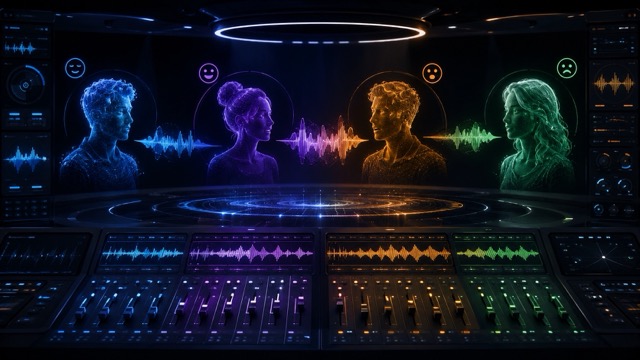
The model is useful when your audio needs more than one speaker. You can prompt a narrator, a customer, a host, a child character, a game NPC, or a dramatic story role. The Seed Audio generator focuses on role contrast, emotional direction, and voice continuity, so each speaker feels more distinct across the scene. Use the free trial to test dialogue scenes for audiobooks, fictional shorts, podcasts, training role-play, and video narration. Seed Audio 1.0 helps turn written lines into a complete spoken exchange instead of a flat voiceover.
Add Music, Ambience, And Sound Effects In One Prompt
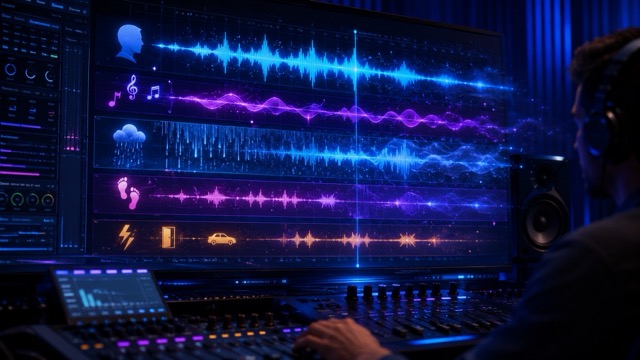
Seed Audio 1.0 changes the audio workflow because the target is a full sound scene, not only a spoken sentence. The Seed Audio generator can follow prompts for background music, soft room tone, rain, footsteps, UI clicks, product sounds, cinematic rises, or a clean final cue. The free workflow helps creators test short-form video sound, ad demos, story moments, and podcast intros without assembling separate tracks first. Seed Audio 1.0 brings voice, atmosphere, and timing into one creative request.
Extend Audio While Keeping A Consistent Tone
Seed Audio 1.0 is also important for longer creative ideas because current reports describe generation up to two minutes at a time and extension with voice consistency. The Seed Audio generator is useful for serialized fiction, course narration, podcast segments, and story drafts where the voice should not drift after the first few lines. The free trial gives you a practical way to test pacing, role memory, emotional continuity, and background balance before exporting a longer asset. Seed Audio 1.0 helps creators move from one short clip to a more continuous audio scene.
Popular Seed Audio 1.0 Use Cases
Use Seed Audio 1.0 when you need an audio asset with voice, timing, music, ambience, and sound effects working together. The Seed Audio generator fits short videos, podcasts, audiobooks, ads, courses, games, and social media audio. The free workflow helps you validate ideas quickly before spending time on detailed post-production.

Podcast Intros And Episode Clips
Create a host-style opening, recap, sponsor read, teaser, or short social clip with Seed Audio 1.0. The Seed Audio generator can combine narration, subtle background music, transitions, and consistent pacing. The free trial is a practical choice for testing podcast sound identity.

Audiobooks And Fiction Scenes
Use Seed Audio 1.0 for character dialogue, warm narration, emotional changes, and scene ambience. The Seed Audio generator can help indie writers and audiobook creators prototype multi-role scenes. Seed Audio 1.0 free is useful for testing story tone before final production.

Video Ads And Product Sound
Build a product demo voiceover with background rhythm, UI clicks, reveal sounds, and a final sonic cue. Seed Audio 1.0 helps marketers test different campaign tones, while the Seed Audio generator creates complete audio concepts from one brief. Seed Audio 1.0 free supports faster ad iteration.

Education And Training Audio
Create narrated lessons, role-play dialogue, alerts, onboarding scenes, and localized learning drafts with Seed Audio 1.0. The Seed Audio generator can mix narrator voice, learner dialogue, room tone, and scenario cues. Seed Audio 1.0 free helps teams test course audio before publishing.
What Users Say About Seed Audio 1.0
Creators, marketers, educators, and storytellers use SuperMaker AI to test Seed Audio 1.0 for faster audio drafting. The Seed Audio generator helps them create richer sound scenes than ordinary TTS, and Seed Audio 1.0 free makes early testing easier.
Seed Audio 1.0 helped me move from a plain script to a full podcast intro. I used the Seed Audio generator to add host pacing, background music, and a clean transition cue. Seed Audio 1.0 free gave me enough room to test several tones before choosing one.
I use Seed Audio 1.0 for short product demos because it can handle voice and sound design together. The Seed Audio generator created a confident narrator, soft UI clicks, and a final brand cue. Seed Audio 1.0 free made campaign testing much faster.
For fiction drafts, Seed Audio 1.0 feels different from normal text to speech. The Seed Audio generator helped me test two characters, emotional pauses, and rain ambience in one scene. Seed Audio 1.0 free is useful when I want to hear a chapter idea quickly.
As a learning designer, I need scenario audio for training modules. Seed Audio 1.0 let me create a narrator, learner response, alert sound, and room tone in one prompt. The Seed Audio generator made the draft feel more realistic, and Seed Audio 1.0 free helped us compare styles.
Seed Audio 1.0 is useful for game dialogue prototypes. I tested NPC lines with different moods and small environmental sounds. The Seed Audio generator helped the scene feel alive before we recorded final assets. Seed Audio 1.0 free saved our team early iteration time.
I needed fast audio for social videos, and Seed Audio 1.0 gave me more than a voiceover. The Seed Audio generator added pacing, background energy, and small effects that matched the clip. Seed Audio 1.0 free made it easy to test before posting.






Seed Audio 1.0 FAQ
Learn how Seed Audio 1.0 works, how the Seed Audio generator differs from ordinary TTS, and how to start with Seed Audio 1.0 free on SuperMaker AI.
Seed Audio 1.0 is ByteDance's Doubao and Seed ecosystem audio generation model. Seed Audio 1.0 is best understood as a multimodal audio model that can create complete sound scenes from prompts and references. Instead of only reading text aloud, the Seed Audio generator can support dialogue, speaker roles, emotion, background music, ambience, and sound effects. You can start with Seed Audio 1.0 free on SuperMaker AI to test the workflow.
Traditional text to speech mainly converts written text into a spoken voice. Seed Audio 1.0 targets a broader audio scene with voice, roles, music, atmosphere, and effects. The Seed Audio generator is closer to an audio director because it can follow a scene brief, not only a script. Seed Audio 1.0 free helps users compare a plain voiceover with a richer sound composition.
Seed Audio 1.0 is described around multi-role dialogue and role-based audio creation. The Seed Audio generator can be used to test prompts with several speakers, emotional changes, and character contrast. For best results, label each speaker clearly and describe tone, pacing, and scene context. Use Seed Audio 1.0 free to test role consistency before creating longer audio.
Yes. Current information describes Seed Audio 1.0 as supporting text and reference-audio inputs. A reference can help guide timbre, style, room feel, or voice direction. The Seed Audio generator can then create an audio scene that follows both your prompt and your reference. Seed Audio 1.0 free is helpful for testing reference-guided voice and atmosphere.
Current reports describe Seed Audio 1.0 as supporting up to two minutes in a single generation, with extension designed to preserve voice consistency. The Seed Audio generator should still be tested carefully for longer scenes, role stability, pacing, and background balance. Seed Audio 1.0 free is a good starting point for evaluating longer audio ideas.
You can use Seed Audio 1.0 free to create podcast intros, audiobook drafts, character dialogue, short video sound, product ads, game scene prototypes, training role-play, and social media audio. The Seed Audio generator helps combine narration, music, ambience, and effects from one prompt, making Seed Audio 1.0 useful for faster creative audio production.
Try Seed Audio 1.0 Free Now
Create dialogue, narration, music-backed scenes, ambience, and sound effects with Seed Audio 1.0 on SuperMaker AI. The Seed Audio generator helps you turn a prompt into a complete audio moment for videos, podcasts, stories, ads, education, games, and social content. Start with Seed Audio 1.0 free and build richer audio faster.
