25 Best Gemini AI Cyberpunk Photo Prompts for Neon-Noir Images
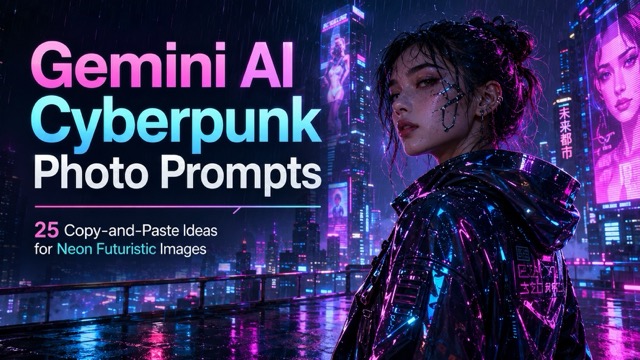
Explore 25 Copy-Paste Cyberpunk Prompts for Portraits, Cities, and Products
Find Your Next Creative Idea
Explore Creative GPT Image 2.5 prompts with visual examples and ready-to-copy instructions.
Explore GPT Image 2.5 Prompt Library
Introduction
Cyberpunk photography brings together futuristic technology, crowded cities, glowing signs, mechanical body parts, dramatic rain, and strong neon lighting. However, simply entering “create a cyberpunk image” often produces a generic result with no clear subject, story, or visual focus.
A detailed prompt gives the AI clearer instructions about the character, environment, lighting, camera angle, clothing, and overall mood. You can copy the prompts below into Gemini or paste them into the SuperMaker AI Image Maker to create cyberpunk portraits, cinematic city scenes, social media visuals, futuristic product images, and concept art.
Each prompt is complete and ready to use. You can also replace small details such as the character, clothing, location, colors, or aspect ratio to create your own version.
What Makes a Good Cyberpunk Photo Prompt?
An effective cyberpunk prompt should describe more than neon lights. It needs a recognizable subject, one main environment, a controlled color palette, and a clear composition.
A useful prompt structure includes:
- Subject and appearance
- Clothing and futuristic accessories
- Location and background
- Lighting and color palette
- Camera angle and lens
- Mood and storytelling details
- Image quality and aspect ratio
Keeping one primary location and one clear visual story often produces a more coherent composition than combining too many unrelated ideas. The reference prompt structure also emphasizes subject identity, outfit materials, setting, lighting, framing, and quality details.
How to Create Cyberpunk Images with AI
Step 1: Choose a Prompt
Select one of the cyberpunk photo prompts below. Choose a portrait prompt for profile pictures and character designs, or select a wide environment prompt for banners, wallpapers, and cinematic scenes.
Step 2: Paste the Prompt into an AI Image Generator
Open the SuperMaker AI Image Maker and add your selected description to the text-to-image input.
SuperMaker allows users to guide image generation with descriptive text and customize options such as the aspect ratio and visual style.
Step 3: Generate and Refine the Image
Generate the first result and review the character, lighting, background, and composition. Instead of rewriting the entire prompt, change only one or two details at a time.
For example, you can replace:
- “magenta and cyan” with “orange and electric blue”
- “rainy alley” with “futuristic subway station”
- “young woman” with “middle-aged male detective”
- “close-up portrait” with “full-body editorial photograph”
- “4:5 composition” with “wide 16:9 composition”
Small changes make it easier to understand which prompt details are influencing the final image.
25 Copy-Paste Gemini AI Cyberpunk Photo Prompts
Cyberpunk Portrait Prompts
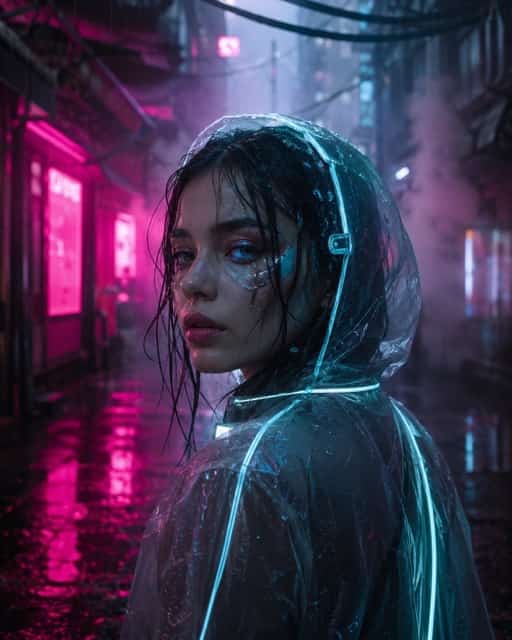
1. Neon Rain Portrait
Create a photorealistic cyberpunk portrait of a young woman standing in a narrow city alley during heavy rain. She wears a translucent hooded jacket with glowing cyan seams, subtle silver facial implants, reflective eye makeup, and wet hair framing her face. Surround her with magenta shop signs, drifting steam, hanging electrical cables, and colorful reflections across the pavement. Use dramatic rim lighting, realistic skin texture, visible raindrops, shallow depth of field, an 85mm portrait lens, and a vertical 4:5 editorial composition.
2. Chrome Street Samurai
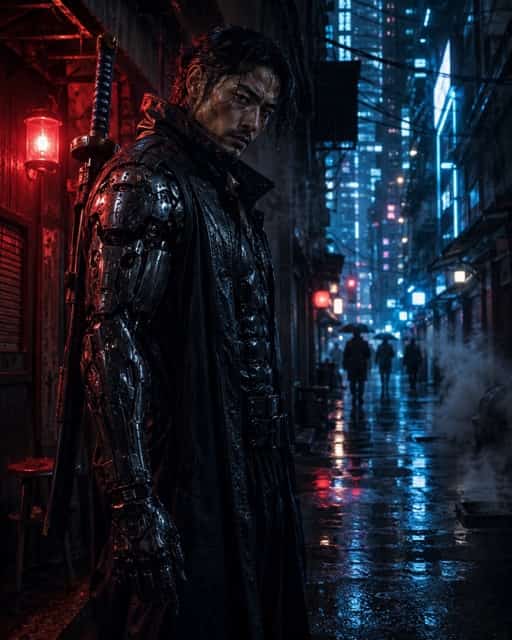
Create a cinematic cyberpunk photograph of a male street samurai standing outside a closed ramen shop at midnight. He wears a long black trench coat over carbon-fiber armor, a mechanical shoulder plate, reinforced gloves, and a chrome katana attached to his back. Add rain-soaked streets, red warning lights, blue neon signs, smoke rising from street vents, and distant pedestrian silhouettes. Use a strong three-quarter pose, high-contrast lighting, realistic metal textures, an intense facial expression, and a vertical 4:5 movie-poster composition.
3. Augmented Eyes Close-Up
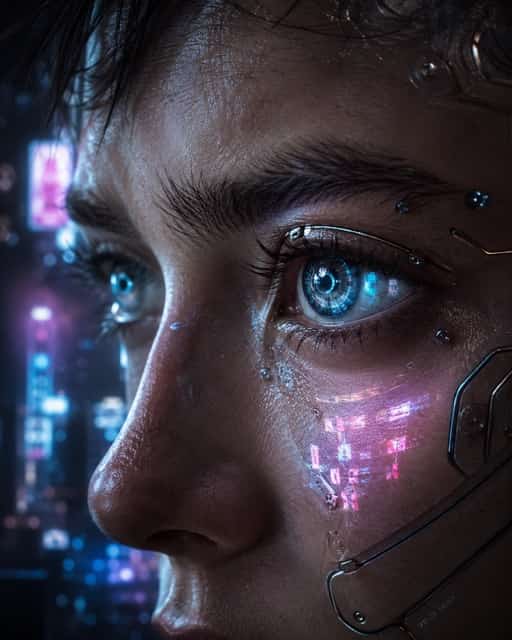
Create an extreme close-up cyberpunk portrait focused on a person's augmented eyes. Show luminous circular interface patterns inside the irises, tiny mechanical details around the eyelids, wet eyelashes, natural pores, and subtle chrome implants along the cheekbones. Reflect pink and blue holographic advertisements across the skin. Use a dark blurred city background, soft cinematic side lighting, crisp eye detail, realistic human anatomy, shallow depth of field, and a premium beauty-photography style.
4. Cyberpunk Detective
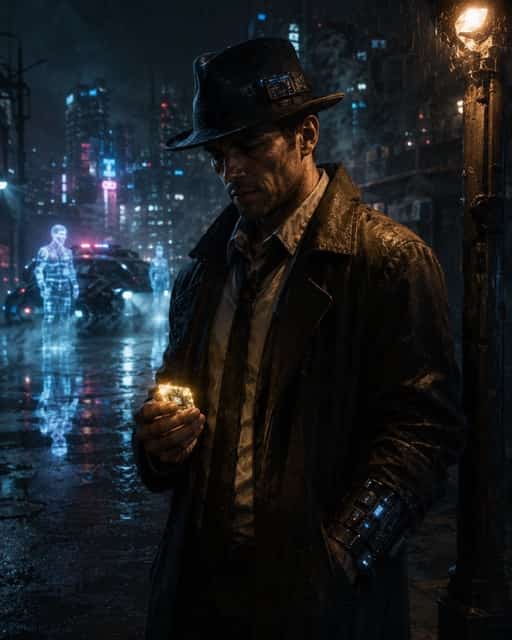
Create a photorealistic cyberpunk noir portrait of a tired private detective standing beneath a flickering streetlight. The detective wears a weathered long coat, a smart fedora with a digital display, a mechanical wrist device, and an old-fashioned shirt with a loose tie. Place a glowing data chip in one hand and add digital vapor, rainy pavement, police holograms, and blurred neon signs behind the character. Use dramatic side lighting, deep shadows, muted blue and amber colors, and a cinematic 4:5 composition.
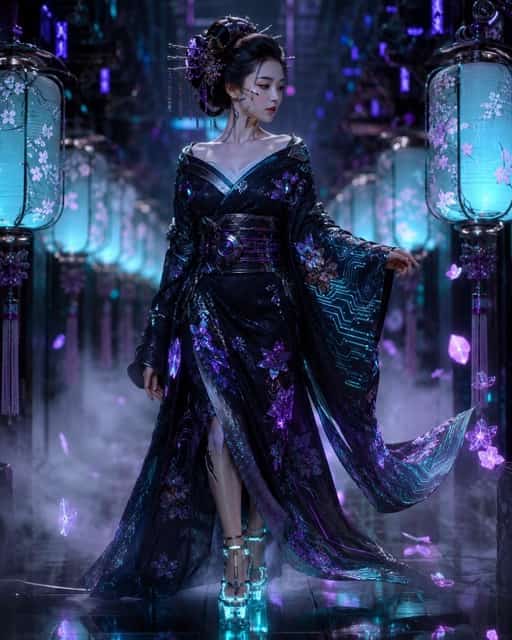
5. Futuristic Geisha
Create an elegant cyberpunk fashion portrait of a futuristic geisha walking through a neon lantern corridor. She wears a dark silk kimono decorated with glowing circuit patterns, metallic hair ornaments, subtle facial cybernetics, and translucent platform shoes. Add violet mist, holographic flower petals, reflective floors, and soft teal lantern light. Preserve realistic facial features and detailed fabric embroidery. Use graceful posing, refined color harmony, an 85mm lens, shallow depth of field, and a vertical luxury-editorial composition.
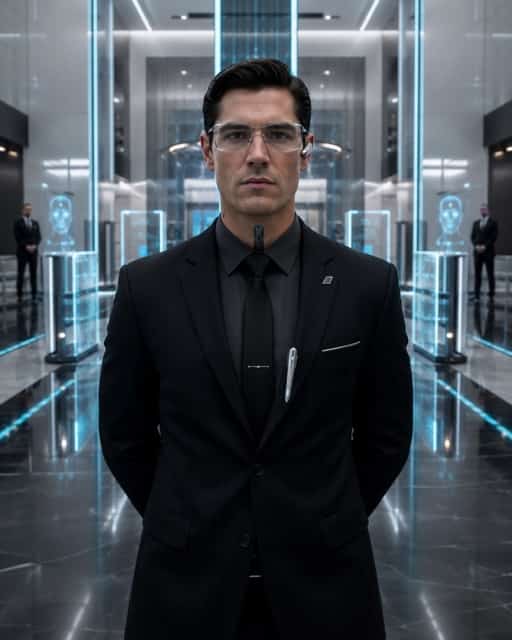
6. Corporate Cyber Agent
Create a realistic cyberpunk portrait of a corporate intelligence agent standing in the lobby of a massive futuristic tower. The agent wears a perfectly tailored dark suit, transparent smart glasses, a subtle neck implant, and a silver communication device. Surround the character with holographic security gates, polished black floors, facial-recognition scanners, and cold white architecture illuminated by cyan lines. Use symmetrical framing, controlled studio-like lighting, sharp facial detail, a calm intimidating expression, and a clean 4:5 composition.
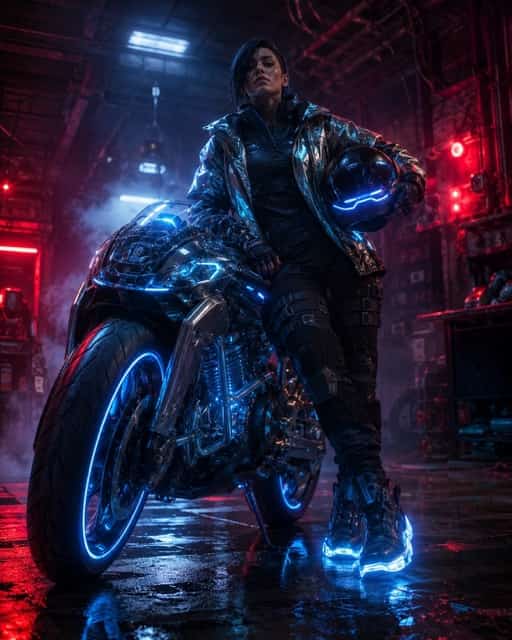
7. Neon Motorcycle Rider
Create a cinematic cyberpunk photograph of a confident motorcycle rider leaning against a futuristic electric bike. The rider wears armored streetwear, illuminated boots, a reflective jacket, and carries a glowing visor helmet under one arm. The motorcycle has transparent panels, blue wheel lights, and polished metallic surfaces. Place the scene inside a gritty neon garage with mist, wet concrete, scattered tools, and red warning lights. Use dramatic backlighting, realistic reflections, a low camera angle, and a vertical poster composition.
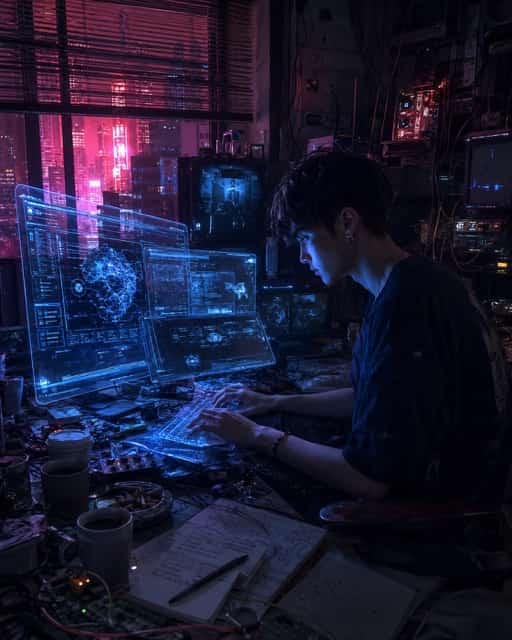
8. Hacker in a Neon Apartment
Create a photorealistic cyberpunk scene of a young hacker working inside a cramped high-rise apartment at night. The character sits before several floating displays, a holographic keyboard, tangled cables, old computer parts, and blinking communication devices. Blue interface light illuminates the hacker's focused face while pink city light enters through window blinds. Add coffee cups, handwritten notes, electronic components, and subtle screen reflections. Use intimate environmental storytelling, shallow depth of field, realistic clutter, and a cinematic 4:5 frame.
Cyberpunk City and Environment Prompts
9. Rooftop Neon Skyline
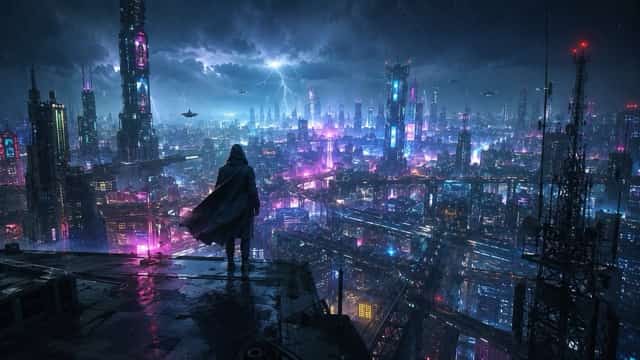
Create a wide cinematic cyberpunk photograph of a lone figure standing on the edge of a skyscraper rooftop. Show a huge futuristic city filled with holographic advertisements, elevated railways, flying vehicles, communication towers, and glowing windows. Add dark storm clouds, distant lightning, wind-blown clothing, and light rain. Illuminate the figure from behind with magenta and cyan city light. Use atmospheric perspective, realistic architecture, dramatic scale, strong leading lines, and a wide 16:9 composition.
10. Underground Night Market
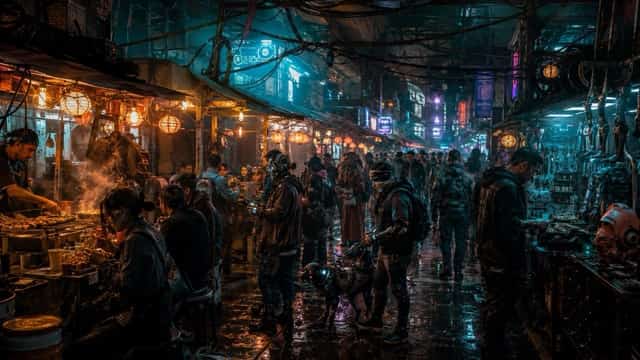
Create a detailed cyberpunk photograph of a crowded underground night market beneath a futuristic city. Show food stalls, cybernetic repair shops, glowing drink containers, mechanical pets, hanging cables, steam, and neon paper lanterns. Include vendors and customers wearing practical futuristic streetwear. Use warm orange food-stall light against cool teal and purple signs. Add realistic crowd depth, wet floor reflections, cinematic haze, rich environmental details, and a wide 16:9 documentary-style composition.
11. Futuristic Subway Platform
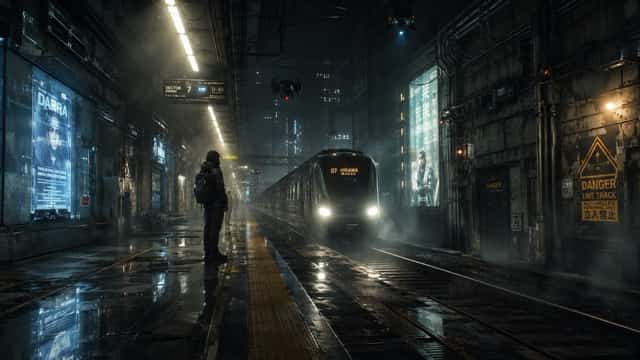
Create a cinematic cyberpunk subway station late at night. Show one solitary passenger waiting beside a wet concrete platform while a high-speed train approaches through the darkness. Add flickering holographic advertisements, damaged wall panels, surveillance drones, warning symbols, exposed pipes, and puddles reflecting blue and amber light. Use strong vanishing lines, deep shadows, light fog, realistic urban grime, restrained neon colors, and a wide 16:9 film-still composition.
12. Neon Sign Alley Without People
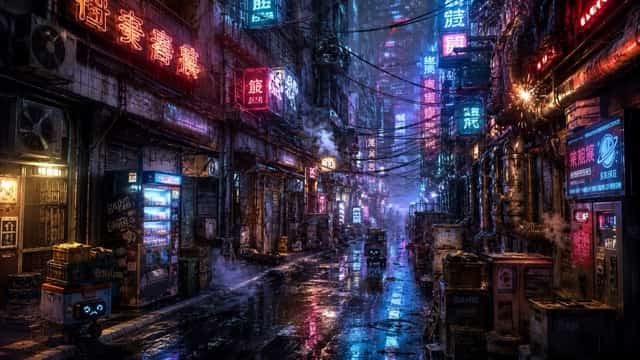
Create a highly detailed cyberpunk city alley with no people. Fill the scene with layered neon signs, abstract futuristic symbols, old air-conditioning units, exposed pipes, electrical cables, delivery crates, vending machines, and small service robots. Add heavy rain, water flowing along the street, electrical sparks, steam, and colorful reflections. Use cyan, violet, red, and warm yellow lighting with realistic fog diffusion. Compose the image as a cinematic 16:9 wallpaper with deep environmental perspective.
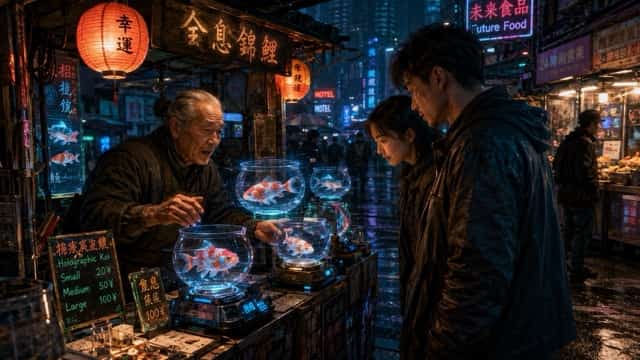
13. Holographic Fish Vendor
Create a photorealistic cyberpunk street scene featuring an elderly vendor selling holographic koi fish from a small night stall. The luminous fish swim through transparent floating bowls while curious customers watch. Surround the stall with neon lanterns, handwritten digital signs, hanging wires, wet pavement, food carts, and drifting particles. Use warm character lighting against a cool blue city background, detailed facial expressions, realistic reflections, and a cinematic 16:9 storytelling composition.
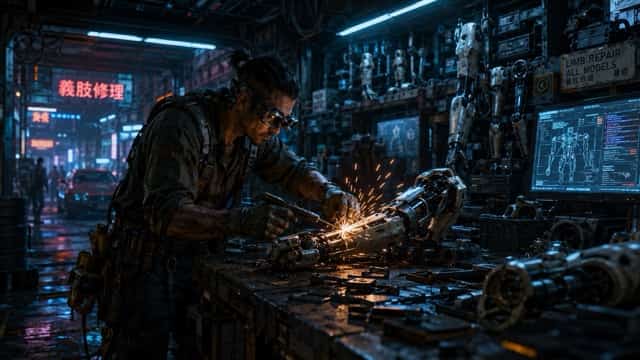
14. Street Mechanic Workshop
Create a realistic cyberpunk workshop where a street mechanic repairs a damaged robotic arm. The mechanic wears oil-stained technical clothing, magnifying smart glasses, heavy gloves, and a tool belt. Fill the garage with mechanical limbs, spare circuit boards, welding equipment, stacked tires, and glowing diagnostic screens. Add bright orange welding sparks against cold blue neon lighting. Use realistic metal textures, controlled clutter, environmental storytelling, shallow depth of field, and a wide cinematic composition.
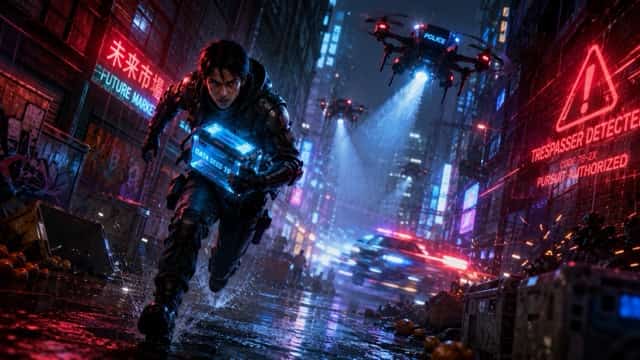
15. Drone Chase Through the City
Create a high-energy cyberpunk action photograph of a courier running through a narrow neon alley while police drones chase from above. The courier wears lightweight armored clothing and carries a glowing data package. Add drone spotlights, warning holograms, rain, sparks, wet walls, overturned market crates, and motion-blurred vehicle lights in the distance. Use a low dynamic camera angle, a sharp main subject, controlled motion blur, strong blue-red contrast, and a dramatic wide 16:9 composition.
Cyberpunk Fashion and Lifestyle Prompts
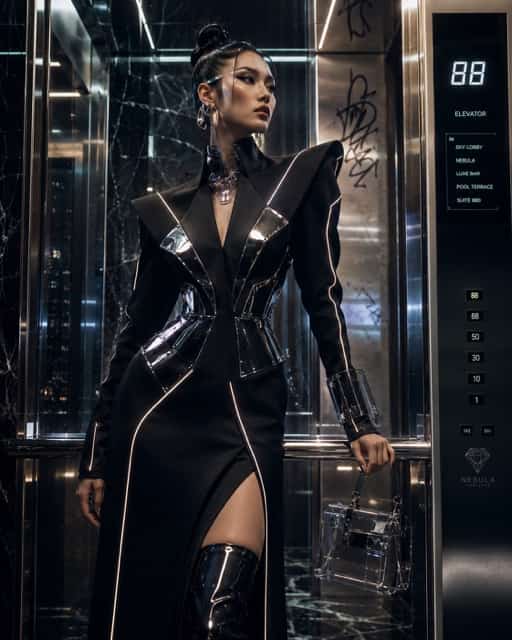
16. Luxury Cyberpunk Fashion Editorial
Create a high-fashion cyberpunk editorial photograph of a model standing inside a luxurious futuristic hotel elevator. The model wears structured black couture with reflective panels, glowing seam lines, sculptural jewelry, and transparent accessories. Combine polished marble, brushed chrome, digital floor numbers, and subtle graffiti in the background. Use elegant posing, strong rim lighting, realistic fabric texture, crisp facial features, magazine-quality retouching, and a vertical 4:5 fashion-cover composition.
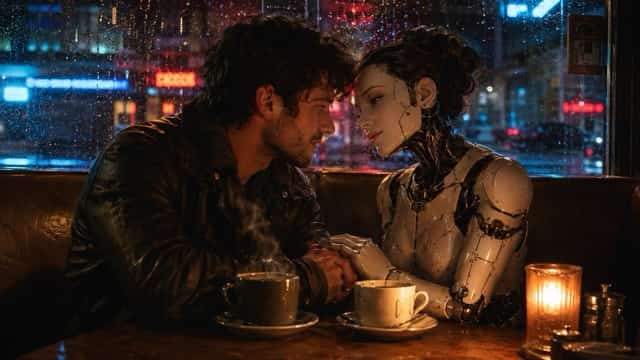
17. Human and Android Cafe Date
Create a cinematic cyberpunk photograph of a human and an elegant android having a quiet late-night cafe date. The android has porcelain-like facial panels, subtle mechanical joints, and expressive artificial eyes. Place steaming drinks on the table and add rain flowing down the window, neon reflections, warm table lamps, and blurred city traffic outside. Use intimate body language, realistic hands and faces, soft romantic lighting, shallow depth of field, and a horizontal cinematic composition.
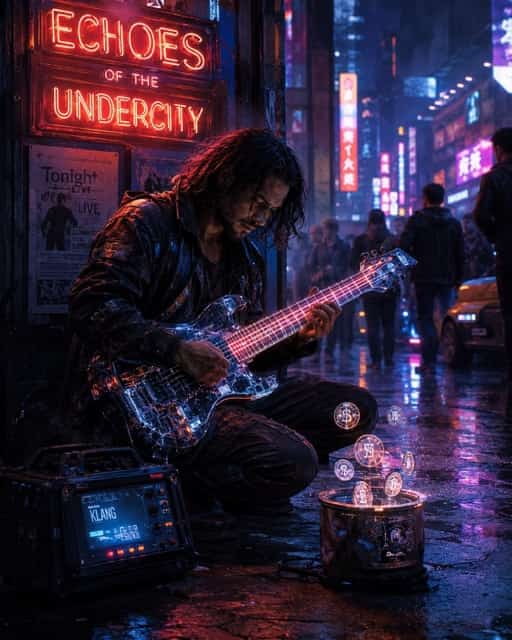
18. Synthwave Street Musician
Create a photorealistic cyberpunk street musician performing beneath a bright neon sign. The musician plays a futuristic electric guitar with transparent components and glowing strings. Add a portable amplifier, holographic coins floating above a tip container, small crowd silhouettes, rain mist, colorful store signs, and passing vehicle lights. Capture an emotional expression and natural performance pose. Use magenta-orange highlights, cool blue shadows, realistic instrument detail, and a vertical 4:5 concert-poster composition.
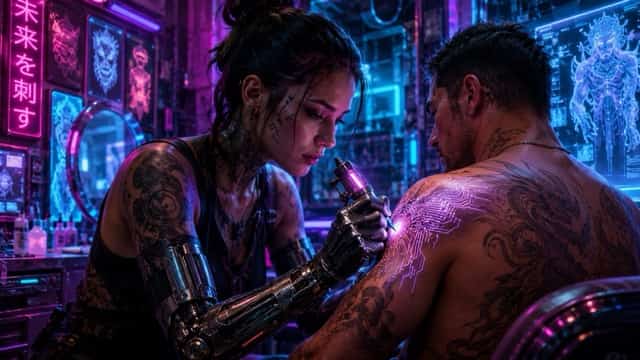
19. Neon Tattoo Studio
Create a detailed cyberpunk photograph inside a neon tattoo studio. Show a tattoo artist with mechanical forearms creating a luminous circuit-pattern tattoo on a client's shoulder. Cover the walls with holographic tattoo designs, glowing tools, sterilized equipment, mirrors, cables, and futuristic artwork. Use saturated magenta and blue tube lighting, realistic skin texture, accurate hands, focused facial expressions, intimate framing, shallow depth of field, and a cinematic horizontal composition.
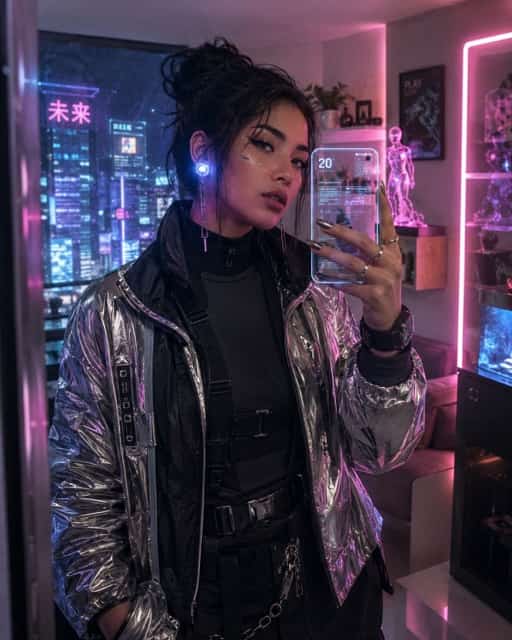
20. Cyberpunk Social Media Selfie
Create a realistic cyberpunk mirror selfie of a stylish content creator inside a futuristic apartment. The creator wears layered techwear, glowing ear accessories, a metallic jacket, and subtle facial implants. Show a smartphone with a transparent screen, neon city lights through the window, holographic decorations, and colorful reflections across the mirror. Use expressive eyes, natural skin texture, clean composition, pink and blue lighting, and a vertical 4:5 social-media-ready format.
Cyberpunk Product and Concept Prompts
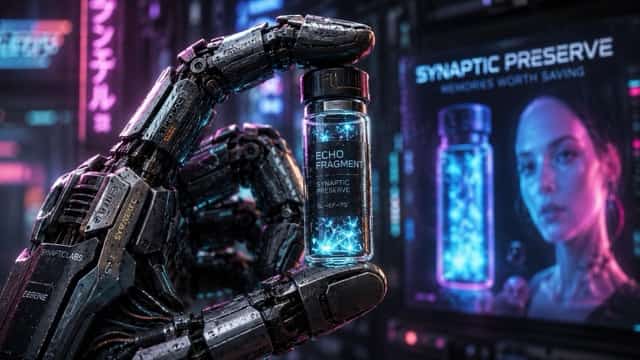
21. Cybernetic Hand and Memory Vial
Create a macro cyberpunk product photograph of a highly detailed mechanical hand holding a small glowing memory vial. Show micro-engraved metal surfaces, articulated joints, tiny wires, realistic scratches, fingerprints on the glass, and soft blue energy inside the vial. Add blurred holographic advertisements and pink neon reflections in the background. Use dramatic studio lighting, shallow depth of field, extreme texture detail, premium commercial photography, and a horizontal product-ad composition.
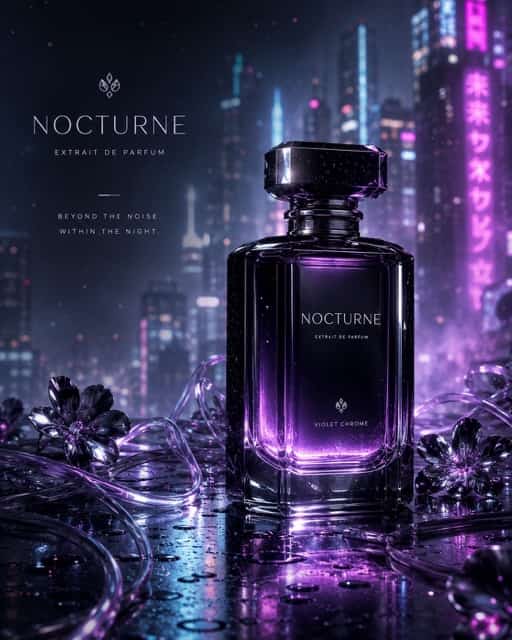
22. Futuristic Perfume Advertisement
Create a luxury cyberpunk perfume advertisement featuring a black glass bottle with illuminated violet liquid inside. Place the bottle on wet reflective metal surrounded by transparent cables, floating digital particles, thin mist, and small chrome flowers. Add a futuristic city blurred in the background with cyan and magenta light. Use precise product focus, premium studio reflections, controlled highlights, elegant negative space for advertising text, and a vertical 4:5 commercial composition.
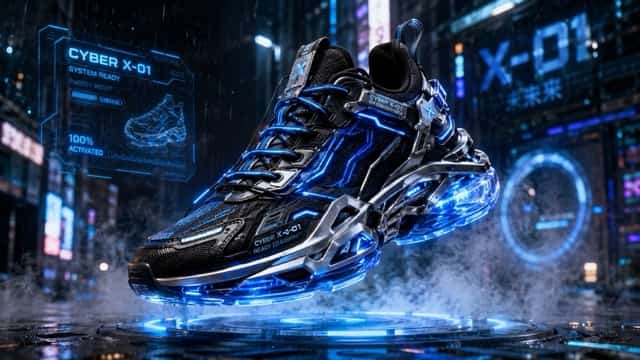
23. Cyberpunk Sneaker Campaign
Create a futuristic commercial photograph of a high-performance cyberpunk sneaker floating above a glowing street platform. The shoe has layered technical fabric, transparent soles, metallic supports, and electric-blue light running through the design. Surround it with rain droplets, smoke, holographic interface graphics, and blurred urban lights. Use a dramatic low angle, sharp product detail, realistic material textures, bold rim lighting, and a wide 16:9 sports-advertising composition.
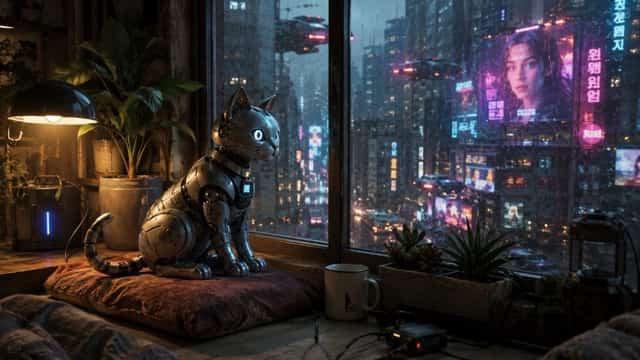
24. Robotic Cat in a Neon Apartment
Create a charming photorealistic cyberpunk scene featuring a small robotic cat sitting beside an apartment window. The cat has brushed-metal fur panels, expressive illuminated eyes, articulated ears, and a flexible mechanical tail. Outside the window, show a rainy neon city with flying vehicles and holographic billboards. Add indoor plants, charging cables, a worn cushion, and warm lamp light. Use cinematic depth, realistic reflections, detailed machinery, and a cozy horizontal composition.
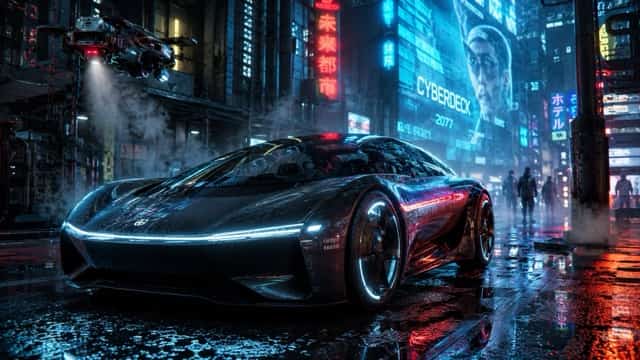
25. Futuristic Electric Car at Midnight
Create a cinematic automotive photograph of a sleek futuristic electric car parked on a rain-soaked cyberpunk street at midnight. The vehicle has a low aerodynamic body, transparent roof, glowing wheel rims, dark chrome surfaces, and narrow LED headlights. Surround it with holographic billboards, steam, wet pavement, service drones, and distant pedestrians. Use realistic paint reflections, dramatic cyan and red lighting, a low three-quarter camera angle, and a wide 16:9 advertising composition.
How to Customize These Cyberpunk Prompts
The prompts above are ready to paste, but changing a few controlled details can make the results more personal.
Change the Main Character
Replace the subject while keeping the environment and lighting unchanged.
For example:
Replace the young woman with an older male detective with silver hair and a mechanical left eye. Keep the rainy neon alley, cyan-magenta lighting, camera angle, and cinematic composition unchanged.
Change the Color Palette
Many cyberpunk images use blue and pink, but other combinations can create a more distinctive style.
Try:
- Red and cold white for a corporate dystopian look
- Orange and teal for a cinematic action scene
- Green and violet for a mysterious biotech atmosphere
- Gold and deep blue for a luxury futuristic style
- Monochrome blue for a colder technological mood
Change the Image Format
Use different compositions for different publishing platforms:
- 1:1: Profile images and square posts
- 4:5: Instagram portraits and promotional graphics
- 9:16: Stories, short-form video covers, and phone wallpapers
- 16:9: Blog headers, desktop wallpapers, and cinematic environments
SuperMaker supports text-based image creation with customizable dimensions and styles, while its page also highlights high-resolution generation and watermark-free downloads.
Keep the Scene Focused
Avoid combining a rooftop, subway, night market, laboratory, and motorcycle garage in one prompt. Choose one main environment and support it with a few relevant objects.
Instead of writing:
A hacker in a subway, laboratory, rooftop, market, cafe, and garage.
Use:
A hacker working inside a narrow apartment filled with monitors and cables, with a rainy neon city visible through the window.
The second version gives the AI a clearer visual hierarchy.
Add Camera Instructions
Photography terms help define how the image should look.
Useful instructions include:
- 35mm lens for environmental scenes
- 50mm lens for balanced portraits
- 85mm lens for close-up portraits
- Macro lens for mechanical objects
- Low-angle shot for heroic characters
- Eye-level shot for natural portraits
- Bird's-eye view for crowded city environments
- Shallow depth of field for subject separation
- Deep focus for detailed city scenes
Reusable Cyberpunk Prompt Formula
Use this template to create additional prompts:
Create a [photorealistic/cinematic/editorial] cyberpunk image of [main subject and appearance]. The subject wears [clothing, materials, and accessories] and is located in [one specific environment]. Add [two to four background elements]. Use [main color palette], [lighting direction], and [atmospheric effect]. Capture the scene with a [camera angle], [lens], and [depth of field]. Include realistic [important textures or details]. Use a [aspect ratio] composition designed for [intended use].
Example:
Create a cinematic cyberpunk image of a female courier with short silver hair and a mechanical right arm. She wears a weatherproof orange jacket, black technical trousers, and illuminated running shoes while standing inside a crowded underground train station. Add security drones, digital departure boards, wet floors, and distant commuters. Use orange and electric-blue lighting, soft fog, and reflected neon light. Capture the scene from a low angle with a 35mm lens and moderate depth of field. Include realistic skin, fabric, metal, and rain textures in a vertical 4:5 poster composition.
Frequently Asked Questions
Can I Use These Prompts Without Uploading a Photo?
Yes. Every prompt in this article can be used as a text-only description. Uploading a reference image is mainly useful when you want to preserve a particular face, outfit, product, or visual identity.
How Do I Make Cyberpunk Faces Look More Realistic?
Describe the face clearly and avoid overcrowding the background. Add instructions such as:
Natural facial proportions, realistic skin texture, symmetrical eyes, detailed eyelashes, accurate hands, subtle facial implants, and soft cinematic lighting.
You can also use a portrait lens, shallow depth of field, and one primary light source to keep attention on the character.
How Can I Create the Same Character in Multiple Scenes?
Keep the character description identical in every prompt. Only change the environment and action.
Repeat details such as:
- Hair color and hairstyle
- Facial features
- Clothing
- Mechanical implants
- Accessories
- Color palette
A reference photo can also help when the selected image generator supports image input.
Why Do My Cyberpunk Images Look Too Generic?
Generic results often come from prompts containing only broad words such as “cyberpunk,” “future,” and “neon.”
Add one distinctive storytelling element, such as:
- A vendor selling holographic fish
- A detective carrying a stolen memory chip
- A musician receiving holographic tips
- A mechanic repairing an illegal robotic arm
- A courier escaping surveillance drones
One recognizable detail can make the image feel like part of a larger story.
Can I Use These Prompts for Social Media and Blog Images?
Yes. Choose a 4:5 or 9:16 composition for mobile platforms and a 16:9 composition for blog headers or desktop banners. Leave negative space around the subject when you plan to add a title, logo, or promotional text later.
Final Thoughts
A strong cyberpunk image needs more than neon colors. The best prompts combine a focused subject, recognizable environment, controlled lighting, realistic materials, and a small storytelling detail.
Start with one of the 25 prompts above and generate the first version with the SuperMaker AI Image Maker. After reviewing the result, adjust only the character, color palette, environment, or camera direction. This simple workflow helps you create a consistent collection of futuristic portraits, city scenes, advertisements, and social media visuals without writing every prompt from the beginning.