Imagine Image 2.0: How Good Is It for Real Creative Work?
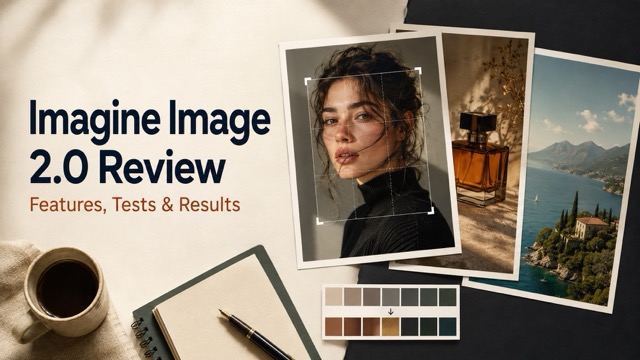
This Imagine Image 2.0 review explores its image generation, precision editing, text rendering, multi-reference tools, practical uses, and key limitations.
Imagine Image 2.0 is xAI’s latest model for generating, editing, and adapting images through Grok Imagine. Rather than focusing only on attractive first-generation results, the model is designed around practical creative workflows involving typography, product visuals, regional edits, multiple references, and different output formats.
The central question, however, is not whether Imagine Image 2.0 can create impressive images. Most modern image generators can do that under the right conditions. The more useful question is whether it provides enough accuracy and control for images that need to be used in advertisements, e-commerce pages, social media campaigns, design concepts, or production planning.
This Imagine Image 2.0 review examines its most important capabilities, where the model appears most useful, what creators should test carefully, and which limitations still require human review.
What Is Imagine Image 2.0?
Imagine Image 2.0 is an AI image generation and editing model developed by xAI. It is currently available as Quality Mode through Grok Imagine on the web, iOS, and Android.
According to the official Imagine Image 2.0 announcement, the model was built for detailed prompt following, typography, layout generation, subject preservation, and iterative editing.
Its core capabilities include:
- Text-to-image generation
- Regional image editing
- Segmentation-based selection
- Background removal
- Multi-reference editing
- Smart Resize
- Improved typography and layouts
- Ready-made creative templates
- Photography, design, and illustration support
Imagine Image 2.0 therefore occupies the space between a traditional image generator and an AI-assisted creative editor. Users can begin with a prompt, refine a selected area, combine several references, and adapt the result for another format without restarting the entire project.
What Makes Imagine Image 2.0 Different?
The biggest difference is its emphasis on controlled iteration.
A basic image generator treats the first prompt as the main creative event. If a single element is incorrect, the user often has to regenerate the complete image and risk losing the parts that already worked.
Imagine Image 2.0 attempts to create a more practical loop:
- Generate an initial image.
- Select a specific region.
- Describe the required change.
- Preserve the correct elements.
- Resize or adapt the finished visual.
This approach is particularly valuable for product photography, advertising, posters, character design, and other projects where consistency matters as much as visual quality.
Imagine Image 2.0 Feature Review
Detailed Prompt Following
Imagine Image 2.0 is designed to follow instructions involving several visual components, including subjects, objects, positions, colors, lighting, text, and composition.
A structured prompt can tell the model:
- Who or what should appear
- Where each element should be positioned
- Which camera angle to use
- How the scene should be illuminated
- What text should appear
- Which colors should dominate
- What must remain unchanged
- Which output format is required
This is more useful than relying on a short collection of style keywords. For practical work, the model needs to interpret an image as a complete visual brief rather than a general aesthetic request.
However, longer prompts are not automatically better. When a prompt contains too many competing instructions, the model may prioritize some details and weaken others. Important constraints should be written clearly and placed near the end of the prompt.
Typography and Layout
Text rendering is one of the most notable areas of focus in Imagine Image 2.0.
The model is intended to produce sharper small text and more organized layouts for:
- Posters
- Flyers
- Advertisements
- Menus
- Product packaging
- Infographics
- Presentation graphics
- UI concepts
- Social media promotions
The best results are still likely to come from short, clearly defined text. A headline such as “WEEKEND BRUNCH” is easier to preserve than a poster containing several paragraphs, multiple prices, contact details, and legal information.
When testing typography, creators should examine:
- Spelling
- Punctuation
- Letter spacing
- Text alignment
- Font consistency
- Visual hierarchy
- Contrast against the background
- Repeated or missing words
Improved text generation can reduce editing time, but it does not remove the need for proofreading.
Magic Wand Editing
The Magic Wand is designed to modify a selected region while leaving the rest of the image untouched.
This can be useful for changes such as:
- Recoloring a jacket
- Replacing a small object
- Correcting a hand
- Changing a facial expression
- Updating one line of text
- Removing an unwanted detail
- Adjusting a product material
The instruction should identify both the requested change and the elements that must remain stable.
For example:
Change only the selected jacket from blue to dark green. Preserve the person’s face, hairstyle, pose, body proportions, background, camera angle, lighting, and shadows.
This type of instruction gives the edit a clear boundary. Without preservation constraints, a localized change may affect nearby textures, lighting, or geometry.
Segmentation
Segmentation helps identify complete visual regions such as a subject, product, garment, background, or individual object.
This can be more efficient than manually defining an irregular selection, particularly when editing:
- Clothing
- Hair
- Furniture
- Product components
- Background areas
- Architectural elements
- Foreground objects
Segmentation is useful when the target has a recognizable boundary. Fine details such as loose hair, glass, reflections, smoke, or transparent fabrics may still require careful inspection after editing.
Background Removal
Imagine Image 2.0 can isolate a subject and remove the original background, producing an asset that can be placed into another design.
Possible applications include:
- E-commerce product cutouts
- Profile photos
- Presentation graphics
- YouTube thumbnails
- Social media advertisements
- Product catalogs
- Poster compositions
Creators should inspect the edges around hair, fur, glass, reflective products, and semi-transparent materials. These are usually more difficult than extracting a simple opaque object.
A clean result should preserve the subject’s natural edge detail without leaving a bright outline from the previous background.
Multi-Reference Editing
Imagine Image 2.0 accepts up to five input images in a single generation. This makes it possible to combine visual information that would be difficult to communicate through text alone.
For example:
- Reference 1 controls character identity.
- Reference 2 controls clothing.
- Reference 3 controls the location.
- Reference 4 controls the product.
- Reference 5 controls the color palette.
The most important rule is to give every reference one clear role.
Uploading several images without explaining their purpose can cause faces, products, clothing, and styles to blend unpredictably. A good multi-reference prompt should state what to borrow from each image and what must not be combined.
Smart Resize
Smart Resize adapts an image to a new aspect ratio by extending and reorganizing the frame rather than simply cropping it.
The official demonstration includes formats such as:
- 1:2
- 9:16
- 2:3
- 3:4
- 1:1
- 4:3
- 3:2
- 16:9
- 2:1
This is useful when one campaign visual needs to appear as:
- An Instagram post
- A vertical Story
- A website banner
- A YouTube thumbnail
- A mobile advertisement
- A marketplace product image
Smart Resize can save time, but creators should check newly generated background areas. The model may add objects, architecture, scenery, or textures that were not present in the original frame.
How to Evaluate Imagine Image 2.0
A useful Imagine Image 2.0 test should include several different content types. Testing the model with only one portrait does not reveal how it handles typography, product consistency, complex layouts, or regional editing.
Portrait Test
A portrait test should evaluate:
- Facial anatomy
- Natural skin texture
- Individual hair strands
- Eye direction
- Hand anatomy
- Clothing folds
- Background separation
- Lighting consistency
The subject should appear believable without excessive skin smoothing or artificial sharpness.

Product Photography Test
A product test should use an object with a recognizable shape and several important details.
Evaluate:
- Product geometry
- Label accuracy
- Material texture
- Reflections
- Buttons and seams
- Logo placement
- Shadows
- Consistency between generations
A visually attractive result is not sufficient if the model changes the product’s construction.
Text and Poster Test
A poster test should include a short headline, one supporting line, and a clear layout.
Check:
- Exact spelling
- Punctuation
- Typography
- Hierarchy
- Spacing
- Subject placement
- Empty space
- Overall readability
Avoid starting with an unusually dense poster. A simple test makes it easier to identify which elements the model handles well.

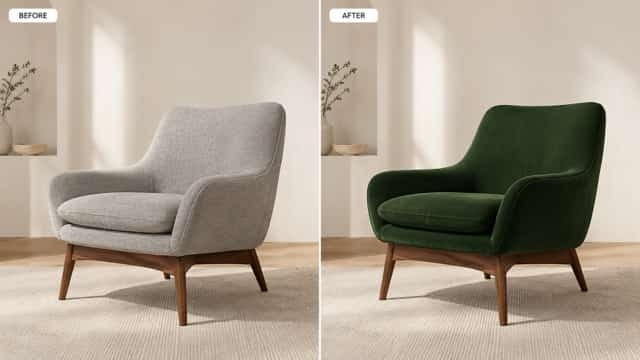
Regional Editing Test
Generate or upload an image, select one area, and request a single change.
For example:
Change only the chair upholstery from gray fabric to dark brown leather. Preserve the chair shape, stitching, legs, room, lighting, shadows, camera angle, and every other object.
Compare the edited result with the source image to determine whether unrelated areas changed.
Multi-Reference Test
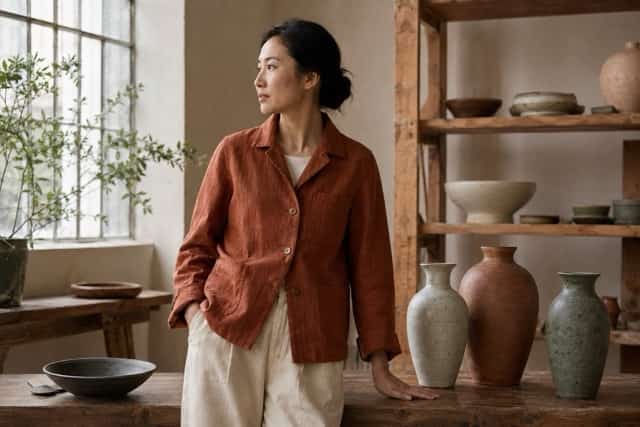
Use references with clearly different purposes, such as:
- One portrait
- One outfit
- One interior
- One color reference
A successful result should preserve the defining qualities of each reference without visibly blending unrelated elements.
Smart Resize Test
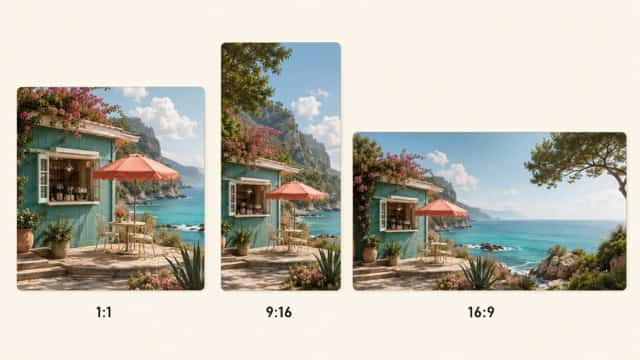
Resize one completed image into:
- 1:1
- 9:16
- 16:9
Then compare subject scale, object placement, background continuity, text position, and newly generated details.
Where Imagine Image 2.0 Performs Best
Advertising Concepts
The combination of image generation, typography, layouts, and controlled editing makes the model well suited to early advertising concepts.
Creators can explore:
- Product launch visuals
- Promotional posters
- Restaurant flyers
- Fitness campaigns
- Event graphics
- Seasonal advertisements
Final commercial assets should still be checked and refined in a conventional design editor.
Product and E-Commerce Images
Imagine Image 2.0 can help produce studio backgrounds, lifestyle settings, color variations, and platform-specific formats.
It may be particularly useful for:
- Product concept visualization
- Background replacement
- Color testing
- Catalog compositions
- Social media product visuals
- E-commerce image variations
When the exact product is already manufactured, reference images and strong preservation instructions are essential.
Content Creation
Bloggers, marketers, and social media creators can use the model to generate:
- Blog covers
- Thumbnails
- Illustrations
- Quote graphics
- Explainer visuals
- Campaign variations
Smart Resize can then adapt one selected result for different publishing channels.
Game and Story Development
Imagine Image 2.0 can support visual development for:
- Characters
- Costumes
- Locations
- Props
- Game assets
- Storyboards
- Illustrated worlds
Multiple references can help maintain a shared color palette and visual direction across separate assets.
UI and Design Exploration
The model can also create early concepts for application screens, icons, presentation graphics, and interface layouts.
These images are best treated as visual references rather than finished functional interfaces. Spacing, accessibility, component behavior, and production code still require manual design work.
Imagine Image 2.0 Limitations
Imagine Image 2.0 introduces stronger controls, but it does not eliminate common AI image problems.
Dense Text Still Requires Review
Long descriptions, prices, dates, addresses, and multilingual text can still contain errors. Important information should never be published without proofreading.
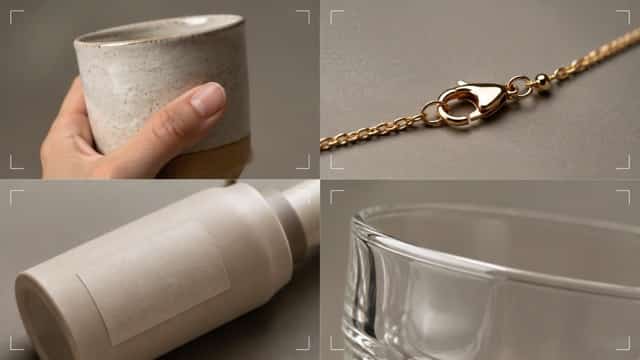
Small Details May Drift
Jewelry, product buttons, stitching, patterns, fingers, and small accessories may change between generations or edits.
Product Accuracy Is Not Guaranteed
A generated product can look realistic while containing incorrect dimensions, materials, labels, or construction details.
References Can Become Mixed
If the purpose of each uploaded image is unclear, the model may blend identities, styles, clothing, or product details.
Local Edits Can Affect Nearby Areas
A selected edit may modify adjacent highlights, textures, shadows, or edges. Always compare the edited result with the original.
Smart Resize Can Invent Details
When expanding the frame, the model must generate new visual information. Those additions may not match the real location or original product environment.
Factual Images Need Human Verification
Maps, diagrams, tutorials, historical scenes, scientific illustrations, and infographics should be checked by someone familiar with the subject.
Who Should Use Imagine Image 2.0?
Content Creators
Imagine Image 2.0 is useful for creators who need frequent blog visuals, social media graphics, thumbnails, and campaign variations without building every design from scratch.
Designers
Designers can use it for visual exploration, moodboards, composition ideas, early poster concepts, and rapid client presentations.
It works best as an ideation and iteration tool rather than a replacement for final design judgment.
E-Commerce Sellers
Online sellers can use the model to explore product settings, seasonal scenes, different colors, and multiple aspect ratios.
Products must remain faithful to what customers will actually receive.
Marketing Teams
Marketing teams can generate early campaign directions and adapt approved concepts for different placements.
Text, prices, offers, brand elements, and legal statements should still be added or verified manually.
Game and Story Creators
Character, location, and prop generation make the model useful for visual world-building. Multi-reference inputs can help different assets maintain a recognizable style.
Imagine Image 2.0 vs. Traditional AI Image Generators
Imagine Image 2.0’s main advantage is not that it belongs to an entirely different category of image model. Its advantage is that several important creation and editing tools are brought into one workflow.
| Capability | Basic Image Generator | Imagine Image 2.0 |
|---|---|---|
| Text-to-image generation | Yes | Yes |
| Detailed prompt following | Varies | Strong focus |
| Regional editing | Limited or separate | Built into workflow |
| Segmentation | Often unavailable | Supported |
| Background removal | Usually separate | Supported |
| Multiple references | Varies | Up to five inputs |
| Smart Resize | Usually separate | Supported |
| Typography and layout | Often inconsistent | Key improvement area |
| Creative templates | Limited | Supported |
This does not mean Imagine Image 2.0 will be the best model for every user. The right choice depends on image style, editing needs, speed, availability, and how closely outputs must match real products or people.
Is Imagine Image 2.0 Worth Using?
Imagine Image 2.0 appears most valuable for users who need more than a visually attractive first draft.
Its prompt following, regional editing, multi-reference support, background removal, and Smart Resize are relevant to real creative workflows. The model can help reduce the number of separate tools required to move from an idea to a usable concept.
It is especially worth testing if your work involves:
- Posters with short text
- Product photography concepts
- E-commerce images
- Social media campaigns
- Character and environment design
- Multi-format marketing assets
- Localized image changes
Users who require exact product reproduction, flawless long-form typography, verified educational graphics, or perfectly consistent characters should continue using human review and conventional editing tools.
Frequently Asked Questions
What is Imagine Image 2.0?
Imagine Image 2.0 is xAI’s image generation and editing model available through Grok Imagine. It supports text-to-image generation, precise editing, multiple references, background removal, and Smart Resize.
Is Imagine Image 2.0 the same as ImagineArt 2.0?
No. Imagine Image 2.0 is associated with xAI and Grok Imagine. ImagineArt 2.0 is a separate AI image model from another platform.
Can Imagine Image 2.0 edit an existing image?
Yes. It can edit selected regions, identify image elements through segmentation, remove backgrounds, and use several reference images.
How many reference images can it use?
The official announcement states that Imagine Image 2.0 supports up to five input images in one generation.
Can it create readable text?
The model is designed to improve typography and layout generation. Short headlines and labels are generally more practical than long paragraphs, and all generated text should be reviewed.
Does it support different image sizes?
Yes. Smart Resize can adapt an existing image to square, vertical, landscape, and banner formats.
Can it be used for product photography?
It can create product concepts, backgrounds, color variations, and advertising visuals. Exact product details must be checked against the real item.
Is Imagine Image 2.0 API access available?
The official August 2026 release stated that API access was coming soon. Check the latest xAI developer documentation for the current status.
Final Verdict
Imagine Image 2.0 represents a meaningful step toward AI image generation that fits practical creative work.
Its strongest qualities are not limited to realism or visual style. The more important improvements are controlled editing, clearer layouts, multiple reference inputs, reusable templates, and the ability to adapt one result for several formats.
The model still requires careful prompting and human review. Text can be incorrect, small details can drift, product designs can change, and expanded image areas can introduce new information.
For creators, marketers, designers, and online sellers willing to review and refine their results, Imagine Image 2.0 offers a flexible workflow for moving from an initial idea to a more controlled visual asset.