Master Google Pics: Guide & 36 AI Prompts
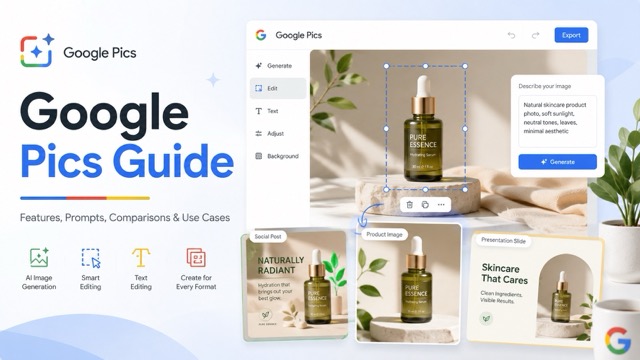
Google Pics is a new AI-powered image generation and editing tool integrated directly into Google Workspace. Rather than regenerating entire images, it allows users to precisely modify specific objects, replace backgrounds, and translate text using natural language. This seamless workflow makes it a highly practical alternative to complex design software for everyday ecommerce, marketing, and business tasks.
What Is Google Pics?
Google Pics is an AI-powered image generator and editor built directly into Google Workspace (powered by the Nano Banana model). Unlike basic generators, it allows you to continue precisely editing an image after it’s generated.
What Can It Do?
Generate & Import: Create new images from text prompts or upload your own to edit.
Object-Level Control: Select, move, remove, or replace specific elements (e.g., swapping a chair in the background) without altering the rest of the picture.
Smart Text Editing: Modify, reformat, or translate text embedded inside images—perfect for localized marketing assets.
Seamless Integration: Create, edit, and collaborate directly within Google Docs, Slides, and Drive.
How to Use Google Pics: Complete Beginner's Guide
The basic Google Pics workflow is simple: Generate/Import → Select → Edit → Crop/Upscale → Share.
Eligible users (Google AI Pro/Ultra and supported Workspace plans) can access it directly at pics.new.
Step 1: Start With a Detailed Prompt (or Import)
You can upload an existing image from Drive/Photos, or generate a new one. When prompting, skip basic requests like "Create a product photo" and specify lighting, style, and composition:
Create a premium product photo of a white skincare bottle standing on a light beige stone pedestal, soft natural daylight from the left, subtle realistic shadows, neutral luxury background, commercial beauty photography, centered composition.
Step 2: Select & Edit (Tell it what NOT to change)
If one element is wrong, don't regenerate the whole image. Select the specific object (e.g., a chair or background) and give a targeted prompt. Pro tip: Always state what must remain unchanged to give the AI clear boundaries.
Replace the selected yellow chair with a minimalist light-oak armchair. Match the original perspective and lighting. Keep the walls, floor, sofa, table, decorations, and overall composition unchanged.
Step 3: Refine, Crop, and Upscale
Once the image looks right, you can crop it for specific formats (social media, web, print) and upscale the final result to 2K or 4K. Everything happens in one place, without needing to switch to other resizing or editing tools.
Google Pics Prompts: 36+ Prompts for Better AI Images
A useful Google Pics prompt should describe more than the subject. Depending on the task, it can specify the environment, composition, lighting, camera perspective, style, intended use, and what parts of an existing image must remain unchanged.
Each of the 36 prompt ideas below can be copied directly and customized for your own workflow.
Product Photography Prompts
1. Clean Ecommerce Product Photo Ideal for simple product pages and online stores.
Create a clean ecommerce product photo of a white skincare bottle standing on a light beige stone pedestal. Use soft natural daylight from the left, subtle realistic shadows, a neutral luxury background, sharp product details, and a centered commercial photography composition.
2. Luxury Beauty Product Photo
Create a luxury product photograph of a premium perfume bottle on polished dark stone. Use soft golden side lighting, subtle reflections, realistic glass details, shallow depth of field, an elegant dark background, and high-end beauty campaign photography.
3. Minimalist Technology Product Photo
Create a minimalist commercial product photo of wireless earbuds on a clean light-gray surface. Use soft studio lighting, gentle realistic shadows, accurate material textures, a modern technology advertising style, and generous negative space around the product.
4. Outdoor Lifestyle Product Photo
Place this outdoor product in a realistic mountain camping environment during early morning. Keep the product shape, logo, colors, proportions, and design unchanged. Add natural sunlight, realistic ground contact, soft shadows, and professional outdoor lifestyle photography.
5. Food Product Photography
Create an appetizing commercial photograph of this packaged food product on a natural wooden kitchen table. Add a few relevant fresh ingredients around the package, warm daylight, realistic shadows, shallow depth of field, and a clean food advertising composition.
6. Jewelry Product Photography
Create a premium jewelry product photo of this necklace displayed on soft cream fabric. Use elegant studio lighting, subtle highlights on the metal, realistic material details, shallow depth of field, and a minimal luxury advertising style.
Ecommerce and Advertising Prompts
7. Marketplace Product Image
Create a professional marketplace product image with the product centered on a clean white background. Preserve the original product colors, shape, packaging, logo, and proportions. Use even studio lighting, crisp edges, minimal shadows, and realistic ecommerce photography.
8. Lifestyle Product Scene
Place this product naturally inside a bright modern living room. Keep the product design, dimensions, logo, and colors completely unchanged. Match its perspective to the environment and add realistic contact shadows and natural daylight.
9. Website Hero Banner
Create a wide website hero image featuring this product on the right side of the composition. Use a premium minimal environment, soft directional lighting, realistic shadows, and clean negative space on the left for a headline, description, and CTA button.
10. Seasonal Product Campaign
Create an elegant seasonal advertising image featuring this product. Keep the product itself unchanged and place it in a warm festive environment with subtle decorative lighting, tasteful seasonal details, realistic shadows, and premium commercial photography.
11. New Product Launch
Create a dramatic launch campaign image featuring this product as the main focal point. Use cinematic studio lighting, a clean modern environment, subtle reflections, strong visual contrast, realistic shadows, and enough negative space for advertising copy.
Social Media Prompts
12. Instagram Product Post
Create a vertical Instagram product promotion featuring this product in a modern lifestyle environment. Use bright natural lighting, realistic textures, clean premium composition, subtle shadows, and clear negative space for a short promotional headline.
13. Instagram Story
Create a vertical 9:16 Instagram Story visual featuring this product prominently in the lower half. Use a stylish minimal background, soft modern lighting, clean composition, and generous empty space in the upper half for promotional text.
14. LinkedIn Business Graphic
Create a professional LinkedIn visual for a modern business announcement. Use a clean corporate composition, subtle visual depth, professional lighting, minimal clutter, and enough empty space for a headline and short supporting message.
15. Pinterest Lifestyle Image
Create a vertical Pinterest-style lifestyle image showing this product being used naturally in a bright modern home. Use warm daylight, soft neutral colors, realistic details, aspirational lifestyle photography, and a clean vertical composition.
16. YouTube Thumbnail Background
Create a bold YouTube thumbnail background for this topic. Use one clear visual focal point, dramatic lighting, strong contrast, a simple uncluttered composition, and large negative space on one side where headline text can be added later.
Marketing and Promotional Prompts
17. Website Advertising Banner
Create a wide digital advertising banner featuring this product in a premium commercial setting. Position the product on the right, use clean directional lighting and realistic shadows, and leave approximately 40 percent of the left side uncluttered for marketing copy and a CTA.
18. Promotional Poster
Create a modern promotional poster featuring this product as the main visual. Use a strong focal point, premium studio lighting, clean graphic composition, realistic product details, balanced negative space, and a professional advertising aesthetic.
19. Sale Campaign Creative
Create a clean promotional campaign visual for a seasonal sale. Feature the product clearly, use energetic but professional styling, realistic lighting, strong visual hierarchy, and enough empty space for discount information and a CTA.
20. Brand Campaign Image
Create a premium brand campaign image using this product as the main subject. Use a sophisticated minimalist environment, consistent visual styling, soft directional lighting, realistic shadows, and high-end editorial commercial photography.
Object Editing Prompts
(When editing an existing image, explicitly describe the selected element and what must remain untouched.)
21. Remove an Unwanted Object
Remove the selected object from the image. Reconstruct the area behind it naturally so the edit is invisible. Keep all other objects, lighting, perspective, textures, colors, and composition unchanged.
22. Replace an Object
Replace the selected chair with a modern light-oak dining chair. Match the original size, position, perspective, lighting, and shadows. Keep the table, walls, floor, decorations, and every other element unchanged.
23. Change an Object's Color
Change the selected sofa from dark gray to warm beige. Preserve the original fabric texture, shape, folds, highlights, shadows, perspective, and surrounding environment. Do not change anything else in the image.
24. Move an Object
Move the selected product slightly to the right while keeping its original size, angle, orientation, design, and appearance. Reconstruct the original area naturally and preserve the existing lighting, shadows, background, and composition.
25. Change Clothing Color
Change the person's jacket from black to dark navy blue. Keep the jacket design, fabric texture, folds, stitching, body position, face, hair, skin tone, lighting, and background unchanged.
26. Replace Furniture
Replace the selected coffee table with a minimalist round wooden coffee table. Match the original room perspective and lighting, create realistic contact shadows, and keep every other piece of furniture and decoration unchanged.
Background Editing Prompts
27. Replace a Product Background
Replace the existing background with a bright modern kitchen. Keep the product exactly the same size, angle, shape, position, colors, packaging, and logo. Match the environmental lighting naturally and add realistic contact shadows.
28. Create a Studio Background
Replace the current background with a clean light-gray photography studio backdrop. Preserve the subject completely, including its shape, colors, textures, dimensions, and details. Add soft realistic studio shadows and balanced professional lighting.
29. Create an Outdoor Background
Replace the current background with a realistic green park during golden hour. Keep the person completely unchanged. Match the direction and intensity of the sunlight, preserve natural depth of field, and create realistic environmental lighting.
30. Luxury Interior Background
Place this product inside a premium minimalist interior with light stone surfaces, warm neutral tones, soft natural sunlight, subtle realistic shadows, and an elegant editorial atmosphere. Keep the product itself completely unchanged.
Text and Localization Prompts
31. Replace Text Inside an Image
Replace the selected headline with "Summer Collection". Keep the original typography style, approximate font size, alignment, spacing, color, perspective, position, and overall visual design unchanged.
32. Translate Image Text
Translate all visible English text in this image into Spanish. Preserve the original visual hierarchy, typography style, colors, spacing, alignment, placement, and surrounding design as closely as possible.
33. Localize a Marketing Graphic
Adapt this English marketing graphic for a French-speaking audience. Translate the visible promotional text into natural French while preserving the original visual hierarchy, typography style, colors, branding, layout, and image content.
Presentation and Business Prompts
34. Presentation Hero Image
Create a professional 16:9 presentation image about artificial intelligence in modern business. Use realistic workplace imagery, a clean editorial style, subtle technology elements, balanced composition, and clear negative space for a presentation title.
35. Business Report Illustration
Create a professional illustration for a business report about ecommerce growth. Use a modern corporate visual style, simple visual storytelling, realistic business elements, balanced composition, and sufficient empty space for accompanying report text.
36. Training and Instructional Image
Create a clear instructional visual showing a person completing this task in a modern workspace. Make the main action immediately understandable, keep the environment simple, use realistic lighting, and avoid unnecessary visual distractions.
Google Pics vs Canva vs Photoshop vs Nano Banana: Which Is Better?
Google Pics enters a market where people already have several ways to generate and edit visual content. However, Canva, Photoshop, Nano Banana, and Google Pics solve slightly different problems.
| Tool | Best Suited For | Main Strength | Typical Workflow |
|---|---|---|---|
| Google Pics | AI image creation & precise everyday editing | Object editing plus Workspace integration | Generate → select → edit → refine → share |
| Canva | Graphic design & template-based content | Templates & easy visual layouts | Template → customize → publish |
| Photoshop | Professional image manipulation | Detailed manual editing control | Import → layers/masks/tools → refine → export |
| Nano Banana | AI image generation & transformation | Google's underlying generative AI capabilities | Prompt/image → generate or transform |
Google Pics Use Cases
Google Pics becomes more interesting when viewed through actual tasks rather than a list of AI features.
- Ecommerce Product Photography: Place a single product into various environments (lifestyle, seasonal, or studio) without reshooting, keeping the core product visually anchored while the context changes around it.
- Social Media & Marketing Campaigns: Quickly adapt one core visual into multiple formats (Instagram squares, vertical Stories, wide web banners) and batch variations without starting from scratch.
- Remove or Replace Distracting Objects: Precisely erase unwanted elements (cables, signs, photobombers) or replace specific parts of an image without destroying the original scene's layout or lighting.
- Localize Text for International Markets: Directly translate embedded text into other languages (e.g., French, Spanish, Japanese) while preserving the original typography, layout, and visual style completely intact.
- Streamline Presentation Images: Generate and refine visuals directly inside Google Slides and Docs, eliminating the frustrating cycle of exporting, editing in external apps, and re-uploading files.
Conclusion
Google Pics is entering an already crowded image-generation and editing market, but its core value proposition is distinct. Its biggest idea is not simply giving users a prompt box to receive an AI image. The more compelling workflow is:
Generate → select → edit → preserve → refine → resize → share → continue working.
Canva may still be a better choice when complete graphic layouts are the priority. Photoshop remains much stronger when professional designers require detailed manual control.
Google Pics makes the most sense for users who want AI image creation and editing to sit closer to the tools they already use. For ecommerce sellers, marketers, content creators, educators, and teams already working inside Google Workspace, its object-level controls, text translation, and 2K/4K upscaling mean a single visual can move through the creative process seamlessly.
The question is no longer just whether an AI can generate an image—it's whether it can help turn that first generation into the exact image your project actually needs.