Old Photo Restoration Prompt Gemini: Best Copy-and-Paste Prompts to Restore Old Photos
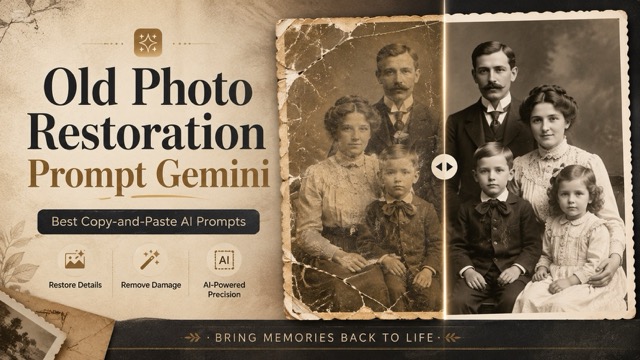
With the right old photo restoration prompt Gemini, users can remove scratches, fix fading, restore faces, colorize black-and-white photos, and make old memories look clear again. Choose a prompt that matches your photo type, copy it, and generate a natural restored result.
Find Your Next Creative Idea
Explore Creative GPT Image 2.5 prompts with visual examples and ready-to-copy instructions.
Explore GPT Image 2.5 Prompt Library
Introduction
A strong old photo restoration prompt Gemini can help remove scratches, reduce blur, repair faded areas, improve facial clarity, colorize black-and-white photos, and enhance image quality while keeping the original person, clothing, background, and vintage feeling unchanged.
In this guide, you will find practical old photo restoration prompt Gemini templates that users can copy and paste directly. You can use these prompts for family portraits, wedding photos, childhood pictures, black-and-white images, sepia photos, group photos, and severely damaged old photographs.
You can also try these prompts with an AI image tool like SuperMaker AI Image Maker to test different restoration styles and create cleaner, more polished results.
What Is an Old Photo Restoration Prompt Gemini?
An old photo restoration prompt Gemini is a written instruction that tells Gemini or another AI image model how to repair and enhance an old photo.
A simple prompt may look like this:
Restore this old photo.
But this prompt is too short. It does not tell the AI what damage to fix or what details to preserve.
A better old photo restoration prompt Gemini should include clear instructions such as:
Restore this old photograph naturally. Remove scratches, dust, stains, fading, blur, and cracks while preserving the original face, identity, expression, clothing, background, lighting, and vintage atmosphere. Improve clarity and contrast without changing facial features or making the image look artificial.
This type of prompt works better because it gives the AI a clear editing direction. It also prevents common problems, such as changing the person’s face, making skin too smooth, adding fake details, or turning a vintage photo into an unrealistic modern image.
Why Prompt Quality Matters for Old Photo Restoration
Old photo restoration is different from normal image enhancement. When users restore an old family photo, they usually want the image to look cleaner, but they do not want the person to look different.
A poor prompt may cause AI to:
- Change the face
- Make the person look younger or older
- Add unrealistic skin texture
- Replace old clothing with modern clothing
- Remove the vintage feeling
- Over-colorize black-and-white photos
- Make the restored image look fake
A good old photo restoration prompt Gemini should balance repair and preservation. It should improve image quality while keeping the original memory faithful and recognizable.
How to Use These Old Photo Restoration Prompts
To use these prompts, first upload your old photo to Gemini or your preferred AI image tool. Then choose the prompt that best matches your photo type. Copy the full prompt, paste it into the prompt box, and generate the restored image.
If the result changes the face too much, add stronger instructions such as “preserve the exact identity” or “do not change facial features.” If the image still looks blurry, add “enhance facial clarity, texture, and resolution naturally.” If the restored image looks too modern, add “keep the vintage style and historical atmosphere.”
For a simple workflow, you can open SuperMaker AI Image Maker, upload your photo, paste one of the prompts below, and test different restoration results.
Best Old Photo Restoration Prompt Gemini Templates
1. High-Fidelity Old Photo Restoration Prompt Gemini
Use this prompt when you want a clean, realistic, and balanced restoration.
Restore this old photograph with high fidelity. Remove scratches, dust, stains, cracks, noise, fading, and blur while preserving the original identity, facial features, clothing, background, lighting, and historical character. Improve sharpness, contrast, texture, and resolution naturally. Do not change the face, do not over-smooth the skin, and do not make the image look artificial. Output a clean, realistic, high-resolution restored photo.
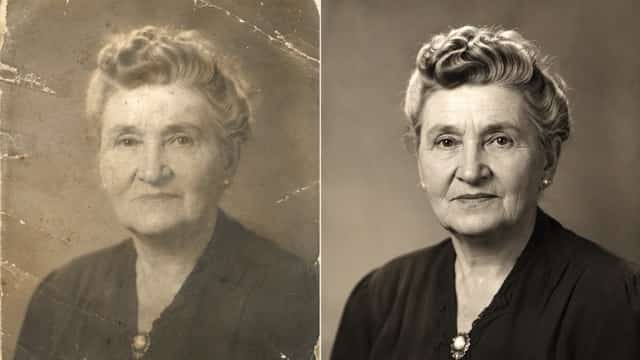
2. Natural Family Photo Restoration Prompt
Use this prompt for old family portraits where emotional accuracy is more important than dramatic editing.
Carefully restore this old family photo in a natural and realistic way. Repair fading, blur, grain, scratches, stains, dust, and small damaged areas. Keep every person’s original face, expression, age, hairstyle, clothing, body shape, and position unchanged. Enhance clarity, brightness, and contrast gently while preserving the warm vintage feeling of the original photograph. Avoid plastic skin, fake colors, or unrealistic facial reconstruction.
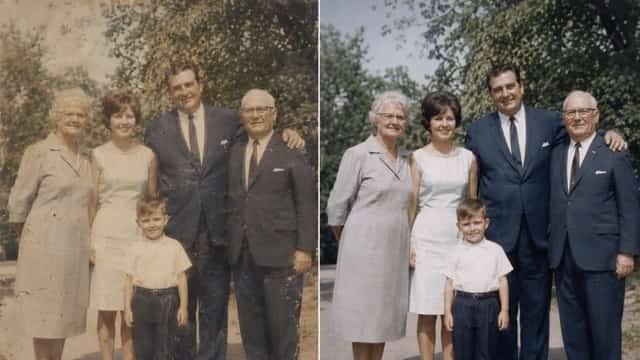
3. Vintage Portrait Restoration Prompt
Use this old photo restoration prompt Gemini for a single-person portrait.
Restore this vintage portrait photo with a strong focus on identity preservation. Remove dust, scratches, stains, fading, blur, and noise. Enhance the eyes, skin texture, hair detail, facial contours, and overall clarity naturally. Keep the original expression, lighting direction, clothing, and background style. Do not beautify the person excessively, do not change facial features, and do not make the image look modern or fake.
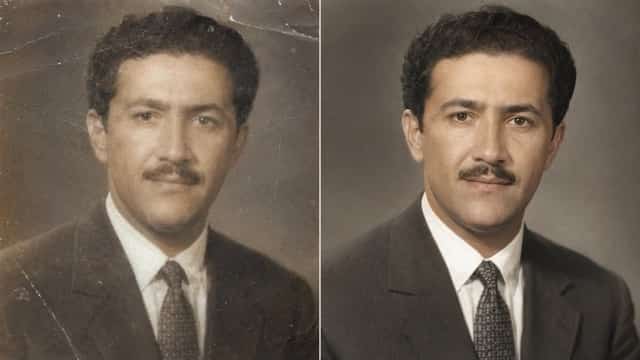
4. Black-and-White Photo Colorization Prompt
Use this prompt when you want to restore and colorize an old black-and-white image.
Restore and colorize this old black-and-white photograph. Remove scratches, dust, stains, fading, grain, and blur while preserving the original identity, facial features, clothing, pose, and historical atmosphere. Add realistic and subtle colors based on natural skin tones, period-accurate clothing, and believable background colors. Avoid oversaturated colors, modern filters, or artificial effects. Keep the final image natural, respectful, and historically authentic.
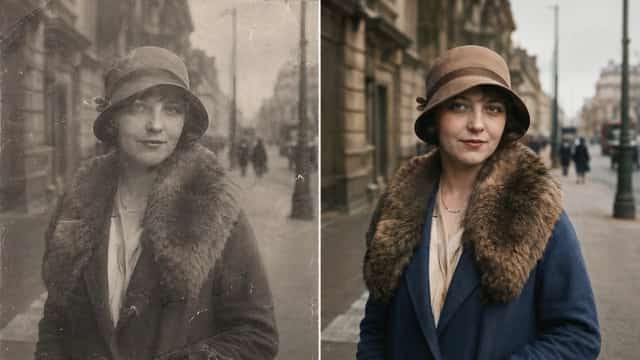
5. Severely Damaged Old Photo Repair Prompt
Use this prompt for photos with cracks, tears, missing corners, or heavy damage.
Repair this severely damaged old photograph. Restore torn areas, cracks, missing details, stains, scratches, faded sections, blur, and noise as realistically as possible. Reconstruct damaged background and clothing details while preserving the original face, identity, pose, expression, and historical style. Do not invent a new face, do not change the person’s appearance, and do not make the photo look artificial. Output a clean, believable restored photo.
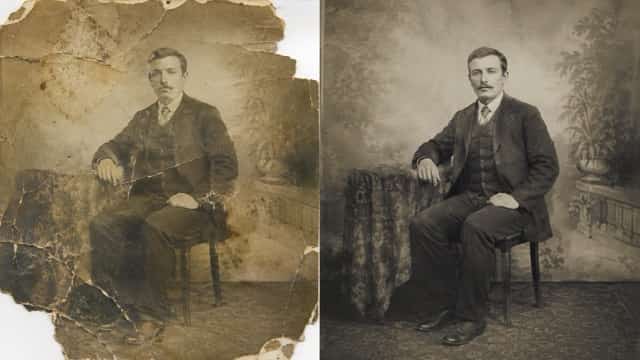
6. Faded Sepia Photo Restoration Prompt
Use this prompt for antique sepia photos with brown or yellow tones.
Restore this faded sepia photograph while keeping its antique charm. Reduce discoloration, stains, scratches, dust, grain, blur, and faded areas. Improve facial clarity, contrast, sharpness, and fine details naturally. Preserve the warm sepia tone, original lighting, clothing, background, and historical texture. Do not make the image look overly modern, over-sharpened, or digitally over-processed.
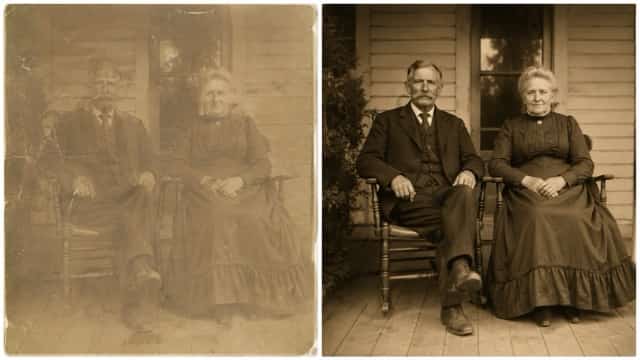
7. Old Wedding Photo Restoration Prompt
Use this prompt for vintage wedding portraits and couple photos.
Restore this old wedding photograph with elegant and natural detail. Remove scratches, dust, stains, fading, cracks, blur, and noise. Preserve the couple’s exact faces, expressions, wedding clothing, hairstyle, pose, body shape, and background. Enhance fabric detail, facial clarity, lighting, and contrast without changing the original style. Keep the romantic vintage atmosphere and create a clean high-resolution restored image.
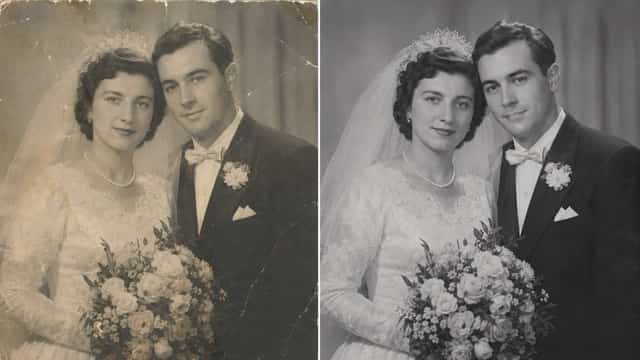
8. Group Photo Restoration Prompt
Use this old photo restoration prompt Gemini for class photos, family groups, or historical group pictures.
Restore this old group photo naturally and carefully. Remove scratches, dust, stains, blur, grain, fading, and damaged areas. Preserve every person’s original face, identity, expression, clothing, pose, body shape, and relative position. Enhance clarity and lighting evenly across the entire image. Do not change facial features, do not replace faces, and do not make people look modern. Keep the restored photo realistic and faithful to the original memory.
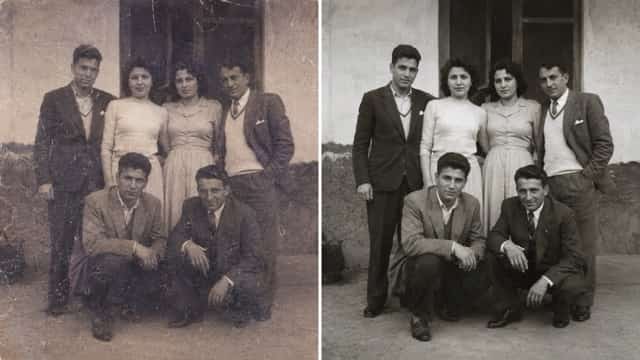
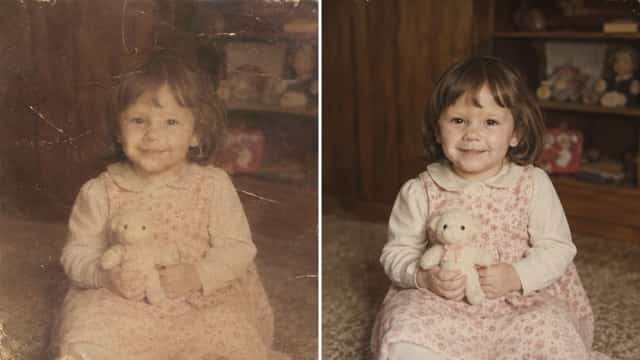
9. Old Childhood Photo Restoration Prompt
Use this prompt for baby photos, childhood portraits, and old school pictures.
Restore this old childhood photo gently and naturally. Fix fading, dust, scratches, stains, blur, grain, and small damaged areas while preserving the child’s exact facial features, age, expression, clothing, pose, and background. Improve brightness, clarity, contrast, and soft detail without making the face look older or different. Keep the emotional and nostalgic feeling of the original photograph.
10. Studio-Quality Old Photo Restoration Prompt Gemini
Use this prompt when you want a polished result for printing, framing, or sharing.
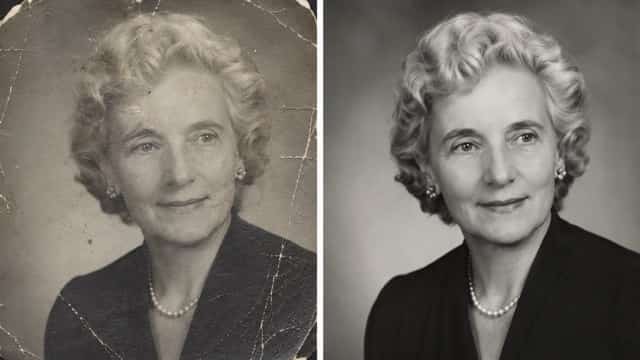
Professionally restore this old photograph to studio quality. Remove visible damage, scratches, cracks, stains, fading, grain, dust, blur, and noise. Enhance fine details, lighting balance, facial clarity, natural texture, contrast, and resolution while preserving the original identity, expression, clothing, background, and historical essence. Reconstruct missing areas realistically. Keep the result photorealistic, clean, sharp, and natural without over-processing or changing the subject’s appearance.
More Old Photo Restoration Prompt Gemini Ideas
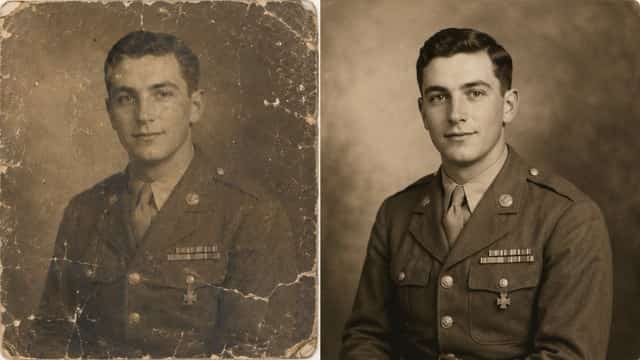
11. Old Military Photo Restoration Prompt
Restore this old military photograph with respect and historical accuracy. Remove scratches, dust, stains, fading, blur, cracks, and noise. Preserve the person’s exact face, uniform, medals, posture, expression, and background details. Enhance clarity, contrast, and texture naturally without changing the historical style. Keep the restored image realistic, dignified, and faithful to the original photo.
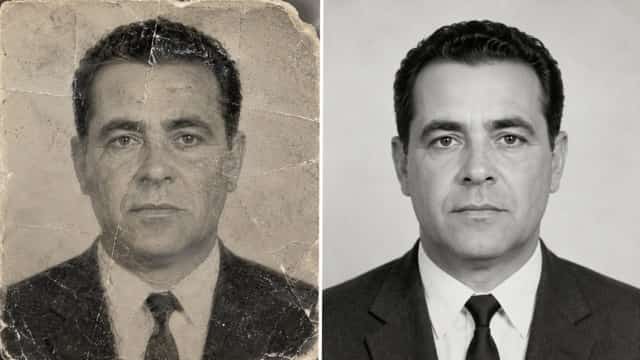
12. Old Passport Photo Restoration Prompt
Restore this old passport-style photo naturally. Remove dust, scratches, stains, fading, blur, and discoloration while preserving the exact facial features, expression, hairstyle, clothing, and background. Improve sharpness, brightness, contrast, and resolution without changing identity or making the face look artificial. Keep the result clean, realistic, and close to the original image.
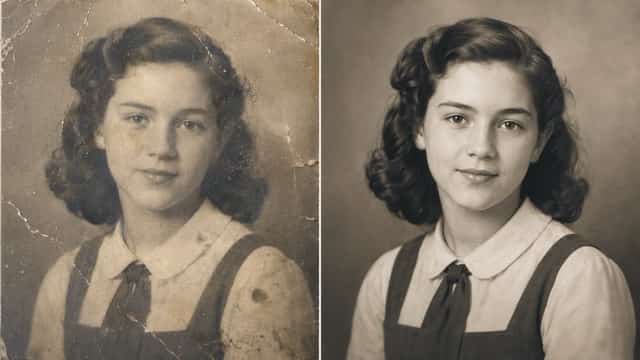
13. Old School Photo Restoration Prompt
Restore this old school photo with natural detail. Remove scratches, dust, stains, fading, blur, and grain. Preserve the student’s original face, age, hairstyle, clothing, expression, pose, and background. Improve facial clarity, lighting, and overall quality gently. Do not change the person’s identity, do not modernize the image, and keep the nostalgic school-photo feeling.
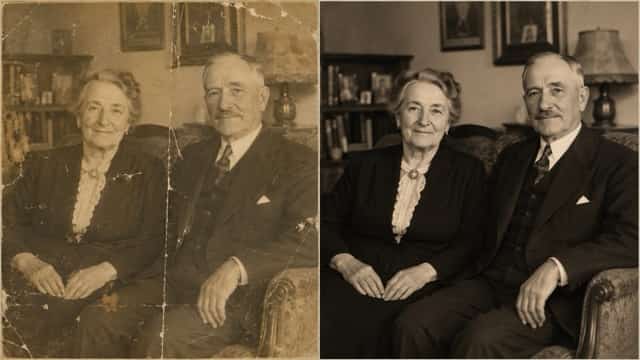
14. Old Couple Photo Restoration Prompt
Restore this old couple photo in a warm and natural style. Remove scratches, dust, stains, fading, blur, cracks, and noise. Preserve both people’s exact faces, expressions, clothing, hairstyles, pose, and relationship feeling. Enhance clarity, contrast, lighting, and detail while keeping the original romantic and vintage atmosphere. Avoid artificial skin, fake colors, or changes to identity.
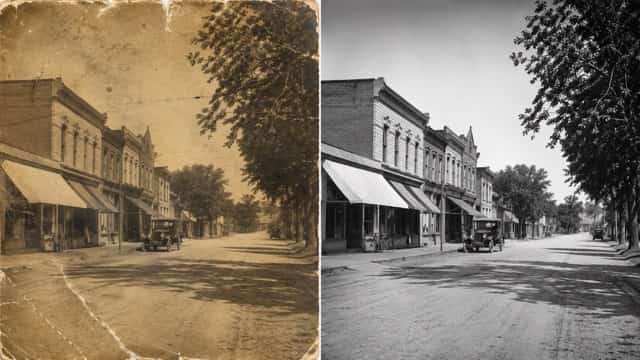
15. Old Landscape Photo Restoration Prompt
Restore this old landscape photograph naturally. Remove scratches, dust, stains, fading, blur, discoloration, and noise. Improve clarity, contrast, lighting, and environmental details while preserving the original scene, composition, perspective, and vintage atmosphere. Do not add unrealistic objects, modern elements, or artificial colors. Keep the restored image faithful to the original photo.
Old Photo Restoration Prompt Formula
If you want to create your own old photo restoration prompt Gemini, you can use this simple formula:
Restore this old photo + describe the damage + preserve the original identity and details + improve quality naturally + avoid fake AI effects.
Here is a full example:
Restore this old photo by removing scratches, dust, stains, cracks, fading, blur, grain, and damaged areas. Preserve the original face, identity, expression, clothing, background, lighting, and historical atmosphere. Improve sharpness, contrast, brightness, texture, and resolution naturally. Do not change facial features, do not over-smooth the skin, do not add fake details, and do not make the image look artificial.
This formula works well because it gives AI both repair instructions and creative limits. For old photo restoration, limits are very important. The AI should improve the photo, not redesign the memory.
Best Prompt Words for Old Photo Restoration
You can improve your old photo restoration prompt Gemini by adding clear words that describe the result you want.
| Goal | Useful Prompt Words |
|---|---|
| Remove damage | scratches, dust, stains, cracks, tears, faded areas |
| Improve clarity | sharpen details, enhance facial clarity, improve texture |
| Keep identity | preserve exact face, preserve identity, do not change features |
| Keep vintage feeling | historical atmosphere, antique charm, original style |
| Avoid fake results | no plastic skin, no artificial colors, no over-processing |
| Colorize old photos | subtle colors, natural skin tones, historically accurate colors |
Common Mistakes to Avoid
Using a Prompt That Is Too Short
A short prompt gives AI too much freedom. Instead of writing “restore this old photo,” describe the exact damage and the final style you want.
Forgetting to Protect the Face
If the photo is blurry or damaged, AI may change the person’s face. Always include phrases like “preserve the exact identity,” “do not change facial features,” and “keep the original expression.”
Making the Photo Too Modern
Some restored photos lose their historical feeling because the prompt asks for a modern or cinematic style. If you want a realistic result, use words like natural, faithful, vintage, historical, and authentic.
Over-Colorizing Black-and-White Photos
Colorization should be subtle. Avoid bright, saturated, or fantasy colors unless you want a creative version instead of a realistic restoration.
Ignoring Clothing and Background
Old photos often include important clothing, rooms, streets, furniture, or historical details. A good old photo restoration prompt Gemini should preserve these details instead of replacing them.
Best Use Cases for Old Photo Restoration Prompt Gemini
| Photo Type | Best Prompt to Use |
|---|---|
| Old family photo | Natural Family Photo Restoration Prompt |
| Black-and-white image | Black-and-White Photo Colorization Prompt |
| Damaged photo | Severely Damaged Old Photo Repair Prompt |
| Single portrait | Vintage Portrait Restoration Prompt |
| Wedding photo | Old Wedding Photo Restoration Prompt |
| Group photo | Group Photo Restoration Prompt |
| Childhood photo | Old Childhood Photo Restoration Prompt |
| Printable result | Studio-Quality Old Photo Restoration Prompt Gemini |
You can start with the high-fidelity prompt first. If the result is too simple, try the studio-quality prompt. If the image is black and white, use the colorization prompt. If the face changes, add stronger identity-preservation instructions.
For more creative image editing and AI visual generation, you can also try SuperMaker AI Image Maker and test different prompt styles for restoration, enhancement, and image improvement.
FAQ About Old Photo Restoration Prompt Gemini
What is the best old photo restoration prompt Gemini?
The best old photo restoration prompt Gemini is a detailed prompt that asks AI to remove scratches, dust, stains, cracks, fading, blur, and noise while preserving the original face, identity, clothing, background, lighting, and vintage atmosphere.
Can Gemini restore old family photos?
Yes. Gemini-style prompts can help restore old family photos when the instructions are clear. The prompt should tell AI to repair damage while keeping every person’s original face, expression, age, clothing, and position unchanged.
Can I use Gemini to colorize black-and-white photos?
Yes. You can use a colorization prompt to restore and colorize black-and-white photos. For natural results, ask for subtle colors, natural skin tones, period-accurate clothing colors, and a historically authentic style.
Why does AI change faces in old photos?
AI may change faces when the original image is blurry, scratched, or missing details. To reduce this problem, include strong instructions such as “preserve the exact identity,” “do not change facial features,” and “keep the original expression.”
How do I restore a badly damaged old photo?
Use a prompt that clearly mentions torn areas, cracks, stains, missing details, fading, scratches, and blur. Also tell AI to reconstruct missing parts realistically without inventing a new face or changing the original person.
Can I use these prompts in other AI image tools?
Yes. Although this guide focuses on old photo restoration prompt Gemini, most prompts can also work in other AI image tools. You may need to adjust the wording slightly depending on the platform.
Conclusion
A good old photo restoration prompt Gemini can help turn faded, scratched, blurry, or damaged photos into cleaner and more natural images. The best prompts do not just ask AI to repair the photo. They also tell AI to preserve the original face, identity, expression, clothing, background, and historical feeling.
If you want a realistic result, use detailed prompts that focus on natural restoration, identity preservation, and subtle enhancement. Start with a high-fidelity prompt, then refine the wording based on the result. For practical testing, you can use SuperMaker AI Image Maker to experiment with different prompt styles and create restored-looking images with better clarity, lighting, and detail.
With the right old photo restoration prompt Gemini, old memories can look cleaner, sharper, and more beautiful while still staying true to the original photo.