How to Make an AI APT Music Video With Two Photos
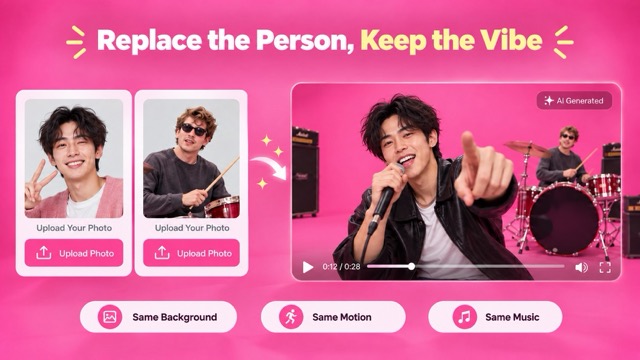
Turn two portraits into an APT duo video with SuperMaker. Follow the upload order, choose settings for your first attempt, and check both faces before sharing.
Want to put yourself and a friend into the APT duo performance? SuperMaker’s AI APT MV generator uses two separate face photos and a prepared template. No prompt or performance footage is needed.
Here’s how to set up your first video—and what to check before making another.
Step 1: Prepare One Portrait per Person
Choose two separate photos, each showing one clear, well-lit face. Avoid sunglasses, heavy filters, blur, and extreme side angles.
Before uploading, open both pictures at full size. Can you clearly distinguish the eyes, nose, and mouth? If someone’s face occupies only a tiny part of the image, find a closer portrait. Enlarging a blurry crop will not restore the missing detail.
For an easy first attempt, use straightforward selfies rather than heavily edited profile pictures.
Step 2: Upload the Photos in the Right Order
Open the AI APT music video page and find Upload Two Face Photos. Add your images through Upload files or Assets Library.
The upload order determines the starting positions:
- First photo: the performer on the left.
- Second photo: the performer on the right.
These positions refer to the beginning of the template. Check the previews before continuing, especially if you have a particular role in mind for each person.
Step 3: Set Up Your First Generation
The AI APT video generator includes aspect ratio, 768P / 2K resolution, and output-count controls. Review Public Visibility and Required Credits before selecting Generate Video.
For a first attempt, use this suggested setup:
| Setting | Starting choice | Why |
|---|---|---|
| Aspect ratio | 9:16 for a vertical post; 16:9 for landscape | Match the format you intend to publish |
| Resolution | 768P | Evaluate the pairing before requesting a higher-resolution version |
| Number of videos | 1 | Find out whether your photos work before generating more variations |
Treat the first output as a check of the faces and composition. A higher-resolution video is only useful if you already like the performance.
Step 4: Review the Whole Clip
After generation, check My Videos.
Watch once at normal speed, then replay while following each person separately. Use this checklist:
- Recognition: Can you identify both people immediately?
- Movement: Does either face change noticeably during a head turn?
- Expressions: Do the eyes and mouth look convincing during the performance?
- Framing: Do both performers remain comfortably inside the frame?
Check the beginning, a moment with noticeable movement, and the ending. One attractive opening frame is not enough to judge the whole result.
If Something Looks Wrong, Change One Thing
Use the problem you see to decide your next attempt.
| Problem | What to try next |
|---|---|
| One person looks less recognizable | Replace only that person’s portrait with a clearer, more evenly lit photo |
| The starting roles are reversed | Reverse the upload order |
| A face looks fine initially but changes during movement | Try a more front-facing reference and compare the same moment again |
| A vertical edit cuts someone off | Use a wider presentation or fit the full clip inside the vertical canvas |
| You cannot tell whether the new version improved | Compare both versions at matching timestamps |
Keep the stronger portrait and your other settings unchanged while testing a replacement. This makes it easier to tell whether the new photo helped.
Prepare the Video for Posting
Choose a cover frame where both faces are easy to recognize. If you add text, keep it away from the performers’ eyes and mouths.
Give the post one simple hook:
- “We took two selfies and accidentally formed a duo.”
- “Sending this instead of asking them to do the APT dance.”
- “Our friendship finally has a music video.”
Watch the exported version once on your phone to catch awkward crops or oversized captions.
Ready to make yours? Open AI APT MV, choose your two portraits, and start with one video.
For another performance format, follow our AI Rap Duo tutorial or try the STORM II crowd-dance tutorial.