MiniMax H3 Max Director: What It Is, Features, and How to Use It
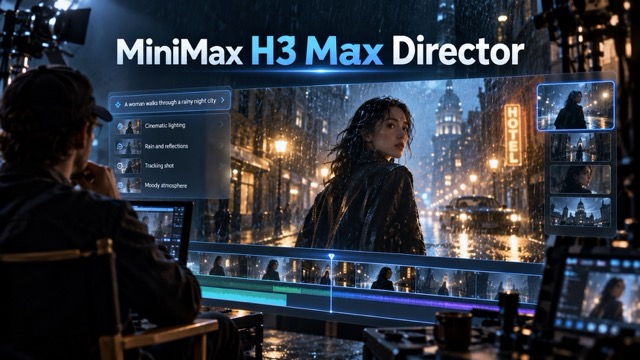
Explore MiniMax H3 Max Director, a real-time AI video model that lets creators guide scenes as they generate. Learn its key features, use cases, prompting workflow, and how it differs from H3 and H3 Max.
What Is MiniMax H3 Max Director?
Most AI video generators follow a familiar workflow: write a prompt, start generation, wait for the result, watch the finished clip, then generate again if something is wrong. MiniMax H3 Max Director introduces a very different idea. Instead of treating each video as a finished request, it keeps a generation session running and allows you to change what happens next while the video is still being created.
That turns AI video generation into something closer to live directing. You can establish a character, location, visual style, and story, start the video, then send new instructions as the scene develops. Rather than repeatedly starting from zero, the model attempts to preserve the existing world while responding to the latest direction.
This makes MiniMax H3 Max Director especially interesting for interactive storytelling, live entertainment, experimental filmmaking, virtual characters, advertising concepts, and other projects where creators want to influence a video as it unfolds.
synchronized audio and accepts new text directions during the active session.
How H3 Max Director Changes AI Video Generation
The important difference is not simply speed or video quality. It is the relationship between the creator and the model.
With normal text-to-video generation, most decisions have to be made before pressing Generate. If the character performs the wrong action or the scene develops in the wrong direction, another generation is usually required.
With H3 Max Director, the initial prompt becomes the beginning of a conversation with the video.
| Traditional AI Video | H3 Max Director |
|---|---|
| Generate a finished clip | Generate a continuous session |
| Prompt before generation | Prompt before and during generation |
| Changes often require regeneration | New directions affect upcoming scenes |
| Individual clips | Continuous visual context |
| Mostly predetermined scene | Interactive scene development |
This creates a much tighter creative feedback loop. Instead of imagining an entire sequence before seeing anything, creators can watch the result develop and decide what should happen next.
That distinction could become particularly important for longer AI-generated stories. Connecting separately generated clips often creates visible inconsistencies in faces, clothing, environments, camera position, or lighting. Director instead conditions new segments on the preceding content and prompt history to help carry the scene forward.
Key Features of MiniMax H3 Max Director
Try MiniMax H3 Max Director to see these features in action, or read on for what each one actually does.
Real-Time Prompt Direction
What it does: Lets you send new prompts while the video is still generating, instead of only before you hit Generate.
Your opening prompt sets the scene. Every prompt after that works like a direction given mid-shoot — you don't need to re-describe the environment, just say what happens next.
Example:
Opening prompt: "A cinematic detective story inside a quiet 1980s hotel lobby during a thunderstorm." Mid-session prompt: "The detective hears a sound behind the elevator and slowly turns around."
The model keeps the session's context, so short follow-up prompts still land correctly.
Continuous Scene Memory
What it does: Remembers earlier prompts and visuals so the same character, outfit, and setting stay consistent as the scene continues.
Without this, longer AI videos tend to drift — faces change, rooms rearrange themselves. Director reduces (but doesn't eliminate) that drift by referencing a rolling history of past prompts. (See the spec table below for the exact memory range.)
Native Video and Audio Streaming
What it does: Generates video and matching audio together, in one pass — no separate sound step.
Works across landscape, vertical, and square formats, so the same workflow covers cinematic, social, and interactive content.
Start From an Image
What it does: Lets you upload a first-frame image instead of starting from text alone.
Useful if you already have a character design, product shot, or composed opening frame — Director uses it as the visual starting point and builds the session from there.<meta charset='utf-8'><html><head></head><body><h3>Real-Time Prompt Direction.
Spec Sheet: H3 Max Director vs. the H3 Base Model
Because "H3," "H3 Max," and "H3 Max Director" share a name, it's easy to mix up which numbers apply to which version. Here's what fal currently documents for each:
| Spec | MiniMax H3 (base model) | H3 Max Director |
|---|---|---|
| Output style | Single finished clip | Continuous streamed session |
| Max length per request | Up to 15 seconds | ~2 minutes per session (longer sessions available to approved use cases) |
| Resolution | Up to 2K | 480p or 768p |
| Frame rate | Not specified by MiniMax | 24 fps |
| Audio | Native stereo audio | Synchronized audio at 32 kHz |
| Aspect ratios | Not specified by MiniMax | 16:9, 9:16, 1:1 |
| Generation increments | Whole clip at once | 10-second chunks |
| Prompt memory | N/A (single prompt) | 1–50 previous segment prompts (default: 12) |
| Mid-generation editing | Not supported | Supported — new prompts affect upcoming footage |
Two things worth noting: resolution tops out lower on Director than on the base H3 model, and Director's real-time architecture is what enables mid-session prompting — a trade-off, not a straightforward upgrade.
How to Use MiniMax H3 Max Director
The most important step happens before generation: create an opening prompt that describes a world capable of continuing, rather than a single finished shot. You can follow along with this workflow directly on MiniMax H3 Max Director as you read.
A useful opening prompt should establish the environment, recurring characters, visual style, elements that must remain consistent, and an action already taking place.
For example:
A continuous cinematic mystery following the same female journalist through a rain-soaked coastal town at night. Preserve her face, beige trench coat, vintage camera, wet cobblestone streets, warm window lights, and deep blue nighttime palette. Keep the camera natural and cinematic with slow tracking movements. Open with her walking toward an abandoned seaside hotel while distant thunder rolls.
Once the generation begins, subsequent prompts should become shorter and more directional:
She sees a light switch on inside the top-floor window.
Then:
She stops, raises her camera, and slowly zooms toward the window.
Then:
A mysterious silhouette appears behind the curtain before disappearing.
This style works better than repeatedly rewriting a giant cinematic prompt because each instruction only needs to decide the next moment.
Where H3 Max Director Could Be Useful
What the current session-based workflow supports today:
- Rapid creative experimentation. Directors, advertisers, and visual designers can explore multiple narrative directions in one running session, without planning and rendering an entirely separate sequence every time.
- Early product ideation. Instead of generating a polished advertisement immediately, creators can explore how a product scene changes when the camera moves, the environment shifts, or a character interacts with the product — all within the same session.
- Experimental short-form storytelling. A single creator can steer a scene turn by turn, giving new direction as the story develops, which suits short interactive clips or social content.
Where the concept could head next (not yet part of the current feature set):
The persistent-session architecture is the kind of building block that could eventually support things like audience-influenced fictional broadcasts, interactive game worlds, or virtual hosts that respond to live input. fal has not documented multi-user or viewer-driven branching as a current capability — today, direction comes from a single creator controlling the session, not from an audience choosing outcomes. Treat this section as a plausible direction for the technology rather than a confirmed roadmap.
The goal, either way, is not necessarily to replace traditional editing. It is to make the idea-development stage more interactive.
MiniMax H3 vs H3 Max vs H3 Max Director
The similar names can easily cause confusion, so here's the short version (see the spec table above for the numbers):
- MiniMax H3 is the original open multimodal generation model released by MiniMax. It understands combinations of text, image, video, and audio context and generates videos with native stereo audio.
- H3 Max is fal's post-trained variant of that open foundation, optimized around faster generation and improved model behavior — but it still returns a single finished clip.
- H3 Max Director takes the concept further. Instead of primarily returning a completed video file, it keeps a real-time connection open so users can continuously influence what the model generates next. fal describes Director as its own engineering work built on the H3 Max family.
So the word Director matters: this model is designed around controlling an ongoing video rather than simply requesting another clip.
Limitations to Know
Real-time generation also creates new limitations.
Resolution and aspect ratio currently have to be selected before the session begins and cannot be changed while it is running. The first-frame image, memory setting, and seed are also fixed for that session. Standard sessions currently run for up to two minutes, although fal says longer sessions are being enabled for approved use cases.
The current 768p maximum also means Director is better viewed as an interactive generation technology than a direct replacement for every high-resolution production workflow.
Prompting changes as well. Extremely detailed prompts are not always the goal. Creators need to think more like directors: establish the world first, then give clear instructions for the next action.
A New Way to Direct AI Video
MiniMax H3 Max Director represents an important change in how AI-generated video can be created. To recap what sets it apart:
- It replaces single-shot clips with a continuous session you can keep steering.
- Real-time prompting lets you send new directions while generation is already running, instead of only before it starts.
- A rolling memory of past prompts and visual context helps keep characters, settings, and style consistent across the scene.
- It supports synchronized audio, an optional first-frame image, and multiple aspect ratios — with the trade-off of a 768p resolution ceiling and session-length limits for now.
The traditional workflow asks, "What video do you want me to generate?"
Director introduces another question:
"What should happen next?"
That difference transforms prompting from a one-time command into an ongoing creative process. Characters can remain inside the same world while creators adjust actions, camera behavior, atmosphere, and narrative direction as the sequence continues.
For filmmakers, marketers, developers, storytellers, and creators experimenting with generative media, the most interesting part of H3 Max Director may therefore be neither resolution nor rendering speed. It is the possibility of treating AI video less like a file generator — and more like a scene that can actually be directed. Ready to try it yourself? Explore MiniMax H3 Max Director on Supermaker.
*Specs and capabilities described here reflect what fal documents at the time of writing; check fal's official model page for the current version before building on these numbers.