
More AI Image Generators
Explore our collection of specialized AI image generators designed for different creative needs and styles







Remove Text from Image in One Click
Use SuperMaker AI to remove text from image fast while keeping the original object background product and layout unchanged.
SuperMaker AI is a smart remove text from image solution built for clean image editing. Upload any photo with captions labels signs subtitles brand names or printed words and let our AI remove text from image without changing the rest of the scene. This remove text from image online tool keeps bottles packages posters screens clothes walls and backgrounds intact while restoring the hidden area naturally. If you need to remove text from image for ecommerce content social posts product photos or daily edits this tool gives you a fast and simple workflow.
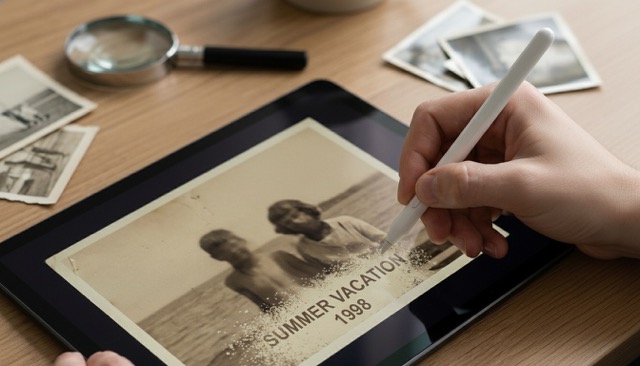
How to Use Our Remove Text from Image Tool
SuperMaker AI makes it easy to remove text from image with a simple upload and generate workflow. No manual brushing and no design skills required.

Upload an Image with Text
Upload any JPG or PNG that contains words numbers captions labels watermarks or printed text. Our remove text from image workflow is designed for product photos posters screenshots portraits packaging and everyday pictures.

Click Generate
Click generate and let SuperMaker AI remove text from image automatically. The system detects the text layer and rebuilds the covered area so the bottle sign clothing package or background stays visually consistent.

Download the Clean Result
Preview your result and download a clean version in seconds. This remove text from image online tool helps you keep the original composition while removing unwanted text only.
Best AI Image Tools for Creative Projects
Explore creative tools for image, learn tips and tricks, and see how AI can be your assistant in turning concepts into finished projects.
















Features of Our Remove Text from Image Tool
SuperMaker AI helps you remove text from image across many visual scenarios. From product photos to posters and screenshots our remove text from image online tool focuses on text removal while preserving everything else.

Remove Brand Names but Keep the Product
- Use SuperMaker AI to remove text from image when brand names or printed words appear on bottles boxes jars or packaging.
- This remove text from image online tool erases the text only and keeps the perfume bottle product label shape reflections highlights and shadows intact.
- It is ideal for product mockups ad cleanup marketplace visuals and concept testing.
- If you need to remove text from image without deleting the product itself this workflow is built for that exact task.

Clean Posters Signs and Screens
- Remove text from image on posters shop signs billboards screens menus and printed boards.
- SuperMaker AI rebuilds the covered surface naturally so colors edges lighting and perspective stay aligned.
- This remove text from image online tool is useful for ad revisions visual localization and presentation design.
- You can remove text from image while preserving the structure of the sign screen or poster.

Remove Watermarks Captions and Subtitles
- Remove text from image when the text appears as overlay captions subtitles date stamps or watermark style wording.
- Our remove text from image online tool fills the hidden area with matching texture and keeps the photo looking natural.
- It works well for travel photos social content archived screenshots and creative assets.
- The goal is simple: remove text from image and keep everything else visually unchanged.
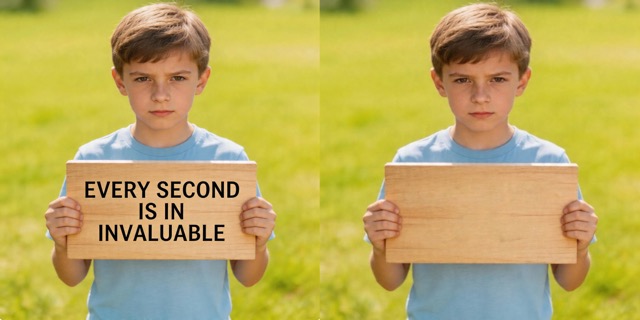
Keep Clothes Walls and Backgrounds Unchanged
- A strong remove text from image result should not damage the original scene.
- SuperMaker AI keeps clothing walls paper packaging surfaces product textures and backgrounds stable while removing only the text.
- This remove text from image online tool is great for creators sellers and designers who want fast cleanup without rebuilding the whole image.
- Remove text from image and keep the visual identity of the original photo intact.
Why Choose Our Remove Text from Image Online Tool
SuperMaker AI is designed for people who want to remove text from image quickly and cleanly. It is simple enough for everyday users and precise enough for visual content work.

Product Photo Cleanup
Use this remove text from image workflow to clean product bottles jars boxes and packaging for ecommerce previews catalogs and creative testing. It removes printed words while keeping the product itself unchanged.

Ad and Poster Editing
Designers can remove text from image on posters signs billboards and campaign visuals before adding new copy or localized text later.

Screenshot Simplification
This remove text from image online tool helps clean screenshots by removing titles labels subtitles and extra text to make the visual easier to reuse in decks and demos.

Social Media Image Cleanup
Remove text from image for reposting visuals moodboards and creative references while keeping the original photo layout and style consistent.

Packaging and Mockup Preparation
When you need blank packaging or text free surfaces for mockups this remove text from image online tool creates a cleaner base image quickly.

Daily Photo Retouching
Remove text from image for travel shots menu boards shop signs shirts labels and other daily photos when you want a cleaner visual without manual editing.
What Users Say About Our Remove Text from Image Tool
Creators designers and sellers use SuperMaker AI to remove text from image across many workflows. These users like how the tool removes only the text while preserving the rest of the picture.
I used SuperMaker AI to remove text from image on a perfume bottle mockup. It erased the brand name cleanly and kept the bottle reflections and glass details looking real.
This remove text from image online tool helped me clean store sign photos for a pitch deck. The sign structure stayed intact and only the wording disappeared.
I needed to remove text from image on product packaging before testing new label concepts. The result looked smooth and saved me a lot of Photoshop time.
I clean screenshots for tutorials all the time. This remove text from image online tool makes it easy to remove captions and interface text while keeping the rest of the image stable.
I tried it on poster images and it worked better than expected. SuperMaker AI could remove text from image without warping the background color blocks and edges.
For ecommerce drafts I often need blank bottles boxes and labels. This remove text from image workflow gives me clean surfaces fast and keeps the product photo looking professional.




Frequently Asked Questions About Remove Text from Image
Read the most common questions about how to remove text from image with SuperMaker AI. Learn what the tool removes what it preserves and when to use it.
Remove text from image means deleting visible words letters numbers captions subtitles labels or printed text from a picture while keeping the rest of the image unchanged. SuperMaker AI detects the text area and rebuilds the hidden surface underneath so the final image looks clean and natural.
Yes. Our remove text from image online tool is designed to erase only the text itself. If a brand name appears on a perfume bottle package sign or shirt the tool removes the text layer and keeps the bottle package sign or shirt intact.
This tool works well on product photos posters signs packaging screenshots subtitles watermarks labels menus clothing prints and many everyday images. If you need to remove text from image while preserving the rest of the composition this workflow is a strong fit.
Yes. SuperMaker AI is built to remove text from image quickly with a simple upload and generate workflow. You do not need complex editing software to get a clean text free result.
In many cases yes. If the text sits on bottles boxes posters walls screens or other textured surfaces the AI tries to restore the hidden area so it matches nearby color texture lighting and perspective as naturally as possible.
Users often choose this remove text from image online tool because it is fast simple and focused on preserving non text elements. Instead of manually retouching every word you can remove text from image in one click and keep the rest of the scene visually consistent.
Remove Text from Image Now
Upload your photo and let SuperMaker AI remove text from image in seconds. Keep the original object background and composition while getting a clean text free result.
