








More AI Image Generators
Explore our collection of specialized AI image generators designed for different creative needs and styles












Create a 2D pixel sprite sheet With Personality
Your 2D pixel art character sheet, built around your own character
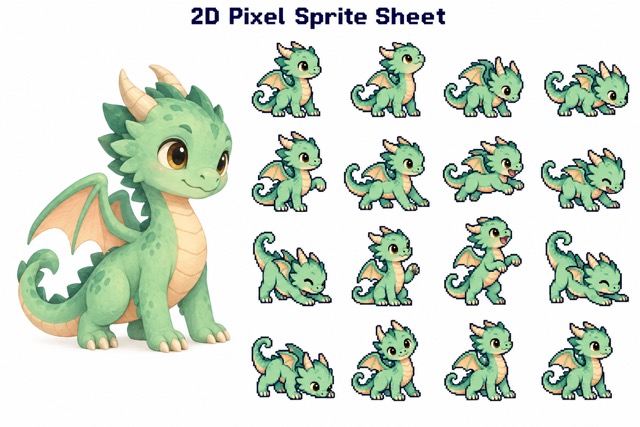
Create a 2D pixel sprite sheet from your character idea or image. Explore a 2D pixel art character sheet with distinct action poses and nostalgic pixel styling. Generate your 2D pixel sprite sheet, then preview the result.
How to Create a 2D pixel sprite sheet
Start your 2D pixel sprite sheet with a written character idea or an uploaded image. Your 2D pixel art character sheet follows a simple describe-or-upload, generate, and preview workflow. Pixel styling and the action layout are built into this 2D pixel sprite sheet.

Describe or Upload Your Character
In Text to Image, describe the character for your 2D pixel sprite sheet: species, clothing, colors, accessories, and personality. In Image to Image, upload one clear reference for your 2D pixel art character sheet. Your 2D pixel sprite sheet can start from either a new idea or an existing design.

Click Generate
Click Generate to create your 2D pixel sprite sheet with GPT Images 2.5 Flare or Sunburst. Your 2D pixel art character sheet receives the built-in pixel style and 4x4 action layout. In Image to Image, your 2D pixel sprite sheet uses the uploaded character without requiring a prompt.

Let the Actions Develop
Wait while the 2D pixel sprite sheet is generated. The requested 2D pixel art character sheet moves through preparation, movement, a signature action, and recovery. Generation time can vary; let the 2D pixel sprite sheet finish before judging its visual continuity.

Preview the Different Poses
Preview the completed 2D pixel sprite sheet and examine the intended sixteen action frames. Check your 2D pixel art character sheet for visibly changing poses and consistent character details. Review the final 2D pixel sprite sheet for missing frames, repeated poses, or alignment changes before further editing.
Best AI Image Tools for Creative Projects
Explore creative tools for image, learn tips and tricks, and see how AI can be your assistant in turning concepts into finished projects.






















A 2D pixel sprite sheet Built Around Your Character
Give your 2D pixel sprite sheet a clear action progression instead of repeated static poses. This 2D pixel art character sheet combines your character design, restrained colors, and expressive movement. Each 2D pixel sprite sheet is an image to review and refine for your project.
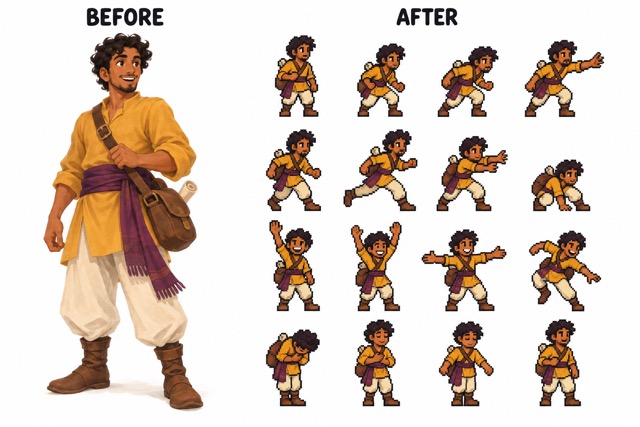
Build a 4x4 2D pixel sprite sheet
Create a readable 2D pixel sprite sheet around sixteen requested frames arranged in four rows. The 2D pixel art character sheet direction asks for one character, one scale, and consistent colors throughout. View your 2D pixel sprite sheet as a sequence: preparation, movement, a signature action, and recovery. This 2D pixel art character sheet gives the character a clear progression and return.
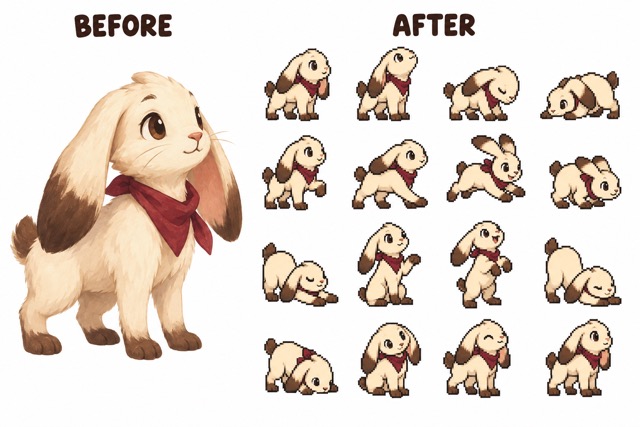
Give Your 2D pixel art character sheet Expressive Poses
A memorable 2D pixel sprite sheet needs more than repeated silhouettes. This 2D pixel art character sheet requests distinct progressive poses with clear changes in stance, limb placement, or expression. The 2D pixel sprite sheet uses movement appropriate to the character: a person can reach, a creature can stretch, and a robot can extend an arm. Your 2D pixel art character sheet aims for expressive actions that remain anatomically coherent.
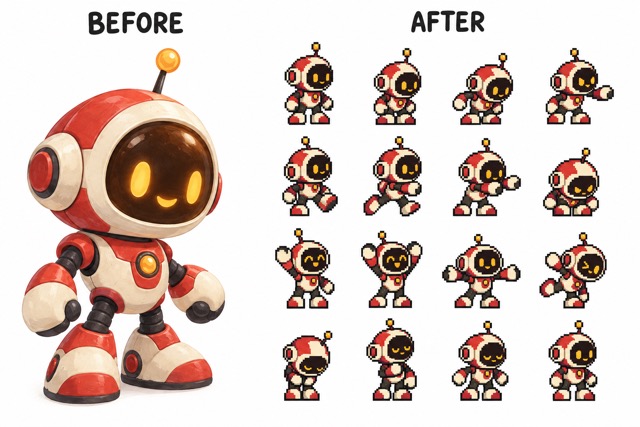
Create a Retro 2D pixel sprite sheet Look
Bring a nostalgic handheld-game feel to your 2D pixel sprite sheet. The 2D pixel art character sheet prompt requests recognizable character proportions, thick dark outlines, readable pixels, and flat shading with two or three tones per color. Your 2D pixel sprite sheet targets a 64x64-per-frame visual style on pure white. Inspect the 2D pixel art character sheet closely: exact pixel dimensions and clean edges may need manual adjustment.
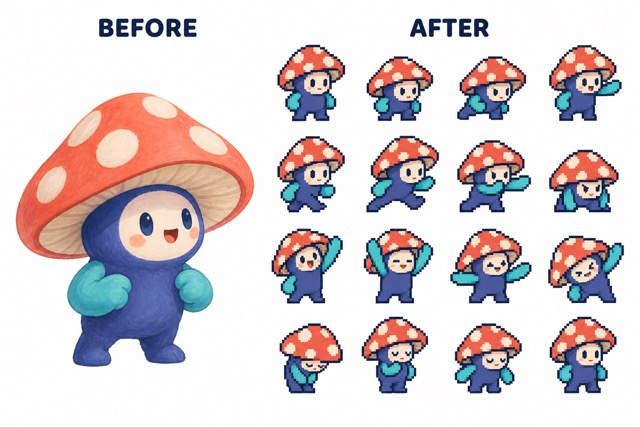
Review a Consistent 2D pixel art character sheet
The 2D pixel sprite sheet uses your character description or uploaded image as its design guide. Your 2D pixel art character sheet aims to keep species, proportions, outfit, colors, and signature details consistent. The 2D pixel sprite sheet ending returns toward the opening pose to support a looping concept. Check your 2D pixel art character sheet frame by frame before slicing, timing, or animating it elsewhere.
Where Your 2D pixel sprite sheet Can Begin
Use a 2D pixel sprite sheet to explore a small character moment for games, stories, or art studies. A 2D pixel art character sheet helps you compare expression and costume details in one view. Treat each 2D pixel sprite sheet as a creative starting point that you can refine.

Indie Game Character Concepts
Explore a 2D pixel sprite sheet for a human, animal, robot, monster, or mascot concept. A 2D pixel art character sheet can help you judge whether the character’s action sequence fits your scene. Review the character sheet before preparing engine-specific assets.
Visual Novel Scene Planning
Use a 2D pixel sprite sheet to plan a small character reaction within a scene. Your 2D pixel art character sheet offers expressions to discuss alongside dialogue and pacing. Keep the character sheet nearby while deciding which emotional beats matter most.

Pixel Art Practice
Study a 2D pixel sprite sheet to compare silhouettes, outlines, and limited shading. A 2D pixel art character sheet can suggest ways to simplify fur, armor, clothing, or mechanical details. Examine the character sheet critically and redraw inconsistent pixels as part of your practice.

Animation Blocking Studies
Read a 2D pixel sprite sheet from left to right to examine the intended action. A 2D pixel art character sheet makes changes in posture and accessory position easier to compare. Use the character sheet as reference when testing frame timing in a separate animation editor.

Character Portfolio Concepts
Build a 2D pixel sprite sheet as part of a clearly labeled AI-assisted character exploration. Present the 2D pixel art character sheet with your own cleanup and design decisions. A refined 2D pixel art character sheet can communicate the relationship between a character’s design and movement.
Creative Perspectives on a 2D pixel sprite sheet
These six fictional testimonials illustrate possible creative reactions to a 2D pixel sprite sheet and a 2D pixel art character sheet. They are examples, not verified customer reviews or reports of measured results.
I would use a 2D pixel sprite sheet to explore an NPC with a distinctive silhouette and expressive action poses. A 2D pixel art character sheet would help me compare how the design holds together across poses before committing to the final character animation.
A 2D pixel sprite sheet would give me a concrete sequence to study. I would look through the 2D pixel art character sheet for poses worth redrawing, then test how different frame durations change the movement.
I can imagine a 2D pixel sprite sheet beside a character-driven story scene. A 2D pixel art character sheet would help me discuss the expression and small gestures with an artist without relying only on written descriptions.
I would treat a 2D pixel sprite sheet as a practice reference for small shapes and color groups. Comparing the 2D pixel art character sheet frames would help me spot details that need a cleaner, more deliberate pixel treatment.
For a 2D pixel sprite sheet, I would pay attention to the silhouette, accessories, and color palette across the sequence. A 2D pixel art character sheet would make it easier to identify where the design drifts and needs my own corrections.
A 2D pixel sprite sheet would be a useful way to visualize one small character moment. I would review the 2D pixel art character sheet, select the strongest poses, and prepare the frames for the requirements of my own prototype.






2D pixel sprite sheet FAQ
Understand what your 2D pixel sprite sheet is designed to create and how to review your 2D pixel art character sheet before using the artwork in a larger project.
A 2D pixel sprite sheet arranges multiple pixel-style character poses in a single image. This page requests sixteen progressive action frames. A 2D pixel art character sheet can show character design and expression references; here, the 2D pixel art character sheet focuses on varied action poses rather than a front-side-back turnaround.
For a 2D pixel sprite sheet, choose Text to Image and describe your character, or choose Image to Image and upload one reference. Your selected GPT Images 2.5 model combines your idea with the built-in rules for your 2D pixel art character sheet. In Image to Image, the 2D pixel art character sheet uses your upload and the prompt box is hidden; click Generate and preview the result.
The 2D pixel sprite sheet can start from humans, animals, robots, monsters, or mascots. Describe a new design in Text to Image, or upload an existing character for your 2D pixel art character sheet. The 2D pixel art character sheet aims to preserve the chosen design throughout the action frames; review it for identity drift.
The result is a 2D pixel sprite sheet image for preview, not a promised GIF, video, or game-engine animation. Your 2D pixel art character sheet requests a loop-friendly ending. To animate the 2D pixel art character sheet, inspect and slice the frames, set timing, and test the return to frame one in suitable software.
The 2D pixel sprite sheet prompt requests 64x64 pixels per frame, a 4x4 layout, and consistent scale. These are generation targets rather than guaranteed export specifications. Check the actual 2D pixel art character sheet dimensions and frame boundaries; resize, align, or redraw your 2D pixel art character sheet where necessary.
Count the frames in your 2D pixel sprite sheet, then compare silhouettes, colors, accessories, and alignment. Your 2D pixel art character sheet should show clearly different actions without accidental extra limbs or missing props. Review the white background, frame boundaries, and transition from the final pose back to the first.
Create Your Next 2D pixel sprite sheet
Turn a character idea or reference image into a 2D pixel sprite sheet concept. Generate your 2D pixel art character sheet, preview the different action poses, and choose what to refine. Your next 2D pixel sprite sheet begins with a description or an upload.
