

More AI Image Generators
Explore our collection of specialized AI image generators designed for different creative needs and styles

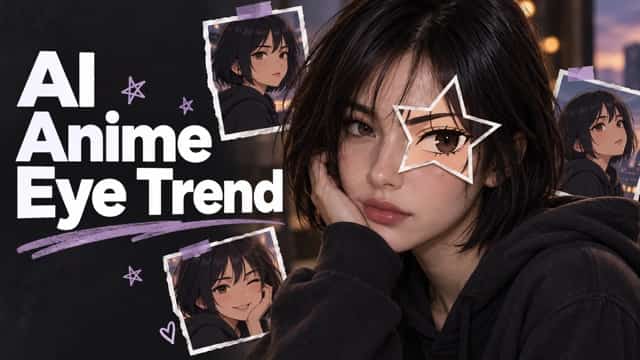









AI Purikura Filter: Turn Photos into Kawaii Booth Pics
Create Japanese photo booth-inspired portraits with sparkling eyes, soft skin, pastel color, stickers, doodles, and playful Purikura charm.
Bring classic Japanese photo booth energy to any selfie with the AI Purikura Filter. Upload a portrait and transform it into a polished Purikura-style image with bright eyes, rosy cheeks, smooth skin, pastel tones, cute stickers, hearts, stars, sparkles, bows, and handwritten-style doodles. The effect keeps the person recognizable while adding the exaggerated sweetness and decorative detail associated with Japanese Purikura photos. Whether you are editing a solo selfie, a best-friend photo, a couple portrait, or a group shot, the AI Purikura Filter gives you a quick way to create shareable kawaii visuals without manually layering effects.
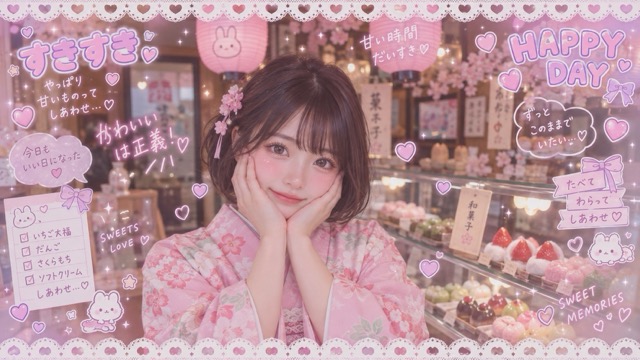
How to Use the AI Purikura Filter
Create a Japanese Purikura-style photo in three quick steps. Upload your image, generate the effect, and download your favorite result.

Upload Your Photo
Upload a clear selfie, couple photo, or group picture. Well-lit images with visible faces help the AI Purikura Filter create cleaner and more recognizable results.

Click Generate
Click Generate and let the AI Purikura Filter add sparkling eyes, soft skin, pastel colors, hearts, stickers, glitter, and kawaii photo booth details automatically.

Download Your Photo
Preview your Purikura Filter result and download the image you like. Save it for profile pictures, social posts, couple memories, or friendship photos.
Best AI Image Tools for Creative Projects
Explore creative tools for image, learn tips and tricks, and see how AI can be your assistant in turning concepts into finished projects.





















Create the Signature Purikura Look with AI
The AI Purikura Filter combines face-focused enhancement with the decorative style of Japanese sticker photo booths. Instead of applying one flat color preset, it blends multiple visual cues that people associate with Purikura: expressive eyes, polished skin, pink blush, pastel color, glossy highlights, playful graphics, and compact photo booth composition. The Purikura Filter gives you a recognizable style while keeping enough flexibility for selfies, couples, friends, and group photos.
Sparkling Eyes and Soft Beauty Retouching
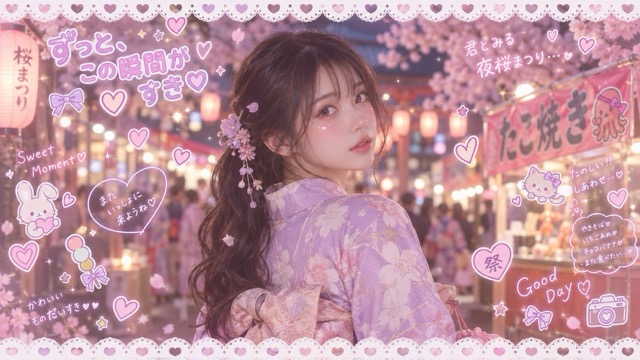
Large, bright eyes are one of the most recognizable parts of the Purikura aesthetic. The AI Purikura Filter can enhance eye brightness, catchlights, lashes, and overall facial polish while keeping the portrait recognizable. It can also soften skin texture, add gentle blush, and create a fresh glossy finish without requiring manual retouching. The Purikura Filter works best when the original face is clear and well lit, because subtle identity details can be preserved while the kawaii styling becomes more noticeable. Use the AI Purikura Filter when you want a cute photo booth look rather than a dramatic character transformation.
Pastel Colors, Glitter, and Kawaii Decorations
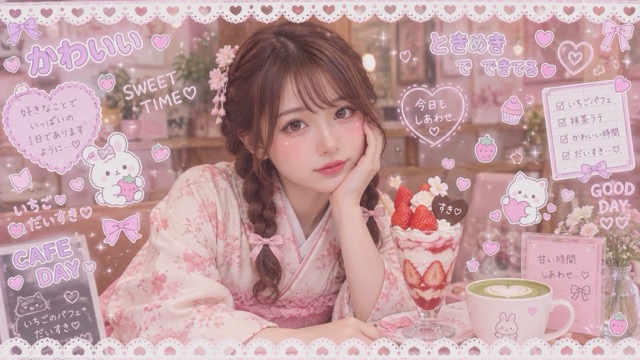
Purikura photos are not only about the face; the decorations are part of the fun. The AI Purikura Filter can add pastel pink, lavender, blue, peach, and cream tones together with sparkles, hearts, stars, bows, flowers, glossy highlights, and hand-drawn-style accents. The Purikura Filter helps create a fuller Japanese photo booth effect without making you place every sticker manually. Use the AI Purikura Filter for soft romantic edits, playful friendship photos, bright birthday images, or nostalgic Y2K-inspired visuals.
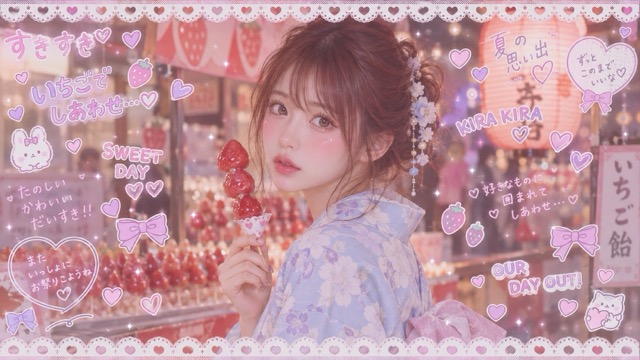
Keep Faces Recognizable in Couple and Group Photos
A good Purikura result should still feel like the people in the original photo. The AI Purikura Filter focuses on beautification and decoration instead of fully replacing faces with illustrated characters. This makes the Purikura Filter suitable for couples, close friends, classmates, siblings, and small groups who want a shared Japanese photo booth look. The AI Purikura Filter can coordinate color, glow, stickers, and framing across multiple faces so the finished image feels like one cohesive Purikura print rather than several unrelated edits.
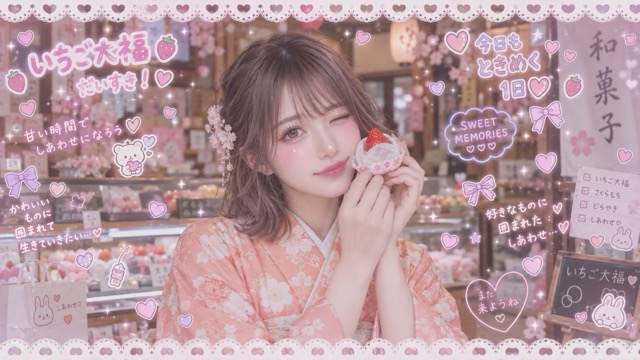
Turn Everyday Photos into Shareable Purikura Moments
The AI Purikura Filter can turn an ordinary phone photo into a more expressive, decorative visual that is ready for sharing. Try it with casual selfies, date-night pictures, birthday snapshots, travel photos, festival portraits, school memories, or friendship photos. The Purikura Filter gives these images a consistent kawaii mood with pastel styling and playful embellishments. Use the AI Purikura Filter when you want a photo to feel more personal, nostalgic, cheerful, or visually distinctive without spending time on complex editing tools.
AI Purikura Filter for Selfies, Friends, Couples, and More
The AI Purikura Filter fits naturally into the kinds of photos people already take and share. Use the Purikura Filter to add Japanese photo booth character to personal portraits, relationship photos, social content, and memory-making moments while keeping the people in the picture recognizable.

Cute Selfies and Profile Pictures
Give everyday selfies a playful Japanese photo booth finish with the AI Purikura Filter. Brighter eyes, blush, smoother skin, pastel tones, and small decorative details can make a simple portrait feel more polished and expressive. The Purikura Filter is useful for profile pictures, story posts, messaging avatars, and casual social updates when you want something cuter than a standard beauty filter but still recognizably you.

Best-Friend Purikura Photos
Recreate the feeling of taking sticker photos together without needing to visit a physical booth. The AI Purikura Filter can give two or more friends matching color, glow, sparkles, hearts, stickers, and playful doodles. The Purikura Filter is ideal for friendship anniversaries, trips, school memories, sleepovers, birthdays, and shared social posts. Generate several variations with the AI Purikura Filter and choose the one that best matches your group personality.

Couple Photos and Date Memories
Turn a favorite couple photo into a romantic Purikura-style keepsake. The AI Purikura Filter can add soft pink tones, glow, hearts, stars, cute frames, and sweet decorative accents while enhancing both faces consistently. The Purikura Filter works well for anniversaries, date-night photos, vacation memories, digital scrapbooks, and private messages. Use the AI Purikura Filter to create a playful visual that feels more personal than an ordinary photo filter.

Social Posts and Kawaii Content
Create eye-catching content for TikTok, Instagram, Pinterest, X, or other social platforms with the AI Purikura Filter. The decorative Purikura look can help portraits stand out through pastel color, expressive eyes, sparkles, and sticker-like graphics. The Purikura Filter is also useful for mood boards, fan pages, digital collages, party posts, and nostalgic Y2K-inspired content. The AI Purikura Filter gives creators a fast way to build a recognizable kawaii visual mood across multiple photos.
Why People Enjoy the AI Purikura Filter
The AI Purikura Filter is built for playful photo transformation, quick experimentation, and easy social sharing.
I used the AI Purikura Filter on a selfie with my best friend and loved how the eyes, blush, and stickers matched without changing our faces too much. The Purikura Filter gave the photo a real photo booth feeling.
The AI Purikura Filter made our couple picture feel cute without turning us into anime characters. The Purikura Filter kept us recognizable and added just enough hearts, glow, and pastel color.
I like using the AI Purikura Filter for birthday photos because it creates a fun sticker booth style much faster than adding effects by hand. The Purikura Filter works especially well on clear group photos.
The AI Purikura Filter gave my travel selfies a cute Japanese photo booth mood that worked perfectly in a digital scrapbook. The Purikura Filter made the whole set feel more consistent.
I wanted a Y2K kawaii look for social posts, and the AI Purikura Filter gave me pastel color, sparkles, and decorative details in one step. The Purikura Filter was much faster than manual editing.



AI Purikura Filter FAQ
Learn what the AI Purikura Filter does, how the Purikura Filter differs from anime and beauty effects, which photos work best, and how to create more convincing Japanese photo booth-style results.
An AI Purikura Filter is an image-to-image effect that transforms ordinary portraits into photos inspired by Japanese Purikura booths. The AI Purikura Filter can enhance eyes, soften skin, add blush, brighten color, and decorate the photo with hearts, stars, sparkles, bows, frames, and doodles. A Purikura Filter is different from a simple color preset because it changes both facial presentation and decorative styling to create a more complete photo booth look.
Purikura is a Japanese style of sticker photo booth photography known for highly decorated portraits. Traditional Purikura machines often enhance faces and let users add writing, stickers, borders, icons, and other decorations before printing small photo stickers. The AI Purikura Filter recreates that visual idea digitally. Instead of visiting a booth, you can use the Purikura Filter on a phone or computer photo to create a similar kawaii mood.
No. The AI Purikura Filter is intended to keep the people in the original photo recognizable while enhancing features and adding cute decoration. An anime filter usually redraws the person as an illustrated or animated character. The Purikura Filter stays closer to a beautified photo booth portrait, with brighter eyes, smoother skin, blush, pastel color, sparkles, hearts, and stickers. Use the AI Purikura Filter when you want kawaii photo styling without a complete character conversion.
Yes. The AI Purikura Filter can work well for couples, friends, classmates, siblings, and small group photos when faces are visible and reasonably well lit. A clear image gives the Purikura Filter more information to preserve facial identity while applying consistent enhancement and decorations. For the best result, avoid heavy blur, extreme shadows, tiny distant faces, or people blocking one another.
Choose a clear portrait with visible eyes, balanced lighting, and faces large enough to see. Selfies, waist-up portraits, couple photos, and small group pictures are strong starting points for the AI Purikura Filter. The Purikura Filter can still stylize casual phone photos, but cleaner source images usually create better facial detail and more balanced decorations. Try a different crop or photo if the first result feels too busy or the faces are difficult to recognize.
Yes, Purikura-style images are well suited to personal social posts, profile pictures, stories, digital scrapbooks, mood boards, and friendship or couple collages. The AI Purikura Filter creates a colorful, expressive look that fits TikTok, Instagram, Pinterest, and other visual platforms. Before publishing, review the Purikura Filter result for any unwanted facial or text artifacts and make sure you have permission to share photos of other people.
Create a Kawaii Photo with the AI Purikura Filter
Turn your favorite selfie, couple portrait, friendship photo, or group shot into a playful Japanese photo booth-inspired image. The AI Purikura Filter adds expressive beauty enhancements, pastel color, sparkles, hearts, stickers, and doodles while keeping the people in your photo recognizable. Try the Purikura Filter and create a cute, nostalgic image ready for sharing or saving.
