






More AI Image Generators
Explore our collection of specialized AI image generators designed for different creative needs and styles













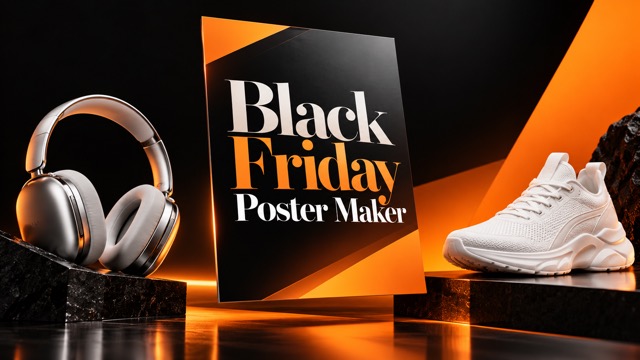
Black Friday Poster Maker
Upload Your Photo, Pick A Style, Make A Sale Poster
Give your product photo a Black Friday makeover without writing a design prompt. SuperMaker's black friday poster maker offers four ready-to-use looks, from bold red promotions to understated cream layouts. Upload a clear photo, choose the style that fits your shop, and generate a poster with a seasonal headline. Review your result, download your favorite, and prepare it for your store, social feed, or next campaign.
How To Use The Black Friday Poster Maker
Start with a clear photo of the product you want to promote. Choose a ready-made visual style, then generate and download a seasonal poster in three straightforward steps.

Upload Your Photo
Upload one clear product photo with the item fully visible. Use a well-lit shot of a single product or a neatly arranged set. Choose an image with recognizable details and enough space around the subject to give the poster a useful starting point.

Choose Your Style
Select Bold Red Sale, Black And Gold, Minimal Cream, or Electric Blue. Each option supplies its own visual direction, including colors, lighting, background, and headline treatment. Pick the look that suits your product and the mood you want for your seasonal promotion.

Generate And Download
Click Generate Image to create your poster, then review the headline and product details at full size. Download the version you like, or choose another style and generate again. Add any exact discounts, dates, or store details afterward in your preferred editor.
Best AI Image Tools for Creative Projects
Explore creative tools for image, learn tips and tricks, and see how AI can be your assistant in turning concepts into finished projects.




















Four Styles For Your Black Friday Poster
Choose a look directly in the generator. Each preset gives the black friday poster generator a different creative direction while using your uploaded product as the starting point. Compare the styles by mood, merchandise, and the kind of promotion you want to present.
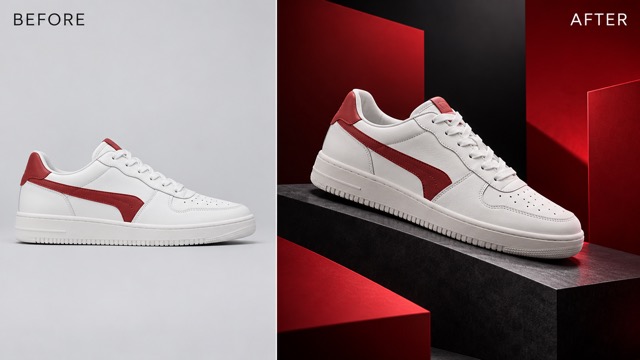
Bold Red Sale
Give your promotion a strong retail feel with crimson shapes, a charcoal background, and a bold seasonal headline. This preset suits products that benefit from an energetic presentation, including sneakers, accessories, and everyday essentials. The AI black friday poster maker uses your photo as the starting point for a striking product composition. Choose this look when you want a direct sale announcement, then add your real offer separately if needed.
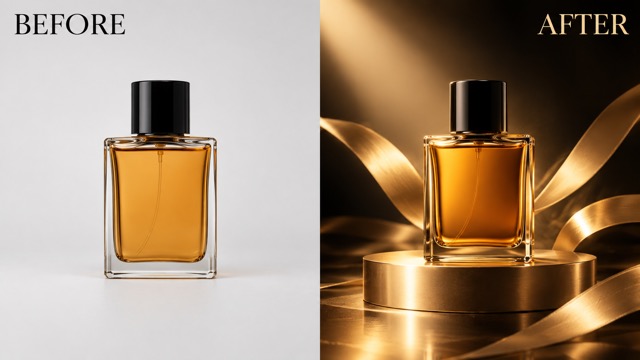
Black And Gold
Frame your product with warm gold lighting, dark surfaces, and a more refined headline treatment. This style is a natural creative direction for fragrance, beauty products, jewelry, and gift collections. The black friday sale poster maker builds the promotional scene around the uploaded item, with space for the seasonal message. Use it when your campaign should feel polished and considered, with the merchandise taking priority over a crowded arrangement of sale graphics.
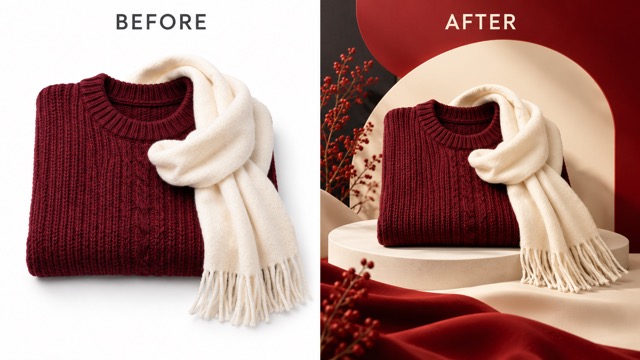
Minimal Cream
Choose a softer promotion with an ivory background, warm shadows, restrained accents, and generous breathing room. This preset works as a visual direction for clothing, homeware, handmade goods, and simple product sets. For a Black Friday flyer maker workflow, use the generated design as your starting artwork and prepare the final layout in your preferred editor. The clean composition leaves room for practical details without starting from a busy design.
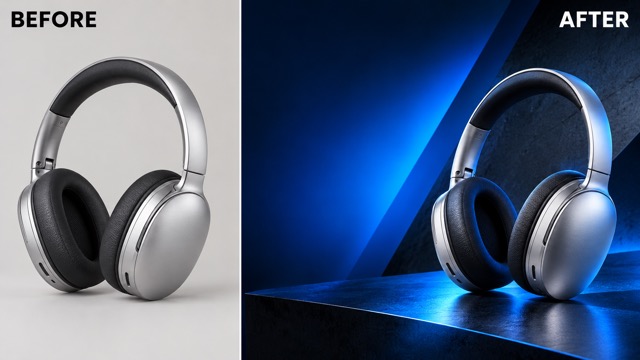
Electric Blue
Explore a contemporary look with electric blue lighting, charcoal shapes, and a clean product-focused composition. Try this style for headphones, electronics, gaming accessories, or merchandise that suits a cooler palette. For a Black Friday banner maker workflow, use the downloaded artwork as a creative starting point. Check the spacing around the headline and product, then adapt the design to the exact dimensions your store header or email campaign needs.
Sale Visuals For The Way You Sell
Choose the product first, then match the style to your audience. These everyday selling scenarios show how a photo-based workflow can help you prepare a seasonal visual without starting with a blank design brief.

Online Stores And Product Launches
For ecommerce teams preparing a seasonal promotion, the black friday poster maker starts with the product photo already used in the shop. Upload a bestseller, bundle, or featured item and compare the four styles. A recognizable product gives the campaign a clear focal point, while the generated layout provides a visual starting point for store and social placements.

Independent Shops And Market Sellers
Boutique owners and market sellers can turn a photograph of their merchandise into a seasonal poster without describing lighting or layout from scratch. Choose Minimal Cream for a quieter look or Bold Red Sale for a stronger promotional feel. Add your actual opening hours, location, or special offer to the downloaded artwork before sharing it with local shoppers.

Social Media Campaign Managers
When preparing a sequence of sale posts, use the same preset across related product photos to give the campaign a shared direction. Generate one poster for the main item and another for a featured category, then review them together. The preset guides the palette and mood, while your final selection keeps the campaign visually coherent across its different placements.

Freelancers And Small Creative Teams
Designers and small marketing teams can use the black friday poster generator to compare several creative routes from one product photo. Try the same item in contrasting presets, review the mood and product presentation, and choose a direction for further work. This creates a tangible starting point for client discussion, with final lettering and production details completed in the team's usual tools.
What Sellers Value In A Sale Poster Workflow
These fictional testimonials illustrate the priorities of different sellers and creative teams. They are sample evaluations, not verified customer endorsements, and focus on the practical decisions involved in preparing a seasonal campaign.
I like starting with a photo of the product we actually stock. Picking a ready-made style makes it easier to explore a seasonal look without first writing a detailed design brief.
The four looks give our team a useful starting point for discussion. Seeing the same product in a bold promotion and a quieter layout helps us choose a campaign direction.
Comparing styles from one photo helps me make the first creative decision. Once the mood and product placement feel right, I can focus on the client's final lettering and details.
A simple upload-and-select process suits the way I prepare shop updates. The softer style gives handmade products room to stand out without surrounding them with too many promotional graphics.
I prefer trying the same preset across related products, then reviewing the results together. It gives the campaign a shared visual direction while leaving room to choose the strongest individual images.
For a market promotion, I want a clear product and a readable seasonal headline. Downloading a design first lets me add the exact location and event details before sharing it.






Black Friday Poster Maker Questions
Find out how the upload-and-select workflow works, which style to try, and what to check before downloading. Start with a clear product photo and let the selected preset guide the design.
Upload one product photo, select a style, and click Generate Image. This page uses Nano Banana Pro with image input and ready-made style instructions. You do not need to write a prompt. Review the resulting artwork and download your selected poster, or switch styles and generate a different version.
The four options are Bold Red Sale, Black And Gold, Minimal Cream, and Electric Blue. Choose red for an energetic promotion, gold for a premium mood, cream for a quieter presentation, or blue for a contemporary look. These are creative directions you can apply to your uploaded product photo.
The presets request a BLACK FRIDAY headline and a SHOP NOW call to action, without inventing discounts, prices, or dates. This simplified workflow does not include a custom offer field. Add your real promotion details to the downloaded artwork in your preferred design editor, then check them before sharing.
You can use the downloaded poster as starting artwork for a flyer or banner. This AI black friday poster maker creates a styled image from your photo; prepare the final layout and dimensions in your preferred editor. Check that the product and headline remain clear when adapting the design to a different shape.
Use a clear, well-lit photo of one product or a coordinated set, with the subject fully visible. Avoid heavily cropped items or images where several unrelated products compete for attention. After generating, compare the shape, color, packaging, and any recognizable details with your original photo before choosing the final poster.
You can select a different preset and generate another version from your uploaded photo; check the displayed credit cost before each run. Download your preferred result. For printing, confirm the required dimensions, resolution, bleed, and color handling with your printer, and inspect the headline and product details at the intended size.
Create Your Next Black Friday Sale Poster
Turn a product photo into a seasonal promotion with the black friday poster maker. Upload your image, choose one of four styles, and generate a design to review and download. Start with your featured item, then add your exact offer details when preparing the final campaign artwork.
