



More AI Image Generators
Explore our collection of specialized AI image generators designed for different creative needs and styles












Preview a Buzz Cut Look with AI Buzz Cut Filter
Upload a portrait and use AI Buzz Cut Filter to visualize a clean, close-cropped hairstyle.
AI Buzz Cut Filter turns one clear portrait into a focused hairstyle preview. Explore a close crop before visiting the barber, compare the edited result with your original, and use AI Buzz Cut Filter as a practical visual reference.
How to Use AI Buzz Cut Filter
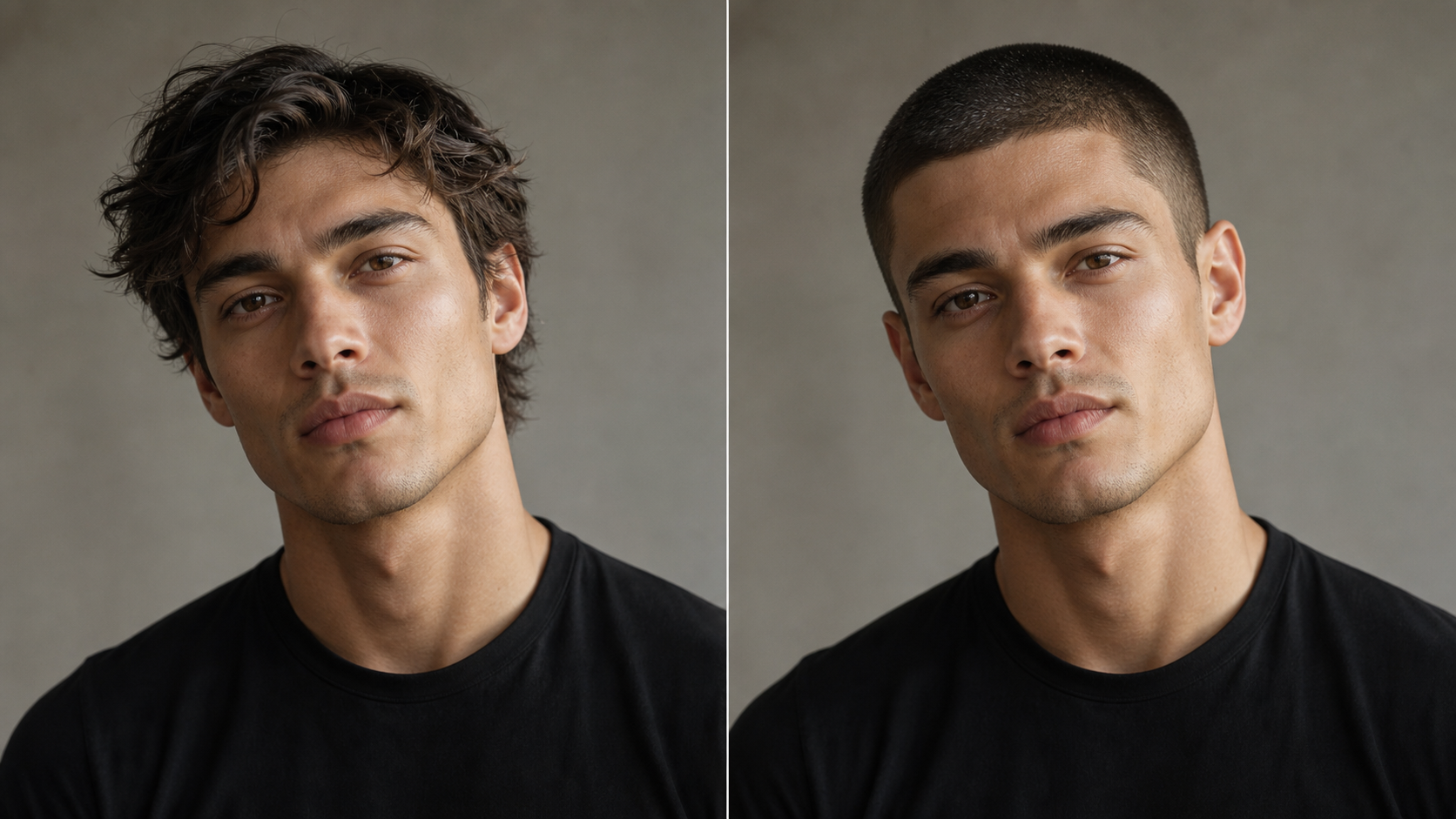
The AI Buzz Cut Filter workflow stays centered on one useful task: upload a clear portrait, create a believable close-cropped preview, then compare the result with your original before deciding whether the hairstyle feels right.

Upload a Portrait to AI Buzz Cut Filter
A straightforward angle gives AI Buzz Cut Filter better visual context for the intended haircut change. AI Buzz Cut Generator works from your existing portrait, so start with an image that already represents the expression and framing you want to keep.

Generate with AI Buzz Cut Filter
Start the transformation and let AI Buzz Cut Filter replace the visible hairstyle with a neat, close-cropped buzz cut. The edit should follow the existing head shape and hairline. AI Buzz Cut Filter focuses the change on the hair instead of rebuilding the entire portrait.

Compare and Save Your Look
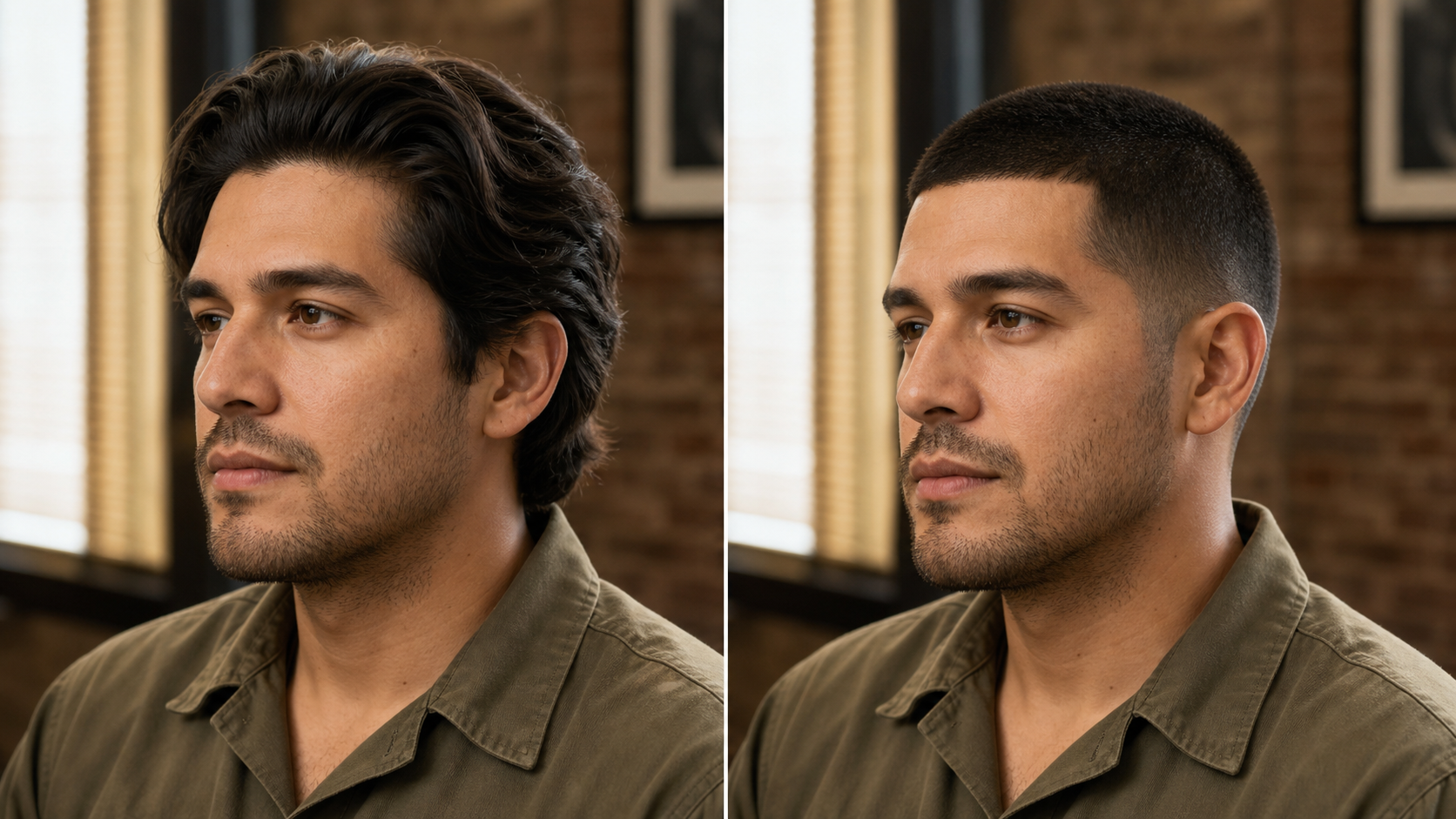
Review the original and transformed portraits side by side, paying attention to the hairline, overall silhouette, and how the shorter style frames the face. If the preview supports your decision, save the result as a personal reference or bring it to a haircut conversation.
Best AI Image Tools for Creative Projects
Explore creative tools for image, learn tips and tricks, and see how AI can be your assistant in turning concepts into finished projects.























What AI Buzz Cut Filter Helps You Explore
AI Buzz Cut Filter supports the decisions around a dramatic short haircut, from seeing the overall silhouette to communicating a direction. Each feature keeps the uploaded portrait central so the preview remains personal and easy to compare.
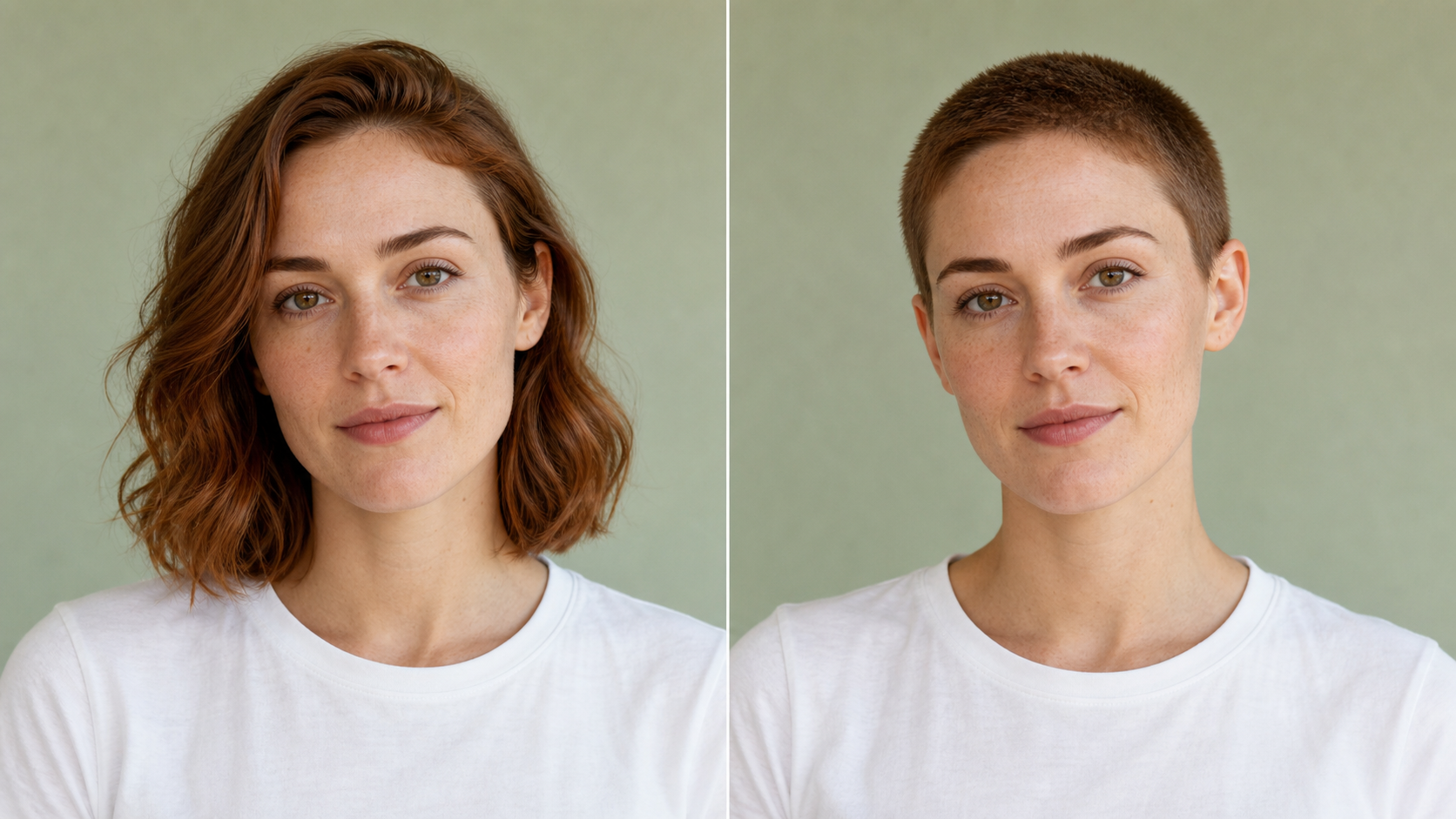
See the AI Buzz Cut Filter Preview Before You Commit
A major haircut can feel difficult to picture from reference photos alone because every face and head shape reads differently. AI Buzz Cut Filter places the short style directly on your portrait, giving you a more personal point of comparison. Use the AI Buzz Cut Generator to examine the new silhouette, notice how much attention shifts toward facial features, and decide what questions to ask before the real cut.
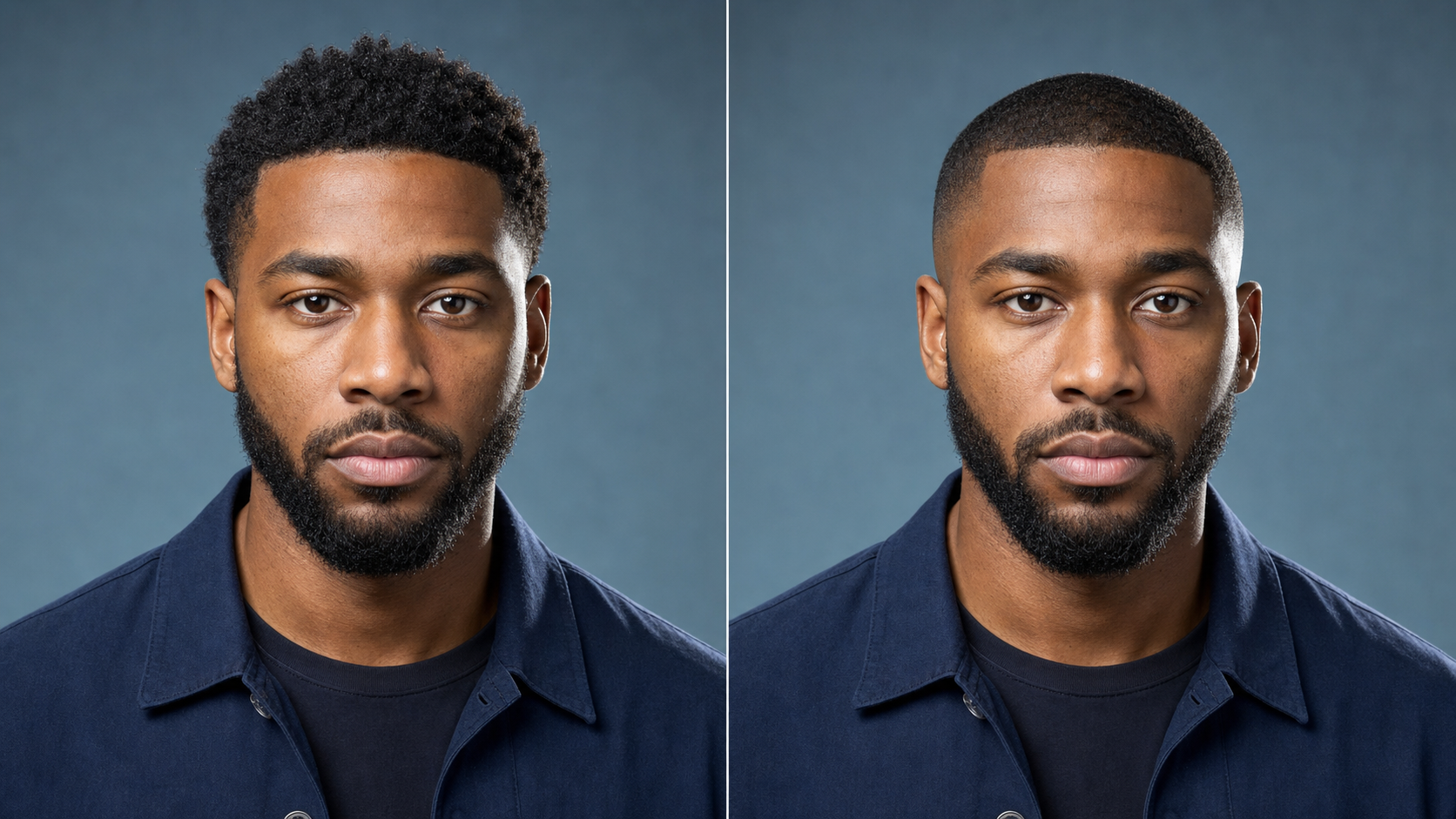
How AI Buzz Cut Filter Keeps the Portrait Yours
A useful virtual try-on should change the hairstyle without changing the person. AI Buzz Cut Filter is designed around that editing goal: preserve facial structure, skin tone, expression, gaze, pose, clothing, background, and the photograph’s lighting while creating a close crop. With Buzz Cut Filter AI, the before-and-after comparison remains meaningful because the haircut is the clear visual difference rather than an entirely regenerated portrait.
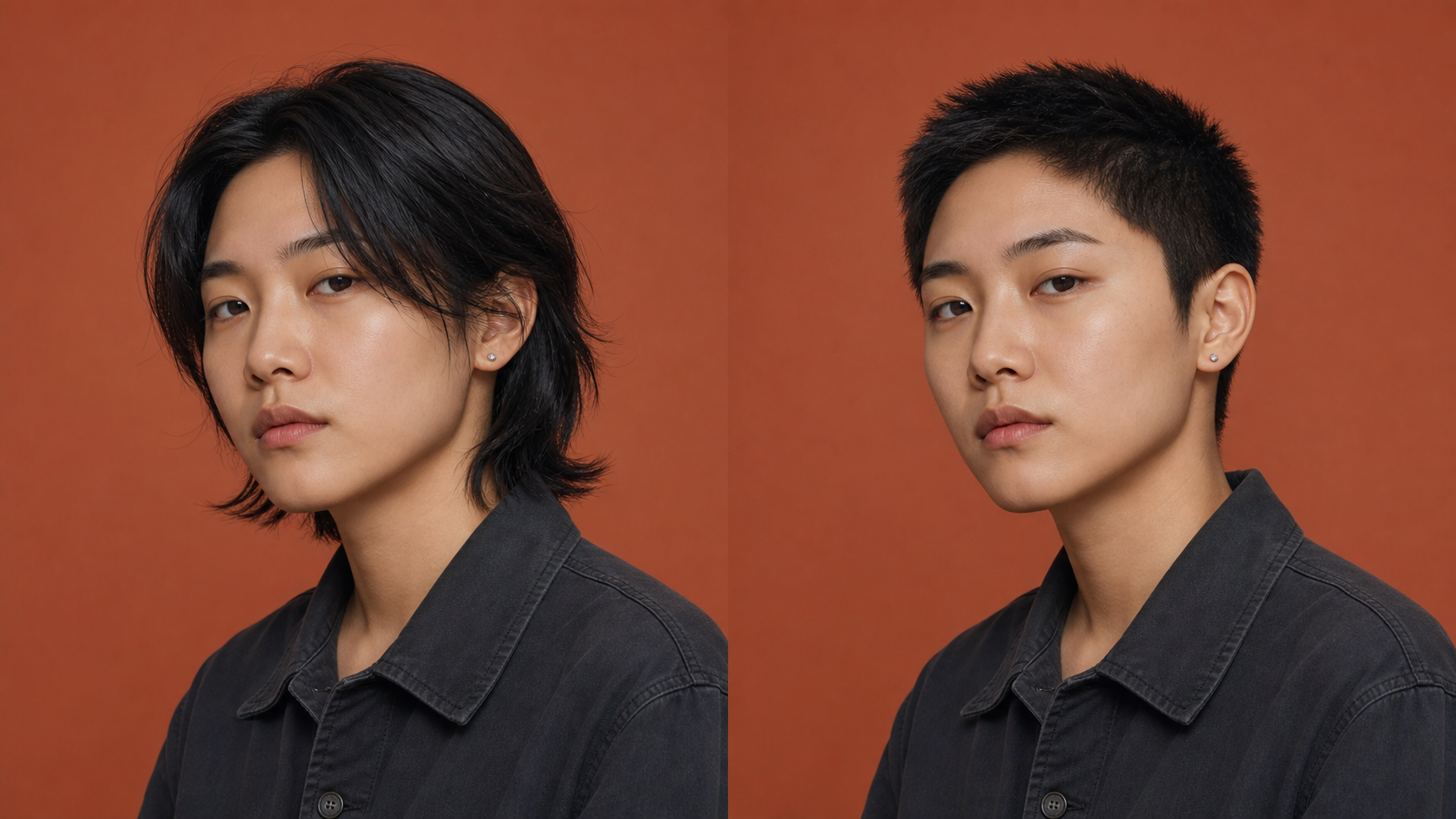
Explore Different AI Buzz Cut Filter Directions
Buzz cuts can look softer, sharper, shorter, or slightly fuller depending on the top length, temple area, edge treatment, and fade direction. AI Buzz Cut Filter helps you think through those visual variables on your own face. Treat each AI Buzz Cut Generator result as a concept rather than a technical barber measurement, then compare alternatives and choose the direction that best matches your taste and maintenance preferences.
Create an AI Buzz Cut Filter Reference for Your Barber
Words such as short, tight, or clean can mean different things to different people. A preview from AI Buzz Cut Filter can make a haircut discussion more concrete by showing the overall shape you have in mind. Bring the Buzz Cut Filter AI image as a visual starting point, then ask your barber how hair density, growth pattern, head shape, and preferred upkeep may affect the real-world version.
Practical Ways to Use AI Buzz Cut Filter
AI Buzz Cut Filter can support personal grooming choices, creative references, and clearer conversations. These use cases focus on thoughtful previewing rather than promising that a generated portrait will predict every detail of a real haircut.

Plan a Major Change with AI Buzz Cut Filter
Going from medium or long hair to a close crop changes the balance of a portrait and reveals more of the head shape. AI Buzz Cut Filter gives you a low-stakes way to study that shift before making an appointment. Use the AI Buzz Cut Generator as one decision input alongside professional advice, your natural hair pattern, and the amount of maintenance you are comfortable handling.

Compare Crop Directions with AI Buzz Cut Filter
Some people prefer an even, utilitarian crop, while others want more contrast around the sides and temples. AI Buzz Cut Filter can help organize that preference visually by letting you compare how different short-cut directions frame the same face. A Buzz Cut Filter AI preview is not a precise clipper specification, but it can clarify whether you favor a softer outline or a sharper, more structured finish.

Use AI Buzz Cut Filter for Practical Planning
A shorter hairstyle may appeal before a hot season, a demanding routine, travel, sports, or another lifestyle change. AI Buzz Cut Filter helps you evaluate the visual side before adjusting the practical side. Run the AI Buzz Cut Generator on a recent portrait, then consider upkeep, scalp exposure, workplace expectations, and how frequently you may want the edges refreshed after the real haircut.

Build Character References with AI Buzz Cut Filter
Writers, illustrators, costume teams, and portrait photographers often need a quick way to explore a character’s visual direction. AI Buzz Cut Filter can create a grounded hairstyle reference while keeping the source person’s pose and expression consistent. Use Buzz Cut Filter AI for early look development, then refine the concept with original styling, wardrobe, lighting, and professional creative judgment for the final production.

Share an AI Buzz Cut Filter Preview for Feedback
Feedback is more useful when everyone is reacting to the same visual idea. AI Buzz Cut Filter lets you share a specific preview instead of describing a hypothetical haircut in vague terms. Show both the original and the AI Buzz Cut Generator result, ask what changes in the overall impression, and weigh those reactions against your own preference rather than treating a group vote as the final decision.

Revisit Short Hair with AI Buzz Cut Filter
If you once wore a very short style, a recent portrait can help you imagine how the look might read today. AI Buzz Cut Filter applies the idea to your current face, clothing, and presentation instead of relying on an old photograph. A Buzz Cut Filter AI comparison can reveal whether you still like the silhouette and which details you would want to discuss differently this time.
How People Use AI Buzz Cut Filter
People turn to AI Buzz Cut Filter for personal decisions and creative planning. Their experiences show how a focused before-and-after preview can make hairstyle conversations more specific while still leaving the final choice to the user.
I had kept the same longer style for years and could not picture such a big change. AI Buzz Cut Filter gave me a concrete image to react to. I used the AI Buzz Cut Generator preview during my consultation, and it helped me explain that I wanted a clean crop without losing too much softness around the hairline.
For a portrait concept, I needed to test whether a close crop would strengthen the styling without changing the model’s expression. AI Buzz Cut Filter kept the comparison focused on the hair. The Buzz Cut Filter AI result helped our small team align on wardrobe and lighting before we committed time to the final shoot.
I wanted opinions from friends, but reference photos of other people were not helping. AI Buzz Cut Filter made the conversation personal because everyone could see the style on my own portrait. After comparing the original with the AI Buzz Cut Generator version, I knew which parts of the look I liked and what I still needed to ask my barber.
I used the preview while developing a character whose appearance needed to feel practical and direct. AI Buzz Cut Filter preserved the face and pose well enough for an early reference. The Buzz Cut Filter AI comparison gave me a stronger silhouette to sketch from while leaving room for my own decisions about texture, costume, and final design.
The useful part was not simply seeing shorter hair; it was seeing how the change shifted attention toward my face. AI Buzz Cut Filter gave me a clear before-and-after view. I saved the AI Buzz Cut Generator image as a discussion reference, and my barber helped translate that general direction into a length that suited my actual hair.
I was curious about a buzz cut but did not want a novelty effect that changed the whole portrait. AI Buzz Cut Filter kept the original setting and expression recognizable. Comparing the photo with the Buzz Cut Filter AI result helped me separate the parts I genuinely liked from the initial surprise of seeing such a dramatic haircut.


FAQs About AI Buzz Cut Filter
These answers explain how AI Buzz Cut Filter fits into haircut planning, what makes a helpful source photo, and where a virtual preview has limits. Use them to set realistic expectations before creating and comparing your result.
AI Buzz Cut Filter is an image-editing tool for virtual hairstyle try-ons. You upload a portrait, and the tool creates a version with a close-cropped buzz cut while aiming to preserve the person’s face, expression, pose, clothing, lighting, and background. The result is best treated as a visual concept for comparison and conversation, not a guarantee of exactly how a real haircut will look on your natural hair.
Use a recent photo with even lighting, a clear view of the full head and hairline, and a natural front-facing or slight three-quarter angle. Avoid hats, hands covering the hair, strong motion blur, deep shadows, or tight crops that cut off the top of the head. Better source visibility gives AI Buzz Cut Filter more context for a coherent hairstyle edit while preserving the rest of the portrait.
A generated preview can help you assess the overall silhouette and communicate a direction, but it cannot measure your exact hair density, growth pattern, scalp visibility, cowlicks, or how a particular clipper guard will behave. Use AI Buzz Cut Filter as a planning reference. For technical length, fade, and maintenance advice, show the image to a barber who can evaluate your hair in person.
Yes. A close crop can suit many styles and identities, and the usefulness of the preview depends more on the source photo than on gender. AI Buzz Cut Filter should keep the uploaded person recognizable while changing the hairstyle. Try a clear portrait, evaluate how the shorter silhouette frames your features, and choose the look based on your preference rather than assuming buzz cuts belong to one type of person.
Check whether the face, expression, gaze, head position, skin tone, clothing, lighting, and background remain consistent. The new hair should follow the head shape, connect naturally around the temples, and avoid obvious cutout edges or misplaced texture. If AI Buzz Cut Filter changes unrelated details, use a clearer source portrait or generate another version before relying on the image as a planning reference.
Yes. A preview can give your barber a faster sense of the overall silhouette you want, especially when words such as short or tight feel ambiguous. Bring both the original and the AI Buzz Cut Filter result, then explain which parts matter most. Your barber can translate that concept into practical choices based on your hair texture, density, growth direction, head shape, and preferred maintenance schedule.
Picture Your Next Cut with AI Buzz Cut Filter
Upload a clear portrait and let AI Buzz Cut Filter turn an uncertain haircut idea into a visual comparison. Review the change, note what feels right, and use AI Buzz Cut Filter to start a more informed conversation.
