


More AI Image Generators
Explore our collection of specialized AI image generators designed for different creative needs and styles












See Yourself with Dread Using AI Dreadlocks Filter
Upload a portrait and use AI Dreadlocks Filter to preview a locs-inspired hairstyle.
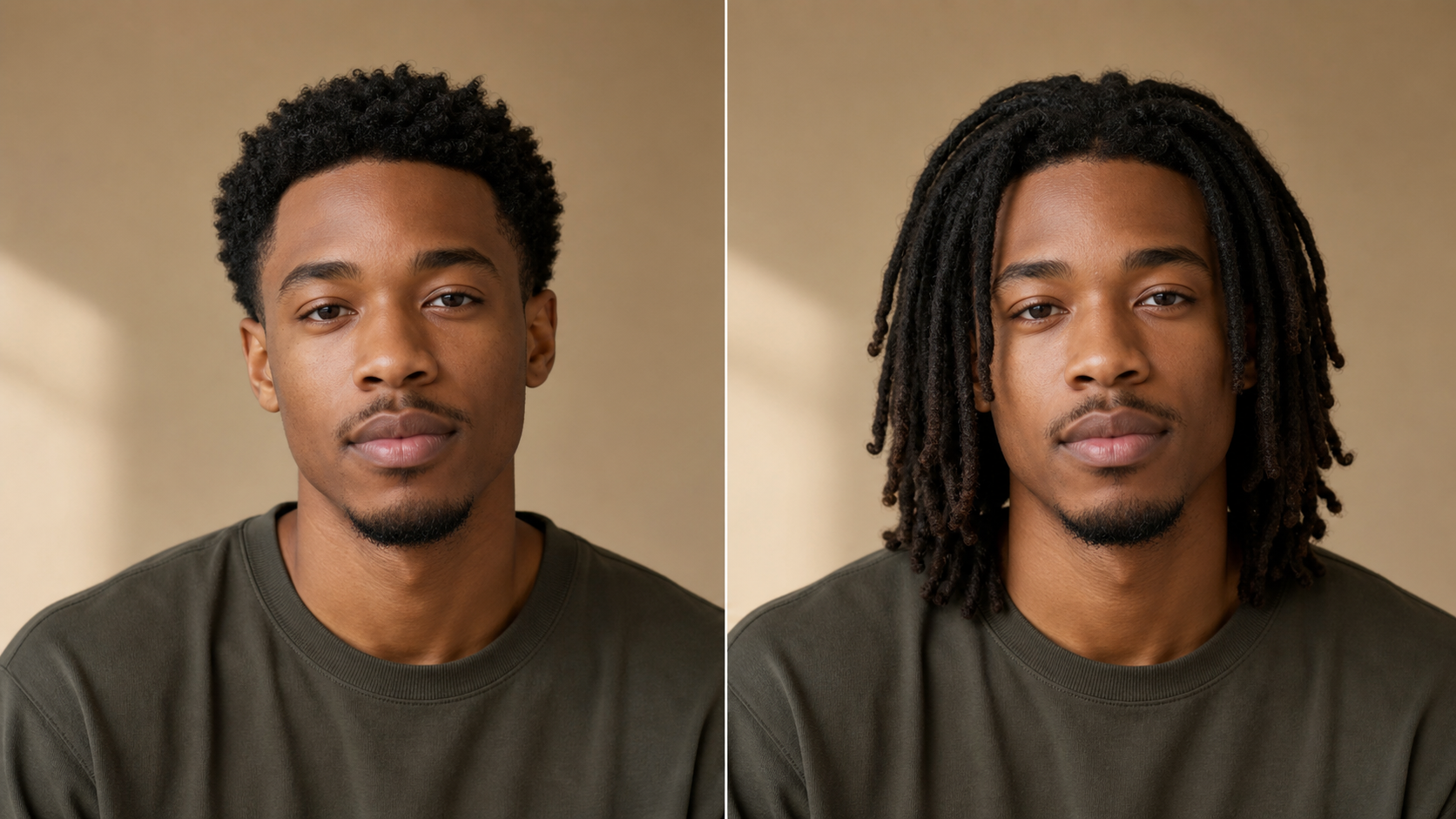
AI Dreadlocks Filter turns a clear portrait into a focused hairstyle preview. Explore how locs frame your face, compare the result with your original photo, and use AI Dreadlocks Filter as a practical visual reference before changing your hair.
How to Use AI Dreadlocks Filter
The AI Dreadlocks Filter workflow stays centered on one clear task: upload a visible portrait, create a locs-inspired hairstyle preview, then compare the result with your original before deciding how you want to explore the look.

Upload a Portrait to AI Dreadlocks Filter
Choose a well-lit image that shows your face, hairline, and full head without a hat, hand, or heavy shadow covering the hair. A straightforward angle gives AI Dreadlocks Filter useful visual context for the transformation. The AI Dreadlocks Hair Filter works from the portrait you provide, so begin with the expression, framing, and background you want the finished preview to retain.

Generate with AI Dreadlocks Filter
Start the transformation and let AI Dreadlocks Filter reinterpret the visible hairstyle as natural-looking locs. The edit should follow the existing head shape, hairline, perspective, and lighting while leaving the face, pose, clothing, and setting intact. With AI Dreadlocks Filter, the AI Dread Filter keeps the hairstyle change central instead of rebuilding the entire portrait.

Compare and Save Your Locs Preview
Review the original and transformed portraits side by side. Look at the overall silhouette, the placement around the hairline, and how the new length frames the face and shoulders. If the idea feels useful, save the preview for personal planning or a stylist conversation. The AI Dread Effect from AI Dreadlocks Filter makes the visual difference easier to discuss than a description alone.
Best AI Image Tools for Creative Projects
Explore creative tools for image, learn tips and tricks, and see how AI can be your assistant in turning concepts into finished projects.






















What AI Dreadlocks Filter Helps You Explore
AI Dreadlocks Filter supports the decisions around a locs-inspired hairstyle, from seeing the overall silhouette to communicating a direction. Each feature keeps your uploaded portrait central so the transformation remains personal, recognizable, and easy to compare.
Preview Locs with AI Dreadlocks Filter Before You Commit
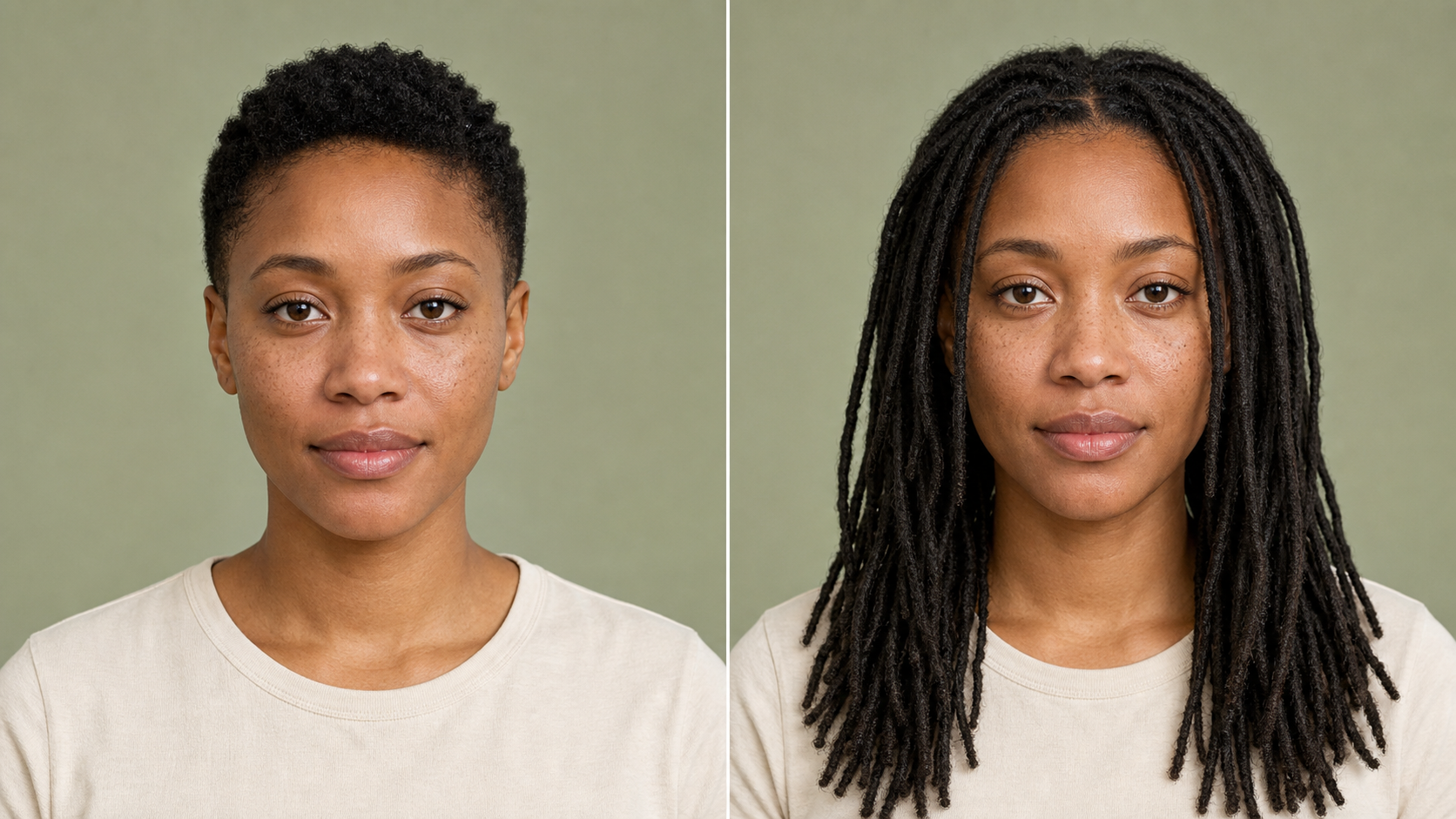
Locs can change the balance of a portrait through length, volume, parting, and movement. AI Dreadlocks Filter places that change directly on your photo, giving you a personal comparison instead of a generic reference image. Use the AI Dreadlocks Hair Filter to study the new silhouette, notice how the hairstyle interacts with your features, and identify the details you want to ask about before making a real commitment.
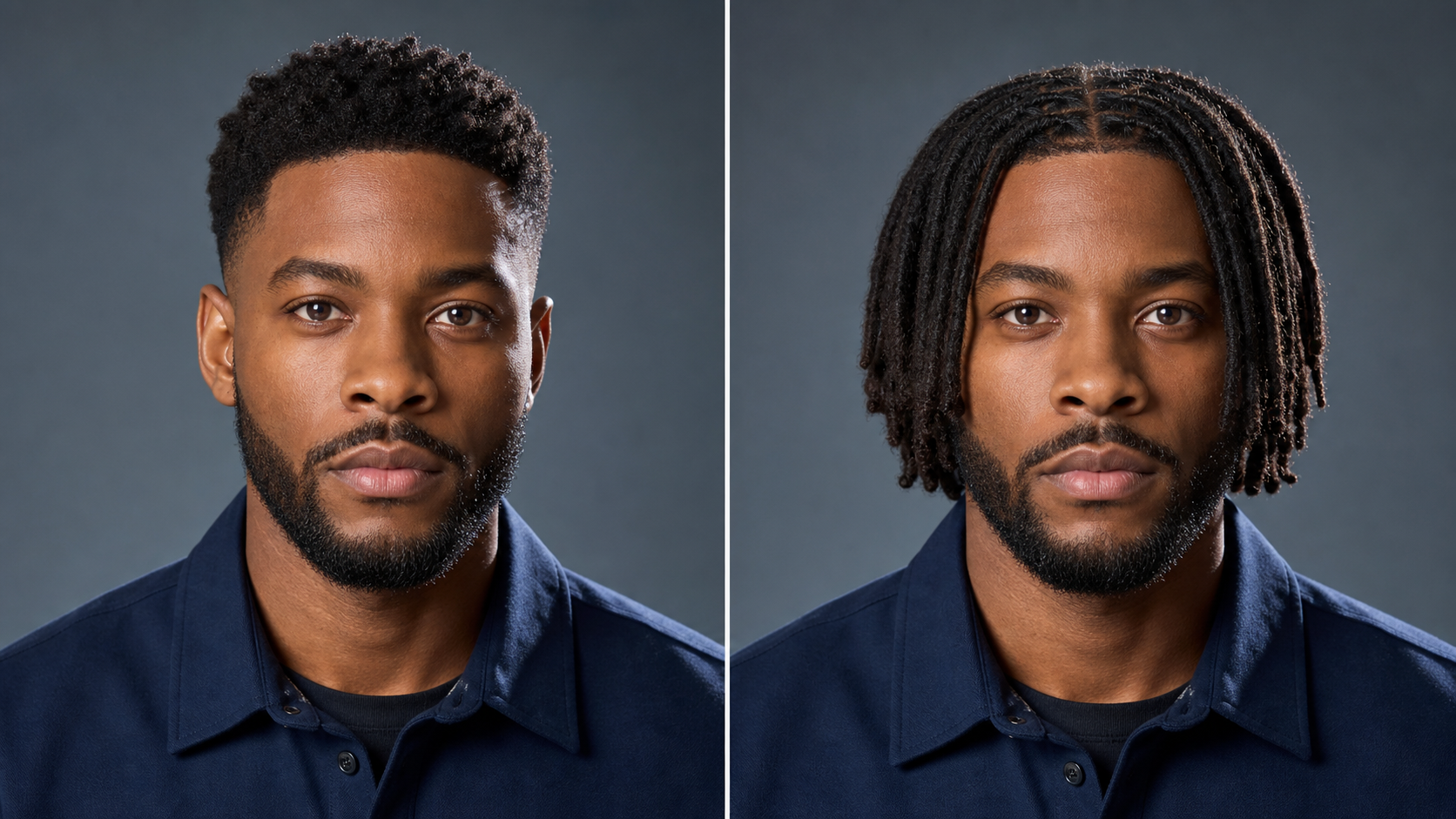
Keep Your Portrait Recognizable with AI Dreadlocks Filter
A useful virtual try-on should change the hair without changing the person. AI Dreadlocks Filter is designed around that editing goal: preserve facial structure, skin tone, expression, gaze, pose, clothing, background, and photographic lighting while adding coherent locs. With AI Dread Filter, the before-and-after comparison remains meaningful because the hairstyle is the obvious difference rather than a newly invented face or setting.
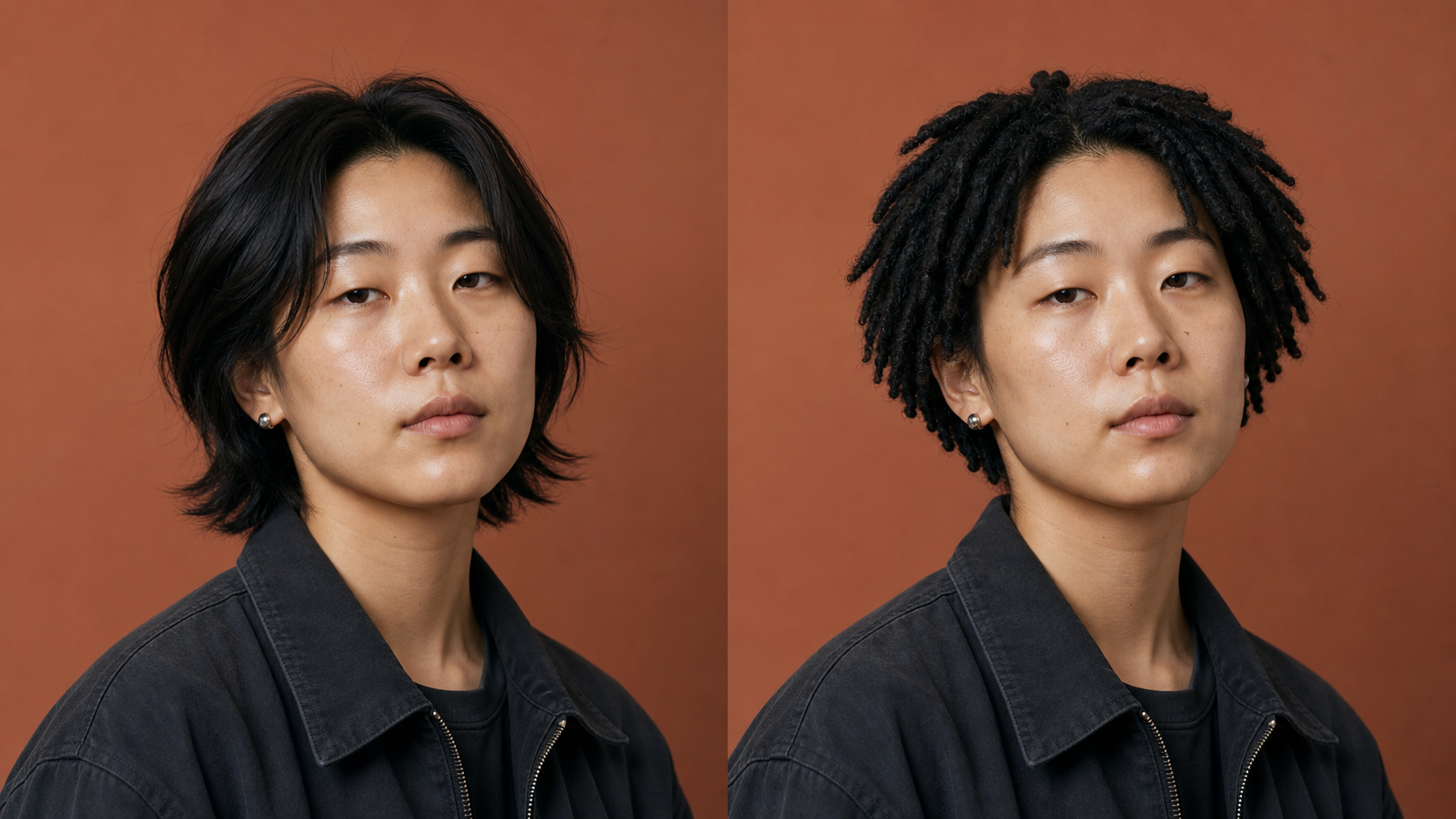
Study Length and Shape with AI Dreadlocks Filter
Short locs, shoulder-length locs, and longer styles create different lines around the face, neck, and clothing. A result from AI Dreadlocks Filter helps you evaluate that overall geometry on your own portrait. Treat each AI Dread Effect as a visual concept rather than a promise about exact length, density, or installation, then use the parts you like to guide further research or a consultation.
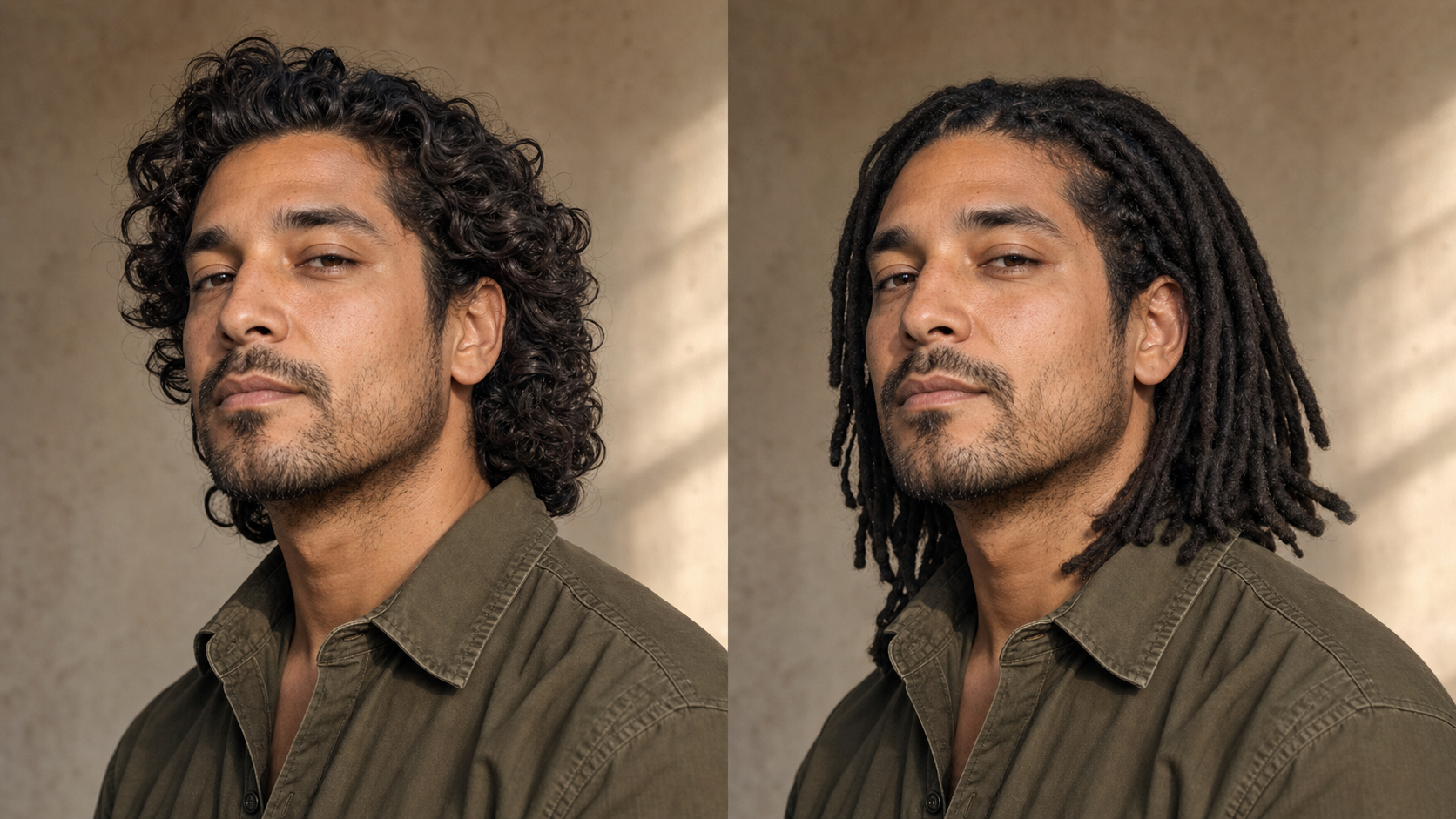
Create a Stylist Reference with AI Dreadlocks Filter
Words such as long, neat, loose, or full can mean different things to different people. A preview from AI Dreadlocks Filter can make a conversation more concrete by showing the broad silhouette you have in mind. Bring the AI Dreadlocks Hair Filter result as a starting point, then ask a knowledgeable loctician how hair texture, density, sectioning, installation method, maintenance, and cultural context shape the real-world choice.
Practical Ways to Use AI Dreadlocks Filter
AI Dreadlocks Filter can support personal style planning, creative references, and clearer conversations. These use cases treat the generated portrait as an exploratory visual, not a prediction of real hair behavior or a substitute for professional guidance.

Plan a Hairstyle Change with AI Dreadlocks Filter
Starting locs or choosing a locs-inspired look can involve questions about length, volume, time, care, and personal meaning. AI Dreadlocks Filter gives you a low-stakes way to evaluate the visual side before making a decision. Use the AI Dread Filter as one planning input alongside advice from an experienced professional, an honest assessment of your hair, and your willingness to follow a suitable maintenance routine.

Compare Silhouettes with AI Dreadlocks Filter
A locs hairstyle can sit close to the head, frame the face, reach the shoulders, or extend beyond them. AI Dreadlocks Filter helps you focus on how that new silhouette changes the same portrait. An AI Dreadlocks Hair Filter preview is not a technical map for section size or finished density, but it can reveal whether you prefer a compact outline, more movement, or a longer visual line.

Prepare for a Style Consultation
A consultation becomes more productive when you can show what attracted you to a look. AI Dreadlocks Filter creates a portrait reference that can help you point to length, placement, and overall mood. Share the AI Dread Effect with a loctician or stylist, explain which elements matter, and invite professional guidance about whether your source idea fits your hair texture, lifestyle, upkeep expectations, and preferred installation approach.

Develop Portrait and Character Concepts
Photographers, illustrators, costume teams, and storytellers often need an early visual reference before final styling begins. AI Dreadlocks Filter can create a grounded hairstyle concept while keeping the source person’s pose and expression stable. Use AI Dread Filter for preliminary exploration, then develop the final character with original wardrobe, lighting, accessories, cultural research, and professional creative judgment rather than treating the generated image as finished design.

Share an AI Dreadlocks Filter Preview for Feedback
Feedback is clearer when everyone is looking at the same visual idea. AI Dreadlocks Filter lets you share a specific preview rather than describe an imagined hairstyle in vague terms. Show both the original and the AI Dreadlocks Hair Filter result, ask how the overall impression changes, and weigh those reactions against your own preference, cultural understanding, and professional advice instead of treating a group vote as the final answer.

Explore a Temporary Visual Concept
You may want to picture locs for a portrait, themed shoot, costume concept, or simple curiosity without presenting the preview as a permanent personal change. AI Dreadlocks Filter applies the visual idea to your current face, clothing, and setting. An AI Dread Effect comparison can help you decide whether the hairstyle supports the concept and which details need more thoughtful research before you develop or share it.
How People Use AI Dreadlocks Filter
People use AI Dreadlocks Filter for personal decisions and creative planning. Their experiences show how a focused before-and-after preview can clarify preferences while leaving technical, cultural, and maintenance questions for thoughtful research and professional conversation.
I had saved plenty of reference photos, but none showed how the shape would work with my own features. AI Dreadlocks Filter gave me something personal to react to. I brought the AI Dreadlocks Hair Filter preview to a consultation, where we discussed which parts were realistic for my hair and which were simply visual inspiration.
For an editorial portrait, our team needed to test whether longer locs would compete with the wardrobe. AI Dreadlocks Filter kept the face, pose, and background stable enough to judge the silhouette. The AI Dread Filter result helped us adjust the neckline and framing before the real styling session, which made the creative conversation much more specific.
I was curious about locs but wanted to separate genuine interest from the surprise of seeing a dramatic change. AI Dreadlocks Filter made that possible with a direct comparison. After reviewing the AI Dread Effect, I had better questions about length, upkeep, and the history of the style before arranging a professional consultation.
I used the preview while developing a character whose silhouette needed more weight and movement around the shoulders. AI Dreadlocks Filter preserved the expression well enough for an early sketch reference. The AI Dreadlocks Hair Filter image gave me a clearer starting point, while I handled costume, texture, and cultural research separately in the final design.
The most useful part was seeing how the hairstyle changed the balance of my face and shoulders. AI Dreadlocks Filter turned a vague idea into a visual reference. I showed the AI Dread Filter preview to a loctician, who explained how my actual texture, starting length, and maintenance goals would affect a real version of the look.
I wanted a concept for a styled shoot without changing the model’s identity or the carefully planned lighting. AI Dreadlocks Filter kept the comparison focused on the hair. The AI Dread Effect helped our team decide that a shorter silhouette worked better with the wardrobe, and we used that direction when briefing the stylist.



FAQs About AI Dreadlocks Filter
These answers explain how AI Dreadlocks Filter fits into hairstyle planning, what makes a helpful source photo, and where a generated preview has limits. Use them to set realistic expectations before creating and comparing your result.
AI Dreadlocks Filter is an image-editing tool for a virtual hairstyle preview. You upload a portrait, and the tool creates a version with locs while aiming to preserve the person’s face, expression, pose, clothing, lighting, and background. The result is best treated as a visual concept for comparison and conversation, not a guarantee of how real locs would form, mature, move, or look on your natural hair.
Use a recent photo with even lighting, a clear view of your face and full head, and a natural front-facing or slight three-quarter angle. Avoid hats, hands covering the hair, strong blur, deep shadows, or a crop that cuts off the top or sides. Better source visibility gives AI Dreadlocks Filter more context for placing the new hairstyle while keeping the rest of the portrait coherent and recognizable.
A focused transformation should keep facial structure, expression, gaze, skin tone, pose, clothing, lighting, and background consistent while changing the visible hairstyle. However, generative edits can vary. Review the result carefully and compare it with the original. If AI Dreadlocks Filter alters unrelated details, try a clearer source portrait or another generation before using the preview as a planning or creative reference.
People with different current hairstyles, hair lengths, textures, and gender presentations can explore the visual concept because the transformation is applied to a photo. Still, a generated image cannot determine whether a specific installation method suits your actual hair or scalp. Use AI Dreadlocks Filter to evaluate the overall look, then consult a knowledgeable loctician for personalized guidance about starting length, sectioning, care, and realistic outcomes.
Yes. A preview can give a loctician or stylist a faster sense of the overall silhouette that interests you, especially when words such as long, full, or neat feel ambiguous. Bring both your original photo and the AI Dreadlocks Filter result, then explain which details matter most. A professional can translate that concept into choices based on your hair, scalp, installation options, maintenance expectations, and long-term goals.
Locs carry deep cultural and historical significance in many communities, and they are more than a temporary visual trend. Use AI Dreadlocks Filter as an invitation to learn, not as a substitute for that context. Research the style’s history, listen to people with lived experience, use respectful language, and consult a knowledgeable professional about care and commitment before turning an exploratory image into a real hairstyle decision.
Picture Your Locs Look with AI Dreadlocks Filter
Upload a clear portrait and let AI Dreadlocks Filter turn an uncertain hairstyle idea into a visual comparison. Review the silhouette, note what feels right, and use AI Dreadlocks Filter to begin a more informed conversation.
