

More AI Image Generators
Explore our collection of specialized AI image generators designed for different creative needs and styles




ChatGPT Sweater: Create Your Cozy Portrait
Join The ChatGPT Sweater Trend With One Photo
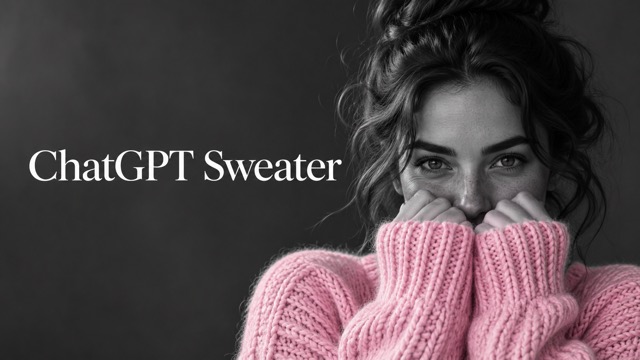
Turn an everyday selfie into a ChatGPT sweater portrait with a soft pink knit, a monochrome face, and sleeves lifted over your mouth. The ChatGPT sweater trend pairs direct eye contact with a quiet studio mood, giving the colorful garment room to stand out. Create your own chunky sweater portrait from one clear photo, with the core styling already built into this image effect.
How To Create A ChatGPT Sweater Portrait
Start your ChatGPT sweater edit with a clear selfie, generate the styled image, then review the face and knit details. The AI sweater trend works best when your eyes are easy to see.

Upload Your Photo
Choose a sharp photo showing one person, with the eyes visible and even lighting across the face. A simple head and shoulders image gives the ChatGPT sweater effect a useful starting point. You do not need to wear knitwear in your original photo.

Click Generate
Generate your ChatGPT sweater portrait using the built-in styling instructions. The ChatGPT sweater prompt describes the pink knit, monochrome surroundings, and raised cuffs together. Check the available settings before starting, then let the image model reinterpret your photo in this cozy portrait style.

Download Your Image
Review your ChatGPT sweater image before downloading: look at the eyes, fingers, sleeve edges, and areas where color should stop. Save the version you prefer for your next post. You can crop it afterward to suit a profile picture or a vertical social layout.
Best AI Image Tools for Creative Projects
Explore creative tools for image, learn tips and tricks, and see how AI can be your assistant in turning concepts into finished projects.










What Defines The ChatGPT Sweater Look
The ChatGPT sweater trend combines a few specific visual choices. A successful portrait balances soft fabric, restrained color, and expressive eyes. These details distinguish the AI sweater trend from a general outfit change or a simple monochrome filter.
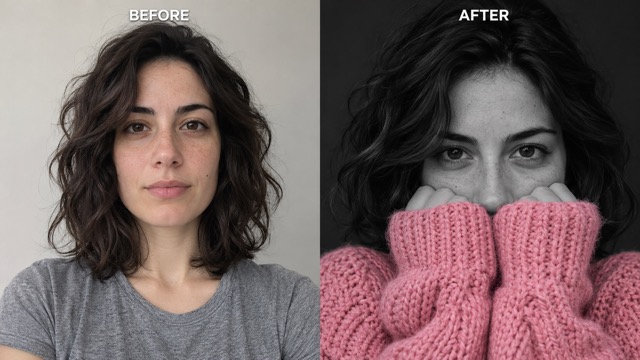
A Pop Of Color Sweater Against Monochrome
The ChatGPT sweater effect makes the garment the only colorful part of the picture. Skin, hair, hands, and the studio background shift into black and white, while the pink wool stays visible. This pop of color sweater treatment creates a clear focal point without adding a busy setting. Your ChatGPT sweater portrait feels cohesive because the face and fabric share the same gentle lighting, even though only one retains its color.
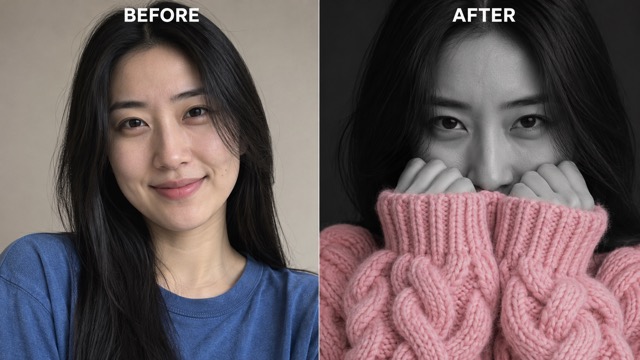
A Chunky Sweater Portrait With Visible Texture
A ChatGPT sweater image needs more than a pink patch over the shoulders. Thick loops, roomy sleeves, and soft folds give the knit a convincing presence around the face. The built-in ChatGPT sweater prompt asks for oversized proportions and detailed wool rather than a flat fabric surface. In a chunky sweater portrait, these tactile details help create the warm, wrapped-up mood that makes the composition appealing even against a dark background.
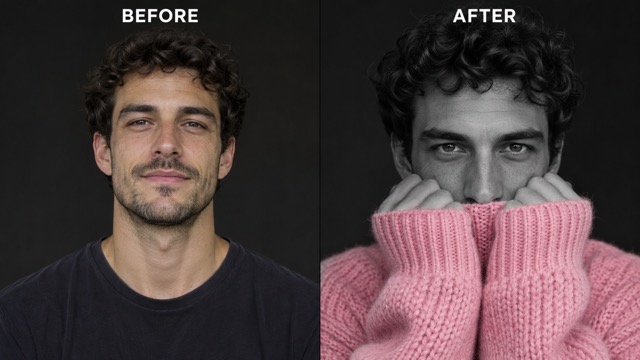
Raised Sleeves And Direct Eye Contact
The recognizable ChatGPT sweater pose brings both cuffs toward the mouth while leaving the eyes and nose clear. The sleeves frame the expression instead of hiding the whole face. Your ChatGPT sweater prompt already includes this gesture, so you can begin with an ordinary portrait rather than staging the pose yourself. Keeping the hands mostly inside the cuffs also supports the intimate, relaxed feeling of the AI sweater trend.
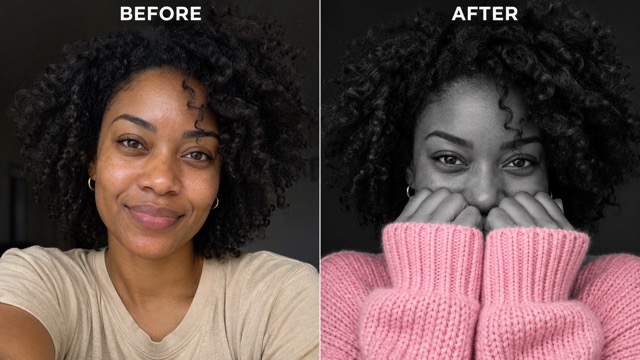
A Focused Portrait For Your Next Post
A ChatGPT sweater portrait keeps attention on the eyes, the sleeve line, and the color accent. That simple arrangement gives you room to crop for different social placements without relying on scenery. Start with a balanced head and shoulders composition, then check that the cuffs remain visible in the final crop. The ChatGPT sweater trend can become a personal profile update or the starting image for a separate video project.
Ways To Use Your ChatGPT Sweater Portrait
Give the ChatGPT sweater look a purpose beyond a single experiment. From a seasonal profile refresh to a visual mood board, the same close-up composition can suit several personal projects without needing an elaborate photo shoot.

Seasonal Profile Pictures
Refresh a personal account with a ChatGPT sweater portrait that puts your eyes at the center. The soft knit suits a cozy seasonal update, while the monochrome background keeps the crop simple. Use a chunky sweater portrait when you want a recognizable face and a warm visual accent that still reads clearly inside a small profile circle.

Social Trend Posts
Make a ChatGPT sweater trend post from a familiar selfie, then pair the original and the new image in your own layout. The contrast makes the transformation easy to understand. For creators exploring the AI sweater trend, a consistent crop helps viewers notice the colored knit and raised sleeves without needing a long explanation in the caption.

Personal Fashion Mood Boards
Use a ChatGPT sweater image to explore the mood of oversized knitwear before planning a portrait session. A pop of color sweater against gray tones can suggest a simple styling direction for your board. Focus on fabric volume, sleeve placement, and lighting; the generated portrait works as visual inspiration rather than a precise preview of a specific garment.

Starting Frames For Video Projects
Build a ChatGPT sweater portrait first, then use the downloaded image as a starting point in a separate image-to-video workflow. Keeping the pose calm leaves room for subtle breathing or a small blink. The ChatGPT sweater trend begins with a strong still image here; animation settings, duration, and movement belong to the video tool you choose next.
Creative Perspectives On The ChatGPT Sweater Style
These fictional example reactions illustrate what different creators might value in this portrait style. They focus on the visual style and possible uses, rather than verified customer experiences or performance claims.
The ChatGPT sweater look appeals to me because the pink stays soft against the gray portrait. I like how the sleeves frame the eyes without needing extra props or scenery.
A chunky sweater portrait gives me a clear mood to explore: quiet lighting, detailed wool, and direct eye contact. The combination feels more deliberate than simply changing an outfit color.
The pop of color sweater is the detail I would build a seasonal post around. It gives the portrait a warm accent while keeping the overall palette easy to coordinate.
For my next visual concept, the ChatGPT sweater pose offers a calm starting frame. I would keep any added motion subtle so the eyes and knitted sleeves remain the focus.
I like the ChatGPT sweater trend for a close profile crop. The face remains central, and the pink fabric provides enough contrast to make a small picture feel considered.
The AI sweater trend is a useful way to discuss selective color with beginners. One garment carries the color, so the relationship between the subject and background is easy to explain.
ChatGPT Sweater Questions Answered
Understand the sweater portrait style, choose a suitable source photo, and know what this image page creates before you begin. These answers cover the portrait workflow and the difference between a finished still and an animated clip.
The ChatGPT sweater trend is a portrait style combining a black and white face and background with a colorful oversized knit. Pink is a familiar choice, and the sleeves often cover the mouth while the eyes face the camera. This page recreates that visual idea from an uploaded photo.
No. This page includes a ChatGPT sweater prompt covering the close-up composition, pink wool, raised sleeves, and monochrome surroundings. Upload a clear portrait to start. The effect uses Nano Banana on SuperMaker; ChatGPT sweater describes the trend you are making, rather than the model running this particular image generator.
Choose a sharp photo of one person with visible eyes and a reasonably clear face. Even lighting and a head and shoulders crop give the model useful detail. Your ChatGPT sweater source does not need to include a sweater, but heavy blur, sunglasses, or a face hidden by objects can complicate the result.
That is the intended ChatGPT sweater treatment: the garment keeps its pink color while the face, hair, hands, and background become grayscale. Review the result around the cuffs and face, where color boundaries are most noticeable. If you spot unwanted color or distorted fabric, try another generation or a clearer source.
This ChatGPT sweater page generates a still portrait. To make a moving version, download your preferred image and continue in a separate image-to-video tool. Gentle breathing or a small blink can suit the pose. The length of the clip depends on that tool and its settings, rather than this image effect.
You can download your ChatGPT sweater portrait and crop it for a personal profile or social post. Keep the eyes and enough of the sleeves inside the crop so the style remains readable. Use your own photo or one you have permission to edit, and check the platform requirements for your intended use.
Create Your Own ChatGPT Sweater Portrait
Bring a clear selfie and turn the ChatGPT sweater look into your next portrait idea. Keep the eyes expressive, the sleeves cozy, and the pink knit in focus. Your image starts with one upload and a ready-made visual direction.