






More AI Image Generators
Explore our collection of specialized AI image generators designed for different creative needs and styles







Christmas PFP: Create A Christmas Profile Picture
Turn Your Photo Into A Festive Christmas PFP
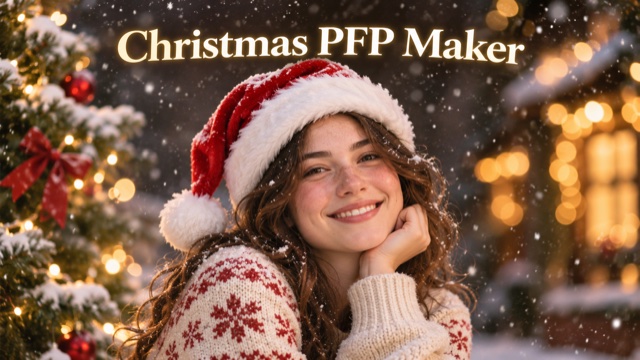
A Christmas PFP gives a familiar profile picture a seasonal refresh without starting from a blank canvas. Upload a portrait, pet photo, or illustrated avatar and use the existing image as the starting point for a festive edit. The effect is designed to add a classic Santa hat, gentle snow, warm lights, and a subtle holiday frame while keeping the subject recognizable. A profile image often appears at a small size, so the details that matter most are a clear face or character, a centered composition, and enough space around the edges. This Christmas profile picture maker brings those ideas together in one image-to-image workflow. You do not need to write a prompt: choose the picture you want to transform, generate an edit, and review the result before using it on your favorite account. Choose a Christmas PFP that feels like you, from a portrait to a favorite character. A Christmas profile picture can add a seasonal touch to a personal account or a community. Your Christmas PFP starts with one image, and the final Christmas profile picture is yours to review before you use it.
How To Make A Christmas PFP
Create a Christmas PFP from one image. Follow these steps to choose a source, generate your Christmas profile picture, and check the result.

Choose Your Source Photo
Choose a clear portrait, pet photo, or illustrated avatar with a visible subject. Leave room above the head for a Santa hat and around the edges for your Christmas PFP. A well-lit image makes the subject's features easier to see.

Upload Your Image
Upload one image with a centered face or character. Choose a photo you are happy to share as a Christmas profile picture, and make sure the subject is easy to recognize. The uploaded picture is the starting point for the edit.

Generate Your Christmas PFP
Start generation without writing a prompt. The effect adds festive details while aiming to preserve the subject and style of your image. Review your Christmas PFP when it is ready. Results can vary with your source image.

Review Your Christmas PFP
Check the face, hat, and edges. Try again if important details are obscured, then preview your Christmas profile picture in your chosen app to make sure the circular crop fits. Keep the hat and subject inside the visible area.
Best AI Image Tools for Creative Projects
Explore creative tools for image, learn tips and tricks, and see how AI can be your assistant in turning concepts into finished projects.


















Christmas PFP Features For Your Profile Picture
A Christmas PFP begins with a familiar image. Explore how the effect adds seasonal details to your Christmas profile picture.
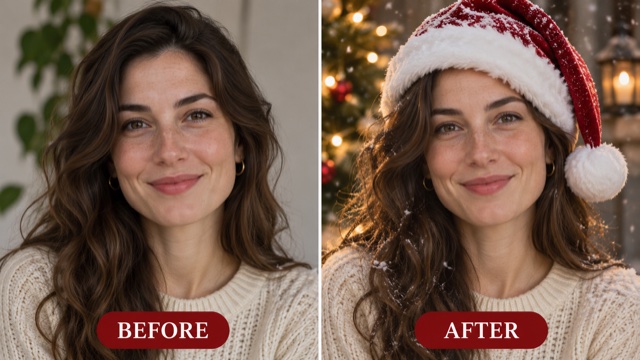
Keep Your Subject Recognizable
The effect starts with your uploaded image and aims to preserve recognizable features, expression, pose, and visual style. A face remains the focus of a portrait, while markings and design details help identify a pet or illustrated character.
Choose a clear source and compare the result with your original. AI edits can change small details, so check glasses, hair, fur markings, or expressions that matter to you. A clear image gives the model useful detail to work with and makes it easier to judge the finished result. Your Christmas PFP can keep the familiar details that make your profile recognizable.
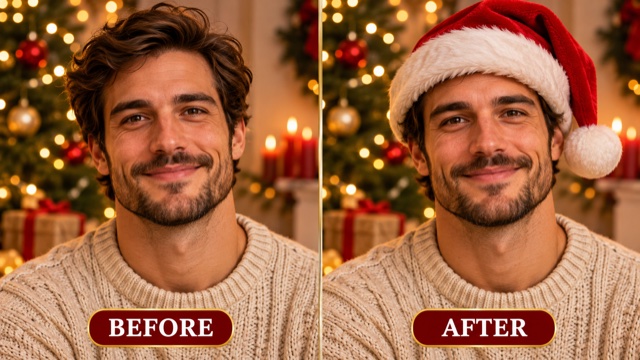
Add A Santa Hat To Your Christmas PFP
A red Santa hat gives your avatar a festive look. The built-in prompt asks for white trim and a pom-pom, fitted naturally without covering the eyes or other important features.
Leave room above the head in your source image. For pets and illustrated characters, check the hat's placement and proportions, which can vary with the subject and style. If your selfie is cropped close to the hair, a photo with more space can help accommodate the hat. This Christmas profile picture effect uses the hat as its central seasonal detail.
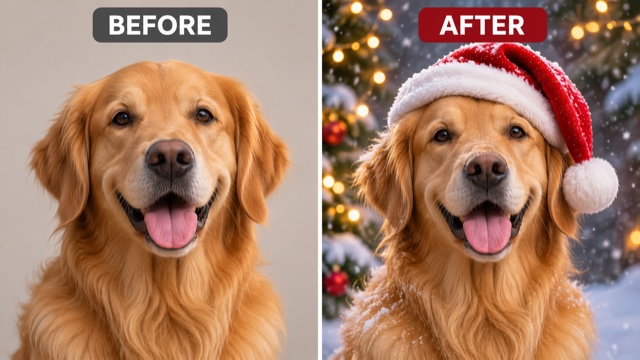
Give Your Christmas PFP A Seasonal Scene
Gentle snow, warm lights, and a subtle border give the image a cozy holiday setting while keeping the subject prominent. A simple background can help these details stand out; a busy source may produce a more layered result.
Review the decoration and contrast around the subject. If the image feels crowded, try a cleaner source picture. The lights and snow are intended to frame the subject rather than draw attention away from it. A Christmas PFP can use these soft details to give an everyday image a holiday mood.
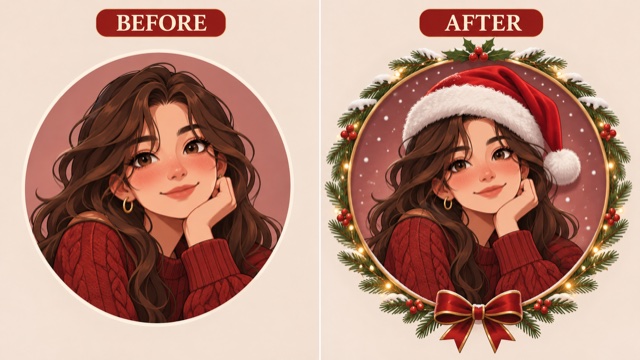
Make A Festive Avatar For The Holidays
A centered subject with room around the head helps keep festive details visible in a circular profile crop. The effect aims for this composition, though results vary with the source.
Preview the image at both large and small sizes. Check that the eyes, hat, and identifying details remain visible, and adjust the crop in your destination app if needed. A small preview shows how the result will appear beside posts and messages on your profile. A Christmas profile picture is easier to recognize when the subject remains clear after cropping.
Christmas PFP Ideas And Uses
A Christmas PFP can bring a shared seasonal theme to a personal account, an online group, or a holiday message. Start with an image that fits the way you plan to use it. Choose a Christmas profile picture for the account or message where you want to share your Christmas PFP.

Christmas PFP For Social Profiles
A Christmas PFP gives a familiar account a seasonal update while keeping your portrait recognizable. Start with a clear image and leave room above the head for the hat. Check your Christmas profile picture at the size it will appear beside posts and comments. Your Christmas PFP can carry the same identity across accounts, though each app may crop it differently. A centered Christmas profile picture keeps the face easy to see. Look for a source with a clean silhouette and enough contrast to remain visible at a small size. A close portrait can be effective when the face is the main detail you want people to recognize.

Christmas PFP For Friends And Communities
Friends and communities can use a shared Christmas PFP theme while each person keeps their own image. Create individual edits from separate portraits or avatars, then compare the results before setting them as profile pictures. Your Christmas profile picture may have different lights or hat placement from a friend's. A Christmas PFP can connect a group without making every Christmas profile picture identical. Group members can select images that suit their own accounts. Similar festive elements provide a shared seasonal look, while different poses, pets, and characters keep each person's profile individual.

Christmas PFP For Gaming Avatars
An illustrated character can be the starting point for a Christmas profile picture. Choose an image that clearly shows the face and head, then check the result for distinctive colors, accessories, and markings. A Christmas PFP can bring seasonal color to a gaming account. If important details change, try another source or create a new Christmas profile picture. Review your Christmas PFP before updating your avatar. When choosing an illustration, use a clear version with enough room around the character. Review the output for small accessories and color differences before replacing an existing avatar.

Christmas Profile Picture For Holiday Messages
A holiday portrait can accompany a seasonal message or community post. Begin with a picture you enjoy and check that the subject stays recognizable. Use a Christmas profile picture to give a familiar sender image a festive touch. A Christmas PFP can sit alongside your greeting while keeping the person or character in focus. Check the hat placement before choosing the final crop for your Christmas profile picture. A centered subject can make the image easy to recognize beside a short greeting. Preview the crop and make sure it does not cut off the most important part of your picture.
Christmas PFP And Christmas Profile Picture FAQ
Find answers about choosing an image, creating a Christmas PFP, and checking your Christmas profile picture crop.
A Christmas PFP is a profile picture with a holiday look, such as a Santa hat, snow, and warm lights. Upload an image as the starting point for the festive effect. The finished picture can be used for a seasonal update or greeting.
Upload a clear portrait, pet image, or illustrated avatar and start generation. Review the face, hat, and edges; no written prompt is needed. Your Christmas PFP is ready to review after generation. Check your Christmas profile picture before setting the crop.
Yes. Use a clear pet photo or illustrated avatar with room around the head. Check fur, markings, line work, and accessories in the result. A Christmas PFP can begin with an animal or character image, and each Christmas profile picture will reflect that source.
The effect aims to retain recognizable facial features and expression, but details can change. Compare the result with your original, including hair and glasses. Check your Christmas PFP for features that matter to you. A Christmas profile picture may vary between generations.
Choose a clear, well-lit image with a prominent subject and space above the head for a hat. Avoid obscured faces or very small subjects. A clear source gives your Christmas PFP room for festive details and helps your Christmas profile picture stay readable.
Yes. Review the image in your chosen platform's profile editor, since circular crops may trim the corners. Preview your Christmas PFP at a small size. Your Christmas profile picture may look different depending on the app's crop.
Create Your Christmas PFP
Bring a little holiday character to the image people already associate with you. Choose a portrait, pet photo, or illustrated avatar, upload it, and create a seasonal variation with a Santa hat, snow, and warm lights. Review the result and the crop before updating your profile, then share your festive look with friends or your online community. Start your Christmas PFP with a picture you like, and check your Christmas profile picture before sharing.