

More AI Image Generators
Explore our collection of specialized AI image generators designed for different creative needs and styles


Snowman Bestie AI: Meet Your Goofy Winter Friend
Your Face, A Snowy Sidekick, One Playful Selfie
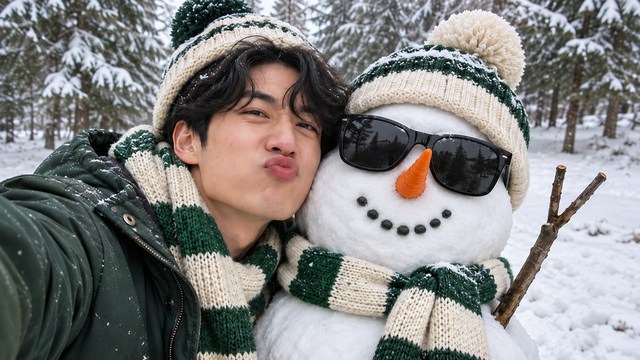
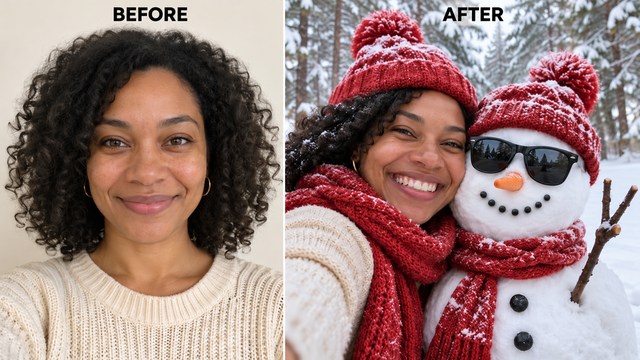
Snowman Bestie AI turns a clear portrait into a close-up winter selfie with a goofy snowman beside you. Big sunglasses, a carrot nose, a coal-pebble smile and cozy knitwear give your new friend an unmistakable personality. Start Snowman Bestie AI from one photo and make a seasonal picture for a social post, a greeting or a winter profile picture. Your upload supplies the human identity while the snowy scene is created around it. A Snowman Bestie AI Photo brings the two faces together with a relaxed phone-camera perspective, snowy pines and soft daylight. Make a snowman selfie without a prompt, then choose the result that feels most like you.
How To Use Snowman Bestie AI
The process stays focused on your photo. Follow four short steps to make and save your winter picture.

Upload One Portrait
Add one clear photo with your face visible. Choose a solo portrait in even light.

Generate Your Selfie
Review the displayed settings and credit cost, then generate. The winter scene is already prepared.

Review Both Faces
Open the result and check your likeness. Look at the snowman, accessories and twig arm too.

Save Your Favorite
Download the image you prefer. Check the snowman selfie crop in the app where you plan to share it.
Best AI Image Tools for Creative Projects
Explore creative tools for image, learn tips and tricks, and see how AI can be your assistant in turning concepts into finished projects.





What Makes A Snowman Bestie AI Photo Stand Out
Your familiar face meets a playful winter character. These three details give the snowman selfie its friendly, instantly readable look.
Snowman Bestie AI With A Familiar Face
Snowman Bestie AI places your recognizable features at the center of a new winter moment. Your photo guides the person's face, hair, skin tone, age and glasses, while a separate snowman leans close beside you. The shoulder-up framing makes the relationship easy to read: two friends squeezing into one phone-camera picture. A Snowman Bestie AI Photo works particularly well when both eyes and the outline of your hair are visible in the source.
Snowman Bestie AI from one photo gives you a simple starting point without asking you to organize a winter shoot. Use an evenly lit portrait with some space around your head and shoulders. When reviewing the snowman selfie, compare the eyes, smile and face shape with your upload. Generations can interpret small details differently, so choose the version with the most convincing likeness and comfortable proportions. A selfie with a snowman best friend should still feel personal.
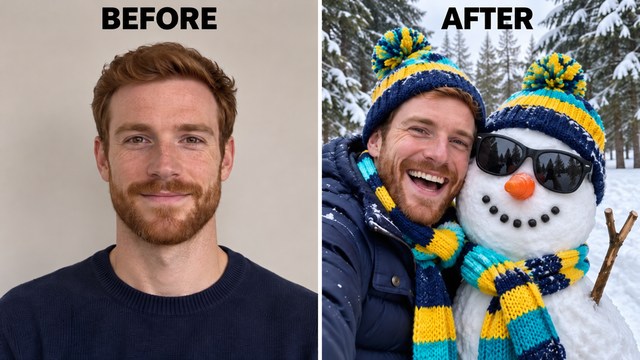
Snowman Bestie AI Photo With A Goofy Sidekick
Snowman Bestie AI gives the snowy companion a personality you can recognize at a glance. Oversized dark sunglasses, a bright carrot nose, a coal-pebble smile and a twig peace sign turn a simple winter character into your mischievous sidekick. Coordinated knit hats and scarves connect the two subjects without hiding the human face. In a Snowman Bestie AI Photo, the playful accessories support the joke while the selfie stays close and uncluttered.
You can make a snowman selfie without a prompt because the character direction is prepared for you. Snowman Bestie AI describes the snowman's expression, the winter accessories and the close camera framing internally. Look for natural contact between the two heads, readable glasses and a twig gesture that stays separate from your hands. The result is a selfie with a snowman best friend that feels cheerful and slightly ridiculous, with photographic snow textures and soft outdoor light holding the scene together.
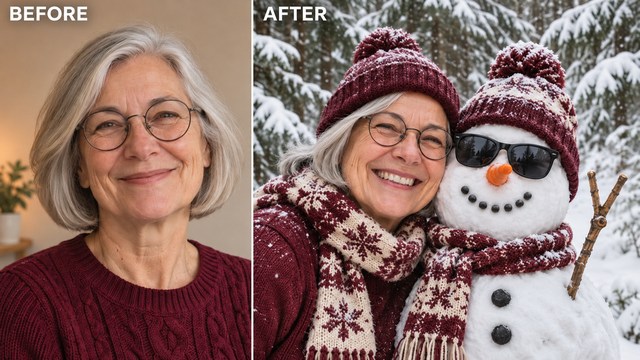
Snowman Bestie AI For A Personal Winter Greeting
Snowman Bestie AI builds a snowy pine-forest setting around the two faces. Pale snow, gentle flakes and soft winter daylight give the image a seasonal atmosphere, while the close composition keeps your expression prominent. A Snowman Bestie AI Photo can become the picture in a holiday message or a winter profile picture, even when your original portrait was taken indoors. The background is newly generated rather than a requirement for your source.
For a greeting, save the full snowman selfie first and add your message in a separate editor. This leaves room to choose readable lettering and position it around the faces. Snowman Bestie AI keeps the image itself focused on the person and companion. For an avatar, preview a tighter crop before using it: both faces, the carrot nose and enough of the knitwear should remain visible. A little breathing space helps a small image retain the friendship that makes the scene memorable.
Where To Share Your Snowman Bestie AI Photo
A personal winter portrait suits small moments as well as seasonal social posts. Start with the same snowman selfie, then adapt the presentation to the place you want to share it.
A Seasonal Profile Picture
Give your account a playful seasonal face with Snowman Bestie AI. A winter profile picture works best when the human expression and snowman remain easy to recognize after cropping. Preview the image inside the actual circle or square used by your app, rather than judging only the full photograph. Keep the carrot nose and sunglasses clear, and avoid cutting across either face. Your Snowman Bestie AI Photo can feel personal without a long caption because the two characters tell the story immediately. Save the full version too, so you can use a wider crop in a story or message later.
A Holiday Card With Personality
Use Snowman Bestie AI as the visual starting point for a warm holiday message. A selfie with a snowman best friend adds humor to a greeting while keeping your own face part of the picture. Download the snowman selfie before adding names, a date or a personal line in another editor. Place lettering in open background space and keep it away from the eyes and snowman accessories. A Snowman Bestie AI Photo can be sent digitally or placed into your own card design. Check the saved dimensions and preview the intended size before printing, especially if you plan a large card.

A Playful Winter Social Post
Snowman Bestie AI gives a winter feed post a simple visual hook: your face beside a companion with far too much personality. Keep the caption short enough for the picture to do the work. The snowman selfie can stand alone or join a collection of seasonal images that you assemble in your social app. Snowman Bestie AI produces the still picture here; any slideshow, music or animation is a separate editing step. Choose a snowman selfie crop that shows the relationship between the faces, then review how it appears in the feed preview. A recognizable expression matters more than filling every edge with decoration.

A Friendly Group-Chat Surprise
Make Snowman Bestie AI from one photo of yourself for a lighthearted group-chat update. The cozy scarves and absurdly confident snowman make an easy conversation starter, especially for friends who enjoy winter jokes. A snowman selfie without a prompt also keeps the preparation simple when you only want a fun image to send. With permission, you can use a friend's solo portrait to create their own separate picture. Review the likeness before sending your Snowman Bestie AI Photo, and choose a result that feels affectionate and recognizable. Keep a downloaded copy if you want to revisit the same seasonal memory next year.
Creative Reactions To A Snowy Friendship
Illustrative names and reactions describe creative possibilities; these are not verified customer endorsements.
Snowman Bestie AI puts the expression first. I like a close portrait where the person and snowy companion feel equally present in the frame.
A Snowman Bestie AI Photo gives a greeting a clear focal point. The sunglasses and warm knitwear make a simple winter concept feel playful.
Snowman Bestie AI has a joke you understand immediately. The snowman selfie makes sense in a small feed preview without a long explanation.
Snowman Bestie AI balances a familiar face with an impossible friend. The twig gesture and carrot nose give the character a wonderfully cheeky mood.
Snowman Bestie AI Questions Answered
Find practical answers about preparing your photo, creating a Snowman Bestie AI Photo and choosing a snowman selfie to keep.
Snowman Bestie AI Photo creates an AI winter portrait of a person beside a goofy snowman. The look centers on a close phone selfie, snowy pines, cozy knitwear and a companion with sunglasses, a carrot nose and a playful expression. Snowman Bestie AI is a way to make a selfie with a snowman best friend from your own portrait. This page creates a still image. You can share the picture directly or add it to a separate editing project for a card or social post.
Upload one clear solo portrait, review the displayed generation settings and cost, then generate. Snowman Bestie AI uses the photo as the identity reference and the prepared scene direction to create the snowman and snowy surroundings. You do not need an existing snowman picture or a second upload. Start Snowman Bestie AI from one photo where your eyes, face shape and hairstyle are visible. The snowman selfie is generated as a new composition, so review the resulting likeness and framing before saving your favorite version.
Yes. Snowman Bestie AI includes the scene direction, so you can make a snowman selfie without a prompt. The instructions describe the snowy forest, close framing, goofy character and coordinated winter accessories. There is no need to paste a long recipe from a social caption. Snowman Bestie AI keeps the visitor workflow to uploading a portrait and generating the picture. It does not ask you to write dialogue, choose a dance or supply a template video. Check the visible settings and cost before starting each generation.
Choose a sharp image with one person, even lighting and a clear view of the face. Heavy shadows, sunglasses hiding the eyes, strong beauty filters and very distant subjects leave less useful detail for Snowman Bestie AI. Your original setting does not need to contain snow or winter scenery. A Snowman Bestie AI Photo builds that environment around the reference person. Everyday glasses and visible hair can help preserve familiar details, but inspect their interpretation in the finished snowman selfie along with the eyes, jawline and expression.
Yes. Download a Snowman Bestie AI Photo and preview it in your chosen app before setting it as a winter profile picture. A circular crop can remove part of the second face, so leave enough room for both characters and the snowman's carrot nose. Snowman Bestie AI also suits a wider personal greeting. Add precise names or a seasonal message after downloading, using a separate editor. Keep the original snowman selfie for alternate crops, and choose the version where your expression remains easy to recognize at a small display size.
Review your Snowman Bestie AI result at a larger size before sharing it. Compare the human face with the source, then check the snowman's sunglasses, carrot nose, coal smile, knitwear and twig arm. The two faces should stay distinct with natural proportions and believable contact. A Snowman Bestie AI Photo can vary in expression and small details between generations. If the snowman selfie feels crowded or the likeness is weak, try a clearer portrait with more space around the head. Save the image that best fits the crop and message you have in mind.
Meet Your Winter Friend With Snowman Bestie AI
A familiar face, a goofy companion and a snowy forest are all it takes for a playful seasonal picture. Start Snowman Bestie AI with one clear portrait, review your new snowman selfie and save the version you want to share. Bring your next winter greeting a little more personality.