




More AI Video Generators
Explore our collection of specialized AI video generators designed for different creative needs and styles
AI Animate Logo: Turn Any Logo into a Video
Upload your brand mark, add a creative idea, and let SuperMaker AI animate it into a striking motion video for ads, social media, launches, and brand storytelling.
Create branded motion content in seconds with AI animate logo technology built for speed and creative control. SuperMaker AI helps you turn logo to video from a simple image upload, then shape the result with your own prompt, style, scene, and message. Whether you want sleek tech motion, product launch energy, cinematic reveals, or social-ready intros, our AI animate logo workflow makes logo animation easy for creators, startups, agencies, and ecommerce teams.
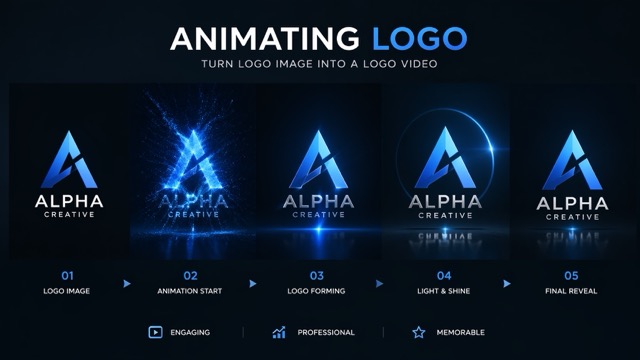
How to Use Our AI Animate Logo Tool
SuperMaker AI keeps logo animation simple. With just a logo image and a short idea, you can use AI animate logo tools to turn logo to video for marketing, content creation, and brand identity projects.

Upload Your Logo
Upload a PNG, JPG, or transparent logo file to start the AI animate logo workflow. SuperMaker AI reads the shape, layout, and visual identity of your logo and prepares it for motion generation.

Add Your Video Idea
Describe the motion you want, such as glowing reveal, metallic spin, neon burst, liquid morph, or cinematic particles. This is where you turn logo to video with more control and make the AI animate logo result match your brand style.

Animate Logo and Download
Click generate and watch AI animate logo turn your static asset into a ready-to-share clip. Preview the result, refine the prompt if needed, and download your final branded video.
Best AI Video Tools for Creative Projects
Explore creative tools for video, learn tips and tricks, and see how AI can be your assistant in turning concepts into finished projects.









Features of Our AI Animate Logo Tool
SuperMaker AI combines logo-to-video generation with prompt-based customization, making AI animate logo creation flexible, fast, and useful for real marketing work.
Turn Static Branding into Dynamic Motion
- AI animate logo transforms a still logo into eye-catching movement without requiring editing skills.
- Use it to build animated intros, looping brand stingers, launch visuals, or premium social clips.
- SuperMaker AI helps you turn logo to video with clean motion that still respects your logo structure.
- This AI animate logo workflow is ideal for fast brand storytelling across platforms.

Prompt-Based Creative Control
- Our AI animate logo tool does more than add random motion.
- You can describe lighting, camera movement, environment, energy effects, transitions, and mood.
- This makes it easier to turn logo to video that fits a luxury, futuristic, playful, minimal, or cinematic brand.
- Every AI animate logo generation can be adjusted with your own prompt idea for more unique results.
Built for Marketing and Social Content
- AI animate logo helps brands produce short motion assets for TikTok, Instagram, YouTube, ads, and product pages.
- Instead of hiring a motion designer for every quick asset, you can turn logo to video in minutes.
- Use the result for brand bumpers, teasers, campaign posts, or hero banners.
- SuperMaker AI makes AI animate logo practical for modern content teams that need speed.
Fast Brand Video Prototyping
- Agencies, founders, and designers use AI animate logo to test multiple motion directions quickly.
- Try different colors, camera styles, reveal timing, and visual concepts before finalizing a campaign.
- With SuperMaker AI, you can turn logo to video repeatedly until the motion feels right.
- This AI animate logo workflow is useful for both rough concepts and polished branded outputs.
Why Choose Our AI Animate Logo Generator
From social media to campaigns and client work, SuperMaker AI helps you turn logo to video in a way that is fast, customizable, and aligned with real brand needs.

Brand Intros for Video Content
Use AI animate logo to create short intros and outros for YouTube videos, podcasts, reels, and livestream recordings. It is one of the easiest ways to turn logo to video and keep branding consistent.

Product Launch Teasers
Before a launch, AI animate logo can generate dramatic reveal videos that build momentum. Add sparks, light sweeps, smoke, or sleek motion to turn logo to video with a more premium campaign feel.

Website Hero Motion
Many brands use AI animate logo clips in hero sections, splash screens, and landing page banners. When you turn logo to video, a static page feels more alive and memorable.

Social Media Branding
Create quick branded loops for posts, stories, pinned videos, and ads. SuperMaker AI lets you turn logo to video for frequent posting without slowing down your content pipeline.

Startup Pitch and Demo Assets
Founders use AI animate logo to make pitch decks, demo reels, and launch pages feel more polished. A strong logo animation can make a new brand look more established from the start.

Creative Client Presentations
Freelancers and studios use AI animate logo to present motion directions to clients before production. It is a fast way to turn logo to video and explore concepts without heavy manual work.
What Users Say About Our AI Animate Logo Tool
Teams, creators, and founders use SuperMaker AI to turn logo to video faster. These stories show how AI animate logo generation can simplify branding and content production.
I needed a quick animated intro for our skincare brand and this AI animate logo tool saved me. I could turn logo to video with a luxe glow effect in minutes, and it looked polished enough for paid ads.
As a freelance designer, I use AI animate logo to pitch motion ideas before moving into full production. It helps me turn logo to video fast and gives clients something visual to react to right away.
Our startup had no time to wait on a full animation process, so we tried SuperMaker AI. The AI animate logo workflow was simple, and we used the result in our demo day video the same afternoon.
I run several product launches each month and needed reusable brand assets. This tool helped me turn logo to video in different styles for teasers, hero sections, and social posts without extra editing work.
The best part of AI animate logo is the prompt control. I described a neon pulse with floating particles, and the result fit our gaming campaign much better than a generic animation template.
I am not a video editor, but I still needed professional-looking motion branding for my channel. SuperMaker AI made it easy to turn logo to video, test ideas, and get a clean final result fast.




Frequently Asked Questions About AI Animate Logo
Learn how AI animate logo works, how to turn logo to video with prompts, and where animated logo videos can be used in real campaigns and branded content.
AI animate logo is a workflow that uses artificial intelligence to turn a static logo image into a motion video. Instead of building every animation frame by frame, the system analyzes your uploaded logo and generates movement, lighting, transitions, and cinematic effects based on your prompt. With SuperMaker AI, you can describe how you want the logo to appear, move, or reveal itself, which makes it easier to create branded motion content without traditional video editing skills.
Yes. Our tool is designed to turn logo to video using your own idea as part of the generation process. You can describe the visual style, background mood, motion energy, reveal effect, or atmosphere you want. That means your AI animate logo result does not need to look generic. You can guide the final video toward a futuristic, elegant, bold, minimal, or playful direction depending on your brand needs.
AI animate logo is useful for social media branding, product launch videos, website hero sections, ad creatives, YouTube intros, app splash screens, presentation decks, and campaign visuals. Any time you need a brand asset with more motion and attention value, you can turn logo to video and reuse it across multiple channels.
In most cases, yes. SuperMaker AI is built to help you turn logo to video quickly so you can generate a result in far less time than a traditional production workflow. This makes AI animate logo especially useful for teams that need multiple drafts, fast campaign assets, or creative testing at scale.
Yes. Many users start with a simple logo image and use AI animate logo to build more premium brand motion for launches and marketing. While results depend on the source logo and prompt, the tool is specifically made to turn logo to video in a way that feels polished, modern, and attention-grabbing.
Animate Your Logo Today
Upload your brand asset, add your creative direction, and use SuperMaker AI animate logo tools to create a standout branded video in minutes.
