





















More AI Video Generators
Explore our collection of specialized AI video generators designed for different creative needs and styles



Oh You Can Make It Cap AI With Your Own Cast
Two Familiar Faces, One Unforgettable Reaction
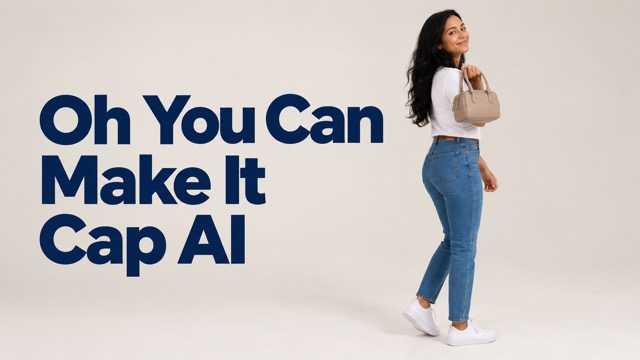
Turn the white-studio exchange into a personal video with oh you can make it cap ai. One person takes the confident handbag turn; the other tries to contain a laugh. Add two individual photos to cast both roles in this playful back-and-forth. The prepared video reference gives the scene its rhythm, while your chosen faces make the reaction feel personal. Start with the friend who always laughs first. Decide the roles together, and let the familiar exchange set up the punchline.
How To Make Your Oh He Tweakin AI Video
Choose your cast before uploading. Photo order decides who reacts and who performs the turn, so two clear individual pictures make the setup easier to understand and review before generation.

Upload Your Photos
Add two separate photos, each showing one person clearly. Use the first for the laughing role and the second for the person holding the handbag. Pick well-lit pictures with unobstructed faces and visible clothing so each character has a clear reference.

Click Generate
Check that your photos are in the intended order, then review the available video settings and displayed credit cost. Click Generate to create your version. The prepared reference and instructions guide the studio scene, turn, reaction, and alternating character shots.

Download Your Video
Watch the completed clip from beginning to end before downloading. Check both faces, the handbag turn, and the reaction shots, then save your preferred result. Add a personal caption in your usual editor and share the version that lands the joke.
Best AI Video Tools for Creative Projects
Explore creative tools for video, learn tips and tricks, and see how AI can be your assistant in turning concepts into finished projects.

























The Small Details That Make The Scene Work
The appeal of oh you can make it cap ai comes from the exchange between two different personalities. A simple studio, a confident turn, and an exaggerated reaction give the short scene a clear setup and payoff.
Give Each Person A Clear Role
Casting is the creative choice at the center of this video. The first photo supplies the person who asks for the turn and breaks into laughter; the second supplies the person with the handbag. Separate reference photos help distinguish the two appearances. Choose a contrast your audience will recognize, such as a quietly confident friend and the one who can never keep a straight face.
Keep The Turn In The Spotlight
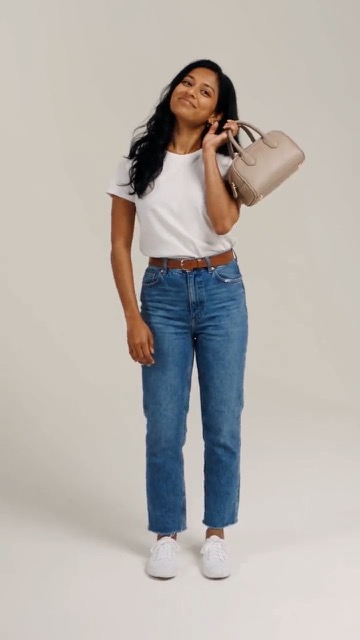
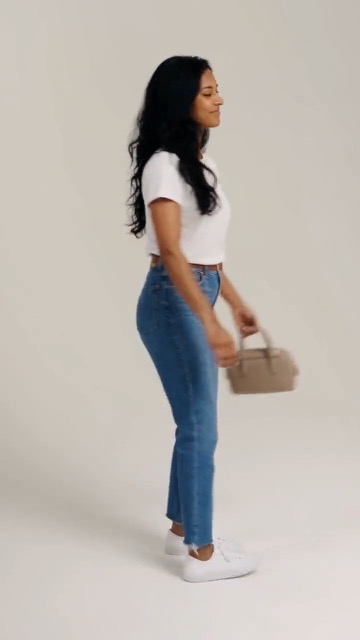
A single full turn provides the scene's visual setup. The handbag, the returning glance, and the moment of confidence all lead into the other person's reaction. The prepared reference gives these actions a shared sequence instead of asking you to describe every movement. Use a photo that shows the second person's face and outfit clearly, then review how that appearance carries through the turn.
Build Toward The Laughing Reaction
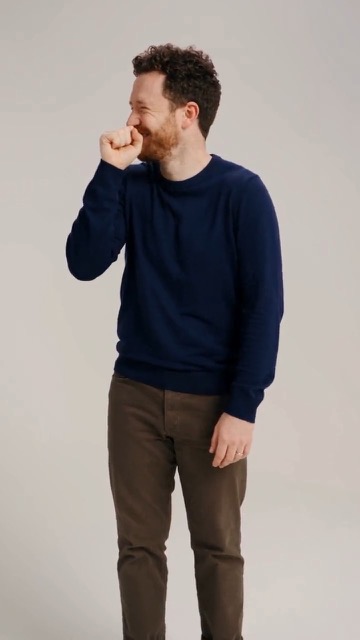
The reaction gives oh he tweakin ai its recognizable personality: a fist moves toward the mouth, the expression breaks, and the shoulders join the laugh. Alternating shots let that response answer the turn without crowding both performers into every frame. The supplied motion reference guides the order and pacing, leaving you to focus on which familiar face makes the reaction funniest for your audience.
Keep The Studio Simple
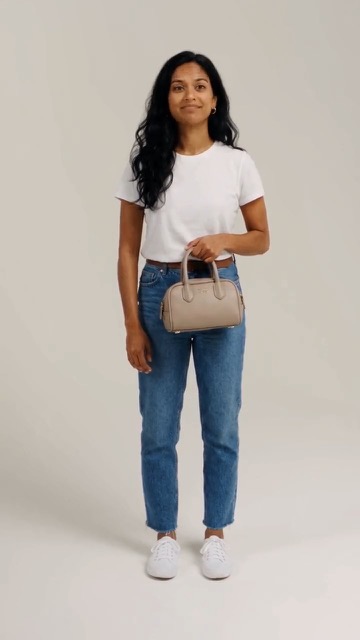
The plain backdrop keeps attention on posture, expressions, and the handbag rather than elaborate scenery. Consistent studio lighting also gives the alternating shots a common visual setting. Your photos provide the cast, while the video reference supplies the scene's overall staging. For a cohesive result, choose clear source pictures with visible faces rather than heavily filtered portraits, crowded group shots, or pictures taken in deep shadow.
Who Will You Put In The Scene?
A recognizable pairing can make the same exchange feel different. Build your oh you can make it cap ai idea around the relationship between the two people, then choose a caption that gives their audience the context.

A Friendship Group's Running Joke
For friends who already quote the same reaction clips, cast the person who starts every joke opposite the one who laughs hardest. Share the finished video in your group chat with a caption about a familiar moment. The result becomes a personal callback that needs very little explanation because everyone knows the personalities behind it.

A Couple's Playful Role Swap
Couples can use the two roles to play with their usual dynamic: one enjoys the spotlight, while the other supplies the dramatic reaction. Try the confident partner with the handbag or reverse expectations for the punchline. It is a simple shared creative project that starts with separate photos instead of arranging a studio shoot together.

A Short-Form Creator's Reaction Post
Creators making reaction-led content can use oh he tweakin ai as a recognizable structure for a personal joke. Choose a cast your viewers already understand and write a caption around a specific situation. Review the pacing before posting, and keep any added text away from the face and handbag so the physical comedy remains easy to follow.

A Birthday Chat With Familiar Faces
For a birthday group or reunion chat, pair the guest of honor with the friend most likely to deliver an exaggerated reaction. Keep the joke affectionate and use photos both people are happy to share. The clip can become a playful opening to a message, giving your greeting a little performance without asking anyone to film.
The Kind Of Reaction This Format Invites
These fictional examples illustrate different creative perspectives on the format. They are not verified customer reviews. Each focuses on a practical reason someone might choose this two-person scene for a personal post.
The contrast between a confident turn and someone trying not to laugh is exactly the joke I want. Casting familiar faces makes the idea feel personal before I even add a caption.
I like that both people have a distinct part to play. Reversing our usual personalities would make the scene more entertaining than simply putting us side by side in another photo.
The plain studio is what appeals to me. There is room to notice the expression and the handbag, so I can keep the caption short and let the reaction carry the idea.
This is a useful format for a birthday joke because the roles are immediately understandable. I would choose the cast around a shared memory and keep the message warm and light.
Knowing which photo belongs to each role makes the setup easier to plan. I want the friend with the biggest laugh in the reaction shots, where that personality matters most.
The turn and response create a clear beginning and payoff. For a community post, I would choose an established pairing and a specific caption rather than add lots of extra visual effects.




Oh You Can Make It Cap AI Questions
Start with the right photos and a clear casting choice. These answers cover the relationship between the search terms, the prepared reference, and what to check when turning your idea into a finished clip.
It is an AI remake of the familiar studio exchange built around a full turn, a handbag, and an amused reaction. This page lets you cast the two roles with individual photos. The prepared reference guides the scene, so the main creative decision is who plays each part.
Yes, these searches commonly point to the same turn-and-reaction meme format. This page uses oh you can make it cap ai as its main name and oh he tweakin ai as a related search phrase. The recognizable sequence is the confident turn followed by the laughing response.
Use two separate individual photos with clear faces, even lighting, and visible clothing. Put the laughing character first and the handbag character second. Avoid sunglasses, heavy filters, or group photos that make the intended subject unclear. Choose photos you have permission to use and check their order before generating.
The scene instructions and reference video are already prepared for this page, so you supply the two character photos. The reference establishes the studio setting and action sequence. You do not need to describe the turn shot by shot or source your own copy of the template video.
No. Your photos and the generation process influence facial details, movement, and expressions. Watch the entire result and check that the two identities remain distinct through the turn and reaction. If something looks off, try clearer source photos and review the current credit cost before creating another version.
Download your preferred result after checking the faces, movement, and ending. Add a short personal caption in your editor or social app, then preview the crop so the handbag and reactions remain visible. Follow your destination platform's AI-content labeling options and choose an audience appropriate for the people featured.
Make The Reaction Personal
Choose the person who owns the spotlight and the one who always laughs first. Bring them into oh you can make it cap ai with two clear photos, check the result, and turn the familiar studio exchange into a joke your audience understands.
