



More AI Video Generators
Explore our collection of specialized AI video generators designed for different creative needs and styles
Santa Caught On Camera In Your Own Home
One Room Photo Becomes A Christmas Camera Clip
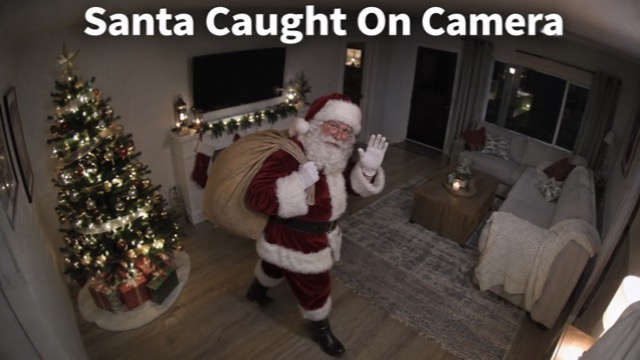
Santa caught on camera AI turns a familiar room into a small Christmas story: a red coat enters the frame, a present reaches the tree, and a knowing glance catches the lens. Start with one clear photo of your living room or porch. Santa caught on camera AI uses that setting as the starting point for an AI Santa video with a fixed home-camera look. Keep the recognisable sofa, doorway and decorations in view, and give Santa space to move. Create Santa caught on camera from one photo for a seasonal family message or a playful holiday post. The charm comes from a place you recognise and one easy-to-follow action.
How To Catch Santa On Camera
Make Santa caught on camera with a photo and the built-in effect. No written prompt is needed.

Upload Your Scene
Add one clear photo of an empty room or porch. Include the tree or doorstep and enough open floor for Santa.

Check The Settings
Review the available video settings. Check the displayed credit cost before generating.

Generate Your Clip
Press Generate to start your AI Santa video. The built-in direction adds the visit without a prompt to write.

Review And Save
Play the finished clip and check the movement. Save the version you want to share.
Best AI Video Tools for Creative Projects
Explore creative tools for video, learn tips and tricks, and see how AI can be your assistant in turning concepts into finished projects.









Make Santa Caught On Camera Feel At Home
Build Santa caught on camera AI around a room you know, a believable camera position and one clear visit. These three choices give an AI Santa video a stronger visual foundation.
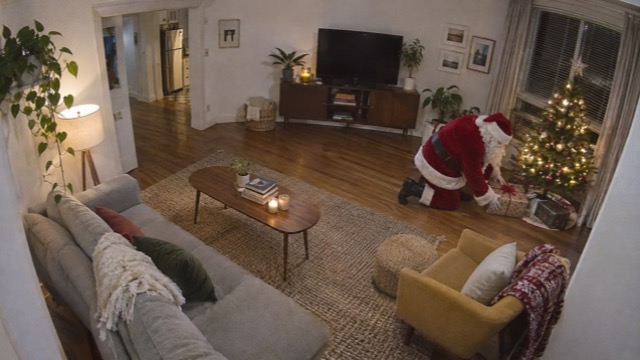
Santa Caught On Camera In A Familiar Room
Santa caught on camera feels more personal when the background starts with your own photograph. A tree beside the sofa, a familiar rug and a visible hallway give the visit a setting your family can recognise. Santa caught on camera AI uses that single scene as the visual starting point, while the built-in direction asks for a fixed view and a simple gift delivery. An AI Santa video works best when the floor has a clear route between the entrance and the tree.
For Santa in your own living room, include the whole space rather than a close-up of decorations. Keep important furniture away from the frame edges and avoid a crowded foreground. Santa caught on camera from one photo should tell a clear little story before it adds visual spectacle. Review the room layout and Santa’s scale in the result; a wider source often gives Santa caught on camera a more coherent setting.
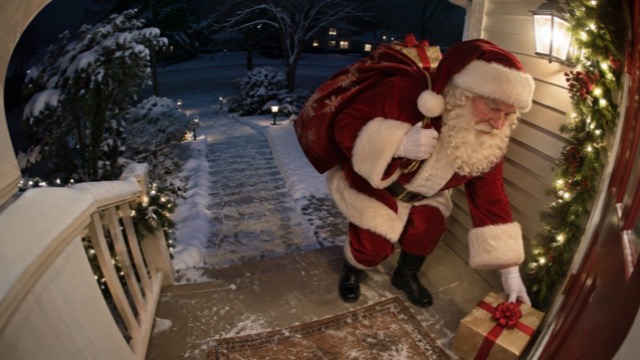
A Santa Gift At Your Door
Santa caught on camera also suits a porch, with the familiar wide view of a doorbell recording. A lit doorstep, an open path and a small parcel make the action easy to understand. Santa caught on camera AI starts from the porch photograph; it does not need a connection to your doorbell hardware. Use an AI Santa video to imagine a brief delivery with Santa approaching, leaving a gift and acknowledging the lens.
For a Santa doorbell camera video, photograph outward from near the doorbell position rather than pointing toward your own front door from the street. This keeps the perspective consistent with the intended recording. Santa caught on camera benefits from a visible landing area and moderate light instead of a frame that is almost black. The best Santa doorbell camera video idea is simple enough to read without explanation. Check the parcel, hands and doorway before saving Santa caught on camera.
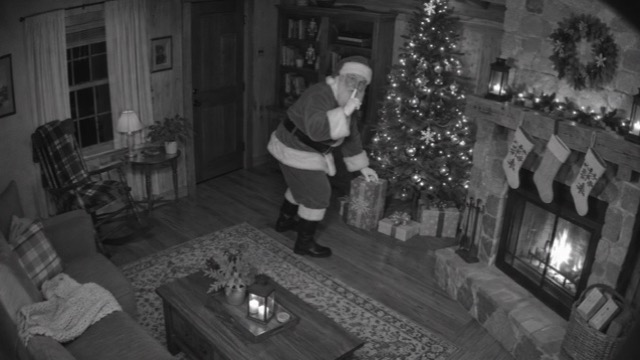
A Small Story With A Fixed Camera
Santa caught on camera gets its character from the fixed camera and the little action inside it. Santa enters, puts down a gift, notices the lens and leaves. Santa caught on camera AI uses a built-in instruction to keep that sequence focused rather than asking you to direct several unrelated events. An AI Santa video can feel playful through a glance or small wave without dramatic camera moves.
For Santa in your own living room, the tree and gift should remain visible throughout the moment. A high corner view leaves room for the action and helps the scene read like a home recording. Santa caught on camera from one photo works best with clear shapes and a well-defined floor. Keep the source sharp even if you enjoy a softer night-camera finish. Watch Santa caught on camera from start to finish, checking that the gift settles naturally and the ending remains clear.
Christmas Scenes To Share
Use Santa caught on camera AI for a festive keepsake, a greeting or a short seasonal story. Choose the setting that fits your audience.

A Christmas Morning Keepsake
Santa caught on camera can become a small scene to replay with your family over breakfast. Start with the room as it looks during the holidays, including the familiar lights and decorations. Santa caught on camera AI gives an AI Santa video a setting that matters more than an elaborate backdrop. For Santa in your own living room, a clear gift delivery is enough to carry the story. Save your clip alongside your other seasonal photos and revisit it as part of the celebration.

A Front Door Holiday Greeting
Santa caught on camera turns an ordinary porch into a festive greeting for friends and relatives. A Santa doorbell camera video works well when the parcel and Santa remain large enough to see on a phone. Santa caught on camera AI builds the action around the uploaded setting, while an AI Santa video adds movement to the holiday message. Keep the scene friendly and straightforward, with a visible path and a warm porch light. Use your clip as the opening moment before your own written greeting.

A Seasonal Social Story
Santa caught on camera gives a short holiday post a recognisable setup and a clear payoff. A familiar room, a surprise visitor and a glance toward the lens create an easy story to follow. Santa caught on camera AI and an AI Santa video can support that idea without a filmed performance in your house. If you are learning how to catch Santa on camera, begin with one uncluttered scene. Share your clip with a caption that makes the playful AI creation clear to your audience.

A Shared Family Tradition
Santa caught on camera from one photo can help relatives in different places join the same seasonal joke. Make a clip from your own space, then send the finished scene with a personal message. Santa caught on camera AI gives an AI Santa video a local setting, even when the family watches from elsewhere. A Santa doorbell camera video can start the greeting; a room with the tree can make it feel more intimate. Keep your clip focused on a single visit so every viewer understands the moment.
Creative Perspectives On Santa Caught On Camera
Illustrative creative perspectives with fictional names; these are not verified customer reviews.
Santa caught on camera feels most appealing when the room is familiar and the action stays small. For an AI Santa video, I would keep the tree, the gift and the little glance toward the camera as the whole story.
A Santa doorbell camera video gives the greeting a clear setup. Santa caught on camera AI makes the porch the centre of the idea, and a simple parcel delivery feels easier to follow than a crowded scene.
For Santa in your own living room, the best starting point is a wide photo with open floor space. An AI Santa video has more room to tell its story when the background is composed carefully.
Santa caught on camera is a useful reminder that one clear action can carry a short clip. For an AI Santa video, I would review the hands, the parcel and the final frame before choosing a version to share.



Santa Caught On Camera Questions
Practical answers about your scene photo and the upload-to-video workflow.
Santa caught on camera AI creates a short AI-generated video of Santa visiting a room or porch based on your scene photo. The AI Santa video focuses on a fixed camera, a brief arrival and a gift delivery, followed by a small acknowledgement of the lens. Santa caught on camera AI is intended for a playful Christmas scene, and an AI Santa video gives that idea movement rather than producing only a still picture. Start with a setting that has a clear entrance and a suitable place for a gift. Santa caught on camera from one photo depends on the visible layout, so a wide shot is usually more useful than a close-up. Your result should be reviewed for movement, room details and framing before you save it.
If you are exploring how to catch Santa on camera, start with a clear photograph of an empty room or porch. Upload that one scene, review the current settings and displayed cost, then generate with the built-in direction. You do not need to write a prompt. Santa caught on camera AI supplies the core visit instruction, and an AI Santa video uses that photograph as its scene starting point. Santa caught on camera benefits from open floor space, a visible entrance and a gift destination such as the tree or doorstep. For Santa in your own living room, include the sofa and other recognisable details without blocking the route. Play Santa caught on camera all the way through before deciding which version to share.
Choose a sharp, well-lit photo of the space where you want the visit to happen. For Santa caught on camera AI, a high corner angle can show the entrance, floor and tree in one frame. Avoid a close-up, extreme darkness or furniture that blocks most of the room. Santa caught on camera AI can use a modest room; elaborate decorations are unnecessary. An AI Santa video needs a readable setting more than a perfect holiday interior. Santa caught on camera from one photo is easier to assess when the important shapes in your AI Santa video are clear. Use a photo you may use, remove private details you do not want in the clip and keep people out of the scene. Check that Santa caught on camera has enough space for its central action.
Yes. Upload a clear porch photo taken from a position resembling a doorbell camera, looking outward across the landing and approach. A Santa doorbell camera video uses that perspective as a creative style; it does not connect to a camera device or retrieve recordings. Santa caught on camera AI asks for a short visit within the uploaded scene, and an AI Santa video can turn a simple doorstep delivery into a seasonal greeting. Keep the area beside the entrance visible so the gift has somewhere to land. Santa caught on camera works better with a clear path than a tightly cropped view of the door. Review the approach, Santa’s size and the parcel placement when checking your Santa caught on camera result.
No written prompt or source video is needed for this fixed photo-based effect. Upload one scene photograph and use the built-in instruction. Santa caught on camera AI provides the visit direction, while the available generation settings remain visible for review. An AI Santa video begins with that photograph rather than footage from your home camera. If you are comparing how to catch Santa on camera across different tools, note that some offer optional prompts or animated stickers; this page uses the upload-and-generate flow. Santa caught on camera does not require you to film a performance, build a sequence or provide Santa’s portrait. A clear empty scene is the useful input. Check the current cost before starting Santa caught on camera.
Watch Santa caught on camera from beginning to end, checking the hands, gift, feet and room layout. Make sure the camera remains steady and the action is visible at the size your audience will watch. Santa caught on camera AI can reinterpret details, so inspect furniture and doorways as well as the central character. An AI Santa video should have a clear beginning and ending before it becomes a greeting or social post. Keep the framing simple, and choose a wider source if the movement feels cramped. Santa caught on camera is a festive AI creation rather than a recording of an actual visit. Use an appropriate caption when sharing publicly, and keep any home details you prefer private outside the source photo.
Create Santa Caught On Camera AI Tonight
Give a familiar room a little Christmas surprise. Santa caught on camera AI starts with one scene photo and a built-in visit direction. Make an AI Santa video, check the whole clip and save a festive moment to share. Start with a clear view of your tree or porch.