













More AI Video Generators
Explore our collection of specialized AI video generators designed for different creative needs and styles

Tidal Wave AI: Put Yourself In The Seafront Surprise
One Photo, One Familiar Face, One Giant Wave
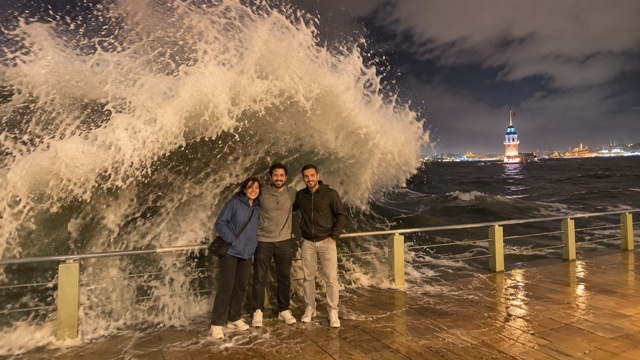
Tidal Wave AI video generator turns a clear adult photo into a seaside moment with a dramatic change of pace. A group poses beside the seawall, a giant wave rises behind the railing, and white foam sweeps across the view. When the water clears, your character reappears and moves toward the camera. Tidal Wave AI video generator gives you the opening left-side role in that sequence, using one photo to make the lead familiar. Tidal Wave AI template keeps the focus on this specific night waterfront scene, with its wet pavement, dark water, and illuminated tower. Make a giant wave video for a playful personal post without filming a storm or organizing a seaside shoot.
How To Make Tidal Wave AI
Use Tidal Wave AI video generator with one adult photo. Tidal Wave AI template supplies the scene and action, so there is no written prompt to prepare.

Choose Your Photo
Choose a clear photo of one adult who has agreed to its use. Keep the face uncovered and easy to recognize.

Upload One Image
Add your chosen image to the upload area. It identifies the person taking the opening left-side role.

Generate Your Video
Review the displayed generation cost, then generate. The prepared effect is applied without a written prompt.

Watch And Download
Watch the full clip, including the moment after the foam clears. Download the MP4 you want to keep.
Best AI Video Tools for Creative Projects
Explore creative tools for video, learn tips and tricks, and see how AI can be your assistant in turning concepts into finished projects.






















From The Pose To The Walk-Out
Tidal Wave AI video generator connects three recognizable parts of the scene: your opening role, the wave that hides the group, and your return into view. Tidal Wave AI template brings these moments together in one seafront wave video.
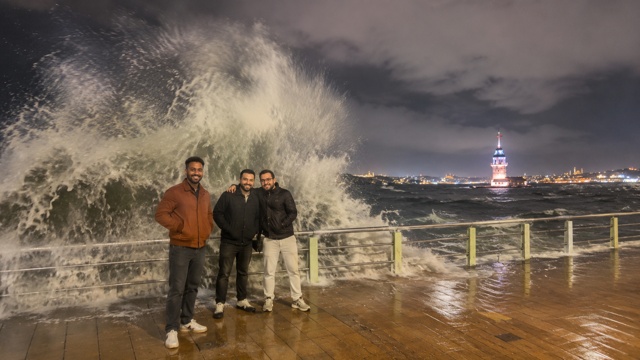
Take The Left-Side Role
Tidal Wave AI video from one photo gives your portrait a defined place in the opening group. You replace the person on the left as seen by the camera, while the other people remain supporting figures in the prepared scene. Tidal Wave AI video generator uses your uploaded face as the identity reference, rather than asking you to assemble a new group photograph. A well-lit photo with visible hair and natural facial detail gives that role a clearer starting point. Tidal Wave AI template keeps the seaside setting around your character: the railing, wet tiles, dark water, and distant illuminated tower. Your source image does not need to contain a beach or match the opening pose. The appeal is seeing a familiar person inside the unexpected moment. Review both the initial wide view and the later closer view when choosing a result to share.
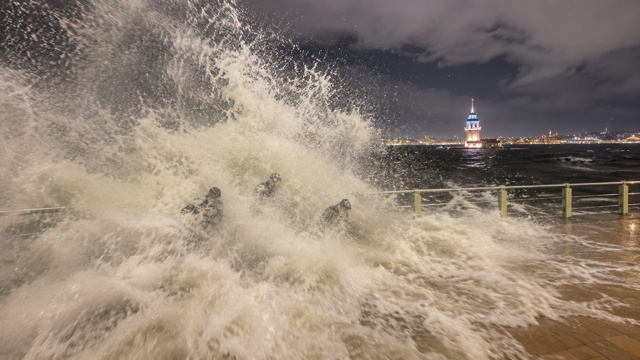
Follow The Wave And Whiteout
Tidal Wave AI builds the surprise around a complete sequence, beginning with a calm pose before the water arrives. The wave rises beyond the rail, breaks over the group, and becomes a wall of white foam that briefly hides the people. Tidal Wave AI video generator uses this interruption as the central event, giving the clip a clear change from setup to impact. Tidal Wave AI template follows the prepared waterfront action rather than inviting a different location or a new disaster story. Make a giant wave video where the scale of the water, the visible railing, and the spray moving toward the camera tell the joke together. The whiteout is part of the intended effect, so the target does not need to remain visible through every moment. What matters is a readable lead-in, a convincing rush of water, and a return from that same scene.
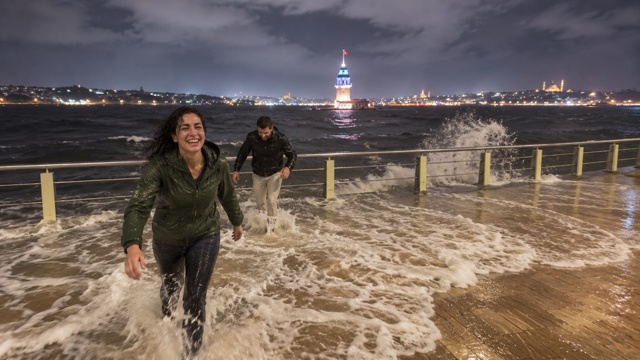
Reappear After The Foam
Tidal Wave AI carries the scene beyond the splash. As the foam settles, the left-side lead returns into view and moves closer, turning a distant group pose into a more personal ending. Tidal Wave AI video generator is directed to carry the uploaded person's appearance through that transition, including the change from a dry opening to a wet recovery. Tidal Wave AI template keeps the action connected to the same promenade instead of ending on an unrelated portrait or cutting to another place. A seafront wave video feels more complete when the audience can recognize who has come through the water. Watch the face, hair, clothing continuity, and walking movement after the whiteout, as well as the first frame. This gives you a useful way to judge the whole result. Keep the version whose return into view makes the familiar face and the playful surprise work together.
Ways To Share Your Seafront Surprise
Tidal Wave AI video generator can turn the same prepared scene into different personal messages. Tidal Wave AI template changes the lead from your photo; the use comes from your caption, audience, and reason for sharing.

A Personal Reaction Post
Use Tidal Wave AI video generator for a post that begins like an ordinary posed photo and finishes with a soaked walk toward the camera. Tidal Wave AI video generator gives the reaction a recognizable subject: you. Tidal Wave AI template already supplies the waterfront surprise, so the caption can stay short and personal. A line about insisting on one more picture makes the setup easy to understand. Tidal Wave AI video from one photo suits a creator who wants to participate without recording a performance.

A Joke For Your Group Chat
Make a giant wave video for friends who know the person always asking for another photograph. Tidal Wave AI keeps one chosen adult in the lead, so the joke can center on that person's familiar expression. Tidal Wave AI video generator does not require everyone in the chat to upload a picture or take part in the scene. Tidal Wave AI template provides the supporting group around the personalized role. Use a photo the person has agreed you may animate, and share the result with a caption that fits your shared memory.

A Playful Travel-Themed Message
Tidal Wave AI template can accompany a lighthearted message about the photograph that did not go to plan. The night waterfront, distant tower, and wet promenade give the seafront wave video a specific atmosphere before the water arrives. Tidal Wave AI video generator puts the chosen lead into that prepared setting without requiring a recent travel photo. Tidal Wave AI template keeps the location consistent throughout the pose, impact, and recovery. Add your own context when sharing, such as remembering an overambitious photo stop with friends.

A Vertical Short With A Clear Ending
Build a short post around the contrast between standing still and walking out of the foam. Tidal Wave AI template is configured for a fourteen-second vertical sequence, giving the setup and return room within one compact clip. Tidal Wave AI video generator uses the opening left-side role for the personalized character. Tidal Wave AI template keeps that role tied to the later approach rather than adding another cast choice. For a phone-screen post, let the opening show the group and keep the ending visible when making any later edits.
Creative Reactions To The Seafront Surprise
Illustrative names and reactions describe possible uses of Tidal Wave AI; these are not verified customer reviews.
I like how Tidal Wave AI turns a quiet pose into a sudden surprise. Seeing a familiar face return after the foam gives the idea an ending I would want to share.
Tidal Wave AI video generator makes sense for our one-more-photo joke. Tidal Wave AI template gives one person the lead while the group scene supplies the setup.
A seafront wave video feels more personal when I can recognize who walks out. I like that the scene carries on after the splash rather than stopping at the biggest wave.
I would use Tidal Wave AI video from one photo for a compact reaction post. The opening role is clear, and the whole idea stays focused on a single playful moment.


Your Seafront Video Questions
Find practical answers about how to make Tidal Wave AI, prepare a suitable photo, and review the complete clip before downloading.
Tidal Wave AI video generator is a photo-based video effect built around a seaside group pose interrupted by a large wave. Tidal Wave AI video generator gives your uploaded portrait the opening left-side role, then follows the wave, whiteout, and recovery. Tidal Wave AI template uses a specific prepared scene with a railing, wet pavement, dark sea, and illuminated tower. The purpose is to put a familiar face into that compact story.
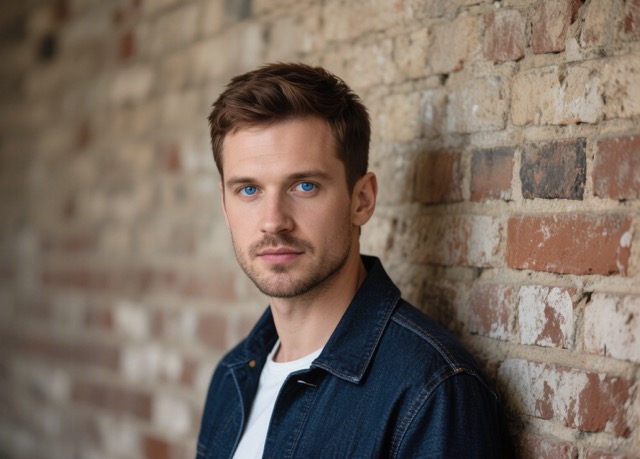
Choose one clear, permitted photograph of one adult, with an uncovered face and visible natural details. Even lighting and a sharp face are more useful than a dramatic filter or a distant group picture. Tidal Wave AI video from one photo needs an unambiguous identity to guide the lead. Tidal Wave AI uses the image for that person rather than identifying several people in one upload. Avoid sunglasses, heavy blur, and objects covering the face. For Tidal Wave AI template, the source background does not need to match the promenade. You can use an ordinary portrait and review how the appearance carries into the scene.
Your image is used to replace the person on the left in the opening shot, from the viewer's perspective. Tidal Wave AI template assigns that same lead to the recovery and approach after the wave. Tidal Wave AI video generator takes one adult photo for one role; this page does not offer a second personalized person, a full-group replacement, or a pet version. Tidal Wave AI leaves the other people as supporting figures in the prepared scene. Check the opening position before judging the later movement, because the lead naturally changes position while walking toward the camera.
Upload your single adult photo and generate with the prepared effect. Tidal Wave AI video generator supplies the scene instruction, so you do not need to write a description, upload a personal reference video, or choose a new action. Tidal Wave AI template keeps the pose, rising wave, complete foam cover, and return into view together. To replace the person on the left, use a photo where that intended adult is the only subject. Watch the finished clip before downloading, especially the face that reappears once the spray has cleared.
The page is configured around a fourteen-second, 9:16 vertical video with an MP4 download. Tidal Wave AI video generator follows the prepared seafront action from the group pose through the wave and the lead's return. Tidal Wave AI template keeps the output focused on a single clip rather than a set of variants. The vertical frame suits viewing on a phone and gives the approaching person a larger presence near the end. Review the displayed generation settings and cost before starting. If you edit the downloaded clip later, keep enough of the opening and recovery for the surprise to remain understandable.
Watch the whole sequence once, then look closely at the identity before and after the whiteout. Tidal Wave AI template should connect the opening lead with the person who reappears, with plausible facial detail, body movement, and clothing continuity. Tidal Wave AI video generator can produce variations, so a good opening frame alone is not enough to judge a result. Confirm that the water fully hides the group, the scene stays connected, and the lead returns naturally. If you want to replace the person on the left using a different photo, check the next generation's displayed cost before starting again. Keep the complete clip you prefer.
Make Your Seafront Surprise
Choose the familiar face at the center of your next surprise. Tidal Wave AI takes one adult photo and places that person in the opening left-side role before the giant wave sweeps across the promenade. Make a giant wave video with a calm beginning, a wall of foam, and a return toward the camera. Tidal Wave AI video generator keeps the process focused on one photo and one prepared sequence. Tidal Wave AI template gives the scene its shape; your chosen face makes it personal. If you are exploring how to make Tidal Wave AI, begin with a clear image and review the full result before you share it.