















More AI Video Generators
Explore our collection of specialized AI video generators designed for different creative needs and styles



Bama Bound AI: Raise Your Banner And Celebrate
One Photo, A Red Banner, Your Big Reaction
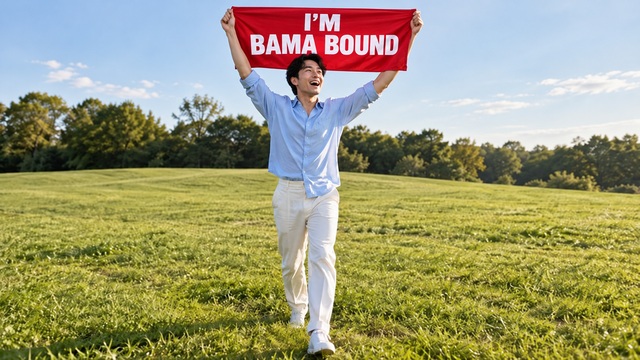
This effect turns a clear portrait into a playful college celebration: green grass, a red banner overhead, a surprised smile and a joyful jump. Bama Bound AI Video Generator builds the scene around your uploaded subject, while Bama Bound AI Template supplies the celebration direction. Make a bama bound video from one photo without printing a sign or filming in a field. Your face, outfit and proportions guide the result. This is an AI meme, with no connection to university admissions.
How To Create With Bama Bound AI
Wondering how to do the bama bound trend? This effect keeps the process focused on your photo and the finished reaction. Bama Bound AI Video Generator handles the scene and movement; Bama Bound AI Template keeps the red-banner idea consistent. Follow these four steps before sharing your fictional celebration.

Choose A Clear Photo
Start this effect with one well-lit photo of an adult subject who faces the camera. A full-body or knee-up view gives the generator useful information about clothing, hands and proportions. Bama Bound AI Video Generator works from the details you supply, so avoid sunglasses, heavy blur and crowded group pictures. Bama Bound AI Template adds the celebration scene later; your source does not need a sign, a campus or a raised-arm pose. For a bama bound video from one photo, a straightforward portrait is the strongest starting point.

Generate The Celebration
Upload the selected picture and use Generate to begin this effect. Check the displayed generation settings and credit requirement before you start. Bama Bound AI Video Generator uses the prepared effect direction, so there is no creative brief to type. Bama Bound AI Template guides the sunny setting, banner lift and happy reaction together. If you searched how to do the bama bound trend, this is the central action: supply your subject and let the fixed celebration run.

Review The Face And Sign
Watch this effect from beginning to end before choosing a take. Look for a consistent face, believable hands, grounded jumps and readable banner lettering. Bama Bound AI Video Generator can interpret the same photo differently across runs, and generated text may need another attempt. Bama Bound AI Template aims for one coherent red banner celebration video, with the subject clear beneath the sign.

Add Your Caption And Share
Pair this effect with a normal picture or an opening caption that sets up the joke. Bama Bound AI Video Generator provides the celebration; your social editor can add the fictional application-and-scholarship punchline. Bama Bound AI Template works as a reaction clip, a reveal or a group-chat surprise. Keep the caption clear that the college acceptance meme video is playful AI content. Review your platform's crop so the banner and face stay visible.
Best AI Video Tools for Creative Projects
Explore creative tools for video, learn tips and tricks, and see how AI can be your assistant in turning concepts into finished projects.

























What Bama Bound AI Brings To Your Meme
This effect combines an instantly recognizable red-sign concept with expressive movement and a subject chosen by you. Bama Bound AI Video Generator gives the still-photo idea an action sequence, while Bama Bound AI Template keeps the result centered on one cheerful visual joke. Artwork below illustrates the concept; generated results will vary.
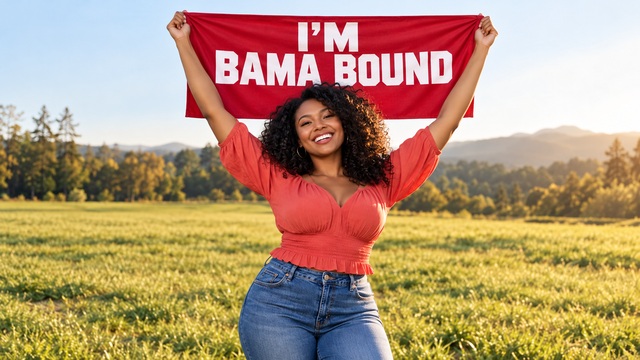
Bama Bound AI With Your Photo As The Reference
A familiar person makes the reveal work. This effect uses your uploaded portrait to guide the subject's face, hair, clothing and body proportions throughout the celebration. Bama Bound AI Video Generator is directed to preserve recognizable appearance rather than borrow the original reference performer's identity. Bama Bound AI Template changes the setting and performance while keeping your photo as the appearance reference.
For a bama bound video from one photo, simplicity helps: one subject, clear eyes, visible hands and enough body information to support the movement. This effect supplies that fictional scene. Check for unwanted changes in skin tone, hairstyle or body shape when reviewing a take. Identity matching is an aim of the effect, not a guarantee for every frame.
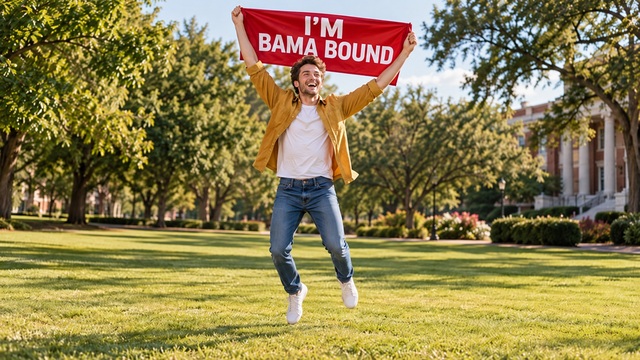
Bama Bound AI With A Clear Celebration Sequence
The pose becomes a story when the expression changes. This effect follows a simple progression: show the red banner, look up in delighted disbelief, jump and cheer, then settle into a proud smile. Bama Bound AI Video Generator is directed toward normal-speed action in a continuous phone-style shot. Bama Bound AI Template concentrates on this short celebration instead of adding unrelated scenes or elaborate choreography.
A red banner celebration video needs breathing room above the head and around the hands. This effect aims for a bright lawn, soft trees behind the subject and a clear daytime atmosphere. If you are learning how to do the bama bound trend, watch for this visual rhythm: recognition first, surprise next, celebration last. Choose a take with believable landings and a controlled camera, so the energetic reaction remains easy to follow.
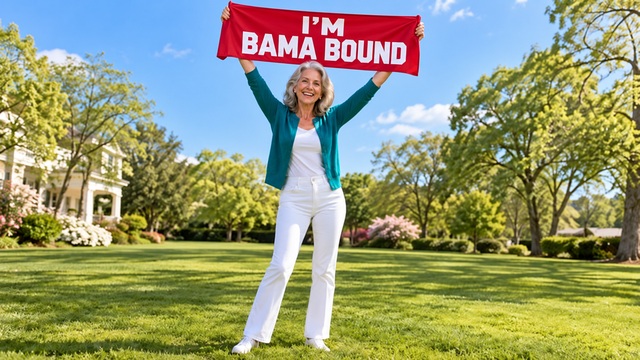
Bama Bound AI With A Punchline You Can Make Your Own
The same celebration can support very different jokes. This effect can turn your own ordinary portrait, an agreed adult friend's photo or an unexpected family portrait into the person behind the banner. Bama Bound AI Video Generator handles one uploaded subject at a time, making it easy to prepare separate reactions with a consistent concept. Bama Bound AI Template keeps each take anchored to the red-sign reveal while your source photo changes the personality of the scene.
For a college acceptance meme video, set up the contrast outside the generator: a casual first photo, a short application joke, then the joyful reaction. This effect does not create an admission decision or verify a scholarship. The banner is a visual prop for entertainment, and this page is not affiliated with the university. A red banner celebration video can also be a humorous family-chat response or a creator's reaction insert. Keep invented claims visibly playful. Add captions after generation so you can position them away from the sign and adjust the timing without rebuilding the entire clip.
Ways To Use Bama Bound AI
This effect is built around one subject and one clear celebration. Bama Bound AI Video Generator can support several posting ideas without requiring a different production setup. Use Bama Bound AI Template as a starting point, then shape the surrounding story in the app where you edit and share.

Personal Trend Posts
Turn your everyday portrait into a fictional acceptance reaction with this effect. Keep the first image casual, then reveal the red banner celebration video as the surprising second beat. Your familiar outfit helps connect both parts. A bama bound video from one photo works well when the contrast is easy to grasp: ordinary snapshot first, exaggerated pride next. Let your caption explain the joke, and leave the face and sign free of added stickers so viewers can read the visual immediately.

Friend And Family Surprises
Choose an agreed adult friend's picture or your own family portrait for this effect. An unexpected subject can make the familiar college pose funnier, especially in a private chat where everyone knows the person. Bama Bound AI Template uses one subject per run, so prepare separate clips for different people. Treat the result as a playful reaction, and check the face before sending it.
Creator Reaction Inserts
Use this effect as a cheerful insert in an original short video. Bama Bound AI Video Generator gives you a recognizable visual reaction that can follow a fictional announcement, a lucky break or a deliberately exaggerated personal win. A college acceptance meme video works best when the surrounding edit explains the context. Use the footage you generate, select music you are allowed to use, and check your final crop before posting.
Trend Tutorials And Explainers
Explain how to do the bama bound trend with this effect as your demonstration workflow. Show a suitable source portrait, describe the upload-and-generate process and discuss what to review in the result. Bama Bound AI Template supplies a fixed idea, so there is no prompt-writing lesson to reproduce. Use clearly labeled artwork when an actual generated demonstration is not available.
Creative Reactions To Bama Bound AI
Illustrative names and reactions describe possible creative preferences; these are not verified customer endorsements or reports of tested results.
This effect feels most entertaining when the ordinary outfit stays part of the joke. I like a familiar portrait paired with an oversized celebration. Bama Bound AI Video Generator makes that moving reaction the focus, and Bama Bound AI Template keeps the idea clear enough for a short reveal.
I prefer a college acceptance meme video with one clear reaction rather than a complicated story. This effect gives me an easy visual idea to build a caption around. The banner, face and jump should all stay readable, with enough room left for the final crop.
This effect is a fun format for an unexpected family-chat reveal. Bama Bound AI Template makes sense as a consistent celebration idea, and choosing a recognizable portrait gives the joke its personality. I would review the face and lettering first, then keep the surrounding caption short and playful.
I like that this effect starts with a photo instead of asking me to script a performance. Bama Bound AI Video Generator fits the kind of quick reaction concept I enjoy: one recognizable subject, one bright sign and a happy final pose. The contrast does the storytelling.




Bama Bound AI Questions Answered
Understand the source photo, the banner and the sharing workflow before making your first Bama Bound AI clip. These answers describe the configured effect and practical review tips.
This effect is a photo-based video effect inspired by the red-banner college announcement meme. Bama Bound AI Video Generator places your subject in a sunny field and directs a joyful banner lift, surprised reaction and celebration. Bama Bound AI Template supplies that fixed scene so you do not need to write a prompt. The phrase on the sign points to the familiar Alabama-bound joke, but the generated scene is entertainment. It is not an acceptance letter, a scholarship offer or evidence of enrollment, and this page has no university affiliation.
Give this effect one sharp picture with a clear adult face, natural lighting and visible body details. A knee-up or full-body view is preferable to a tightly cropped selfie because the action involves arms, hands and jumps. Bama Bound AI Video Generator uses the picture as an appearance reference. Bama Bound AI Template does not require a printed sign or a pre-staged celebration. If your goal is a bama bound video from one photo, choose an uncluttered portrait with the outfit you want to carry into the scene, then check the moving result for consistency.
No. Bama Bound AI uses a prepared effect instruction and an assigned motion reference. Upload your photo and use Generate; the visitor form does not require custom prompt text. Bama Bound AI Video Generator follows the same basic celebration direction across runs. Bama Bound AI Template is intended for this focused meme rather than open-ended scene writing. You can choose a different source photo for another person or outfit, and add your caption in your social editing app afterward.
Bama Bound AI is directed to show I'M BAMA BOUND in large white capitals on a bright red banner, without university logos, mascots or extra printing. Bama Bound AI Video Generator can still make lettering mistakes, especially as fabric moves. Check the entire clip for spelling, readability and unexpected text before sharing. Bama Bound AI Template keeps the sign central to the joke, so a distorted word is a good reason to choose a different take.
Add captions and licensed sound in the editor where you prepare the post after creating Bama Bound AI. Keep your application joke separate from the banner so neither obscures the other. Bama Bound AI Video Generator is directed to use cheerful natural ambience when audio is produced, without copying a commercial recording. A red banner celebration video can still be understood visually if you later replace or mute its sound. An AI label helps viewers understand the fictional reveal.
Check the current requirement shown in the generation form before starting Bama Bound AI. This page does not promise free or unlimited generation, and cost can depend on the available settings. Bama Bound AI Video Generator creates a new interpretation for each run, so identity, hands, movement and text may vary. Review the finished take rather than expecting a perfect match from every photo. If something looks wrong, consider a clearer source before generating again.
Create Your Bama Bound AI Celebration
Pick a clear portrait and let Bama Bound AI build the red-banner moment around it. Bama Bound AI Video Generator brings the reaction to motion, while Bama Bound AI Template supplies the prepared celebration. Review the face and sign, add your own fictional punchline, and create the take you want to share.
