










More AI Video Generators
Explore our collection of specialized AI video generators designed for different creative needs and styles
Hand Of God AI Video: Rise With Golden Hands
One Photo, A Flash Of Light, And A Skyward Reveal
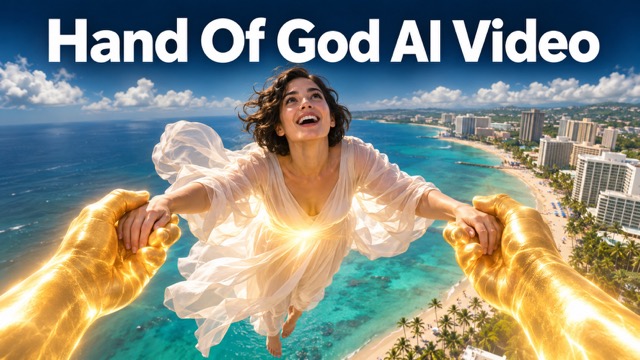
Create Hand of God AI video from one photo and put yourself inside a dramatic seaside lift. Two enormous glowing hands reach toward you, a bright flash changes your outfit into flowing white, and the camera follows you above the coastline. Hand of God AI video generator brings the recognizable visual idea into a simple upload-and-generate workflow. The appeal of Hand of God AI trend is the change in scale: a familiar face becomes the center of an impossible journey. Start with a clear solo portrait, review the available generation settings and make your own Hand of God AI video. Choose a photograph with a readable face, open framing and visible hands. Hand of God AI trend places the emphasis on a recognizable face and a surprising lift.
How To Make Hand Of God AI Video
Use Hand of God AI video generator to turn one adult portrait into a short fantasy scene. Follow these four steps to create Hand of God AI video from one photo without writing a prompt.

Upload One Photo
Add a clear photo of one adult, with the face and hands visible. Choose a head-to-knees or full-body view with room around the person.

Review Your Settings
Check the available duration, framing and displayed generation cost. Keep the subject easy to see in your chosen output format.

Generate Your Video
Start generation with the built-in effect. Wait for the result to appear before reviewing the complete clip.

Watch And Save
Play your video from beginning to end and inspect the face, hands and lift. Save the version you want to share.
Best AI Video Tools for Creative Projects
Explore creative tools for video, learn tips and tricks, and see how AI can be your assistant in turning concepts into finished projects.






















Explore Hand Of God AI Video
Hand of God AI trend works through three connected moments: recognition, transformation and ascent. Hand of God AI video supplies the visual direction for that progression. Your Hand of God AI video begins with the person in your photo, then builds the golden hands, luminous transition and widening coastal view around them. These details give golden hands lift AI video a clear visual story before you add a caption or choose where to post it.
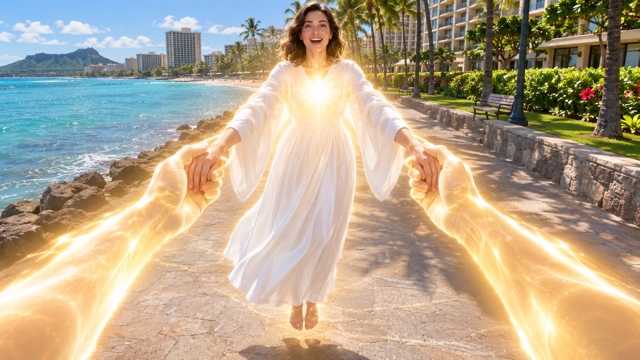
Start With A Face People Recognize
Hand of God AI video generator uses your photograph as the identity reference for the person being lifted. For Hand of God AI video from one photo, choose a solo image with natural proportions and enough of the body visible to support the action. The opening should let viewers recognize you before the light and movement take over.
Hand of God AI trend gets much of its impact from that contrast between an ordinary person and extraordinary scale. In your Hand of God AI video, the golden hands become the visual surprise while your expression carries the reaction. Keep sunglasses, foreground objects and other faces out of the source when possible. Hand of God AI video generator provides a fixed direction, so a useful photograph matters more than a long written description. Review the generated face during the lift as well as at the opening.
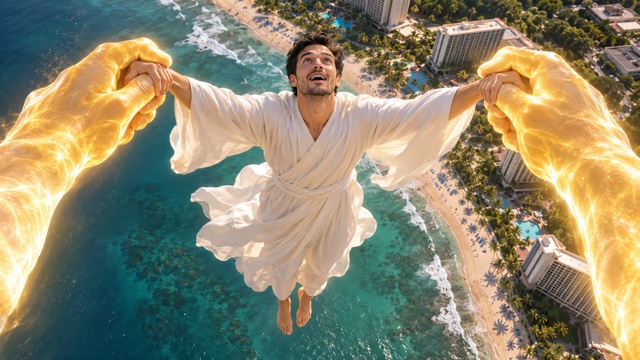
Turn A Bright Flash Into A Transformation
The signature transition in Hand of God AI video is a burst of warm light followed by a flowing white outfit. Two giant golden hands take the subject’s hands, then guide the ascent as the beach drops away. Hand of God AI video generator builds Hand of God AI trend moments into one effect direction, giving the scene a beginning and a visible turning point. You need no filmed performance or separate instructions for each beat.
Hand of God AI trend is easiest to read when the hands, flash and person stay clearly separated. For golden hands lift AI video, look for natural contact at the hands, a consistent face and an outfit that remains coherent after the flash. Your Hand of God AI video can feel playful, amazed or quietly uplifting through the source expression and your eventual caption. Hand of God AI video generator gives you a starting sequence; review the complete result to judge the transition.

Follow The Lift From Shore To Sky
A rising viewpoint gives Hand of God AI video its sense of scale. The person stays central while the promenade, palm trees, hotel towers and turquoise shoreline recede below. Hand of God AI video generator directs the camera to travel with the subject so the ascent reads as a continuous event. A clear coastal background gives viewers familiar size cues before clouds soften the upper part of the journey.
Within Hand of God AI trend, the payoff is seeing a recognizable person suspended above a much larger world. Review your Hand of God AI video at phone size to check that the face still reads and the glowing hands do not dominate it. For golden hands lift AI video, contact and the coastal reveal should be visible. Hand of God AI video generator keeps the creative workflow focused on this single idea. A short caption leaves the face and hands visible as Hand of God AI trend reaches its payoff.
Ideas For Your Hand Of God AI Video
Hand of God AI trend can support a joke, a personal fantasy or a dramatic reveal. Start with the same Hand of God AI video generator workflow, then give your Hand of God AI video a purpose through the photo you choose and the caption you add after generation.

Make A TikTok Reveal
Build a post around Hand of God AI TikTok trend and let the first appearance of the golden hands become the hook. Hand of God AI video generator creates the clip; your posting app can add text and platform audio afterward. Hand of God AI trend works best as a readable visual surprise, rather than a frame crowded with explanations.

Play With The Familiar Caption
Pair your finished clip with God literally picked me up for a direct connection to the meme. Use Hand of God AI video generator to make Hand of God AI trend visuals, then write a caption that fits your own sense of humor. Within Hand of God AI trend, a simple reaction can be more effective than a long setup or an elaborate backstory.

Give A Travel Photo A Fantasy Ending
Turn an ordinary portrait into a bright coastal daydream with Hand of God AI video generator. Your Hand of God AI video can become a playful companion to a travel post or a weekend recap. Keep the person prominent so golden hands lift AI video still feels personal. Hand of God AI trend offers a recognizable visual language for that moment when a normal outing suddenly becomes a journey into the sky.

Send Someone An Uplifting Surprise
Make a lighthearted clip for a friend or family member using a photo they agreed you could use. Hand of God AI video generator keeps the setup to one portrait, and Hand of God AI video gives the message an exaggerated sense of being lifted up. Try a short God literally picked me up caption when it suits the recipient, or use your own warm message.
Creative Perspectives On Hand Of God AI Video
Illustrative creative perspectives with fictional names; these are not verified customer reviews.
I like the immediate visual idea behind Hand of God AI video. A familiar face, huge golden hands and the sudden change in height give a short post a clear reveal. I would keep the caption small enough to leave that moment visible.
For me, Hand of God AI trend depends on continuity. I would watch the hand contact and the outfit change before choosing a clip. Hand of God AI video generator makes the setup approachable, while a complete playback helps judge how well the sequence holds together.
The coastline is what draws me to Hand of God AI video. It gives the rise a sense of distance that a plain background would miss. I would choose a bright, clear portrait so the person remains the focus of the fantasy.
I see Hand of God AI TikTok trend as a compact visual story: arrival, flash and lift. Hand of God AI video generator offers a simple place to start, and I would use the finished motion to decide where a caption should appear.

Hand Of God AI Video Questions
Find practical answers about the photo, effect and sharing workflow. Hand of God AI video follows a fixed direction, while every generated Hand of God AI video should be reviewed before you choose a version.
Hand of God AI video is a photo-based fantasy effect: two oversized golden hands take a person by the hands and lift them above a coastline. A flash introduces flowing white clothing as the camera follows the ascent. Hand of God AI trend is associated with the caption God literally picked me up, explaining why the scene appears under several names. Hand of God AI video generator combines a solo portrait with a built-in instruction to create a new interpretation of the effect. Choose a clear source and check those details throughout the finished clip.
Upload one clear adult portrait, review the generation settings and displayed cost, then start the effect. No written prompt is needed. Hand of God AI video generator supplies the direction for the hands, light transition and upward journey. For Hand of God AI video from one photo, a head-to-knees or full-body image offers more useful information than a tiny face in a distant scene. Once Hand of God AI video is ready, play the complete result and check the face, fingers, robe and background. Hand of God AI trend is recognizable because its moments connect, so inspect the transformation as carefully as the final view.
Choose one person in good light, facing the camera, with a sharp face and visible hands. Hand of God AI video generator needs an ordinary portrait, without a costume or staged flying pose. Start with a simple standing photo for Hand of God AI video. Avoid sunglasses, heavy filters and objects covering the face. Hand of God AI trend moves the subject into a wider setting, which can make facial details harder to read during the rise. Check your golden hands lift AI video at the screen size you intend to share.
Yes, that caption commonly accompanies Hand of God AI trend and its golden-hands ascent. Hand of God AI video focuses on that fantasy sequence; your caption can make the tone funny, amazed or uplifting. Hand of God AI video generator creates the moving image, while text overlays can be added in your social app afterward. For Hand of God AI TikTok trend, keep captions away from the face and hands. This effect centers on a golden lift above the coast, which helps distinguish it from football clips using the same name.
No written prompt or uploaded source video is required for this photo-based version. Hand of God AI video generator provides a built-in direction, and your portrait supplies the person. Make Hand of God AI video without finding a CapCut project or filming a performance. Different tools may use different scenes, timing or endings, so versions of Hand of God AI trend can vary. This page centers on the lift, luminous transition and coastal ascent. Start with Hand of God AI video from one photo and review the available duration and framing before generation.
Watch Hand of God AI video from the opening contact through the final ascent. Check the face, both hands, clothing and body proportions. Hand of God AI video generator creates a new take each time, so assess the actual clip rather than its thumbnail. For Hand of God AI TikTok trend, review framing at phone size and leave space for the platform’s interface. Add music in your posting app when needed; original trend audio is not promised. Hand of God AI trend can work with a short caption because the golden hands already explain the action.
Make Your Hand Of God AI Video
Choose a clear portrait and give an ordinary moment a skyward ending. Hand of God AI video generator puts the hands, flash and coastal lift into one creative direction. Create Hand of God AI video, watch the complete ascent and save the version you want to share. Join Hand of God AI trend with your own face and your own caption. Give Hand of God AI trend a personal ending.