
More AI Video Generators
Explore our collection of specialized AI video generators designed for different creative needs and styles






KONG KONG KING KING KING
One Keyboard, Two DJs, Your Starring Moment
Put yourself and a friend inside the KONG KONG KING KING KING moment. Upload two portrait photos and turn a familiar one keyboard, two DJs setup into a playful performance starring your chosen pair. The appeal is immediate: recognizable faces, a shared keyboard, exaggerated confidence, and a rhythm that makes the whole scene feel like an inside joke. SuperMaker keeps the creative starting point simple, so you can focus on who belongs in your version instead of planning a shoot.

How To Make Your KONG KONG KING KING KING Video
You do not need a keyboard, a recording studio, or a dance routine to join the KONG KONG KING KING KING idea. The one keyboard, two DJs effect starts with two separate portraits and a prepared video template. Follow these four steps to make the pairing clear and give the generation useful visual references.

Choose Your First Portrait
Start your KONG KONG KING KING KING clip with a clear photo of the person you want in the left role. Choose an image with one visible face, natural lighting, and enough detail to recognize the eyes, hair, and facial outline. For one keyboard, two DJs, a clean portrait is more useful than a distant group photograph. Avoid heavy beauty filters, large obstructions, or a face cropped at the edge.
Add Your Second Person
Upload a separate portrait for the right role in your KONG KONG KING KING KING performance. The second person can come from a completely different photograph, so you do not need a picture of the pair together. Keep both faces reasonably clear and similarly detailed for the one keyboard, two DJs concept. Check the upload order before generating, especially when you have a specific idea about who should work the keyboard and who should deliver the bigger reaction.

Generate The Duo Performance
Start the generation after both portraits are in place. This KONG KONG KING KING KING page uses Seedance 2.0 with a prepared direction, so there is no separate prompt to write. The one keyboard, two DJs template supplies the performance context while your photos supply the two appearances. The intended transformation follows the original roles, gestures, and scene instead of asking you to invent choreography.

Review And Share Your Favorite
Watch your KONG KONG KING KING KING result for the details that make the joke work: each person staying in their role, hands meeting the keyboard naturally, and expressions fitting the performance. A one keyboard, two DJs clip should feel like a partnership from beginning to end. If a face is unclear, try a sharper portrait before creating another version. Once you like the result, save it and prepare your caption for the place you want to share it.
Best AI Video Tools for Creative Projects
Explore creative tools for video, learn tips and tricks, and see how AI can be your assistant in turning concepts into finished projects.

























Your Faces Inside The KONG KONG KING KING KING Moment
The KONG KONG KING KING KING concept works because a simple setup leaves room for personality. These four parts explain how a one keyboard, two DJs remake turns two everyday portraits into a recognizable duo idea. The comparison artwork illustrates the concept; it is not a gallery of measured model results.
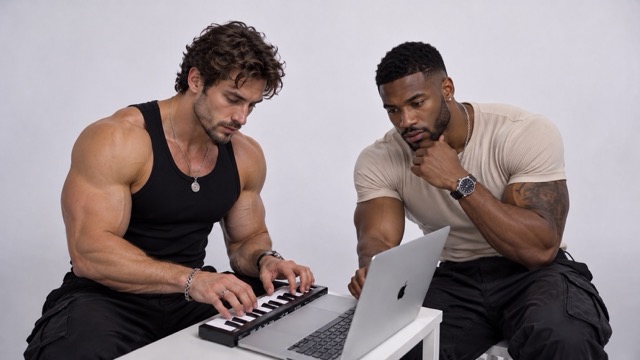
KONG KONG KING KING KING With Your Duo
A strong KONG KONG KING KING KING remake starts with the people you choose. Rather than asking viewers to understand a complicated story, it gives them two familiar faces inside an instantly readable situation. The one keyboard, two DJs pairing can feel playful, competitive, affectionate, or deliberately mismatched depending on your cast. Your photos guide each person's appearance, while the prepared direction keeps their identities assigned to separate roles. Clear portraits help the result communicate that personality without relying on captions.
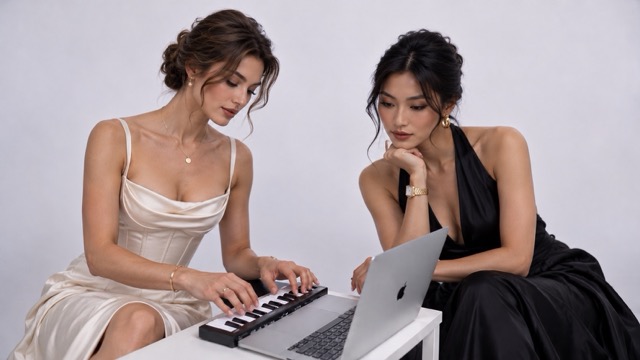
The KONG KONG KING KING KING Keyboard Scene
The setting gives KONG KONG KING KING KING its visual anchor: two performers sharing a small music setup, with the keyboard, laptop, and surrounding scene holding the idea together. For a one keyboard, two DJs remake, those familiar objects matter as much as the faces because they explain what the pair appears to be doing. The prepared instruction asks for the template's background, framing, props, and camera behavior to remain consistent while the performers change. That makes the creative decision easy to understand: choose your cast and let the established setup frame the joke.

KONG KONG KING KING KING With Defined Roles
Timing connects the faces to the KONG KONG KING KING KING performance. A gesture toward the keys, a head turn, and a confident reaction all contribute to the impression that the pair belongs in the clip. The one keyboard, two DJs direction assigns the first portrait to the original left performer and the second to the original right performer, then asks those identities to stay consistent throughout the sequence. It also asks the replacement characters to follow the source movement and interaction with the equipment. This is the intended behavior rather than a promise of perfect frame matching. Reviewing the complete result helps you catch a mixed identity, an awkward hand, or a moment that needs a clearer source portrait.
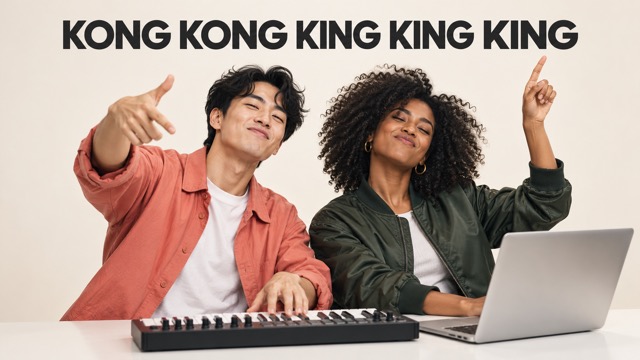
A Short Route From Photos To A Joke
The fun of KONG KONG KING KING KING is imagining who should be in the scene, not spending an afternoon learning an editing timeline. With the one keyboard, two DJs page, two portrait uploads are the creative inputs you need to provide. The selected model and prepared effect direction are already part of the experience. That makes it easy to explore an idea while it still feels spontaneous.
Who Belongs In Your KONG KONG KING KING KING Duo?
The best KONG KONG KING KING KING pairing is often the one that already has a story behind it. Use one keyboard, two DJs as a playful frame for a friendship, a shared hobby, or a running joke. These ideas give you a starting point without requiring a new script or a different filming location.

Best Friends With Opposite Energy
Cast the friend who always takes the lead beside the one who insists they are only watching. A KONG KONG KING KING KING clip gives that familiar dynamic a visual stage. The one keyboard, two DJs setup is especially easy to personalize when your group already knows each person's usual reaction. Choose portraits that show their everyday look, then let the contrast between their roles do the work.

Couples With A Shared Sense Of Humor
Turn your favorite partnership into a KONG KONG KING KING KING performance that feels like a private joke made visible. The one keyboard, two DJs idea can suit a birthday message, a lighthearted anniversary post, or an ordinary conversation that needs something unexpected. Pick clear portraits that both people like, check the role order, and make a version that reflects the mood of your relationship rather than chasing an elaborate production.

Siblings And Family Group Chats
A family pairing can give KONG KONG KING KING KING a completely different personality. Try adult siblings who compete over the playlist, or parents who would enjoy an imaginary turn behind the keys. For one keyboard, two DJs, recognition is the heart of the joke: people who know the pair can immediately imagine the interaction. Keep the concept friendly and choose photographs the participants are comfortable using.
Creator Duos And Collaborations
A KONG KONG KING KING KING remake can introduce a collaboration with a relaxed visual hook. Two creators with different styles can use the one keyboard, two DJs setting to show their chemistry before moving into their regular content. The point is the pairing, so make the faces readable and keep the accompanying message concise. Review the clip together and choose the version that feels like your shared voice; the effect does not guarantee reach or engagement.

Music Fans And Imaginary DJ Teams
If your friends already trade tracks and argue over who controls the playlist, KONG KONG KING KING KING gives that conversation a ready-made scene. Build your imaginary one keyboard, two DJs lineup with the person who always finds the next song.
Creative Reactions To KONG KONG KING KING KING
These illustrative reactions describe ways people might enjoy a KONG KONG KING KING KING concept. They are fictional creative examples, not verified customer reviews or claims about individual results. Each takes a different view of why one keyboard, two DJs can make a familiar pairing feel newly entertaining.
My version of KONG KONG KING KING KING would put my most serious friend beside the person who dances at every party. The appeal of one keyboard, two DJs is that everyone in our group would understand the pairing without a long explanation. I would keep the caption short and let their contrasting personalities be the joke.
I would use KONG KONG KING KING KING for a playful message to my partner after another debate about the car playlist. The one keyboard, two DJs scene turns that tiny everyday disagreement into an imaginary performance. Choosing two ordinary portraits would make the idea feel more personal than a generic reaction clip.
For a creator collaboration, KONG KONG KING KING KING could be a cheerful first hello. I like the idea of one keyboard, two DJs because it gives two different personalities equal space in one scene. I would want the result to show our faces clearly and feel like a joke we both helped create.
I can imagine KONG KONG KING KING KING becoming a favorite in our family chat if the right two people were cast. With one keyboard, two DJs, the familiar relationship matters more to me than a complicated story. I would choose portraits they already like and show them the clip before sharing it more widely.
My imaginary KONG KONG KING KING KING lineup would include the friend who always sends me new songs. The one keyboard, two DJs setup gives our playlist habit a funny visual form. I would focus on a convincing pairing and a caption about our nonexistent first gig, rather than trying to make the clip look like a real event.
The KONG KONG KING KING KING idea makes me think of a quick surprise for a friend who loves keyboard memes. A one keyboard, two DJs version would be a small personal joke, not a major video project. I would start with clear photos and see whether the expressions capture the mood I had in mind.






KONG KONG KING KING KING Questions Answered
Here is what to know before making a KONG KONG KING KING KING remake, from choosing photographs to reviewing your one keyboard, two DJs result.
It is a prepared two-person video effect built around a playful keyboard performance. You provide two portraits to recast the main pair, while the source clip supplies the scene and performance reference. The one keyboard, two DJs phrase describes the visual premise: one shared setup, two personalities, and an instantly readable partnership. The purpose is to help you join the idea with your own cast rather than film a new version yourself.
Provide two separate portrait photos, one for each person in your KONG KONG KING KING KING duo. Choose a single clearly visible person in each photo, with a face that is large enough to read and not covered by sunglasses, a hand, or a heavy filter. You do not need to upload the template video or an audio file. The one keyboard, two DJs effect is prepared on the page, and the two photographs give it the appearances to work from.
For KONG KONG KING KING KING, the first portrait is intended for the original left performer and the second for the original right performer in the first shared view. The prepared instruction asks those assignments to remain fixed even if positions change later. That gives your one keyboard, two DJs pairing a clear starting order. If you want the opposite arrangement, swap the two photo inputs before generating another version. Always watch the finished clip to check that each identity remains recognizable across the performance.
No separate prompt is needed for this KONG KONG KING KING KING effect. The page is configured with Seedance 2.0 and a prepared direction for the two-person replacement. You supply the portraits and start the generation. The one keyboard, two DJs scene is already defined, so you are not expected to describe a stage, explain the camera movement, or write out a sequence of dance gestures. For a first attempt, concentrate on clear photos and the right pairing; those are the creative choices this page puts in your hands.
The KONG KONG KING KING KING direction asks the generation to follow the source scene, props, camera framing, movement, and audio timing while changing the two designated people. This is the intended effect, but AI generation can introduce differences in faces, hands, motion, or sound. A one keyboard, two DJs remake should therefore be checked by watching and listening to the whole result. Exact preservation of an original audio track cannot be guaranteed by prompt wording alone. Treat the preview as the final check before deciding whether the clip matches your idea.
Start by replacing a blurry or obstructed portrait with a sharper image of the same person. For KONG KONG KING KING KING, a clearly visible face provides a better reference than a tiny figure in a crowded shot. Keep one person per image and verify the upload order. Review the beginning, middle, and end of your one keyboard, two DJs result for stable identities and natural interaction with the keyboard. If a version still feels awkward, try another portrait or a new generation rather than assuming every source photo will behave identically.
Make Your KONG KONG KING KING KING Moment
Choose your partner, upload two portraits, and bring your own personalities into KONG KONG KING KING KING. Whether your idea belongs in a private chat or a playful social post, one keyboard, two DJs gives it a familiar setting and a simple starting point. Start with the pair that makes you smile, review the performance, and keep the version that feels most like your shared joke.
