
More AI Video Generators
Explore our collection of specialized AI video generators designed for different creative needs and styles
Stateside Dance AI: Turn Your Photo Into A Dance
Your Face And Outfit In A Reference-Guided Performance
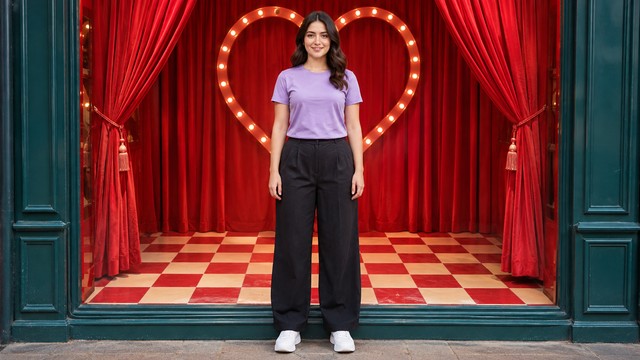
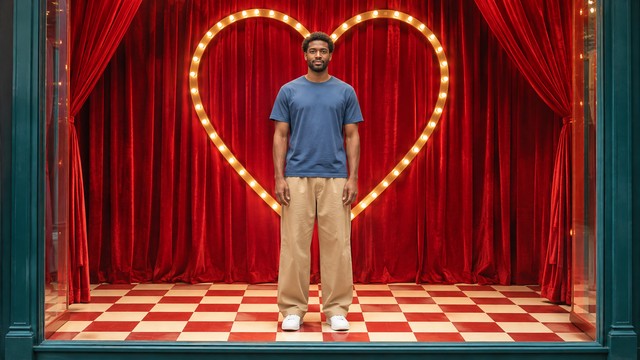
Put your own look into a short performance with Stateside Dance AI. Upload a clear photo and let the built-in video guide the movement, scene, and edit. Stateside Dance AI Video Generator uses your image for the dancer’s appearance, so you can try the routine without filming yourself or describing every gesture. This Stateside Dance AI Template follows a red shop-window variation, with heart-shaped scenery, a checked floor, and alternating dance shots and closer views. Choose a photo with a visible face and outfit, then review the generated clip before sharing it. There is no prompt to write: your main creative choice is the person and look you bring to the performance.
How To Use Stateside Dance AI
The workflow starts with your picture and ends with a clip you can inspect. Stateside Dance AI Video Generator already has its motion reference, so you do not need to find or upload a dance video. Stateside Dance AI Template keeps the routine and scene direction together while your photo supplies the performer. To make a Stateside dance video from one photo, work through the four steps below. A little attention to framing at the start makes the later review much more useful.

Choose One Photo
Start with a clear full-body photo when possible. Keep one person in the frame, with the face looking toward the camera and the outfit easy to read. Even lighting helps Stateside Dance AI Video Generator distinguish facial features from shadows. A tight selfie can provide a face, but it leaves less information about clothing and proportions. For Stateside Dance AI Template, avoid a group shot or an image where a bag, hand, or object covers the person. Use your own image or a photo you have permission to use.

Upload Your Chosen Look
Add the photo through the upload area and confirm that it is the image you intended to use. Stateside Dance AI Video Generator takes appearance from this source; the built-in video supplies the red display set, camera views, and sequence. You do not need to match your original background to the window scene. Stateside Dance AI Template is a fixed effect with no prompt to write, so there is no separate choreography brief to prepare. Keep the source simple and let the reference establish the performance.

Generate The Performance
Check the available generation settings and displayed credit requirement before starting. Stateside Dance AI Video Generator uses a reference workflow to combine the uploaded appearance with the dance. The selected Stateside Dance AI Template contains several views, so continuity matters across shot changes as well as movement. Wait for the task to finish before judging the result. A price or rendering-time claim from another service does not describe this page; use the information shown in your own generation panel.

Watch The Complete Result
Watch from the opening through the final pose. Stateside Dance AI Video Generator can interpret fast gestures differently between runs, so check the face, hands, outfit, and foot contact in motion. With Stateside Dance AI Template, also check that closer views show the same person as the wider dance shots. If an important detail changes, try a sharper source with more body context. Keep a result you are comfortable sharing, and label synthetic media as required by the destination where you post it.
Best AI Video Tools for Creative Projects
Explore creative tools for video, learn tips and tricks, and see how AI can be your assistant in turning concepts into finished projects.







What Shapes Your Stateside Dance AI Result
A recognizable performance needs both an identifiable person and a coherent sequence. Stateside Dance AI Video Generator assigns those roles to different inputs: your photo sets the appearance, and the built-in clip sets the action and edit. Stateside Dance AI Template is designed around that division. The three features below explain what to look for when choosing a source and assessing the finished video, without treating a still illustration as proof of generation quality.
Bring Your Own Appearance
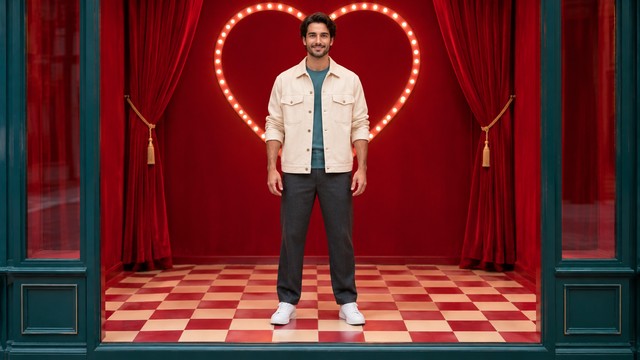
Your photo is more than a face crop. Hair, visible clothing, skin tone, and body shape all help establish the intended performer. Stateside Dance AI Video Generator uses those clues while placing the person into the reference scene. A clear full-body photo is useful for a routine with wide gestures and changes in stance, especially when you want the outfit to remain understandable throughout. Stateside Dance AI Template does not require the source person to be dancing already. A relaxed standing pose is a practical starting state. Before you commit, check that the face is large enough to recognize and that the shoes and hands are not hidden at the image edges. The goal is to provide usable visual information, not a complicated background.
Follow A Defined Dance And Edit
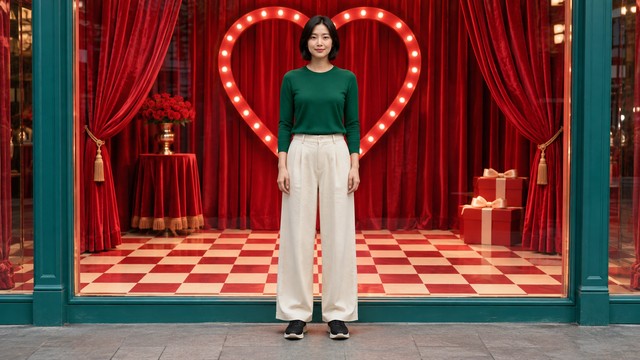
The reference makes this a specific performance rather than a request for any dance. Stateside Dance AI Video Generator receives a clip containing the red shop-window setting, heart props, checked floor, gesture sequence, and changes of view. Stateside Dance AI Template keeps those elements connected so the output has an identifiable visual direction. Your photo supplies the replacement person, while the reference supplies the performance to follow. The Stateside dance TikTok trend appears in several settings online; this page uses the window version rather than claiming every variant has the same scene. When reviewing, pay attention to the transition between a wider dance shot and a close view. A consistent face and outfit across those moments matters as much as an appealing individual frame.
Make A Clip You Can Evaluate
A short video lets you judge the performance as a complete sequence. Stateside Dance AI Video Generator is intended for trying a personal interpretation, then deciding what deserves another take. Stateside Dance AI Template gives you a fixed starting concept, so you can compare different source photos without rewriting the effect. Look for clear gestures, believable weight shifts, and an ending that feels complete. Fast hands, fabric, and facial expressions can still vary; a clean portrait improves the reference but does not guarantee perfect similarity. If you want a Stateside dance video from one photo, keep the task focused on one person and one recognizable look. Watch at normal speed first, then pause only where you need to inspect a specific detail.
Ways To Use Stateside Dance AI
Use the effect where a personal, playful video adds something to the post. Stateside Dance AI Video Generator can help you explore an idea before planning a separate shoot or editing session. Stateside Dance AI Template suits a focused performance rather than an unrelated story. The examples below are starting points for your own content; they do not promise audience growth, platform approval, or a particular response.

Personal Trend Posts
Join the Stateside dance TikTok trend with your own appearance rather than recording the choreography yourself. Stateside Dance AI Video Generator provides a way to try the performance with no prompt to write. Stateside Dance AI Template keeps the scene recognizable while your chosen outfit gives the post a personal detail. Add your own caption after you have reviewed the result.

Outfit And Creator Concepts
Test how a distinctive outfit reads during a short dance. Start with a clear full-body photo so Stateside Dance AI Video Generator can see the clothing you want represented. Stateside Dance AI Template supplies a busy red backdrop, making a simple silhouette especially useful. Treat the clip as a creative concept; it is not a reliable garment-fitting or product-accuracy test.

Separate Clips With Friends
Invite friends who agree to participate to make individual versions from their own photos. Stateside Dance AI Video Generator is configured for one uploaded image and a single intended performer. Stateside Dance AI Template does not add a second dancer on request. Compare the separate clips as a group activity, and let each person decide if their own version is suitable to share.
Fan And Music-Themed Ideas
Use the visual routine for a personal fan post or a music-themed concept. Stateside Dance AI Video Generator helps create the moving image; it does not grant rights to a song. Stateside Dance AI Template follows a dance reference associated with Stateside, but soundtrack availability and posting permissions are separate questions. Choose audio through a source that is appropriate for your intended use.
Creative Perspectives On Stateside Dance AI
These fictional names and sample reactions illustrate preferences people may have when assessing this workflow. They are not verified customer reviews or reports of tested results.
I like a dance workflow with no prompt to write. Choosing a good picture feels more approachable than describing every gesture and camera angle.
A clear full-body photo makes sense to me because the outfit is part of the idea. I would check the moving result before choosing a favorite.
The red window and checked floor give the concept a clear identity. I would want the same face to carry through both the wider shot and the close views.
I prefer knowing that the example reactions are fictional. For the actual video, I would judge the transitions and hands rather than just a single attractive frame.
Stateside Dance AI Questions Answered
Understand the input, reference, and review process before starting. These answers describe this page’s configured workflow; they do not imply that a paid generation has been tested.
Stateside Dance AI is a photo-based dance effect. Stateside Dance AI Video Generator combines one uploaded person’s appearance with a built-in motion reference. This Stateside Dance AI Template uses a red shop-window variation with dance shots and closer views. It creates synthetic movement, so the result is not a recording of the uploaded person performing the routine. Review likeness and motion before sharing the video.
Upload a sharp individual photo, check the available settings and credit requirement, then start generation. Stateside Dance AI Video Generator already has the reference clip. Stateside Dance AI Template therefore needs no user-written choreography prompt. For a Stateside dance video from one photo, a wider view of the body and clothing gives more visual context than a face-only crop. Keep the person unobstructed and review the completed output.
Choose one person in even light with a visible face, hair, and outfit. A clear full-body photo is a useful starting point, although the visible form determines accepted file types and size limits. Stateside Dance AI uses the photo to guide appearance through the dance and shot changes. Avoid extreme angles, heavy blur, and objects hiding the face. A relaxed pose works; the source does not need to show the finished dance. Stateside Dance AI Video Generator benefits from sharp clothing edges. Stateside Dance AI Template can then interpret your look against its existing background.
No. The page is configured with an internal effect instruction and an existing motion reference. Stateside Dance AI shows a photo-upload path without a free-text prompt box. Select your image and use the displayed generation controls. You are not asked to create choreography or supply a second reference video. If your goal is a different dance, camera story, or setting, that calls for a different workflow. Stateside Dance AI Video Generator supplies the effect instruction internally. Stateside Dance AI Template keeps your upload focused on appearance.
The Stateside dance TikTok trend includes human performances and tutorials, while this page creates an AI interpretation. Stateside Dance AI does not teach a physical step-by-step lesson or prove that the person in the output can perform the routine. It borrows its movement and edit from the built-in clip. If you want to learn the choreography yourself, a dance instructor’s demonstration serves a different purpose from a generated video. Stateside Dance AI Video Generator serves the synthetic version. Stateside Dance AI Template therefore complements a trend idea rather than a physical lesson.
Inspect the face through turns and close views, the outfit across cuts, and the hands and feet during movement. Stateside Dance AI results may differ between runs. Use a photo with permission, be clear that the video is synthetic, and check the rules of your posting destination. The Stateside dance TikTok trend’s music is separate from image generation; do not assume that creating a video grants soundtrack or commercial-use rights. Stateside Dance AI Video Generator produces a new interpretation each time. Stateside Dance AI Template gives you a common sequence for comparison.
Make Your Own Stateside Dance AI Performance
Start with a photo you want to see in motion. Stateside Dance AI combines your chosen look with a defined dance reference, giving you a personal version to review before posting. Keep the face visible, let the existing sequence guide the action, and choose the take that best represents your idea.