





















More AI Video Generators
Explore our collection of specialized AI video generators designed for different creative needs and styles



Elevator Outfit Change AI
One Photo. Three Looks. Every Door Opens A New Style.
Elevator Outfit Change AI turns one clear portrait into a fashion video built around a simple surprise: the doors close, then reopen on a different outfit. Start with your everyday look and let Elevator Outfit Change AI carry it into two fresh styling directions, for three looks in total. This elevator outfit change AI video generator uses the elevator itself as the transition, giving the elevator outfit transition a clear beginning, reveal, and finish. Create an elevator outfit change from one photo without filming multiple wardrobe takes or writing a prompt. A steady elevator outfit transition keeps attention on the clothes; the elevator fit check makes each look easy to compare. Bring a photo with a readable face, visible clothing, and a relaxed pose, then generate your own compact wardrobe story.
How Elevator Outfit Change AI Works
Elevator Outfit Change AI keeps the process focused on your photo and the finished fashion story. The elevator outfit transition is built into the effect, so you do not need to describe the door motion. Follow these four steps to create an elevator fit check with three readable looks.

Choose One Clear Portrait With Elevator Outfit Change AI
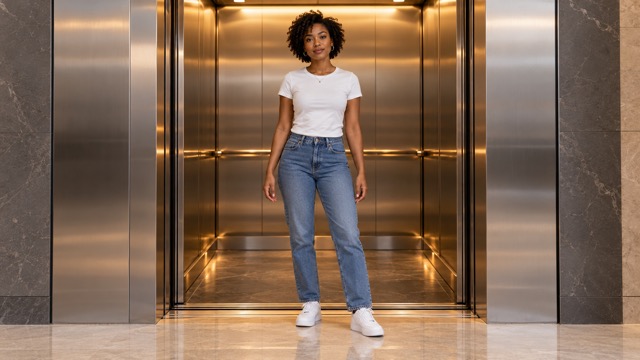
Start Elevator Outfit Change AI with a photo of one person facing the camera. Use even lighting and keep the face unobstructed by a phone, sunglasses, or heavy shadows. A full-body image gives the effect more information about your stance and proportions. For an elevator outfit change from one photo, simple clothing and visible shoes provide a useful starting point.

Upload Your Starting Look With Elevator Outfit Change AI
Upload your chosen image to Elevator Outfit Change AI. Your photo supplies the person and the starting outfit for an elevator fit check, while the fixed effect supplies the elevator scene and later styling. This elevator outfit change AI video generator does not require separate garment uploads. Keep the subject clearly separated from the background for a readable elevator fit check.

Generate The Door-Reveal Sequence With Elevator Outfit Change AI
Use Elevator Outfit Change AI to create the elevator outfit transition with its built-in direction. The requested elevator outfit transition starts with look one, closes the doors to hide a change, reveals look two, then repeats for look three. There is no prompt to write or choreography to record. Check the generation controls and current credit estimate before starting. Open the completed result for review.

Review Each Look Before Sharing With Elevator Outfit Change AI
Watch Elevator Outfit Change AI from the first open door through the final pose. Check that you can identify three total outfits and that each change happens behind closed doors. Inspect the face, fingers, shoes, and fabric at every reveal. An elevator fit check works best when the viewer has time to register each silhouette. Download your preferred elevator fit check and finish it in your usual editor.
Best AI Video Tools for Creative Projects
Explore creative tools for video, learn tips and tricks, and see how AI can be your assistant in turning concepts into finished projects.

























What Elevator Outfit Change AI Brings To Your Fashion Story
Elevator Outfit Change AI connects three looks through one recognizable setting. The elevator outfit transition supplies the rhythm; your portrait supplies the focal point. Use the elevator fit check format to make clothing changes feel like chapters in the same short story.
One Photo Anchors Every Reveal With Elevator Outfit Change AI
Elevator Outfit Change AI starts with one person rather than a collection of unrelated fashion shots. A clear face, steady posture, and visible body outline give the video a consistent visual anchor. This is the appeal of an elevator outfit change from one photo: the wardrobe changes while the central character remains familiar. Elevator Outfit Change AI aims to carry facial features, hairstyle, skin tone, and body proportions across the sequence. The elevator outfit transition then reads as a styling reveal throughout the elevator outfit transition. Keep the torso and face visible. An elevator fit check should make the clothes easier to notice, with each outfit framed around the same recognizable subject. Review every reopened door because likeness and small details can vary during generation.
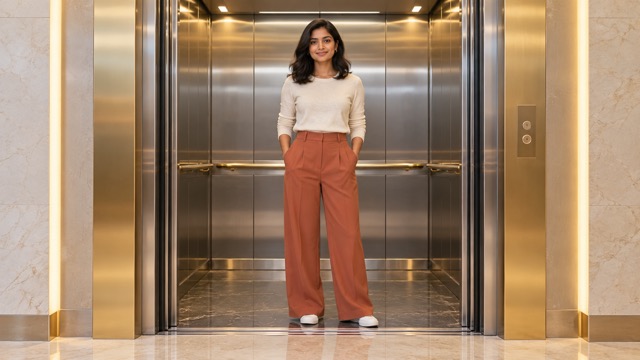
Closed Doors Make The Change Readable
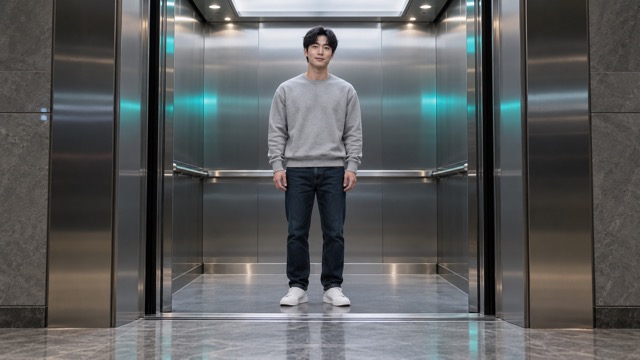
Elevator Outfit Change AI uses a physical visual boundary: the elevator doors meet, hide the person, and open again. A convincing AI elevator door transition changes the wardrobe during that covered moment, rather than dissolving clothes in full view. The fixed camera and repeated doorway make the elevator outfit transition easy to follow. Elevator Outfit Change AI requests two hidden changes and three total looks, with a brief readable pause after each reveal. The elevator fit check stays focused on the outfit as the doors frame the body. Watch the door edges and center seam; the cabin should stay consistent. This three outfit reveal video has a simple rhythm that can hold attention without elaborate dancing, camera spins, or a crowded background. The final elevator fit check provides the payoff; a settled pose matters as much as the elevator outfit transition itself.
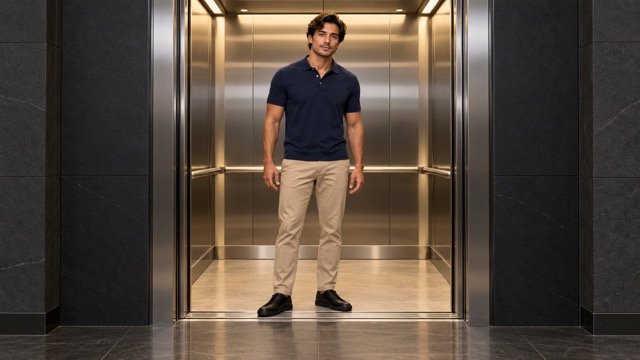
Three Looks Create One Complete Style Arc
Elevator Outfit Change AI gives the fashion story a manageable scope: a starting outfit, a coordinated second look, and a distinct final look. This elevator outfit change AI video generator is configured around that three-look progression, rather than an open-ended wardrobe list. Elevator Outfit Change AI can make an everyday portrait the opening of a more polished style arc, with generated clothing bringing contrast through layers, color, and silhouette. The elevator outfit transition provides continuity between those changes. For an elevator fit check, the strongest contrast is usually easy to read at a glance: a casual outline, more structured tailoring, and a dressed-up finish. This three outfit reveal video format also gives you an opening, middle, and ending to work with when editing an outfit change video for Reels. This workflow does not offer separate clothing-reference slots or exact catalog-garment selection, so inspect the generated details before using them in a product story.
Where Elevator Outfit Change AI Fits
Elevator Outfit Change AI suits personal style posts and fashion concepts with a clear visual sequence. Match the elevator outfit transition to the story you want to tell, then prepare the finished elevator fit check for its audience.

Personal OOTD Stories With Elevator Outfit Change AI
Give a familiar portrait a new fashion context with Elevator Outfit Change AI. The opening elevator fit check introduces you, while later reveals create a compact wardrobe journey. An elevator fit check can become a playful response to a daily styling mood without recording repeated outfit takes. Elevator Outfit Change AI makes the three-look structure the focus, leaving you room to choose a caption or personal commentary afterward.

Reels And Short Fashion Edits With Elevator Outfit Change AI
Use Elevator Outfit Change AI as the foundation for an outfit change video for Reels. The repeated doorway offers natural editing beats, and the elevator outfit transition gives the clip a recognizable rhythm. Preview the final crop so shoes, headroom, and clothing silhouettes remain visible on the intended screen. An elevator fit check benefits from captions placed away from the body and door seam.

Styling And Lookbook Concepts With Elevator Outfit Change AI
Explore a three outfit reveal video as a visual idea for a lookbook or moodboard. Elevator Outfit Change AI connects a casual beginning with more dressed-up silhouettes in one scene. The elevator outfit transition helps a team discuss contrast, reveal order, and the final impression without planning a full shoot. Treat the elevator fit check as a creative styling concept, then compare any generated garments with the actual products before using them in a campaign.

A Shared Style Conversation With Elevator Outfit Change AI
Make a fashion conversation more visual with Elevator Outfit Change AI. Friends or collaborators can create their own individual clips and discuss the looks they prefer. Each generation still starts from one person in one photo. The elevator outfit transition gives separate clips a common visual language, while an elevator fit check highlights color and silhouette. Elevator Outfit Change AI can support that discussion without requiring a group photo or a coordinated filming session.
Creative Perspectives On Elevator Outfit Change AI
Fictional names and illustrative reactions describe possible creative perspectives; these are not verified customer endorsements.
I like how Elevator Outfit Change AI gives every reveal a clear frame. The elevator outfit transition feels easy to follow, and the elevator fit check keeps the focus on the silhouette. Three total looks feel like a complete little story instead of an endless wardrobe reel.
Elevator Outfit Change AI makes the elevator outfit transition the interesting part. A clean AI elevator door transition gives the next look a proper entrance. I prefer an elevator fit check with time to notice the outfit, especially the shape of the jacket and trousers.
The three outfit reveal video format has a useful beginning, middle, and finish. Elevator Outfit Change AI gives a styling conversation something concrete to react to. The elevator outfit transition links the looks, while the repeated framing makes the changes in color and structure easier to judge.
An outfit change video for Reels needs a simple hook. Elevator Outfit Change AI has one I understand immediately: close the doors, open them, see a new look. The elevator fit check format leaves room for a caption without making the visual idea complicated.




Elevator Outfit Change AI Questions
Find practical answers about the photo, the three-look sequence, and reviewing an elevator outfit transition before you share it.
Elevator Outfit Change AI creates a fashion video from a single portrait, using elevator doors to hide outfit changes. The intended result is three total looks: the starting outfit and two later reveals. This elevator outfit change AI video generator uses a fixed effect rather than asking you to write a scene. An AI elevator door transition connects the looks within a consistent elevator setting. Review the completed video for the actual outfit count, door motion, and facial consistency before sharing.
Give Elevator Outfit Change AI one well-lit photo with a clear face and enough body detail to understand the pose. Full-body or three-quarter framing is helpful; avoid group shots and objects covering the torso. For an elevator outfit change from one photo, an everyday outfit makes the opening easy to understand. An elevator fit check is easier to review when hands, shoes, and clothing outlines remain visible. A tight selfie requires more of the body and wardrobe to be generated.
No. Elevator Outfit Change AI uses built-in instructions for the person, elevator scene, and reveal order. Upload one portrait and generate; this page does not require a written prompt or separate outfit references. The elevator outfit transition is part of the fixed effect. The later clothes are generated styling rather than exact garments you select from photos. For a three outfit reveal video, review each look after generation instead of expecting a specific product to appear unchanged.
No. Elevator Outfit Change AI is designed for three looks in total, which means two changes after the opening outfit. The doors close and reopen for the second look, then repeat for the third. This elevator outfit change AI video generator keeps that scope deliberately clear. Each AI elevator door transition should cover a wardrobe change completely. Watch the finished clip from start to end to confirm that the intended three-look sequence is present and readable.
Elevator Outfit Change AI can provide a starting clip for an outfit change video for Reels, as well as other short fashion edits. Check the final framing and platform requirements before posting. An elevator fit check works best when the whole outfit stays readable, so avoid a crop that removes the shoes or cuts through the head. Add captions, music, and other finishing elements separately when needed, and use materials you have permission to share.
Review Elevator Outfit Change AI at every open door. Look for the same recognizable person, coherent clothing, natural hands, and doors that fully cover each change. A convincing elevator outfit transition preserves the cabin and camera framing while the wardrobe changes. Generation can vary, especially around facial features and fine garment details. Choose a result that communicates the three looks clearly; if the face or timing is distracting, try a clearer source photo before building your final edit.
Create Your Elevator Outfit Change AI Video
Turn one portrait into a compact fashion story with Elevator Outfit Change AI. Begin with a clear starting look, let the doors frame each reveal, and review all three outfits before sharing. This elevator outfit change AI video generator keeps the direction built in, so you can focus on your photo and the finished sequence. Bring a source image you like and create an elevator outfit change from one photo today.
